
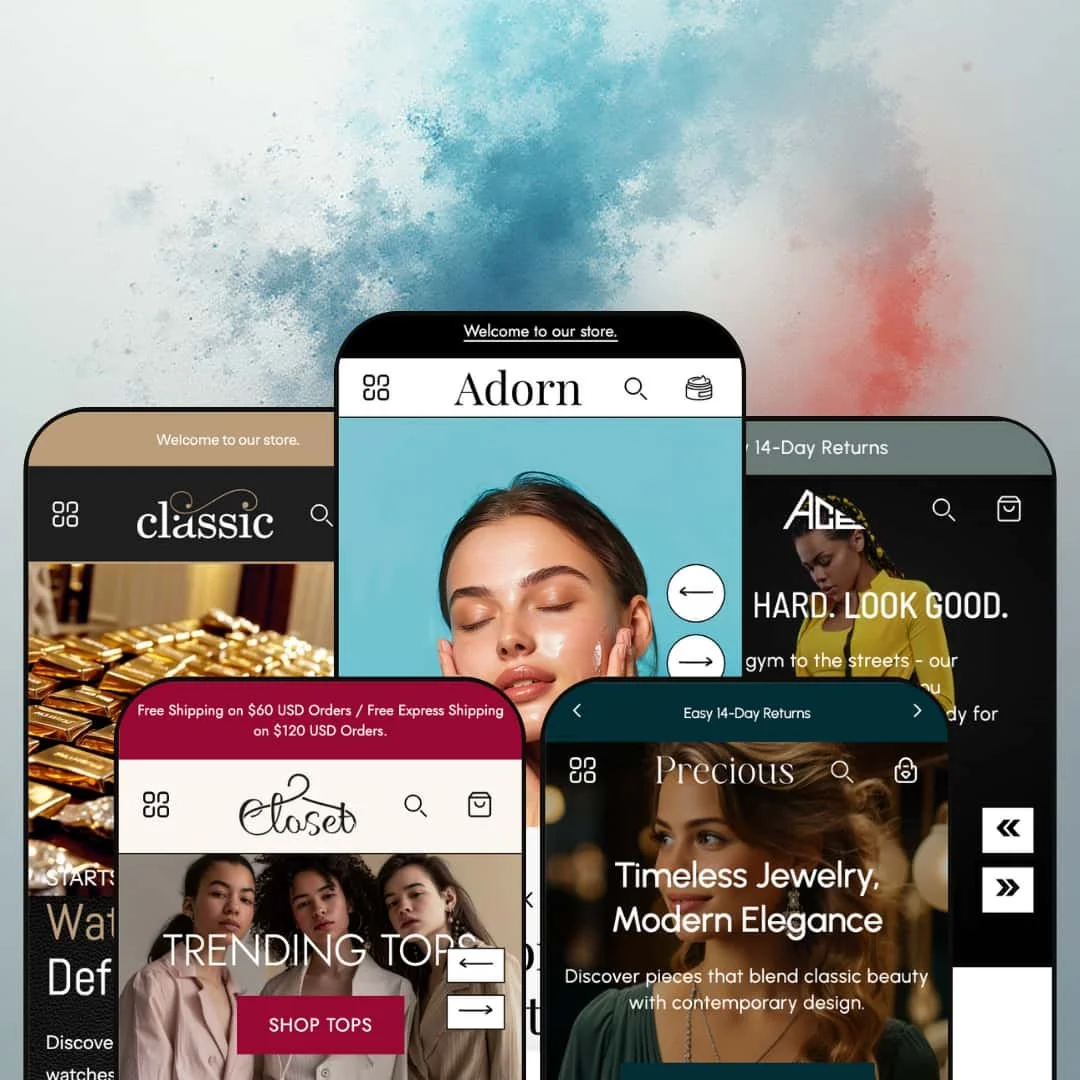
The most persuasive button on Adorn's product page isn't Add to cart. It's the Apply Discount link tucked under a flash-sale countdown, which drops the item and a promo code into the cart in one click, and it tells you exactly what this theme was built to do. Vowel Web shipped Adorn in June 2025 as a single skincare preset on the Online Store 2.0 generation and has since grown it into five demos covering beauty, accessories, womenswear, jewelry and activewear. The question for a merchant is whether a promotion-first toolkit at a standard-tier price fits a brand that would rather not shout.
A flash-sale block that applies the discount for you
Under the price on the Choice preset's executive leather bag sits a countdown labelled "45% off flash sale ending in" and, beneath it, an Apply Discount link that adds the bag to the cart with the code already attached, so the shopper never types anything. The Closet wrap dress runs the same block at 20% with the code 20OFF, and the skincare demo places it inside the homepage buy module. The code travels with the click. For flash-drop and restock-driven apparel and accessories brands in the mid-market, running under 100 SKUs, this replaces the copy-the-code-then-find-the-field routine that leaks conversions at the last step.
Shoppable video rails
Fashion and jewelry brands already cutting vertical clips for social have the raw material this section wants. The product video slider runs a row of autoplaying videos with a product card pinned to each one, name, price and a Sold out state included, so a clip of a dress in motion sits next to the dress you can buy, and Closet, Precious and Ace all stage it under different headings ("Top Rated by You", "Shine with Us", "Shop the Latest Trends"). It's a lookbook that checks out. It suits impulse-led catalogs under 50 SKUs where the video is the pitch and the product card is the receipt.
The homepage sells, not just points
How much of a homepage can behave like a product page? On Adorn, a full section of it: the featured-product module renders the gallery with thumbnails, the variant picker, the quantity stepper and the buy button in place, so the Choice demo's cateye sunglasses show an eight-image gallery with Rose gold, Black and Tortoiseshell swatches without a click-through, and the skincare demo's mascara adds a Glossy or Matte finish picker beneath five colour swatches. Every one of the five demos runs it. For single-hero-product brands and small evergreen catalogs under 30 SKUs, the homepage stops being a doorway and starts taking money.
A cart drawer that keeps selling
Open the empty drawer on any Adorn demo and a "Deal of the day!" product card is waiting inside it, badge and price included, above the order-notes field; the skincare demo adds a discount-code field to the drawer, gift wrapping has been a cart option since August 2025, and the cart page takes a shipping estimator block. The empty state isn't empty. For gifting-led jewelry and beauty stores chasing average order value, and for merchants whose customers arrive holding codes from email and social, the drawer does the nudging without adding a cross-sell app.
The reviews are typed, not collected
The Ace demo's announcement ticker reads "★★★★★ Rated 4.9 out of 6,000+ reviews", the skincare demo's "20,000+ Real Results From Real People" grid is a row of quote cards with merchant-typed handles, and Ace's "What Customers Says" section pairs a testimonial with a product card and a buy button, and none of it connects to a review submission, a count or a date. Six thousand reviews, zero review engine. That's theatre. This kept bugging me across all five demos because no product page renders a star rating either, so a beauty or supplement brand selling considered, repeat-purchase products will install Judge.me or Loox before launch and style the widget into a page that wasn't drawn around it.
Discount is the default voice
Percentage badges sit on almost every product card in all five demos, flash-sale countdowns run inside product buy boxes, the skincare homepage headlines a Super Sale at up to 50% off, Choice and Precious both stage an "Up to 40% Off" countdown banner, Closet runs "Designs Closing Soon!" and "Final Hours" timers back to back, and Ace leads its featured set with a 50% OFF badge under "Flash Deal You Can't Miss". Five presets, one register. A luxury jewelry house, or any evergreen brand selling considered pieces at full price, inherits a storefront that keeps asking for the discount and has to switch off badges, timers and sale sections one by one before the design reads as premium.
An Online Store 2.0 build at a 2026 price
Adorn belongs to the Online Store 2.0 generation: JSON templates, sections everywhere, blocks that nest one level deep, and a product template whose quantity stepper, accordions and "View full details" link behave exactly as Dawn's do. That's the one Dawn comparison worth making. Dawn, Shopify's free baseline, sits on the same generation, so the $270 buys Adorn's section library and its promo kit rather than a newer editor, and with Shopify's own free lineup now on the Theme Blocks generation, nested blocks and AI-assisted block building stay out of reach here unless the developer rebuilds. Agencies standardising on one theme across client stores, and single-brand operators with 100–500 SKUs planning a multi-year run on the same install, are buying at the end of an architecture, not the start.
What it takes to launch
Expect a two-to-three-day pass across shared boilerplate: product subtitles and accordion copy that repeat between verticals, bracketed shipping and returns placeholders, default section text left in image-with-text and video blocks, AI-draft remnants in long-form guides, size-chart imagery, card text blocks, market and currency-list defaults, and the countdown, badge and discount-code staging you'll want to re-time or remove before launch.
-
What works in this preset
Skincare shoppers buy by ingredient, and this demo's collection page knows it. The filter column on the All collection stacks Availability, Price, a Quantity facet with 50ml, 100ml, 150ml, 200ml and 500ml options, colour swatches, an Ingredients facet listing Aloe vera, Caffeine, Collagen, Peptides and Retinol, and a Cosmetic finish facet from Glossy to Semi-matte, each value carrying a product count. Counts show next to every value. A collection banner image and a breadcrumb trail frame the grid, and the 23-product catalogue reads like a real shelf, which makes the facets worth testing with a few filters applied.
The before-and-after results block is the beauty-specific piece. Under an "Acne Bootcamp" heading, three paired image sets sit side by side, each with a one-line customer caption, so the proof a skincare brand lives on gets its own section instead of a testimonial card. The product page follows the same logic: a "How To Use" step list, an "Ingredient Spotlight" naming Vitamin C, Hyaluronic Acid, Peptides and Aloe Vera, and a row of benefit icons reading Dermatologist Approved, 100% Natural Ingredients and Cruelty-Free directly beneath the description. It reads like a routine, not a listing.
"Popular Categories" greets you before you type. I clicked the search icon and the overlay opened pre-filled with Face Mask, Face Serums, Moisturizers and Sunscreens plus an Information column, which turns the search box into a second navigation for a store with a dozen categories. The mega menu does the same in two registers: the Shop All column lists individual products under Our Favorites, Best Sellers and New Arrivals, while Shop By Collections switches to image tiles. A Call Us phone link sits in the header row and the announcement bar rotates two messages, so the utility layer is staged, not assumed.
Where it stumbles
For a listing that calls itself a beauty theme, the beauty demo stages surprisingly little beauty tooling. The tag-driven quiz section that arrived in February 2026, the one piece of the library that could run a skin-type finder, isn't on this homepage, and the makeup items run generic colour dots (Black, Blue, Green, Red, Orange on a mascara) where shade names or photographed swatches would do the selling. Nothing turns the Acne Bootcamp routine into a set either. Skincare sells as regimens, and there's no routine or bundle builder in the section library, so the demo pitches a programme it can only sell one bottle at a time.
-
What works in this preset
Video does the category work here. The collection list tiles for Watches, Bags, Sunglasses and Belts are autoplaying clips rather than stills, the hero slideshow opens on a video slide before the "Watches That Define You" image slides with bold-word emphasis inside the headline, and a video-background band separates the leather bag grid from the sunglasses grid further down. Every category gets a clip. For an accessories brand with product footage, the preset gives that footage three different homes without a page builder.
I scrolled through the whole page and got the feel of a department store compressed into one scroll. The announcement bar carries a secondary menu row (About, Blog, Sale, Contact) above the main navigation, a collection tabs section flips between Trending Watches, Bags and Sunglasses grids without leaving the page, and a "Pick Perfect Dial" image slider lays out dial styles from Mixed Dial and Flieger to Chronograph, Roman and Arabic as visual entry points. A product-image marquee ticks past between sections. Three stacked banners split Men's, Women's and Kids sunglasses, which is the closest any of the five demos comes to a gender-split navigation.
Where it stumbles
A watch page with no case size. The executive leather bag page carries Colour and Carry options pickers (Shoulder strap or Backpack strap), a "98 in stock" line and the accordion set, but nowhere across Choice's product pages does a measurement get its own slot, so case diameter, lens width or strap length lives inside description prose or not at all. Watches and eyewear are bought on numbers. A merchant in either category will be writing those numbers by hand into every description, with no filter to match.
-
What works in this preset
Apparel merchants will recognise the card grammar immediately. Product cards in the Latest Arrivals grid carry colour swatches that link straight to a specific variant (Red / 2XL, Navy blue / XL), a second image on hover, a percentage badge and a Choose options quick-add, while single-variant items get an Add to cart button instead. Swatches link to variants, not products. Since January's update a click on a card swatch also swaps the card image, which is the detail that makes swatches useful on a phone rather than decorative.
Open the Closet homepage and three panels greet you instead of one hero: Trending Tops, Dress to Style and Latest Designs side by side, each with its own button. Below that the page runs a "Seasonal Edits" image slider, a Shop By Category list with Shop Collection buttons under Dresses, Tops, Bottoms, Outerwear and Tees, collection tabs for Our Favorites, Best Sellers and Sale, and, unusually for a homepage, a four-question FAQ section with a contact block under "How Can We Help You?". The marquee of value props (Tailored Comfort, Premium Lasting Fabrics) breaks up the grids. It's a long page, but a merchandised one.
The buy box is stacked for fashion. On the button-front mini skirt, colour swatches sit above size pills, a "Low stock: Only 12 left!" line sits under them, a Size chart trigger with a ruler icon opens a chart in a modal, and a "Secure checkout with" row of payment icons sits under Add to cart before the accordions for Product Description, Care & Instructions and Shipping & Returns take over. Below the fold the page keeps going with image-with-text rows for the midi dress edit, an Occasion Ready block and a Premium Materials video. Nothing here needs an app to exist.
Where it stumbles
I sat up at the sets. The Bohemian Fringe Top & Maxi Skirt Set, the Red Power Suit Set and the Burgundy Blazer and Wide-Leg Trousers Set are each sold as one product with one size axis, so a shopper who is a medium on top and a large below has no way to say so, and there's no set builder in the library to size the pieces separately. For a womenswear preset that leads with co-ords, that's a structural gap rather than a staging one. Sets as single SKUs work for uniforms, not for bodies.
-
What works in this preset
Occasion is the organising idea here, not category. A collection slider stages Engagement, Weddings, Birthday Gifts and Anniversaries with a "New Arrival" eyebrow on each tile, and a tabbed collection section flips between Rings, Earrings, Bracelets and Necklaces to reveal sub-collection tiles with straplines: Engagement Rings "Celebrate Forever", Wedding Bands "Timeless Symbols of Love", Statement Rings "Bold & Beautiful", then Huggie, Drop and Gemstone earrings, Bangles, Cuffs and Chains. An "Explore Diamonds by Shape" strip lists Asscher, Marquise, Radiant, Cushion, Oval, Round, Emerald, Pear, Heart and Princess as links. That is how a jeweller thinks. The demo maps it onto sections without an app.
The buy box carries jewelry-specific blocks. On the pearl necklace, a benefit list promises an adjustable 16"–18" chain, hypoallergenic metal and handcrafted work above the picker, the metal choice uses photographed swatch images for Gold, Silver and Bronze rather than flat colour dots, a "Low stock: Only 3 left!" line and a Size chart trigger sit beneath, and the accordions cover Care instructions, Material and a Size guide broken out by rings, necklaces, bracelets and earrings. The header runs two logo files so the mark switches between light and dark states. Small things, but jewellery is small things.
Shop the look finally gets a jewelry use. The section pairs a lifestyle banner with two product cards, Classic Pearl Drop Earrings and Pearl Drop Hoop Earrings, so the styled image sells the pieces in it. An icon row (Ethically Sourced, Handcrafted Design, Premium Quality, Easy 7 Day Returns), a star-icon text marquee, an on-page FAQ with a contact block and a hero slideshow with two buttons per slide round out the quietest homepage of the five, which suits the vertical.
Where it stumbles
I went looking for a ring size and didn't find one. The Sterling Silver Ring and the Minimalist Open Circle Ring offer Gold, Silver or Bronze and nothing else, the pearl necklace runs S, M, L and XL while its own benefit list promises an adjustable chain, and no product in the demo stages an engraving field or a gift message at the product level, in the one vertical where gifting is the business. The size guide accordion explains how to measure a finger. The picker never asks for the answer.
-
What works in this preset
Ace is the loud one, and it's the newest. The announcement bar runs as a scrolling ticker cycling "Free Shipping on Orders Above $99" and "Easy 14-Day Returns", the hero headlines bold a single word ("TRAIN HARD. LOOK GOOD.", "FIND STRENGTH IN STILLNESS"), and a text marquee chants "Run · Train · Flow · Flex · Conquer" between sections. Shop By Activity is the smart part. Yoga & Pilates, Gym & Training, Running & Jogging, Cycling and Tennis & Pickleball tiles route shoppers by what they do rather than what they wear, which is how activewear brands with a 50–100 SKU range and cross-shopping customers actually get browsed.
The Highlight section draws the spec sheet on the garment. A product image sits between eight callouts, Breathable & Lightweight, Chafe-Free Design, High-Waist, Sustainable & Durable Fabrics, Moisture-Wicking, Quick-Dry, 4-Way Stretch and Squat-Proof, which does for leggings what a table does for laptops. A "Sustainability Focus" block pairs a full-width image with a secondary inset image and a "Sustainable. Stylish. Strong." headline, and a four-post blog row (Active Living Tips & Trends) closes the page. Ace also runs the collection slider under Shop By Category with New Arrivals eyebrows on Leggings, Tops, Sports Bra and Outerwear.
"Power Move", "Second Skin", "Move Bold". Those are the straplines under the Leggings tiles in the tabbed collection section, with Urban Shield and Trail Proof under Outerwear and High-Impact under Sports Bra, so the sub-categories carry a benefit line each instead of a bare name. The product page continues the theme: a benefit list (4-Way Stretch Fabric, Moisture-Wicking Technology, Supportive Sports Bra, High-Waist Leggings) above the picker, a Size chart trigger, and accordions where Material explains Cotton Comfort, Recycled Fabrics and Compression Technology and the Size guide is broken out by tops, bottoms, sports bras, outerwear and footwear. Copy carries the load here. It carries it well.
Where it stumbles
A fresh drop that's mostly gone. I counted six sold-out cards in the ten-card "Fresh Drop From the Store" grid, all four bra-and-legging sets among them, so the section that should feel like a launch feels like the day after one, and the quick-add buttons on those cards have nothing to add. The bras run a single S–XL axis. Support level, the number activewear buyers actually shop on, appears only as light, medium and high in the size-guide prose, never as an option, a badge or a filter, so the activity-led navigation up top has no equivalent in the buy box.
A theme that grew in public
Adorn launched as a single skincare preset in June 2025 and picked up four more within four months, and the release notes kept the same pace afterwards: pre-order and Shopify Plus quantity rules in November, a cart discount field and colourway siblings in January, a tag-driven quiz in February, then a quick order list, an age gate, back-in-stock alerts and right-to-left support in June. Fifteen releases in fourteen months. The pattern matters more than any single feature, because the theme you install is not the theme you'll be running next spring.
Mobile is art-directed, not squeezed
Read the five demos side by side and one discipline repeats: the hero slideshows carry a separate mobile image per slide (Ace uploads three, Precious one), the size chart takes a second file for phones, and a global setting adds a banner overlay for mobile only. Desktop crops don't get reused. That is what the "mobile-first" line on the listing cashes out to in practice: dedicated assets, which also means dedicated work every time a campaign changes.
The listing sells a beauty theme; four presets aren't one
Every feature blurb on the Theme Store page pitches "the best beauty store theme", yet only the default demo stages skincare, and the listing's industry tags name jewelry and food and drink, the second of which has no preset at all. A food merchant buys blind. Treat the listing as the skincare preset's sales pitch and judge the other four on their own demos, because the copy won't help you do it.
Prose where data should be
Across all five product pages the information shoppers compare on arrives as typed rich text: size charts are uploaded images with a second file for phones, size guidance is paragraphs in an accordion, ingredients are an image-with-text block, and watches, eyewear and rings have no measurement slot. None of the five demos render structured product data as a table, and the feature list carries no spec or comparison table. Catalogs that live on specs, from ring sizes to lens widths to SPF and ml counts, will maintain that information by hand in every description, with the collection filters as the only structured layer they get.
The demos trail the changelog
The quiz, the colourway siblings block, the quick order list and the age gate all shipped between January and June 2026, and none of the five demos stage any of them. What you can test before buying is the 2025 theme. The trial store is the only place to see the features that justify the recent updates, which moves the evaluation work onto the merchant.
★ 7.6/10
Rating
-
Countdown-and-code buy boxes, pre-order, cart cross-sell, video rails, occasion and activity merchandising, plus a quiz and B2B blocks on the changelog; reviews and structured specs stay app-and-hand work.
8
-
Every homepage pattern the demos use is a stock section with global controls, but five demos' worth of promotional defaults and boilerplate copy have to be dismantled before a quieter brand can launch.
7
-
Dedicated mobile slide images and a mobile size-chart file, a ticker-style announcement bar, a slide-out cart with cross-sell, and a drawer menu that folds product-level links into accordion sub-levels.
8
-
The homepages run long and media-heavy: video backgrounds, autoplaying collection tiles, video rails and multiple marquees stack on every demo, so page weight lands on the merchant's restraint.
7
-
Five palettes and five distinct homepage compositions from one library, with global settings for arrow shapes, badge shapes, drawer radius and header curves; the promo-first register is the limit, not the section count.
8
Frequently Asked Questions
-
Since January 2026 the product page has a product siblings block that links separate colourway products into one picker, which matters if you're not on Shopify Plus, where Shopify's own Combined Listings lives. The demos don't stage it; they run colours as variants with swatches.
-
Yes. A Quiz section added in February 2026 filters a collection by the product tags a shopper picks as answers, which makes a skin-type or fit finder possible once the catalogue is tagged for it. None of the demos show it running, so build one in the trial before you count on it.
-
Products set to continue selling when out of stock get a Pre Order button in place of Add to cart, a behaviour added in November 2025; the skincare demo's mascara shows the button in position. It changes the label and lets the order through, nothing more, so expected ship dates are copy you write.
-
On Shopify Plus, yes: quantity rules and volume pricing render on the product page since November 2025, and a Quick Order List section arrived in June 2026 for line-by-line ordering. On other plans those blocks have nothing to display.
-
When your Shopify locations offer pickup, the product page lists each one with its address and readiness time; the skincare demo shows five pickup points, each reading "usually ready in 24 hours".
-
An age verifier popup arrived in June 2026, which matters because the listing tags food and drink as a target industry; it's the first block a beverage merchant should switch on in the trial to check the copy, the timing and how it behaves on return visits.
-
Right-to-left support arrived in June 2026 and the skincare demo runs an Arabic locale beside English and French; the theme's own interface strings ship in EN, FR, IT, DE and ES, while product content translation stays with Shopify Markets.
This review is based on hands-on testing of the publicly available preset demos of the Adorn Shopify theme as of September 16 2026. Theme features, preset availability, and performance can change with subsequent updates from the theme developer.