
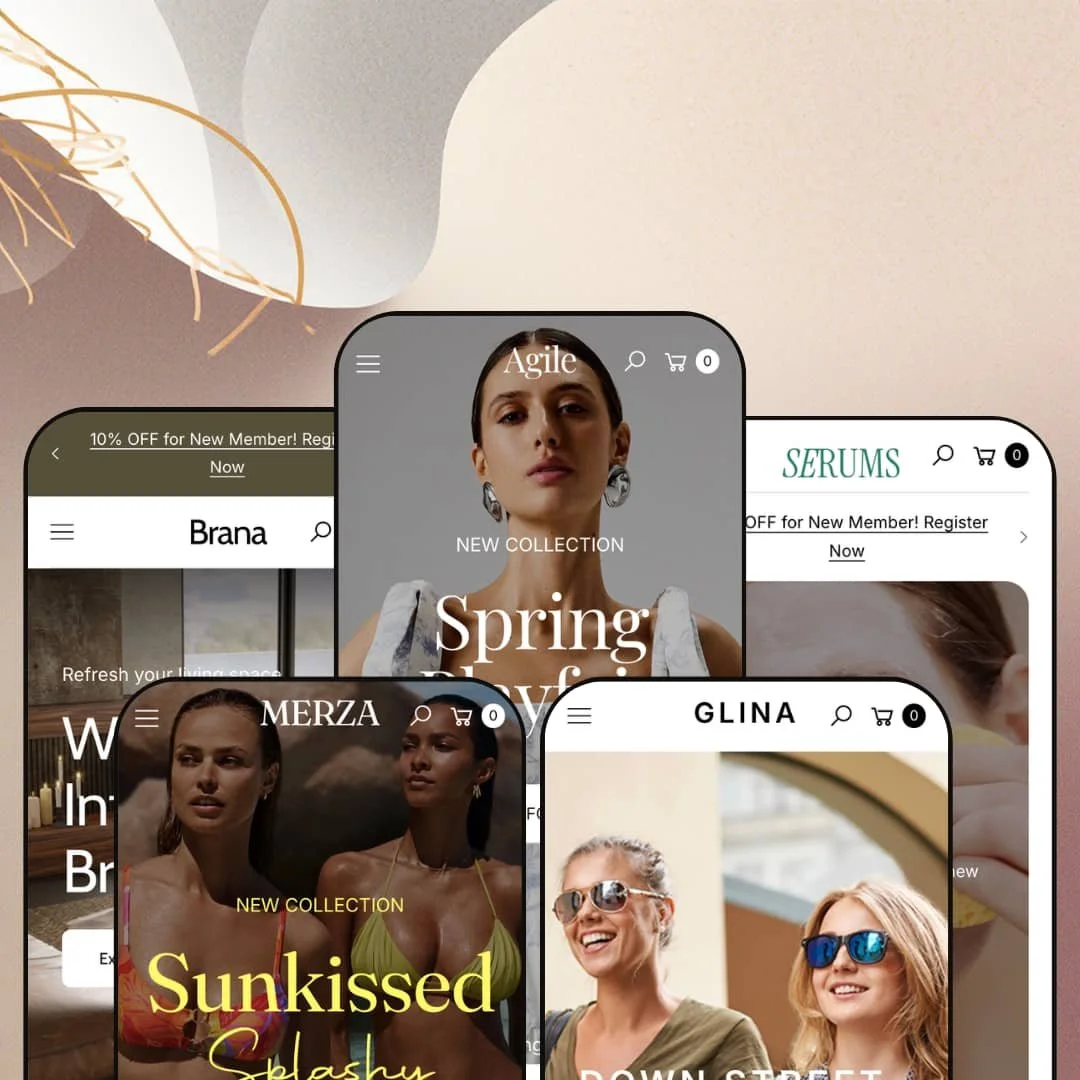
Most premium Shopify themes pick a lane and stay in it. Agile, from Vietnamese studio NextSky, runs five: a high-fashion dress demo, a hushed skincare storefront, a product-grid eyewear shop, a promo-loud swimwear brand, and a showroom for furniture, all riding the same Online Store 2.0 section system. At $320 it asks to be judged as a multi-vertical generalist rather than a specialist, which raises the obvious question for anyone shopping it. Does that breadth come at the cost of depth, or does one section library actually hold up across that many identities?
Five verticals, one purchase
Buy Agile once and you get five fully realized storefronts, not one look with color variants. The Agile fashion demo, the Serums beauty layout, the Glina eyewear build, the Merza swim preset, and the Brana furniture showroom each arrive as a distinct, production-ready arrangement of the same section system. For an agency building client stores across categories, or a multi-brand operator running apparel and homeware under one roof, that range turns a single $320 license into a starting point for several very different projects. One library, five briefs covered.
A native merchandising kit that skips the app pile
The theme ships a coordinated merchandising kit as native sections: Compare Product, Shop The Look lookbooks, shoppable story tiles, video and TikTok shopping blocks, and bundle groupings, each populated from your own catalog. For a beauty or furniture merchant carrying 50 to 200 SKUs who would otherwise install and configure a separate comparison or shoppable-video app, these arrive ready to fill in, with the wiring already handled. That suits a conversion-focused, mid-market store with a considered-purchase catalog, where side-by-side specs and styled inspiration genuinely move the sale. The whole kit lives in the theme.
Built to carry a big catalog
What happens when your catalog runs into the hundreds? Agile answers with product-discovery tooling staged for volume: a mega menu capable of carrying featured product tiles inside the dropdown, advanced filtering by color, size, price, and brand, enhanced search, infinite scroll, and a sticky header. For a high-volume retailer or a multi-category store with 200 to 1,000-plus SKUs and a browse-heavy buying pattern, that combination keeps deep inventory navigable instead of overwhelming. Big catalogs were clearly in mind.
Conversion utilities that usually mean extra apps
The feature list reaches past styling into transactional tooling: pre-order, back-in-stock alerts, a stock counter, an age verifier, gift wrapping, and in-store pickup are all theme-level, alongside a bundled EU translation set (EN, FR, IT, DE, ES) for the theme's own interface strings. For a restock-driven or drop-model brand (back-in-stock plus pre-order plus countdown working together) or an age-restricted seller needing a gate at entry, having these in the theme trims the launch app list. Useful from day one.
It's the previous editing generation
At $320, Agile sits in premium territory, and the one thing a 2026 premium buyer should clock is its architecture generation. This is an Online Store 2.0 theme: JSON templates and a drag-and-drop section editor, but blocks that nest only a couple of levels deep, not the newer Theme Blocks (Horizon-era) model with deeply nested, AI-assisted block editing. For an in-house team at a larger operation that edits often and would lean on deep, in-context block control, or a brand planning years of self-iteration rather than a one-and-done build, that generation gap is worth weighing. Functionally it is current. Architecturally it is one step back.
Broad, not deep, by design
Five verticals from one section library is the selling point, and also the ceiling. Because Agile spreads across fashion, beauty, eyewear, swim, and furniture, it does not carry the deep vertical-specialized tooling a single-category specialist would (no virtual try-on for eyewear, no ring-sizer or certification display for fine jewelry, no room-planner or AR placement for furniture), so a merchant whose conversion hinges on one of those will be back in the app store. For a high-end jeweler needing certification and sizing, say, or a furniture seller wanting in-room visualization, the generalist breadth leaves a real gap. Range has a cost. Depth is it.
Restraint isn't its native setting
This theme wants to fill the page. Every preset defaults to a long, section-stacked homepage dense with carousels, banners, badges, and proof, which is a deliberate conversion posture and a poor fit for a brand whose whole identity is whitespace and quiet. For a single-brand luxury label with a small, tightly curated catalog selling a considered, high-ticket product, building the restrained, gallery-like storefront that audience expects means subtracting sections, not arranging them. You will be deleting, not decorating.
What it takes to launch
Expect a multi-day content pass before launch: rewriting hero captions, FAQ entries, testimonials, and About-page narrative across whichever preset you choose; populating the metafields that drive swatches, filters, and comparison sections; re-staging the mega menu to your own category tree; and aligning demo brand naming where a preset's sample branding differs from the look you adopt. Budget toward the higher end if you deploy more than one preset or run the bundled EU localization.
-
What works in this preset
Land on the Agile demo and the merchandising comes in waves. A five-slide editorial slideshow gives way to a curated dress carousel where color swatches and sale flags (one dress marked 47% off) sit right on the card, and below that a tabbed block splits the catalog into Mini, Midi, and Maxi without a page reload. It is busy. For a fashion label with a real lookbook cadence and a deep dress range, that density reads as intent rather than clutter.
The lookbook is where this preset earns its fashion label. A "Shop The Look" section pins buyable products onto styled photography, a row of round "shopable stories" tiles mimics the Instagram-story pattern (#Chic, #Party, #Workwear), and a Compare Product block sets two dresses side by side with their swatches and quick-shop buttons. I clicked through the story tiles expecting decoration and found each one wired to a collection. That is editorial commerce, not just pretty imagery.
Lower down, a store-locator section lists three brick-and-mortar addresses with phone numbers and opening hours, a "Shop The Bundle" block groups outfit pairings under a single buy prompt, and a testimonial slider ties quotes to specific products. For an omni-channel apparel label running a flagship alongside the online store, that locator is a useful default to inherit. It saves a build.
Where it stumbles
The flip side of that apparel focus: the Agile preset is the most vertical-locked of the five. Its menus assume occasions (Summer, Party, Work), its hero rotation assumes seasonal drops, and its carousels assume a model-photographed catalog, so a merchant who likes this layout but sells, say, homeware would be re-pointing nearly every section toward a different kind of product. The bones carry over. The styling does not.
-
What works in this preset
Serums does the opposite of Agile, and the restraint is the point. A muted video hero opens onto a single ethos line about sustainable sourcing, a clean six-tile category grid, and product cards pared back to name, vendor, and price with the swatch noise turned down. For a skincare or wellness brand selling trust and routine rather than impulse, that calm reads as premium. The page breathes.
The before-and-after slider is the standout merchandising move here. Drag the handle and a bare-skin shot wipes into a post-treatment one, the exact kind of proof a results-driven skincare or wellness brand wants to put above the fold before a shopper even starts scrolling. I almost missed it. A bundled "Special Offer" block below lets shoppers add a three-product set to the cart in a single action.
An "As Seen on Instagram" row pulls five real social posts into a clean strip, and a Tips and Tricks blog feeds editorial content underneath the product sections. For a small-batch beauty brand leaning on user content and education to build credibility, both are sensible defaults. They need real links swapped in. The structure, though, is ready.
Where it stumbles
One staging choice to weigh: Serums opts for a single-column category dropdown rather than the multi-column mega menu the theme makes available, which suits a tight skincare range but would feel cramped for a beauty retailer carrying makeup, hair, body, wellness, and tools across dozens of sub-collections. The fix is a re-stage, not a missing piece. Worth knowing before you commit to the look.
-
What works in this preset
Open Glina's Sunglasses menu and it does something the other presets only gesture at: the dropdown carries live featured products, with prices and color swatches, sitting beside the usual collection and category columns. For an eyewear shop where buyers cross-shop by frame shape, gender, and use case, putting two hero frames inside the navigation is a smart shortcut to product. The menu sells. I noticed it working before I reached the homepage.
This is also the preset that takes internationalization seriously out of the box. A rotating top bar runs four trust messages (free shipping over $99, 30-day returns, Klarna pay-later, secure checkout), the country-and-currency selector is staged across real markets (USD, EUR, GBP, JPY, CAD, VND) rather than left on a single default, and a three-up Services block presents eye exams, frame-finder guidance, and pay-later messaging. For a mid-market optical brand selling across borders on a high-consideration purchase, those defaults remove guesswork. Less to configure on day one.
Where it stumbles
Where Glina leans is product-first, and that is a positioning choice as much as a design one. The default homepage moves quickly from hero to grid to services, with brand narrative kept to a single carbon-offset line, so an eyewear maker who wants to lead with craft or heritage will be reaching for the theme's storytelling sections that this demo simply uses less. Not a gap. A different emphasis.
-
What works in this preset
Merza is the newest addition to the family (it shipped in the December 2025 update) and it is the most unashamedly promotional of the set. A code-driven announcement bar dangles 15% off, a three-tab Best Seller block sorts swimwear into Swimsuits, Bikinis, Tops, and Bottoms, and a countdown-timer "Limited Sale" section pushes urgency before you have scrolled past the fold. For a fast-moving swim or fashion brand that lives on drops, flash sales, and a young repeat-buyer audience, that energy is on-brand. It is loud on purpose.
The detail I keep coming back to is the "Editor's Pick of the Week" block, which embeds a full product purchase experience directly on the homepage. It renders the complete variant picker, color swatch, size buttons (XS through XL), a quantity stepper, and an add-to-cart, so a shopper can buy the hero SKU without ever opening the product page. For a single-hero-product drop or a swim brand pushing one seasonal style, that is a real conversion shortcut. Cleanly done.
A "Video Shop" section frames a TikTok-style vertical video next to shoppable product cards, a four-icon trust row (free shipping, easy returns, Klarna, secure payment) anchors the lower page, and a "Lookbook Splashy" block pins products onto lifestyle photography. For a social-led swim brand converting TikTok and Instagram traffic into carts, the video-commerce default matches how the audience already shops. The pieces line up with the channel.
Where it stumbles
The same intensity that suits a flash-sale brand can work against a premium one. Merza stacks urgency cues, a discount-code bar, a countdown timer, a season-deals banner, and repeated sale flags, which is fine for an impulse-driven swimwear shopper but heavy-handed for a label trying to feel considered and quiet. Dialing it down means switching sections off, not on. Easy enough, but worth planning.
-
What works in this preset
Brana is the preset built for merchants with a lot to show. Its whole pitch is catalog handling: advanced filtering by color, size, price, and brand, paired with product-heavy collection showcases, so a furniture or home-decor store with hundreds of SKUs across rooms and styles can let shoppers narrow fast. For a mid-to-large homeware catalog where browsing is the buying journey, that filter-led layout is the right default to start from. Discovery is the design.
On presentation, Brana leans showroom. The homepage is built around hero video, parallax movement, large-format imagery, and lifestyle galleries with image hotspots, the visual language of a furniture brand that wants rooms to feel lived-in before a shopper clicks. For an upscale decor label selling considered, higher-ticket pieces to a slower, repeat-buyer audience, that magazine-style staging earns the premium positioning. It sells the feeling, then the filter does the work.
One section system, five convincing identities
Read all five presets back to back and the achievement is not the count, it is the range. The same underlying section library produces a high-fashion editorial site, a hushed skincare storefront, a functional eyewear shop, a loud swim brand, and a warm furniture showroom, none of them feeling like one skin stretched thin over the others. That is the real flex.
One editor to learn, not five
Because every preset is the same theme underneath, the editing model does not change when the look does. An agency or in-house operator who sets up the Agile preset already knows how to run Brana or Serums: same sections, same settings, same logic. For anyone managing multiple stores or planning to re-skin as the brand evolves, that low switching cost is a quiet but real operational win. Learn once, apply five times.
Staged to sell, not just to display
The pattern that surfaces only after all five demos is posture: each one is arranged to convert, not merely to look good. Urgency, social proof, cross-sell, and sale badging are present by default in every preset, so the theme's resting state is conversion-forward rather than gallery-passive. For merchants who want the commerce instincts already switched on, that consistency is reassuring. Selling is the default.
The demo is doing the heavy lifting
Strip a preset back to an empty install and the distance to that polished demo is wide, in every single one. The presets look premium because they are dressed in dense imagery, layered sections, and full content, so the burden of looking that good transfers entirely to the merchant the moment real products go in. Across all five, getting from install to launch is a content project, not an afternoon of swaps. Empty, it is just structure.
The speed promise comes with conditions
Agile markets itself on blazing speed, and the demos quietly complicate that claim. Every preset's default homepage is media-heavy: multi-slide hero sliders, background video, parallax, and several stacked product carousels with large imagery, all of which add weight a lean storefront would not carry. The performance is there if you prune toward restraint, but the demos model the opposite, so honoring the speed positioning becomes the merchant's job. Speed is earned here, not given.
★ 8.2/10
Rating
-
A broad native section library plus transactional tooling (pre-order, back-in-stock, age verifier, stock counter, in-store pickup) covers most launch needs without a heavy app stack.
9
-
The Online Store 2.0 section editor is consistent across all five presets, so the learning curve is shallow, though the dense default homepages mean meaningful editing time before launch.
8
-
Presets ship dedicated mobile slider assets, thumb-friendly product cards, sticky add-to-cart, and slide-out menus, with layouts that reorder cleanly on small screens.
8
-
Lean lazy-loading and WebP imagery help, but media-dense default homepages (multi-slide heroes, video, parallax) add weight that needs pruning to hit the marketed speed.
7
-
Five vertical-distinct presets from one section system, backed by an extensive section list, give wide room to restyle across categories.
9
Frequently Asked Questions
-
Choose by layout behavior, not the vertical label. Start from Brana for a large filtered catalog, Serums for a lean brand-story layout, or Agile for maximum merchandising sections, then restyle to your products.
-
Yes. The theme includes a Featured Product section that renders the full variant picker (color swatches, size buttons, quantity, add-to-cart) inline, so a one-product or hero-SKU homepage works without sending shoppers to a separate product page
-
The sections and layout install; the demo's text, imagery, testimonials, and sample branding are placeholders you replace. Plan a real content pass rather than expecting the demo to populate itself.
-
No. A Shopify theme license is per store. The five presets are five looks inside one purchase for a single store, not five separate store licenses.
-
Partly. The theme bundles EU translation files (EN, FR, IT, DE, ES) for its own interface text and renders the country and currency selector, but the actual currency conversion and product-language switching run on Shopify Markets at the platform level, not the theme.
-
Brana. It is built around advanced filtering (color, size, price, brand) and product-heavy collection showcases, and the mega menu can surface featured product tiles inside the dropdown to keep deep inventory navigable.
This review is based on hands-on testing of the publicly available preset demos of the Agile Shopify theme as of June 9 2026. Theme features, preset availability, and performance can change with subsequent updates from the theme developer.