
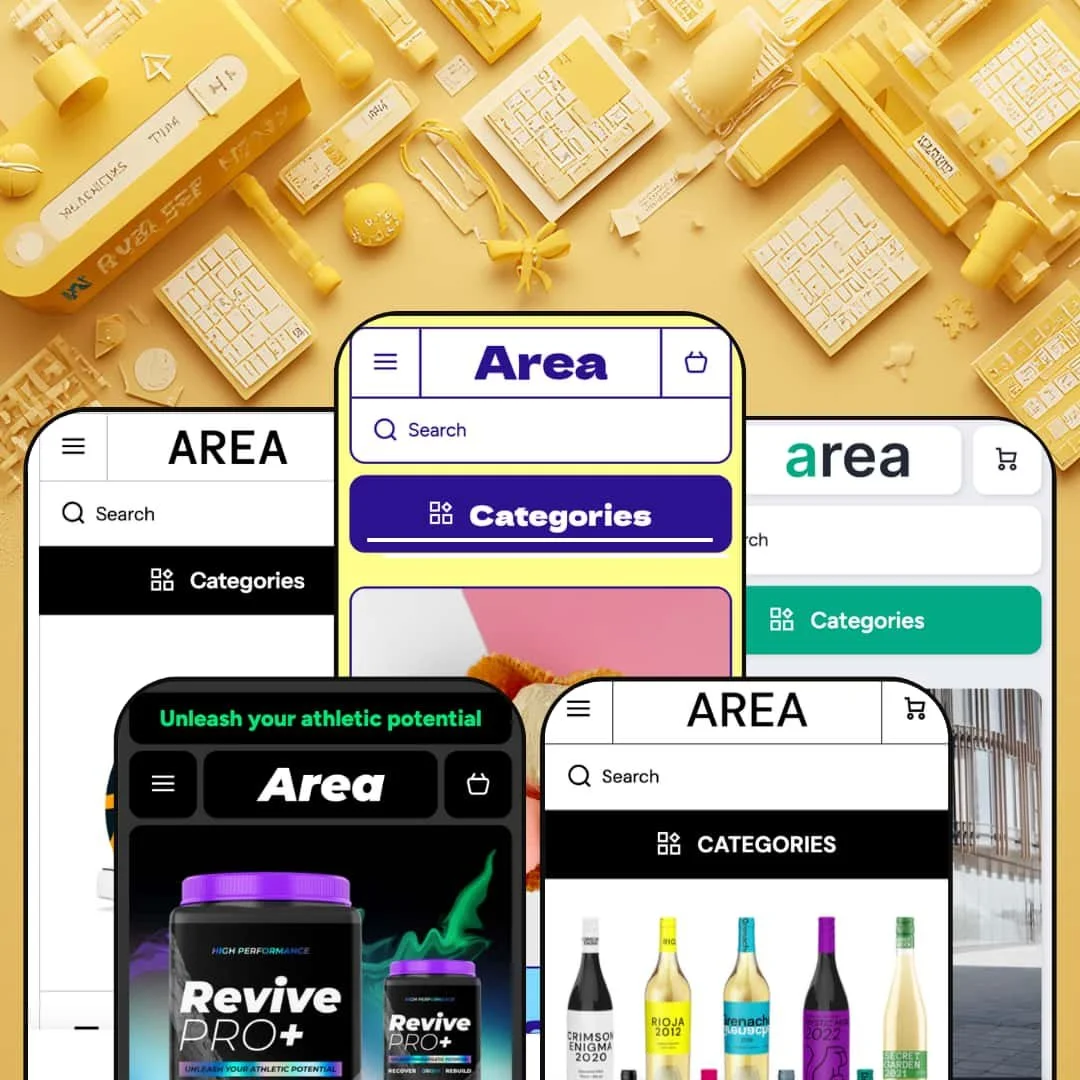
Most Shopify themes pick a lane and commit to it. Area refuses. The same theme ships as five genuinely different storefronts: a maximalist apparel catalog, a bright ice-cream shop, a dark single-product supplement pitch, a spec-driven electronics showroom, and an age-gated wine merchant, all built on Online Store 2.0 architecture. The interesting question isn't whether it's flexible; it's whether that much range leaves anything underbuilt.
Mega-menu merchandising that filters before the click
The navigation isn't a list of links; it's a filtering surface. The mega menu pulls metaobject and metafield attributes into the dropdown itself, so a shopper narrows by grape variety, wheel size, or battery capacity before a collection page ever loads. The header does the sorting. That collapses two or three browsing steps into one, and for attribute-rich catalogs in the 50-to-200-SKU range, especially considered-purchase categories like electronics and wine where buyers shop by spec, it makes the header the primary discovery tool.
A built-in kit for product-heavy storytelling
A supplement seller listing ingredient dosages, an electronics seller publishing spec sheets, a food seller surfacing allergen notes: all three get native sections for the job. The detail lives on the page. This is the theme's structured product-information family, supplement-facts blocks, spec tables, ingredient and usage panels, and product tabs, working together to put disclosure-grade detail in front of the buyer rather than behind a link. For categories where the sale hinges on technical or compositional detail, that's information design a merchant would otherwise assemble by hand or rent from an app.
Five real verticals from one license
Set against buying a separate theme for each vertical, Area's pitch is range. The five presets aren't recoloured twins; they're genuinely distinct builds, an apparel catalog with shoppable video, a single-product advertorial, a spec-filtered electronics showroom, an age-gated bottle shop, and a bright food grid. Eight more style variations layer on top. For an agency or multi-brand operator standing up several different storefronts, or a single merchant still deciding which direction a catalog will take, one purchase covers a remarkable amount of ground.
Cart tools aimed at order value
The slide-out cart arrives wired for order value: a free-shipping progress bar, an order-special-instructions field, and a sticky checkout button working as one conversion unit. The bar sets the goal. For impulse-led, cross-sell-heavy stores, an apparel or food shop chasing a higher average order, that running nudge toward the free-shipping threshold does real work at the exact moment of checkout.
The default is maximalism, and restraint is your job
Every preset ships loaded to the rafters with carousels, marquees, promo banners, brand strips, video sections, an Instagram feed, and a blog module, all stacked down a homepage that scrolls well past what a lean store needs. Restraint isn't on the menu. A brand built on whitespace and a single confident hero image will spend its setup time deleting, and the theme offers little guidance on what to cut. For minimalist or single-statement luxury labels, and for small catalogs under 30 SKUs that can't fill all those rows, the out-of-box density works against the brand rather than for it.
Those review sections aren't a review system
The Medicines and Technical presets show handsome "Reviews" sections, named customers, quotes, star glyphs, and it's easy to read them as built-in social proof. They aren't. They're theme testimonial blocks filled with static content you enter yourself, not a live review engine that collects, verifies, or displays real buyer ratings as they come in. A store that depends on review volume and star aggregation, common in supplements and electronics where buyers lean hard on social proof, will still need a dedicated app like Judge.me or Loox wired in. The section sets the stage; it doesn't gather the reviews.
The best merchandising is inert until you feed it data
The attribute filters, spec tables, and ingredient panels that make the demos impressive all run on metaobjects and metafields you have to populate. The capability is theme-wide and genuine. On day one, it's empty. Adopt the Winery build and you inherit a variety, style, and country filtering system that returns nothing until every bottle carries those metafields, assigned by hand or by import. For large or attribute-rich catalogs run by lean teams, 200-plus SKUs without a dedicated merchandiser, that upfront data discipline is the difference between the theme performing as demoed and falling flat.
What it takes to launch
Expect a multi-day pass before launch: replacing demo copy across each preset's stacked sections, populating the metaobjects and metafields that drive the navigation filters and product-information blocks, swapping placeholder media and social links, and resetting market and currency defaults. Running more than one preset multiplies the copy and brand-naming work accordingly.
-
What works in this preset
Scroll the Area homepage and it just keeps going. A video hero gives way to a featured-collection tile row, then two product carousels with quick view, a shoppable "Style in Motion" section pairing autoplay clips with linked product cards, an Instagram-style feed, and a brand-story block dated to 1975. Product cards carry two images with a rollover swap, variant swatches, and metafield badges like "Ready to ship." For an apparel merchant who wants the storefront doing the selling, that's a lot of surface working from the first screen.
I clicked into the mega menu and found it doing real work. The Sneakers entry expands into stacked filter columns for collection, colour, and size, so a shopper can jump to "size 10, black" before a collection page ever loads. The effect is immediate. The Caps entry, by contrast, stages a flat product list with thumbnail tiles, the same menu system configured two different ways for two different jobs.
-
What works in this preset
On Flavor, the colour hits first. Bright and sugar-forward, it's a total mood swing from the apparel build, and this isn't a recolour: the type, spacing, and button styling read as a different brand entirely, the clearest sign the style presets reach past colour into the whole visual register. The catalog splits into six dessert collections, ice cream, sherbet, gelato, mochi, popsicle, and sorbet, each with its own homepage row.
What surprised me was the FAQ. The homepage carries a full expanding FAQ accordion answering food-specific questions about dietary restrictions, custom cakes, and seasonal flavours, sitting right above the blog module. The product quick view is unusually complete too: open one and you get weight variants like 16oz and 32oz, a price that updates per size, and a paragraph of ingredient description. For a food merchant who fields the same allergy and sizing questions every day, having those answers staged on the page earns its place.
Where it stumbles
The food preset is built for a deep menu, and a small scoop shop will feel the overshoot. Six stacked collection rows, each repeating the same card pattern, assume a catalog with dozens of flavours across multiple formats. A neighbourhood gelateria with twelve products will find the homepage outrunning its inventory, with rows that thin out, repeat the same handful of cards, or sit half-empty until the menu grows. The structure rewards range; it underuses a short menu.
-
What works in this preset
The Medicines preset breaks the pattern completely. Softali stages it as a dark-themed sport-supplement store called "Boosted," and there's no catalog here at all: the entire homepage is a single-product advertorial for one supplement, built from a stack of education sections, a supplement-facts table listing ingredient dosages to the milligram, certification badge rows like vegan and gluten-tested, a benefits grid, a science explainer, and an embedded buy form with a quantity stepper. It proves the section library can carry a full long-form product story, not only a grid.
I went looking for where a shopper actually buys, and the page keeps the answer close. A product form with price and add-to-cart is embedded directly in the long scroll, a contact "Ask a question" form sits below the description, and a testimonial row carries six named quotes with avatars. A countdown-timer promo waits at the foot of the page for limited-time framing. It's a funnel, not a shelf.
Where it stumbles
This preset stages one product's story and nothing else, no collection grids, no category navigation, because it isn't trying to be a catalog. A supplement brand with a ten-SKU range would pull those sections in from the theme's other builds and rebuild the navigation to grow past a single product. As a launchpad for one flagship it's excellent. As the starting point for a catalog brand, it's the wrong door.
-
What works in this preset
Technical is where the spec-hunters get served. Dressed in utilitarian grey for an electric-mobility store, its mega menu is the most attribute-dense of the five: the Gyroboards entry breaks into brand, type, wheel size from 6.5" to 14", and battery capacity from 300 to 600 W/h. A featured-brands strip filters the catalog by vendor. This is navigation for shoppers who arrive already knowing the spec they need.
Open a product and the specs lead. An embedded product block lists maximum speed, power reserve, battery capacity, charging time, and permissible load as a clean comparison table, the at-a-glance data an e-bike buyer actually weighs. Reviews appear as a testimonial section with star glyphs and named riders, and below sit value-prop blocks, a store-story video, and a ten-question FAQ on range, safety, and regulations. For a considered electronics purchase, the page front-loads the homework a buyer would otherwise hunt for.
-
What works in this preset
Winery is where the theme's filtering ambitions peak. The Red Wine mega menu wires four metaobject- and metafield-driven filter columns: brand across six wineries, grape variety from Cabernet through Syrah, winemaking style across traditional, progressive, and lo-fi natural, and country of origin. These aren't decorative links; they resolve to real filtered collection URLs. A shopper can narrow to natural-style Italian reds straight from the navigation.
The feature that matters most here is the age gate. Wine has a compliance problem. Load the demo and an "Are You 18 or Older?" popup blocks entry until you confirm, the built-in age-verification feature that lets the theme serve alcohol, CBD, or other adult categories without a separate app. Every product card leads with its winery name, so the storefront reads like a curated multi-producer bottle shop. I noticed how much the build leans on producer identity, where the apparel and food presets put the product itself first.
Where it stumbles
That vendor-forward design assumes you're selling other people's wine. A single estate that bottles only its own label gets a card system stamping the same producer name on every tile, redundant chrome for a one-winery storefront. The brand filters and vendor taxonomy presume a multi-producer catalog to sort through. A boutique château would strip most of that machinery and lose the preset's main organising idea in the process.
Style presets that change mood, not just colour
The design range is the headline. Read the five demos back to back and it's the first thing that lands: the bright food shop and the dark supplement advertorial don't feel like the same theme wearing different paint, with typography, spacing rhythm, and component styling shifting enough that each reads as its own brand. That points to a design-token layer doing genuine work beneath the presets, the real asset for a merchant who wants a distinctive storefront rather than a recognisable one.
One editor logic under five different skins
The skins differ; the skeleton doesn't. The header and footer grammar, the card system, the section spacing, and the way styles are applied carry across every preset, so a merchant who learns to edit one build can navigate the editor for any of the others. That consistency is what keeps the theme's range from turning into five separate learning curves, and it matters most for agencies or operators maintaining more than one Area store at once.
Premium-tier breadth at a budget-tier price
Step back and the positioning is the story. Five distinct vertical builds, eight style variations, age verification, attribute filtering, long-form product sections, and a full cart toolkit arrive for a list price of $100. That's an unusual amount of theme for the money, and it reframes most of the trade-offs in this review as effort rather than absence: the features are present, and the question is how much work you'll invest to make them yours.
It optimises for the showroom, not the storefront
Demos sell; storefronts ship. Every build is engineered to look maximally capable in a demo, packed with sections and sample content, which is a different goal from shipping something lean, fast, and on-brand. The gap between the demo and a credible live store is wider here than the polish suggests, and closing it is the merchant's labour in every preset. Buyers should price that in: the impressive part is what you see, and the work is what you don't.
Built on Online Store 2.0, not the newest architecture
Area runs on Online Store 2.0 rather than the newer Theme Blocks generation. The architecture is a generation behind the newest. In practice that distinction changes nothing today for a normal storefront; the theme is fully sectioned and actively maintained. It's worth knowing for buyers who specifically want the latest nested-block editing and AI-assisted block tooling, since those primitives belong to the generation that came after this one. Treat it less as a flaw and more as a ceiling on how far forward the architecture reaches.
★ 8.0/10
Rating
-
A broad section library, attribute-filter navigation, age verification, countdown, product-information blocks, and cart tools, all available across presets, with the demos emphasising different parts of it.
9
-
Editor logic stays consistent across builds, but the volume of sections, style options, and metafields to configure makes setup demanding; a single-purpose theme would ask less.
7
-
The build is mobile-first; the menu collapses into a nested accordion drilldown through collections and filters, and card grids reflow cleanly to narrow screens.
8
-
Individual sections stay reasonably light, with image lazy-loading and CDN delivery, though the maximalist default homepages stack heavy video, carousels, and feeds that real-world speed will hinge on trimming.
7
-
The style-preset system shifts mood as well as colour across very different verticals, backed by eight style variations and deep type and colour control.
9
Frequently Asked Questions
-
The Medicines preset (Softali's "Boosted" supplement demo) is built as a one-product advertorial, with supplement-facts blocks, an embedded buy form, and a testimonial row all aimed at a single SKU. It's the natural starting point for a one-product launch.
-
Yes. The built-in age-verification popup gates the Winery demo with an "Are You 18 or Older?" prompt, and it supports alcohol, CBD, and similar adult categories without a separate app.
-
The Area preset. It stages multi-image product cards with colour and size variant swatches, an apparel-style mega menu, and a shoppable "Style in Motion" video section that links clips to products.
-
Yes. Several presets surface a full expanding FAQ accordion directly on the homepage, with the food build also running a blog module, useful for pre-purchase questions and content-led SEO.
-
The video heroes, the shoppable video section, and the card animations are theme features; the demo footage is illustrative, and you replace it with your own media.
-
No. The theme layers additional style variations like Stylish, Lineal, Bright, Technical, and Boosted on top of the preset builds, so the available looks run beyond the five headline demos.
This review is based on hands-on testing of the publicly available preset demos of the Area Shopify theme as of June 2026. Theme features, preset availability, and performance can change with subsequent updates from the theme developer.