
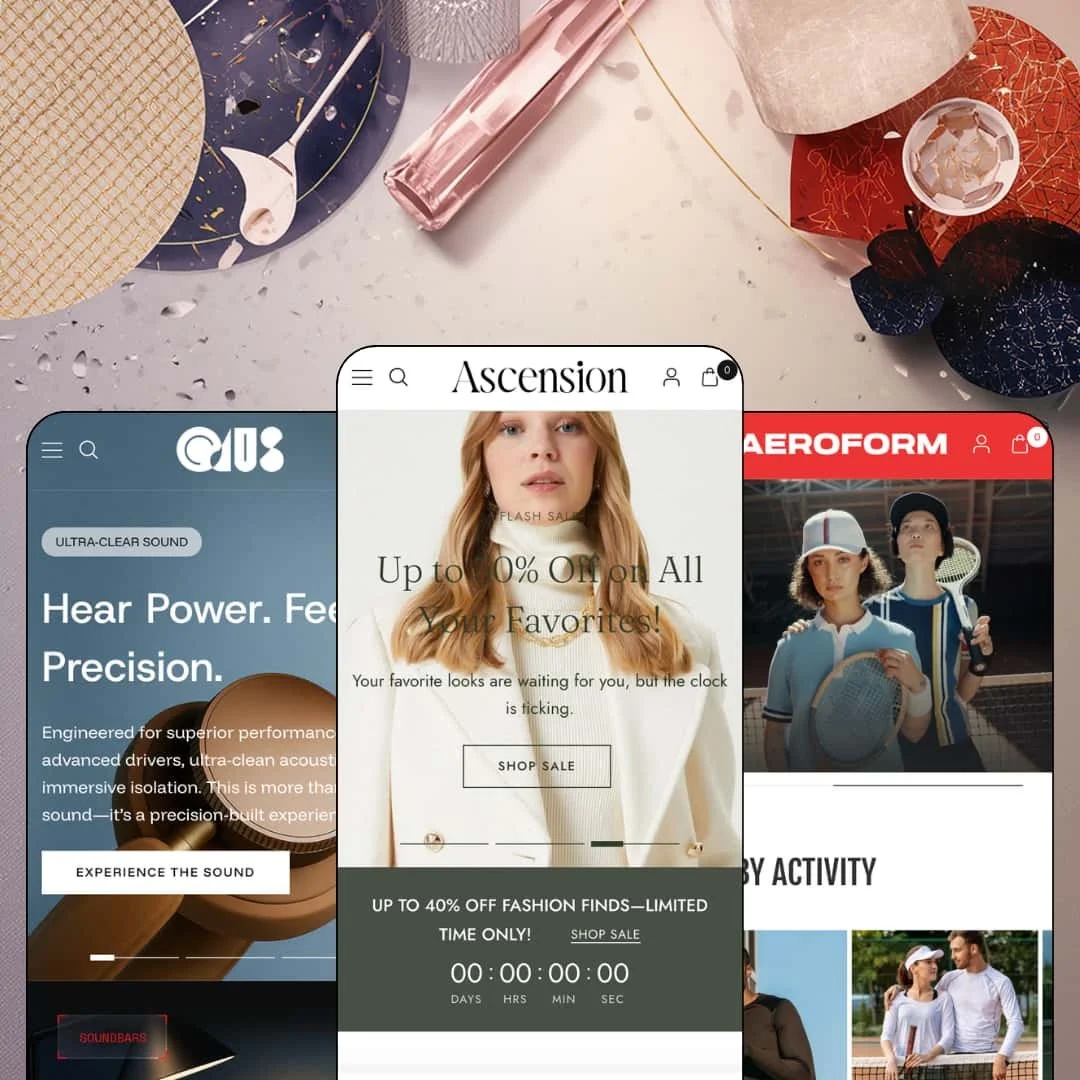
A theme that pitches itself as "crafted for luxury" opens its flagship demo with a Black Friday marquee. That tension runs through Ascension, Fuel Themes' Online Store 2.0 preset family, which jumps from a boutique womenswear store to a loud sportswear campaign to a near-black audio showroom across three demos. I spent time in all three to figure out which of those brands the theme actually is. At $400, that question is worth answering before you commit.
The navigation sells, not just sorts
Mega menu columns can render live product tiles with images, prices, badges, and quick-view triggers, and in-menu promos sit on the official feature list as well. In the audio demo, a $1,399 wireless soundbar is shoppable from inside the Shop flyout before any page has loaded. That's discovery compressed into a hover. For cross-shop-heavy buyers browsing multi-category catalogs in the 50 to 200 SKU range, the menu becomes a second homepage instead of a table of contents.
Cards that close, not just link
Product cards behave like miniature buy boxes, and the pieces work as one kit. Single-variant items get a direct Add to cart on the card, multi-variant items switch to Choose options with size chips and color swatches, autoplaying video can replace the still, and sale badges compute their percentage on their own. It's a lot of machinery in a small rectangle. Impulse-buy apparel brands running drop-style releases will feel the difference in how few taps stand between grid and cart.
Five product-page layouts from one purchase
The listing promises five product-page layouts with adjustable media dimensions, and the flagship demo stages four of them as named nav destinations: Grid, Thumbnails, Collage, and List. You can compare how the same buy box reads against different gallery grammars before committing to anything. Layout choice matters most when photography is uneven. Single-brand stores with 11 to 100 SKUs and mixed asset quality can match each product to the layout its images deserve.
Built for selling into Europe
If you run a single-brand apparel or audio store selling into French-, German-, Italian-, or Spanish-speaking markets, Ascension arrives with its interface strings already translated. EU translations in five languages and right-to-left support both sit on the feature list, and the sportswear demo stages a 29-country selector in its header. The groundwork is done. What remains is Shopify Markets configuration and your own product-content translation, which no theme can do for you.
The social proof is scenery
Star ratings render on product cards, a hero banner types out RATED 4.7/5, and a testimonial section claims 50,000+ five-star reviews, yet none of it connects to a review engine. The applause is painted on. Merchants will need a review app before any of those stars mean anything, plus an integration pass to make the display honest. Mid-market fashion boutiques courting repeat buyers, where trust does the reselling, should budget for that from day one.
No data layer under the storytelling
Product information lives in prose. Tabs and content blocks carry descriptions, care notes, and shipping copy, but there's no spec-table section, no comparison view, and no metafield-driven data grammar anywhere on the feature list, which is a strange gap for a family that stages a four-figure soundbar catalog. I kept looking for a single measured product number and didn't find one on the listings I opened. Audio and electronics merchants serving considered-purchase buyers across 50+ SKU catalogs will end up hand-typing figures into rich text or paying for custom work.
An Online Store 2.0 theme at a $400 price
Ascension ships on the same Online Store 2.0 architecture that Dawn, Shopify's free default, has run since 2021, so none of your $400 buys a newer generation of the platform. What the money buys is the section library, the motion system, and three staged identities. That case is real. Single-brand stores shopping at this pricing tier against the free baseline should just be clear they're paying for design and merchandising surface, not architecture.
What it takes to launch
Expect a multi-day pass across hero claims, testimonial and press blocks, promotional copy, and menu re-linking, plus inventory re-staging so featured grids stop leading with unbuyable items and a full replacement of demo product data before launch.
-
What works in this preset
Open the Dresses menu and you're already shopping. The flyout splits into Midis, Minis, and Maxis, and each column renders live product tiles with prices, quick-view triggers, and badges like Trending, Pre-order, and a computed 20% off. A $648 brocade dress sells itself from inside the navigation, one hover before any collection page loads. For a boutique trading on browsing momentum, that's real distance saved.
The Pleated Pants listing shows the siblings system the demo's Features menu advertises. Red and Black exist as separate products stitched together through colorway swatches, so each shade keeps its own URL, imagery, and inventory story while shoppers hop between them in one click. Around the buy box sits a full kit: size buttons with a sizing-guide modal, a "67 in stock, ready to ship" line, a trust-icon row, and a Need-help contact form that opens right on the page. It's dense without feeling cluttered.
Why describe templates when you can stage them? Six pre-built landing pages ship as clickable nav destinations in this demo, including Today's Drop, The Latest & Greatest, Threads, and a gift shop, and Fuel Themes bills exactly these ready-made sale and campaign pages as the theme's first listing highlight. You can judge every one of them before spending a cent. That's the right way to sell a template library.
Where it stumbles
The staging keeps arguing with the positioning. Fuel Themes pitches Ascension as a luxury theme, yet this demo's resting voice is a 30%-off jacket hero, a 40%-off countdown block, and press copy that celebrates shopping "without breaking the bank." I went looking for the quiet version of this storefront and never found it, even though a boutique selling $694 leather jackets could absolutely run this theme quietly.
The Dresses flyout leads its Midis shelf with a sold-out palm-print dress, and the same unbuyable product resurfaces in the homepage grid. A menu built to sell shouldn't showcase what can't be bought.
-
What works in this preset
Motion does the selling on this preset's product pages. Scroll past the buy box on a leggings listing and the page turns into a feed: five vertical video reels run in a strip, each with a buyable product card attached underneath, so a sneaker or a sports bra can be shopped straight out of its clip. For activewear, where movement is the proof of the fabric, this is the most persuasive section in the entire family.
The homepage moves even where nothing is filmed. A marquee band loops YOUR TEAM, YOUR COLORS, YOUR JERSEY, YOUR LEGACY behind a floating jersey cutout, icon-led story blocks alternate with tabbed product grids, and a promo section hands out the AERO40 code for 40% off. It reads like a campaign, not a catalog.
Product cards adapt to the vertical without any settings drama. Apparel tiles carry XS to XL chips while sneakers switch to EU sizes 38 through 44, every card prints a vendor byline like Alpha Gear or CrossBeat that deep-links into that vendor's collection, and the tabbed grid flips between New arrivals, Shoes, and Clothing in place. Multi-brand sports retailers get their sorting logic for free.
Where it stumbles
Nearly everything here is sold out. The five bestsellers, the new-arrivals tab, the featured showcase sneaker, and the leggings product page I opened all render the same dead Sold out button, which means the one thing a conversion-minded demo should prove, the path from grid to cart, can't be experienced anywhere along the homepage route.
One section promises officially licensed team jerseys, custom kits, and limited editions, then routes its button to the general clothing collection where no jersey exists. The pitch outruns the catalog.
-
What works in this preset
Halfway down the homepage, a full buy box interrupts the storytelling. The EchoWood Mini speaker gets a four-image gallery, a Color picker, a Technology toggle across Bluetooth, Wireless, and Wired, and a live Add to cart button, so a $129 purchase can close without a product-page detour. That's homepage-to-cart in one section.
Everything in Opus is staged against near-black. A SILENCE THE WORLD marquee circles a floating headphone cutout, feature tiles pair short claims like Built for Sweat & Weather with autoplaying clips, and the curated headphone row mixes video cards in with stills so the grid itself feels alive. The restraint is deliberate: no discounts, no countdowns, just product.
The Element Studio listing behaves like a mini-site. Its gallery leads with video, the price flips from $499 to $599 when the Technology option changes from Bluetooth to Wired, a "66 in stock, ready to ship" line sits under the picker, and benefit rows for build quality, noise cancellation, and low-latency wireless carry the story far below the fold. Long pages need the sticky buy bar, and it's there.
Three storefronts that don't share a skeleton
Read side by side, the demos genuinely diverge: a light editorial boutique, a loud kinetic sports campaign, and a near-black audio showroom, all built from one section library. Section order, color temperature, and voice change between them, not just the imagery. Choosing a preset here is a real brand decision rather than a color swap, and that makes the single purchase stretch further than the preset count alone suggests.
Motion is the house signature
Video is treated as a first-class merchandising material everywhere: hero loops, autoplaying card media, in-menu clips, and reel-format sections recur across all three demos, and the August 2026 release notes layer animated grid transitions on top. Brands whose products look best in movement, activewear and audio above all, get a storefront identity built around exactly that fact.
Multi-vendor curation comes standard
Every demo prints vendor bylines on cards and product pages, each deep-linking to an automatically built vendor collection, so a curated multi-brand assortment organizes itself from Shopify's vendor field alone. Select shops and boutique aggregators get marketplace-style browsing without extra tooling. It's quiet, but it's everywhere.
The design assumes a media pipeline
All three identities lean on full-width video heroes, campaign photography, autoplaying card clips, and reel-format footage; strip those assets out and the sections deflate into large empty frames. This is a theme for brands that already produce motion content on a schedule, and a standing commitment for anyone who doesn't.
Listed verticals the presets never visit
The Theme Store files Ascension under Jewelry & Accessories and Food & Drink, yet the three presets stage womenswear, activewear, and audio, so neither listed industry gets a staged reference anywhere in the family. Merchants in those verticals are buying on faith and adapting alone.
★ 7.8/10
Rating
-
Card-level quick buy, a siblings colorway system, five product-page layouts, and a broad promo kit; the missing spec and comparison grammar holds the ceiling down.
8
-
Editor-standard sections plus staged template pages help, but switching presets resets color and font choices per the developer docs, so commit to one early.
7
-
Sticky buy bars on product pages, collapsible stacked navigation, and card chips sized for thumbs; the autoplay-heavy design rewards restraint on mobile data.
8
-
Lean initial page weight with aggressively lazy-loaded imagery; real-world numbers will track how much autoplay video a merchant stacks per page.
8
-
Three genuinely divergent staged identities, a dark scheme out of the box, and per-product layout switching cover an unusual stylistic range.
8
Frequently Asked Questions
-
In the audio demo, yes: a homepage buy module offers a gallery, variant pickers, and Add to cart in one section, and single-variant products carry direct add-to-cart buttons on their grid cards.
-
Both patterns are staged. A siblings setup links red and black trousers as separate products through swatches, while a Variant Image Set demo keeps colors as variants with their own image groups.
-
Sold-out badges render on cards, and a native pre-order flow is staged on a brocade dress listing, so upcoming drops can take orders before inventory lands.
-
The listing says five with adjustable media dimensions, and the flagship demo stages four as clickable examples named Grid, Thumbnails, Collage, and List.
-
English, French, Italian, German, and Spanish theme strings plus right-to-left support, with version 7.0.0 from August 2026 adding further locales.
-
No. Quantity pricing and combined listings are both flagged as Shopify Plus features on the listing, so standard-plan merchants shouldn't count on either.
This review is based on hands-on testing of the publicly available preset demos of the Ascension Shopify theme as of August 2026. Theme features, preset availability, and performance can change with subsequent updates from the theme developer.