
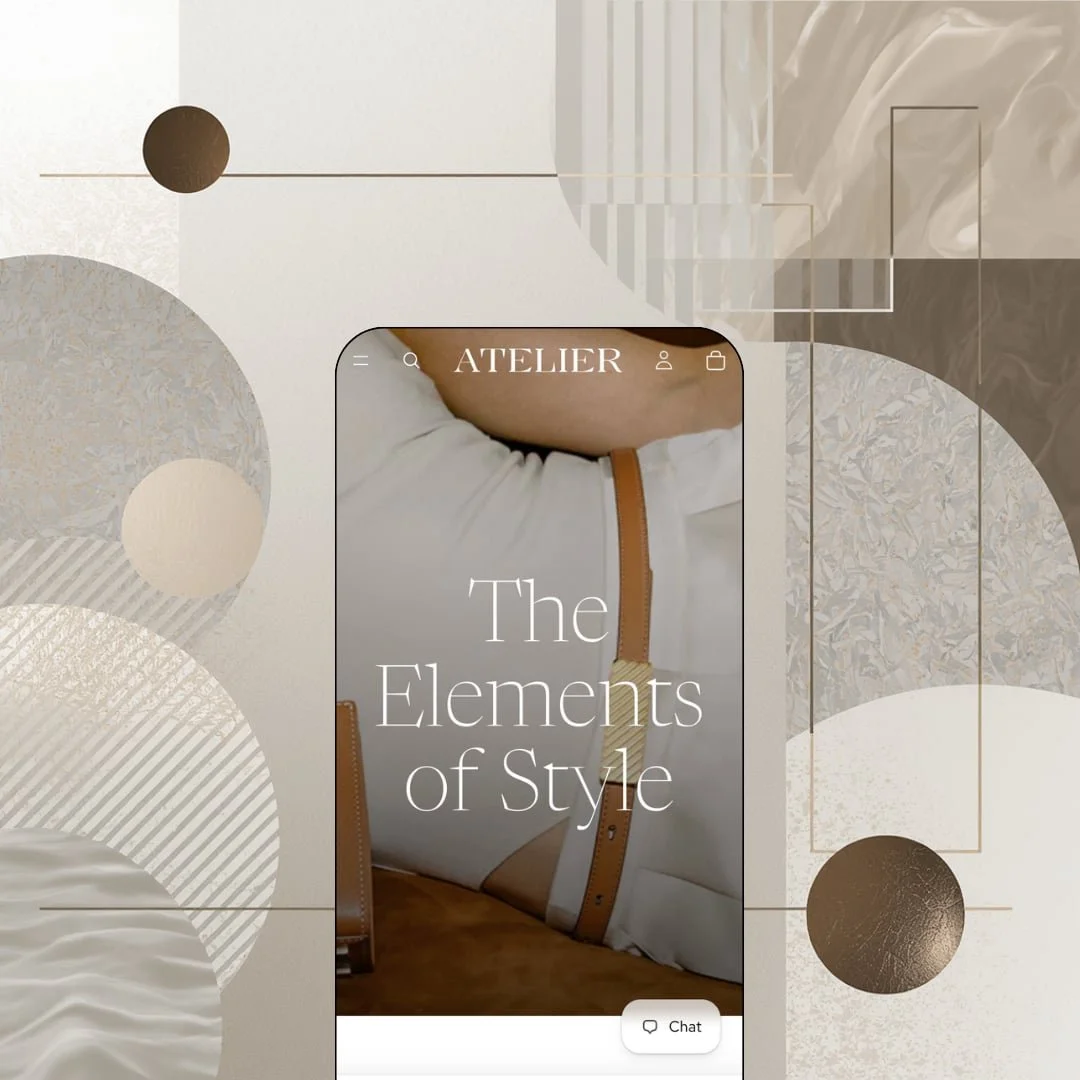
Most free Shopify themes look like a starting point. Atelier looks like a finished luxury storefront before you've changed a single setting, with a full-bleed hero, hairline typography, and product photography given room to breathe. It belongs to the Theme Blocks generation Shopify introduced in 2025, which means nested blocks and a mobile-first build sit under that calm surface. The question is whether the calm holds once real merchants start pushing on it, and 76 Theme Store reviews suggest the answer is complicated.
A buy bar that follows you, thumbnail and all
Dawn gives you nothing once the add-to-cart button scrolls out of view. Atelier keeps a compact strip pinned in the header with the product thumbnail, the title, the selected variant name, the price, and an Add to cart control, so the purchase stays one tap away while the shopper reads through care instructions and measurements. On mobile that matters more. For considered-purchase brands selling $400-plus leather goods to repeat buyers who read before they buy, this is the single most useful thing Atelier does that Shopify's default free theme doesn't.
Three-level mega menu with grouped columns
The Bags menu opens into three headed columns (Type, Collections, Gifts), and each column carries its own child list: five bag shapes under Type, four named lines under Collections, two gift edits under Gifts. That's three levels from one hover. It lets a merchant separate how shoppers browse (by shape) from how the brand talks (by line) without building two menus, and the in-menu promos on the feature list mean an image tile can sit in the same panel. Mid-market accessories brands with 50 to 100 SKUs spread across several named lines get navigation that scales past a flat dropdown without an app.
Quick buy that knows the difference between Add and Choose
Why should a one-variant product open a modal? Atelier's product cards carry two states: single-variant items get a direct Add control, multi-variant items get Choose, which opens the quick view instead. Each card also runs a small image carousel behind the primary shot. On the tote-bags collection, every one of the 17 cards renders that control, so a shopper can fill a cart without ever leaving the grid, which is exactly the path you want for last-minute gift shopping. For impulse-leaning gift buyers at a boutique with under 30 SKUs, fewer pages between wanting and buying is the whole game.
Collection filtering built for a color-led catalog
The tote collection exposes Availability, an eight-value Color filter running from Beige to White, and a price range with the ceiling printed as a hint ("The highest price is $710.00"), alongside nine sort orders and a column-count toggle for the grid. Swatch filters and infinite scroll are on the feature list too. For a free theme that's a full discovery layer. Apparel or footwear merchants running 100 to 500 SKUs across a dozen colorways can let shoppers cut a grid by color before they ever open a product page.
Weak track record: 30% positive across 76 reviews
Seventy-six merchants have reviewed Atelier and only 23 came away positive, against 29 neutral and 24 negative. The complaints cluster around stability rather than taste: a July 2026 review describes pages freezing in the Facebook and Instagram Android in-app browser (the designer points to version 4.1.1 as the fix), and an August 2026 review still reports black boxes and white screens on mobile after updating to the latest version. For a theme Shopify built, that's a rough report card. Drop-model brands sending impulse buyers from Instagram ads to a mobile storefront should read the review thread before committing.
Colorways multiply the catalog
Atlas appears four times in the search overlay (Bordeaux, Shark, White, Praline), each a separate product at $625, and the tote collection lists Sera Tote six times and Wayfarer Tote three times. One product per color. The combined-listing feature that would group them is flagged Shopify Plus on the listing, so a merchant on a standard plan either accepts a grid where the same bag repeats in every finish or manages color as a variant and gives up the per-color URL and photography. Leather-goods and jewelry brands with 20 to 50 styles in five or more finishes will feel that trade-off on every collection page.
A thinner settings surface than Shopify's older themes
Merchant reviews from spring 2026 list what they went looking for and couldn't find: a price-range display on cards instead of only the lowest price, more layout control on the blog page, and metafield rows that accept multiple metaobjects. Another April 2026 review asks why there are no theme-specific customization instructions, and the designer's reply routes to the general Help Center. This kept bugging me, because the theme's editorial pitch depends on the blog and on metafield-driven content. None of that is fatal. Multi-brand retailers with 100-plus SKUs who rely on the blog for evergreen traffic will bump into these ceilings within the first month of setup.
What it takes to launch
Expect a copy and imagery pass across the hero, collection tiles, product-description accordions, and the About, Shipping, and Returns pages, plus footer and newsletter re-staging. Any merchant outside leather goods adds a full vertical swap on top.
-
What works in this preset
You land on a single sentence. "The Elements of Style" sits over a full-width suede photograph, the logo flips from white to black as the header leaves the transparent hero, and nothing asks you to buy anything yet. That restraint is the pitch. Directly under the hero, four collection tiles carry live item counts (Shoulder Bags 12, Tote bags 17, Crossbody Bags 12, Clutches & Pouches 6), so the catalog announces its own size before a single product card renders. I sat up at that detail, because counts on tiles are the first sign a theme treats the homepage as a navigation surface rather than a poster.
Five images, one price, three accordions. That's the entire product page for the Mini Sera Éclat, and it works because the gallery stacks large frames with a full-screen lightbox behind each one instead of shrinking the photography into a thumbnail strip. I clicked through all five and never lost the buy button. Below it, Description, Care, and Design fold into accordions, keeping the leather specs and shoulder-drop measurements one tap away without pushing the "You may also like" rail off the first screen on desktop. For a bag at $580, the page reads like a catalog spread.
The homepage's featured-product block stages the Mini Isla in Suede Caramel at $525 against a lifestyle photograph rather than a cutout, and the four-card "New this season" grid follows it with the same editorial spacing. Further down, an image-with-text band about premium materials links straight to the About page, and a split "A size for every occasion" section pairs a small and a large product shot side by side. The footer closes with three link columns, a newsletter field, and the Atelier wordmark rendered oversize as a final brand beat. It's a short page. Six sections, and it feels complete.
Where it stumbles
The Theme Store files Atelier under Jewelry & Accessories and Food & Drink. The demo stages neither; everything on it is leather bags, flats, heels, wallets, and belts. A jewelry merchant finds no ring-size axis, no material or hardware accordion, and no engraving or gift staging to copy, and a coffee roaster finds nothing at all, even though the listing promises an ingredients and nutritional-information section. The vertical the demo actually sells to is the one the listing doesn't name.
No product in the demo carries a size axis. Every item exposes exactly one option, Color, with a single value, so the variant picker never renders more than one pill and the size chart on the feature list never gets a reason to appear. Dimensions live as bullets inside the description instead. The Flats and Heels collections in the menu make that gap visible: shoes without sizes read as a lookbook, not a shop.
Atelier is the quiet one in Shopify's free lineup, an editorial showcase that treats whitespace as a feature.
The trade-off is that it asks the merchant to bring photography good enough to fill that space, and the same restraint that makes the demo feel expensive leaves almost no promotional machinery staged anywhere. Urgency-driven brands will spend their setup time adding rather than removing.
Among Shopify's own free themes it's the clearest less-is-more statement, and it earns that position on the product page more than anywhere else.
Rating
★ 6.8/10
-
Sticky buy bar, three-level menu, two-state quick buy, and a full filter set ship free; combined listings stay Plus-only and merchants flag missing price-range display.
7
-
Standard Shopify editor with King's section library. The 30+ sections require curation effort, and the multi-preset structure means merchants need to commit early to one preset's section staging.
7
-
Mobile-first build with a slide-out menu and a pinned buy bar, offset by the mobile freeze and rendering complaints running through the 2026 review thread.
6
-
Six-section homepage, lazy-loaded imagery, and a light script footprint; nothing on the page competes with the photography.
8
-
Editorial luxury is the only register the demo speaks; the airy layout resists being pushed into a dense, promo-heavy storefront.
6
Frequently Asked Questions
-
The feature list includes an ingredients and nutritional-information block, but the demo never stages it, so you'd be configuring it blind rather than copying a working example.
-
It slides out with a "Your cart is empty" heading, a log-in prompt for faster checkout, and a Continue shopping link back to the full catalog; cart notes and gift wrapping are on the feature list for when it fills.
-
Yes. The demo loads two logo files, one white and one black, and swaps them as the header scrolls off the hero image onto the white page body.
-
It opens pre-populated with a product row and a View all link, and each result card swaps to its second photo on hover.
-
Pre-order, in-store pickups, and a stock counter are all listed as theme features; the demo doesn't stage them, so test each on your own catalog before launch.
-
Version 4.1.5 shipped on August 31, 2026 with bug fixes and performance work, following a 4.1.1 release in July that the designer says addressed the in-app-browser freeze.
-
No. The bags are licensed from mlouye for demonstration only, and every product description carries a note saying so.
This review is based on hands-on testing of the publicly available preset demos of the Atelier Shopify theme as of September 2026. Theme features, preset availability, and performance can change with subsequent updates from the theme developer.