
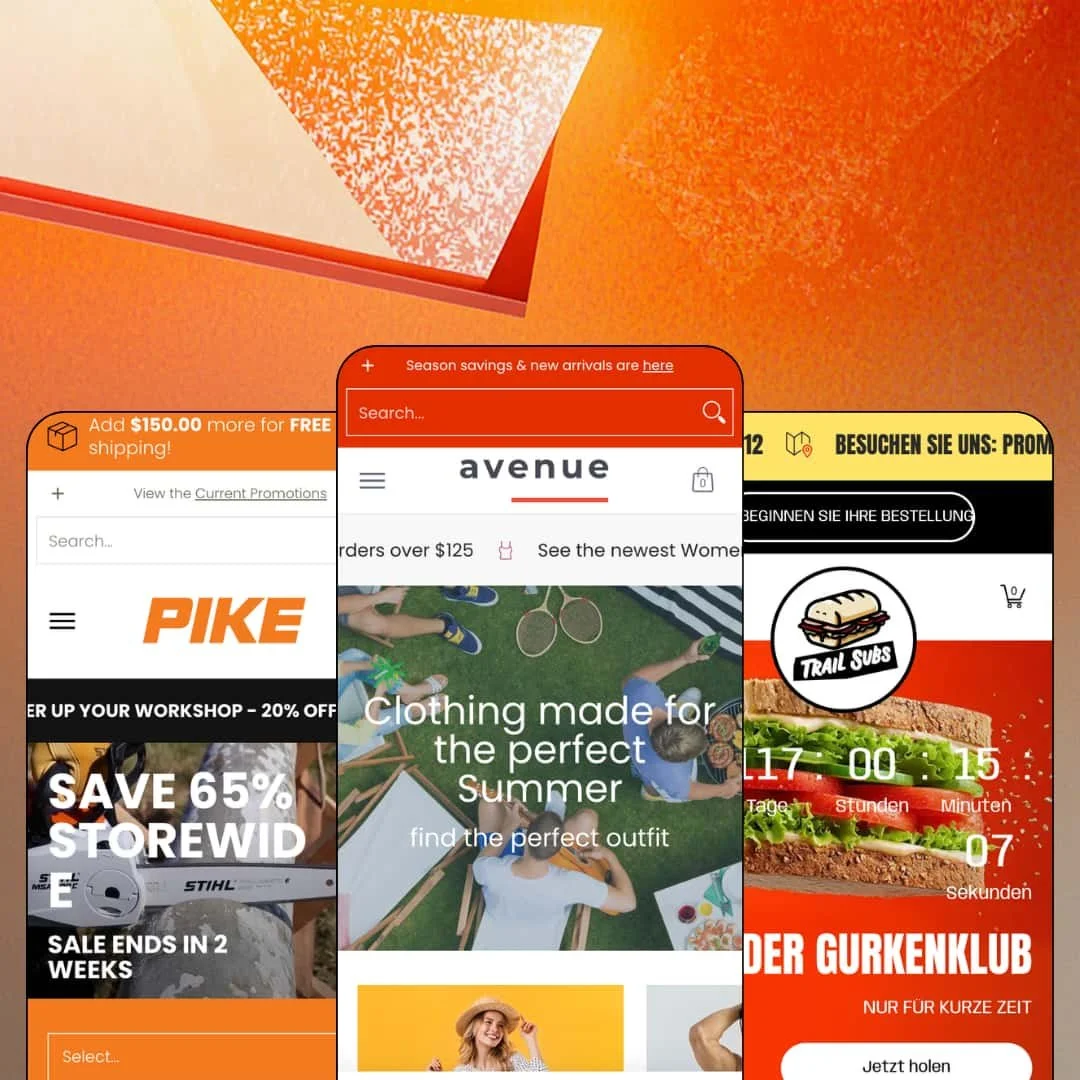
You're selling to buyers who arrive knowing exactly what they need: a 16-inch guide bar, a gluten-free half sub, a men's medium in grey. Avenue, an Online Store 2.0 theme that Red Plug Design Co. has maintained since January 2019, is built around getting those buyers to the right product fast. The $320 package ships three presets, Avenue for clothing, Pike for tools and hardware, and Trail for restaurants, all running the same filtering, sub-collection, and product-compare machinery. Seven years in, version 13.2.0 landed in July 2026, which tells you something about how this one has been kept alive.
Filtering that starts before the collection page
Avenue puts a live filter section directly on the homepage: cascading dropdowns where the first pick populates the next, with the same configuration reusable on collection pages. There, it grows into price ranges, variant-option facets, metafield spec filters, and image-tile facets built on metaobjects. Buyers narrow by spec, not by scrolling. For tool, parts, or electronics merchants with 200-plus SKUs selling to considered-purchase buyers, this one system should drive the buying decision above anything else in the package.
One category tree, wired everywhere
Merchants running a department catalog, whether that's men's/women's/kid's apparel or a 500-SKU hardware superstore organized by task, build their collection relationships once. That single setup then drives collection-page menus, sliders, and breadcrumbs on both collection and product pages, plus sub-collection navigation rows at the top of category pages. Navigation stays consistent wherever a buyer lands. Deep catalogs feel shallow to move through, which is the entire point.
A native compare table with real depth
Up to five products go side by side, on the standard commerce attributes plus as many as twenty custom metafield rows. The checkboxes live right on the product cards. That means the feature meets buyers mid-browse instead of hiding behind a dedicated page, which is where comparison decisions actually happen for people weighing two similar machines. For outdoor-equipment and appliance merchants at mid-market to premium price points, serving buyers who cross-shop specs, this replaces what would otherwise be a comparison-app install plus the integration work.
Variants treated as first-class merchandise
Individual variants carry their own stock counters, restock messaging, and even their own tax and price display behaviors. Push it further and the quick-order-list treatment renders every variant as a separately buyable row with its own price and quantity control. Sizes stop hiding behind a dropdown. For restock-driven apparel stores, and for food or beverage merchants selling one item in several formats, that variant-level granularity changes how the whole catalog gets presented.
The signature features run on data you don't have yet
The stack renders nothing from product titles alone. Spec filters need metafields, image facets need metaobjects, the compare table needs its attribute rows mapped, and Trail-style nutrition chips demand their own data entry per product. I kept a rough tally while testing and stopped counting the distinct data structures at six. For a first-store founder with an under-30-SKU, impulse-purchase catalog, the machinery you're paying $320 for will sit mostly dark.
Filters mirror your data, flaws included
There's no normalization layer between product data and the filter sidebar. The filter believes whatever it's fed. Values render exactly as entered, so two spellings of the same spec, or the same measurement with and without a decimal, appear as separate facets sitting next to each other. This kept bugging me as I moved through the catalog pages. Multi-editor teams running 500-plus SKUs with several people touching metafields will need a data-entry convention from day one, because every inconsistency becomes customer-facing UI.
An Online Store 2.0 foundation at a 2026 premium price
Avenue predates the Theme Blocks generation, and the architecture shows it: sections and blocks behave the way they have since 2021, without the deeper nesting newer builds allow. Shopify's free Dawn covers that same architectural baseline, so the $320 buys the discovery toolkit and three staged verticals, not a newer foundation. That trade is defensible. Agencies standardizing on current-generation tooling, and premium-positioned single-brand merchants planning a multi-year build they'd rather not re-platform, should weigh it consciously.
The default voice sells discounts, not brands
All three demos lead with urgency mechanics: countdown clocks, rotating sale messages, Save-$ badges, rebate tiles, a storewide 65%-off video hero. The default voice is a discount bin. Luxury and premium-priced brands running evergreen, full-price catalogs will spend part of their setup pass removing promotional chrome rather than adding character, because some of that rhetoric is baked into how the staged sections are written.
What it takes to launch
Expect the standard copy and imagery pass, then a real data-modeling phase: metafield and metaobject population for spec filters and compare attributes, collection-relationship mapping for the sub-collection system, mega menu staging, and a translation review across the staged locales. Plan two to three focused days for a mid-size catalog, more if your product data currently lives in spreadsheets.
-
What works in this preset
Open the Men's menu and you get a photo panel plus two nested levels of links: Tops splits into Button Downs, Hoodies, Polos, and T-Shirts before you've left the header. That depth carries a real department-store catalog across Men's, Women's, and Kid's with four house brands behind it. Further down the homepage, a working filter section sits directly in the page flow. Pick a department and the next dropdowns populate accordingly.
I spent the most time on the demo's own Avenue Tee, which is staged to show off the product template. Fifteen media items share one gallery, mixing photography, video, and 3D models with a View-in-your-space button. Each variant carries its own stock message, from a dated back-in-stock note to a sold-out state, and the size buttons sit beside photographic color swatches instead of dropdowns. It's dense, and it's fast to read.
A free-shipping progress bar is wired into the cart at a 125threshold.Card−levelmerchandisingisbusyinausefulway:Save−125 threshold. Card-level merchandising is busy in a useful way: Save- 125threshold.Card−levelmerchandisingisbusyinausefulway:Save− badges, Pre-Order labels, Quick Shop triggers, and swatch thumbnails that flip the card image per color. Tabbed product rows split Tanks, Dresses, and Sunglasses inside one section rather than stacking three.
Where it stumbles
The flagship demo often reads as a feature manual rather than a store. The Avenue Tee's description literally documents which variant demonstrates which display option, and a Theme Features page sits in the main navigation. That's honest, and genuinely useful while you evaluate, but it means the clothing preset does less than Pike or Trail to model what a finished brand looks like.
-
What works in this preset
This is the preset that justifies the price positioning. The chainsaw collection page carries a sidebar with a sub-collection menu, a price range, and then spec facets pulled from metafields: bar size, engine power, displacement, run time, battery system. Two of the filter groups render as image tiles, so Homeowner, Professional, and Rescue each get an icon instead of a checkbox.
Every product card in that grid carries an Add-to-compare checkbox. Stock states are granular there too. One saw shows Pre-Order, another is flagged sold out with the restock month printed right on the card, and a comparison-chart PDF is linked from the collection description.
The homepage plays the same discovery game before you ever reach a collection. I clicked through a cascading selector listing seventeen tool categories, past video tiles for Chainsaws, Mowers, and Trimmers, a promo-tile row with a military discount and a rebate offer, and an FAQ block answering warranty and servicing questions on the homepage itself. It's a lot of page. For a dealer-style catalog, that density earns its keep.
Where it stumbles
The showcase sets an asset bar most independent dealers should budget for honestly. Pike's hero is video, several category tiles are video, and the product photography is studio-grade throughout. Strip those assets out and the preset's authority thins quickly, because the layout hands its biggest slots to media.
-
What works in this preset
Trail is the newest of the three demos and the most opinionated. Products render as menu rows, and each variant becomes its own orderable card: Half/Regular at one price, Full/Gluten-free at another, quantity stepper attached. Under every item sits a nutrition line reading calories, fat, and protein, plus a row of ingredient chips with tiny icons for sourdough, cheddar, and arugula.
The chrome adapts to food service. The rotating utility bar carries a tap-to-call phone link, a location link, and a Start Your Order button instead of retail promos, and the footer adds a WhatsApp link beside the usual socials. A before/after image slider gets repurposed as a footlong reveal, which made me grin.
Between sections, a marquee scrolls "You know you're hungry, listen to your gut." There's a proper news blog underneath with location-opening and seasonal-menu posts, and the mega menu links individual sandwiches, not just collections. Small choices, but they add up to a preset that behaves like a restaurant site instead of a shop wearing a chef's hat.
Where it stumbles
Retail grammar still shows through the apron. The cart runs a shipping progress bar, so adding one sub prompts you to spend $19.99 more for free shipping, and the newsletter promises 15% off your next order. Those are store reflexes, not restaurant ones. A merchant running pickup-heavy local orders will want to reword or switch off several of these staged defaults before the tone reads right.
One shopping logic, three convincing skins
Read across all three demos and the constant isn't a look, it's a behavior: land, narrow, decide. That behavior holds up as a department store, a dealer catalog, and a sandwich counter without the seams showing. The preset family proves the discovery system generalizes, which is a harder trick than restyling a hero section three times.
A maintenance record you can verify
January 2019 to version 13.2.0 in July 2026 is a long, visible release trail, and the newest preset's assets date from within the past year. Whatever else you're buying, you're not buying abandonware. On the support side, the theme's age has quietly become an argument for it.
International plumbing that's switched on
Pike's country selector maps genuine local currencies per market instead of leaving every region on dollars, and each preset stages a multi-language switcher that goes beyond checkbox compliance. Cross-border readiness gets demonstrated in the demos, not just listed. It's the least flashy thing in the package and possibly the most load-bearing.
Utility without a signature
Across three verticals, the design layer stays conventional retail chrome: competent grids, competent heroes, nothing you'd recognize as Avenue in a lineup. The machinery is the identity. Brand-led stores will need to bring their own art direction, because the theme contributes logistics, not aesthetics.
Density is the only demonstrated speed
All three homepages run long, section-stacked builds, and the staged answer to every merchandising question is another module: another tile row, another tabbed block, another promo band. Reading the presets together, no example of restraint appears anywhere in the family. Minimal, editorial pacing is achievable in the editor, but you'd be working against every reference the developer gives you.
★ 7.4/10
Rating
-
Homepage filtering, a five-product compare, sub-collection wiring, and variant-level selling states make product discovery the theme's clear center of gravity. Little in that lane is left to apps.
9
-
Everyday editing is standard section work, but the headline features stay invisible until metafields, metaobjects, and collection relationships have been modeled and populated.
6
-
Trail ships separate desktop and mobile art for its hero and shop-the-look sections, footer columns collapse into accordions, and the slide-out cart with its shipping bar translates well to small screens.
8
-
Images lazy-load and the newest preset runs lean WebP assets, but Pike stacks several video sections onto a single homepage, and that weight budget is one the merchant inherits.
7
-
One section library convincingly produces a clothing store, a dealer catalog, and a restaurant menu, yet the visual range stays inside utilitarian retail whichever preset you start from.
7
Frequently Asked Questions
-
Red Plug runs a Zendesk help center, and the demos link into specific setup articles from inside staged content, so you can read the exact instructions for a feature while looking at it.
-
By default it compares vendor, rating, price, and variant options, and you can extend it with up to twenty custom metafield rows across a maximum of five products at once.
-
Pre-Order ships as a theme feature, and the demos show Pre-Order states rendered on product cards alongside standard Add-to-Cart and Sold-Out buttons.
-
No. Presets are starting configurations of one shared section library, so you can install any of the three and restage it for a different vertical.
-
The theme's UI strings ship pre-translated in English, French, Italian, German, and Spanish, with right-to-left support; translating your own product content still runs through Shopify's localization workflow.
-
Gift wrapping and cart notes are part of the cart feature set, and the demo product form adds a gift-receipt checkbox directly above the buy button.
This review is based on hands-on testing of the publicly available preset demos of the Avenue Shopify theme as of August 2026. Theme features, preset availability, and performance can change with subsequent updates from the theme developer.