
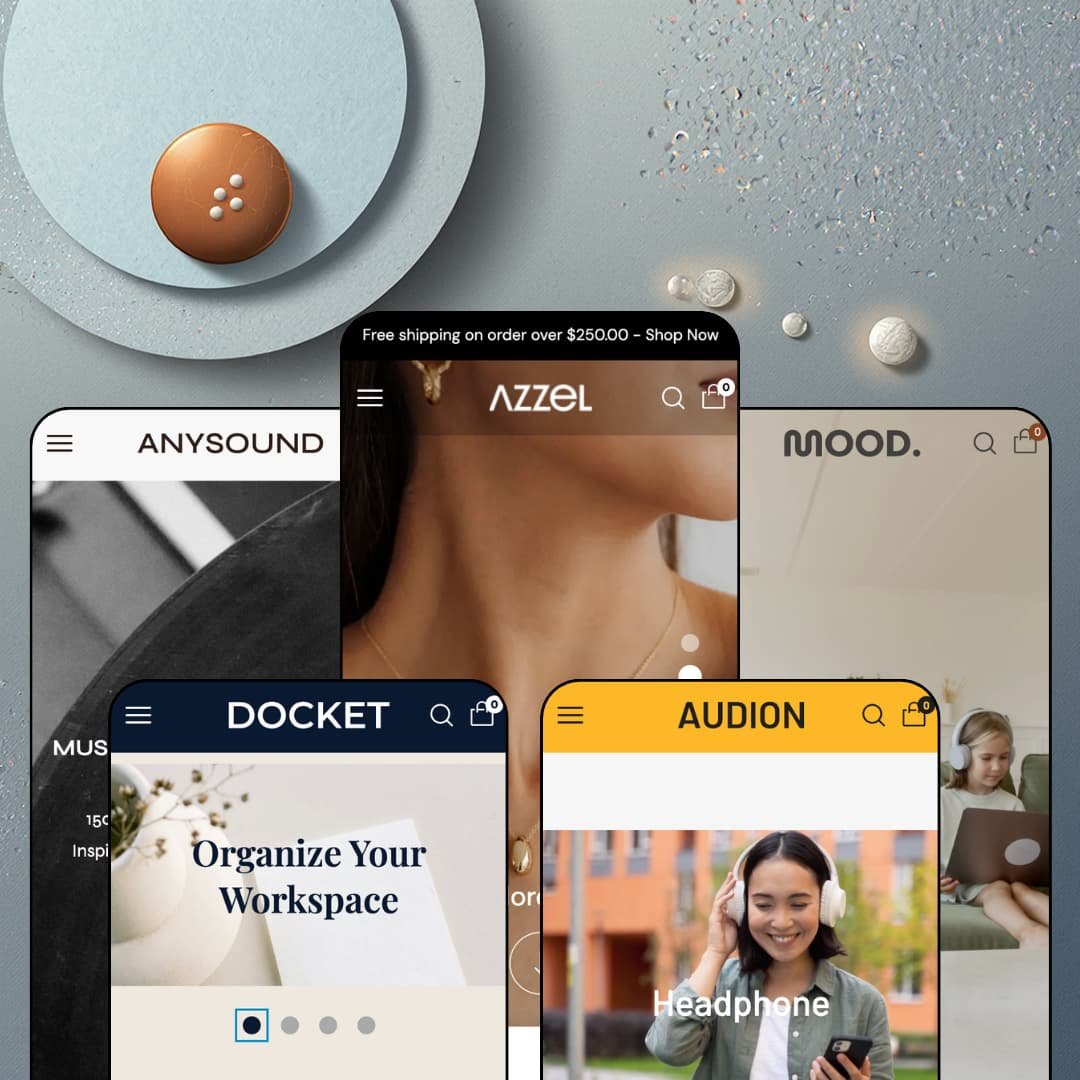
Most theme demos treat video as wallpaper behind a headline. Azzel treats it as a sales floor, pairing videos with their own purchasable product lists across a five-preset family that spans fashion, furniture, vinyl records, stationery, and headphones for a single $200 license. Built by Tapita on Online Store 2.0 architecture, it launched in January 2025 and has grown from a lone fashion demo into that five-vertical spread. I spent time in all five to see whether the motion-first pitch survives contact with each vertical.
Shoppable video is a section family, not an app pitch
The video layer lives in the theme itself. Sections pair a playing video with an attached, purchasable product list, and three of the five demos deploy them as the homepage centerpiece, each clip selling two to four products with live prices beside the play button. For apparel and beauty brands in the 30 to 100 SKU range that already produce social-style video, this turns existing footage into storefront real estate.
Five verticals from one license
Multi-brand operators and agencies squeeze the most here. One $200 license carries fully staged fashion, furniture, record-store, stationery, and electronics demos, and each preset genuinely re-stages navigation, hero treatment, and section mix rather than recoloring one layout. An operator seeding several small storefronts gets five starting points where the budget usually buys one.
A native compare drawer for considered purchases
A Compare counter sits in the header of the fashion and furniture demos, product pages feed a persistent compare drawer, and a dedicated compare page collects the selections, all without an install. For furniture and electronics merchants selling three-figure, deliberated purchases across 50-plus SKUs, that is a decision-support layer living in the theme rather than in another monthly line item.
Product cards that close the sale themselves
Every card is a miniature buy box. Hover swaps in a second image, color swatches render inline, badges flag BEST SELLER, SOLD OUT, and percentage discounts, and both quick view and a direct add-to-cart sit on the card itself, so simple purchases finish without a product-page visit. For high-frequency, impulse-leaning catalogs, the grid does the checkout's warm-up work.
Five demos, zero proof
Not one storefront stages any social proof. No testimonial section, no press strip, no star display, nothing beyond generic trust-badge icon rows, and the Theme Store feature list is equally silent on review or testimonial presentation. A buyer evaluating Azzel for a trust-dependent vertical, say furniture or audio gear at considered three-figure prices, cannot see how proof would even render here.
The identity is expensive to feed
Motion is the whole personality, and motion costs money. Nearly every signature moment in these demos assumes shot, edited, product-tagged footage exists, and a store that cannot supply it collapses back into a conventional image theme. First-time sellers and solo founders without a content pipeline should price in production before the license.
Product data stays prose
Attribute-driven goods sell on structured detail. Azzel gives them paragraphs. Product pages carry rich-text tabs, the feature list offers a size chart but no metafield-driven spec tables, and the electronics demo describes noise-cancelling headphones entirely in prose. Merchants whose shoppers compare battery life, dimensions, or paper weights line by line will find the compare drawer has no data layer underneath it.
The AOV pitch outruns the urgency toolkit
The listing promises a theme "built to boost AOV," but the advertised conversion kit is promo banners, product badges, in-menu promos, and trust badges. There is no countdown, no stock counter, no shipping-progress mechanic anywhere on the feature list. Flash-drop and restock-driven merchants who convert on manufactured urgency will be shopping the app store for exactly the pressure tools the marketing implies are included.
What it takes to launch
Expect a two-to-three-day pass before launch: full copy and imagery replacement across five demo vocabularies, shooting and product-tagging the footage the video sections require, rebuilding collections and menus where demo handles no longer match their labels, reconfiguring Markets, currencies, and language defaults away from the demo staging, and sweeping placeholder copy, misdirected footer links, and demo pricing artifacts throughout.
-
What works in this preset
Fashion gets the flagship treatment here. The homepage's Mix & Match row stages five video tiles, and each one carries its own product list, so the clip about sweaters sells a Slim Round Neck Sweatshirt and an Oversized Drop Shoulder T-shirt right beside the play button while the bags clip sells an Oblong Shoulder Bag. A shopper never has to leave the video to reach a price.
The product page arrives in two staged layouts, and the demo is confident enough to link both straight from the main navigation: one with the gallery on top, one with media pinned left of the buy column. Both carry a sticky buy summary that follows the scroll, tabbed description and shipping panels, trust lines under the button, and a quantity stepper that reports how many units already sit in your cart, a small touch that quietly prevents accidental double orders on a phone.
Where it stumbles
The staging undercuts its own showcase. The New Arrival grid leads with a Basic Oversized Hoodie that is sold out in all nine of its color and size combinations, and the navigation's own product-layout showcase links to that same unbuyable product. For a preset whose job is to demonstrate the buying experience, opening the tour on a dead end is a strange curatorial call.
-
What works in this preset
Furniture shopping runs on measurements, and Mood's product cards respect that: variant labels carry the dimensions inline, so the Cancún Lounge sofa reads 125½ (W) x 71 (H) cm and the Padini Study desk lists its full length, width, and height before anyone clicks through. Sale percentages render as badges on the card corner. It is dense information delivered without clutter.
Motion carries the rest of the demo. A looping video hero opens the page, a rotating ticker cycles delivery and free-shipping messages beneath it, a marquee band of category links (sofas, beds, tables, lamps) scrolls between sections, and four shoppable video tiles anchor the lower half with sustainability and craft stories that each sell their own furniture list.
Where it stumbles
Those dimensions live inside variant name strings rather than any structured layer, which reads against the vertical. A shopper deciding between two coffee tables is parsing text fragments out of dropdown labels, and a merchant with a deep catalog is hand-typing measurements into every variant title instead of maintaining them once as data.
-
What works in this preset
A record store lives or dies by its taxonomy, and this demo actually builds one. The Categories menu splits the catalog four ways at once: mood-based collections like Chill Vibes and Focus & Study, genres, decades from the 70s through the 2000s, and a streaming tier, with promo image tiles for limited editions and podcasts riding alongside. There is even a dedicated Artists page in the top navigation, the only vertical-specific page type anywhere in the preset family.
The trending row behaves like a shop window. Album covers scroll in a continuous marquee under a promo ticker pushing the vinyl sale, and the market selector is staged with 29 countries from Japan to Israel, easily the most international configuration of the five demos.
Where it stumbles
I went looking for a way to hear anything and never found one. There is no preview player, no tracklist structure, no listening moment anywhere in the demo, and for a vertical whose entire purchase decision starts with the ears, a music store staged completely silent works against its own positioning.
-
What works in this preset
The hero here breaks the family pattern in a good way. Instead of a full-bleed slideshow, Docket runs a center-mode carousel that shows one and a half slides at once, letting the next campaign image peek in from the edge and invite the swipe. It is a small staging idea. On a desk-goods store trading in tidy, tactile products, the partial-reveal rhythm suits the merchandise.
Below it, the New In section runs as tabbed collections, flipping between All, Notebook, and Pen views with a see-all link per tab, so the homepage carries three curated grids in the footprint of one. The mega menu opens on a four-image tile row before any text links appear, leading with photography the way a stationery brand should.
-
What works in this preset
The hero works a double shift. Audion opens with two autoplaying video tiles side by side, one for headphones and one for earphones, each doubling as a collection link, so the top of the page is simultaneously a mood piece and the start of the navigation funnel. The tabbed arrivals section underneath flips between Headphone, Earphones, and Adapters without a page load.
Further down, the before-and-after image pairing gets a commerce job instead of a decorative one: each half of the comparison links to its own product page, turning the slider from the feature list into a two-way product entry point. The shoppable video row returns here too, with Beats Flex and Baseus earbud clips carrying their own buyable lists.
The header re-learns each vertical
Read all five demos in a row and the navigation is where the family earns its breadth. The same menu system rebuilds itself as a genre-and-decade taxonomy for records, a rooms-versus-products dual axis for furniture, an image-tile-first opening for stationery, and a promo-tile fashion menu. That is the difference between five presets and five paint jobs.
Motion as a house style
Each demo is kinetic in its own register, and the identity only becomes visible across the set. Everything moves. Autoplay heroes, marquee tickers, rolling category bands, hover-swapped cards, and video woven between sections give the family a shared pulse that a single demo would read as a gimmick and five demos establish as a design language.
An interface built for European storefronts
Interface strings ship pre-translated in English, French, Italian, German, and Spanish, right-to-left rendering is supported, and the demos stage multi-market selectors as far as a 29-country configuration. For a $200 theme, that is unusually thorough groundwork for selling across the EU from day one.
The listing and the preset family disagree
Shopify files Azzel under Jewelry & Accessories and Food & Drink, and not one of the five presets serves either industry. Jewelry survives only as an accessory sub-menu inside the fashion demo, and food appears nowhere at all, so merchants who find the theme through those industry filters arrive at a preset family built for five entirely different businesses.
One skeleton wearing five outfits
Strip the imagery away and every homepage is nearly the same ordered stack: hero, ticker or marquee, product carousel, video row, value-proposition columns, blog. The record store's Artists page is the lone vertical-specific page type in the family, which means the vertical character buyers see in the demos is carried almost entirely by assets the merchant must replace.
A 2025 theme on the previous generation
Azzel launched in January 2025 already on Online Store 2.0, the architecture generation that Theme Blocks-era releases have since moved past. Dawn, Shopify's free baseline, sits on that same OS 2.0 foundation, so the $200 here buys staging, sections, and the video layer rather than a newer technical footing.
Rating
★ 7.4/10
-
Shoppable video sections, a native compare drawer, quick-buy cards, and a flexible mega menu cover the merchandising core; there is no structured spec layer and no urgency mechanics on the feature list.
7
-
Sections stage through the editor with two product-page layouts pre-built; the video sections only look like the demos once real footage is produced and tagged.
8
-
A persistent bottom tab bar (home, search, collections, account, cart), slide-out menu, and the sticky buy summary give phones a native-app rhythm.
8
-
Image-heavy presets (especially Regal and Castle's editorial staging) carry significant homepage weight. OS 2.0 lazy-loading patterns are in place, but the default section count adds DOM weight that lean themes avoid.
7
-
The demos lean on autoplay video in heroes and mid-page rows, which front-loads media weight; carousels load in grouped slides and imagery ships in modern formats.
7
Frequently Asked Questions
-
No. The video sections with attached product lists are native theme sections; you supply the footage and assign the products per video in the editor.
-
Five: Azzel (fashion), Mood (furniture), Anysound (vinyl and music), Docket (stationery), and Audion (audio and electronics). The listing's short description still says "2 ready-made designs," but the preset gallery shows all five.
-
Yes. A Compare counter sits in the header of the Azzel and Mood demos, feeding a compare drawer and a dedicated comparison page without any app.
-
Two are staged in the demo itself: a media-on-top layout and a media-left layout, both linked directly from the fashion demo's navigation and both carrying the sticky buy summary.
-
The current release is version 4.1.1 from December 2025, roughly eleven months after the theme's January 2025 launch.
-
Tapita, a Hanoi-based developer, runs a Zoho helpdesk and a documentation portal; the Theme Store reviews repeatedly credit a support agent by name for custom code help.
-
Shopify classifies it for "Some (11–100+)" products, and the demos stay inside that band, each staging a few dozen items across curated collections.
This review is based on hands-on testing of the publicly available preset demos of the Azzel Shopify theme as of August 28 2026. Theme features, preset availability, and performance can change with subsequent updates from the theme developer.