
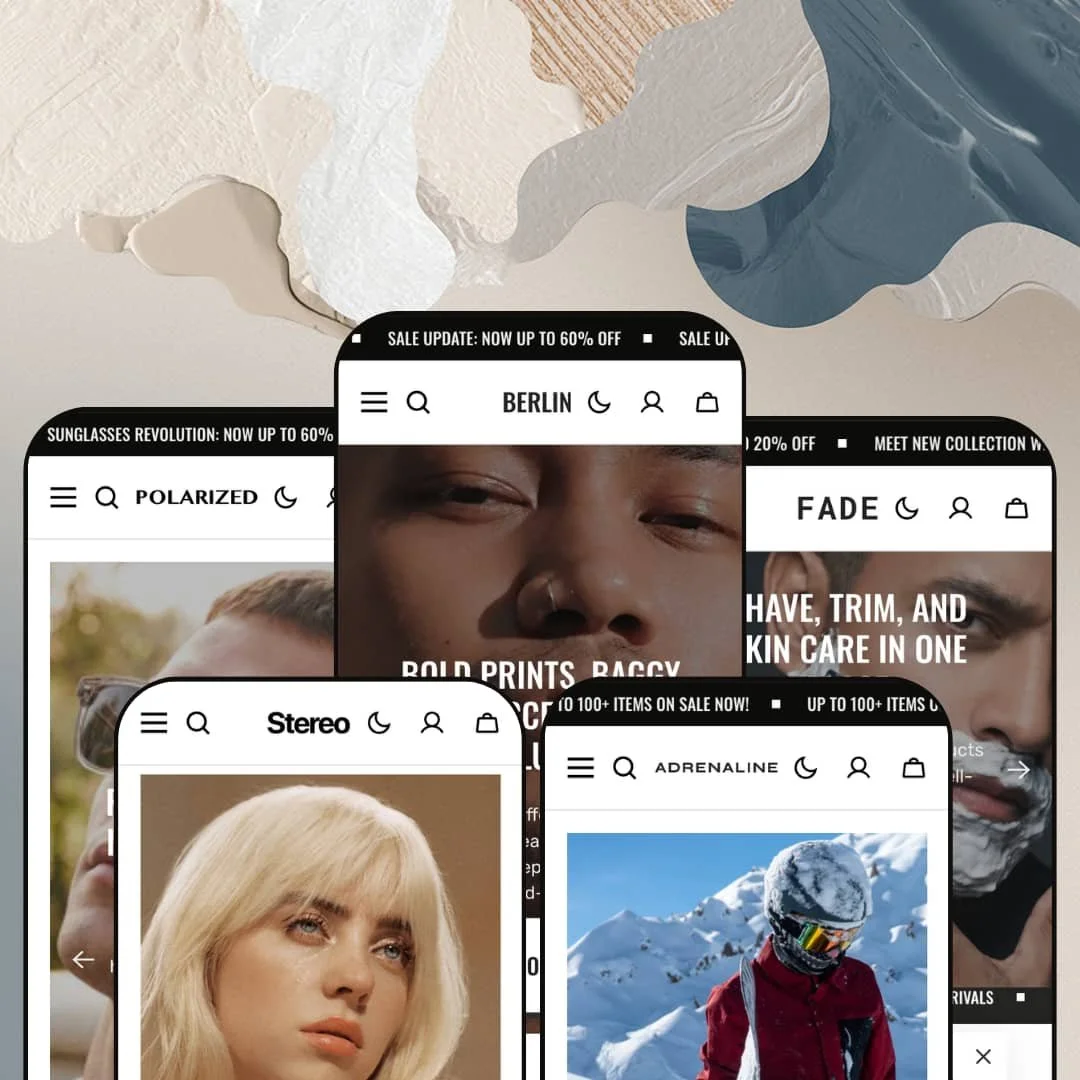
Most premium Shopify themes pick a vertical and commit. Berlin, a $380 Online Store 2.0 theme from Apparent Collective, refuses to: its five preset demos cover streetwear, snowboarding gear, luxury eyewear, men's grooming, and vinyl records, and the same section library gets restyled for each one. The pitch is "minimalist, feature-rich theme for immersive product storytelling," yet what I found across five demo stores is closer to a promotion engine wearing five different outfits. Whether that's a compliment or a warning depends entirely on what kind of store you run.
A 24-section library that goes past the usual suspects
Berlin's Features navigation exposes roughly two dozen homepage sections in every preset, and the list includes tools many section libraries skip: a Compare section for spec tables, Product Markers for shoppable image hotspots, a Before/After image slider, Image Tabs for tabbed brand storytelling, and Ticker strips for scrolling announcements. Depth here means fewer app installs. For single-brand merchants with 30 to 200 SKUs who rebuild their homepage seasonally, the library is wide enough that two stores on Berlin can look like different themes entirely.
The conversion toolkit ships as a coordinated bundle
How many dashboards should one flash sale take? Berlin's answer is a single coordinated conversion-feature bundle inside the theme: countdown timers, promo popups, promo banners and tiles, stock counters, trust badges, product badges, and an age verifier. The pieces share styling and one editor. For drop-model apparel brands selling impulse-priced products under $100, where every launch is an event with a deadline, having the full urgency stack native means launch pages come together in the editor instead of across five app dashboards.
In-menu merchandising most navigation can't do
The mega menu accepts featured product cards with live pricing and sale badges, promotional text lines, and full collection-image panels, on top of three levels of link nesting. That turns navigation into selling surface. Shoppers who open the menu to browse see a merchandised product before they've picked a category. Multi-category stores with 100+ SKUs and cross-shop-heavy buyers, where a customer entering for pants should be shown the matching cap, get the most from this.
Product page architecture that flexes per catalog
Three gallery layouts (stacked, thumbnails, thumbnail carousel) and two variant-picker styles (pills, dropdowns) are demonstrated live across the presets, and the same product template handles a nine-variant fleece short with color-and-size pills and a single-variant snowboard without layout strain. Stock counters render inline. Accordion tabs organize description, materials, and shipping without pushing recommendations below the fold, which suits considered-purchase merchants selling multi-variant apparel or accessories where the second and third product photos close the sale.
Quiet brands pay for machinery they'll switch off
Berlin's identity is its urgency stack, and a store that doesn't discount can't use most of it. Evergreen luxury merchants, think fine jewelry or heirloom goods with no sale calendar and considered repeat buyers, will disable the countdowns, tickers, popups, stock counters, and promo tiles that justify a meaningful share of the $380 price. What remains is a handsome but more ordinary theme. Buying Berlin to run it quiet means paying premium-tier money for the third of the theme you keep.
No wholesale surface anywhere in the declared feature set
The published feature list runs consumer-DTC from top to bottom: nothing for quick-order forms, volume-pricing display, or trade-account presentation appears in any category. Wholesale-enabled merchants running 500+ SKU catalogs alongside retail, or brands where trade buyers reorder in bulk, will find the theme offers them styling but no workflow. That's a hard boundary, not a configuration gap.
Five verticals of styling, zero verticals of workflow
The preset family proves the design system travels, but travel is all it does. Eyewear gets no prescription flow, records get no audio preview, and sports equipment gets no sizing logic beyond standard variants; each vertical receives the same generic toolkit under different photography. Merchants in workflow-heavy verticals, opticians with fitting requirements or music sellers with sample-listening buyers, should budget for apps to cover what the vertical actually demands. The presets open doors. They don't furnish the rooms.
What it takes to launch
Expect a multi-day pass covering copy replacement across five-language theme strings where used, collection restructuring away from the demo's filter-based navigation taxonomy, metafield population for the Compare section, promotional section pruning to match your discount cadence, and a full imagery swap. The demo stores use licensed third-party product photography that cannot ship with a live store.
-
What works in this preset
The flagship streetwear demo opens with a four-slide hero, each slide carrying its own headline, subline, and call-to-action, and the editorial typography does most of the selling. Headlines like "No Basics Just Statement Pieces" sit huge over full-bleed photography. It works. The demo then alternates product rows with scrolling ticker strips (a sale message, a free-shipping message) so the page never settles into a static grid for long, which suits a brand that lives on urgency.
You can buy without ever leaving the homepage. The "item of the week" section drops a complete buy box into the page flow: variant pills, quantity stepper, stock counter reading "10 items in Stock," accordion tabs for description and care, even social share buttons. For a drop-model streetwear brand pushing one hero product per week, this section alone changes how the homepage functions, turning it from a gallery into a point of sale.
I clicked into the mega menu and found a featured product card sitting inside the dropdown, complete with image, price, and sale badge, next to a promo line offering a welcome discount. Three levels of nesting handle Tops, Bottoms, and Headwear sub-categories. In-menu merchandising at this depth is a genuine differentiator for stores where navigation is the primary discovery path.
Where it stumbles
The demo stages promotion at maximum density: two ticker strips, a countdown banner, three separate sale-themed product rows, and a discount popup, all on one homepage. That staging choice reads loud for a preset whose typography and photography are otherwise pitching restraint, and merchants drawn to the minimalist positioning will be dialing sections back rather than adding them.
-
What works in this preset
Snowboards from $330 to $555 anchor this demo, and the staging respects the price point. Product cards carry rollover images, so a board's graphic face swaps to its base on hover, a small touch that matters when the artwork is the product. The category grid splits Snowboards, Clothing, and Accessories into large photographic tiles instead of text links.
Testimonials here don't float free; each quote is paired with the specific product card it praises, so a ski resort manager's endorsement sits directly beside the Tempest Turn's Storm Strider it references. That pairing converts social proof from decoration into merchandising, and it's the sharpest use of the theme's testimonial tooling across all five demos. Short catalog, high ticket, opinionated staging.
Where it stumbles
For a sports-equipment vertical, the preset ships no spec-comparison staging on its homepage even though the theme's Compare section exists in its Features menu; the demo leaves the one tool this audience most needs sitting off-stage. Riders comparing flex ratings and lengths across three $400 boards would have to rely on the merchant wiring that section up with metafield data themselves.
-
What works in this preset
Would you trust this layout with a $1,536 pair of sunglasses? The demo answers by staging exactly that: the Clairaut at $1,536, the Melvyn at $1,400, catalog-wide pricing that treats eyewear as jewelry. Whitespace expands, ticker noise recedes relative to the flagship preset, and the lookbook section leads the page instead of a discount banner. Variant pills carry full material descriptions like "Rose Gold / Black (Brown Lens)" rather than bare color names, which is the level of specificity a considered luxury purchase demands.
The homepage buy box reappears here for the Corsair, and at this price tier it reads differently than in the streetwear demo. A $750 frame with three lens variants, stock counter showing five items, and full gallery access without a page load makes the homepage feel like a private showing. Same section, opposite psychology.
Where it stumbles
Nothing in the demo addresses prescription eyewear. There's no Rx-entry staging, no lens-configuration flow, no pupillary-distance capture; an optical retailer selling prescription frames alongside sunglasses would need app support for the entire fitting workflow, and the preset's "Optical" collection gives no hint of that gap.
-
What works in this preset
Grooming products under $17 need volume merchandising, and this demo restructures accordingly. Product rows tighten, the buy-box-on-homepage section disappears, and a founder-attributed mission statement ("co-founder, Jacob Smith") anchors the brand story where other presets put countdown banners. The three-tile category grid (Beard Care, Body Care, Hair Care) does clean, functional work.
I noticed the feature list's "Ingredients or nutritional information" support becomes relevant precisely here, where a $12.95 shaving lotion lives or dies on what's in the bottle. The preset's accordion product tabs give ingredient disclosure a natural home. It's the quietest of the five demos. That restraint demonstrates the theme can turn its promotional machinery down as well as up, which the flagship demo alone wouldn't prove.
-
What works in this preset
Vinyl records get merchandised by artist here, and the theme's vendor field carries the weight: cards render "Taylor Swift," "Kendrick Lamar," and "Billie Eilish" as vendor lines above album titles, which is exactly how record buyers scan a bin. Genre-based navigation (Pop, R&B / Soul, Rap / Hip hop, Rock) replaces the size-and-color logic of the apparel presets without any visible strain on the nav architecture.
Album art is square; the grid adapts. Product cards drop the hover-swap treatment since a record sleeve has one face that matters, and the collection tiles lean on photography of crates and turntables to sell atmosphere. Of the five demos, this one makes the strongest case that the preset system is doing real adaptation work rather than palette swaps, because the catalog logic genuinely differs from the other four verticals.
Where it stumbles
A record store demo with no way to hear the records is an odd sell. The theme's product-video support could theoretically carry audio previews, but nothing in the demo stages listening, and music merchants whose customers expect needle-drop samples before buying a $40 limited pressing will be shopping the app store on day one.
One purchase, five credible starting points
Read together, the presets function as a multi-vertical starter kit rather than five color schemes. The catalog logic genuinely shifts between them: artist-vendor merchandising for records, lens-spec variant naming for eyewear, drop-cadence staging for streetwear. An agency or holding company launching stores in unrelated categories gets five working information architectures from one license, which is a different value proposition than any single preset suggests.
A shared skeleton that lowers the learning curve
Every preset builds from the same header, footer, cart drawer, and section vocabulary, so skills transfer completely between builds. A merchant who configures the streetwear preset can stand up the grooming preset without relearning anything, and teams managing multiple storefronts keep one mental model. Three years of steady releases (version 1.3.4 shipped June 2026) suggest that skeleton will stay maintained.
The presets share one homepage script
Reading all five demos back to back reveals the same running order underneath every vertical: hero slideshow, product rows, countdown, testimonials, journal, FAQ, multicolumn value props, Instagram strip. Differentiation lives in photography and palette more than in page architecture. Merchants expecting five structurally distinct store concepts are getting one concept dressed five ways, and competitors on the same theme will be easy to recognize.
Ambition concentrates on the homepage
The distinctive sections, the in-menu merchandising, and the embedded buy box all serve the landing experience, while collection and product templates stay conventional across every preset. Stores whose traffic enters through product pages via search or social ads, rather than through the front door, will touch Berlin's most ordinary surfaces first and its most distinctive ones rarely.
★ 7.8/10
Rating
-
A roughly 24-section library, native conversion stack, five-language theme strings with RTL support, and a Compare section cover ground that normally requires several apps.
8
-
Online Store 2.0 sections everywhere with a consistent structure across presets; the main effort is pruning promotional sections to fit your actual discount cadence.
8
-
The mobile menu splits into tabbed Main, Collection, and Articles panels with collection imagery intact, preserving the mega menu's merchandising on small screens.
8
-
Homepages run image-heavy with repeated ticker strips and large hero media; responsive image sizing is in place, but the default staging carries real visual weight.
7
-
Three product gallery layouts, two variant-picker styles, and five demonstrated brand personalities from one section library give wide latitude without custom code.
8
Frequently Asked Questions
-
Each demo's Features navigation exposes roughly 24 sections, ranging from staples like slideshows and collection grids to less common entries such as Blockquote, Split-Screen Slideshow, Overlay Product Grid, and a standalone Countdown page section.
-
The feature list declares EU translations for English, French, Italian, German, and Spanish theme strings, plus right-to-left layout support; product content still needs translation through Shopify's own localization tools.
-
The Adrenaline and Polarized demos stage exactly that, with snowboards to $555 and eyewear to $1,536, and the restrained staging in those presets shows the promotional styling can be dialed down.
-
Apparent Collective, based in Valletta, Malta, maintains the theme with documentation at their help center and advertises 24/7 support with responses within 15 minutes, a claim worth testing during the trial period.
-
Each demo links live examples of every style from its Features menu, so you can compare the stacked gallery on one product against the thumbnail carousel on another before committing to a layout for your own catalog.
This review is based on hands-on testing of the publicly available preset demos of the Berlin Shopify theme as of July 2026. Theme features, preset availability, and performance can change with subsequent updates from the theme developer.