
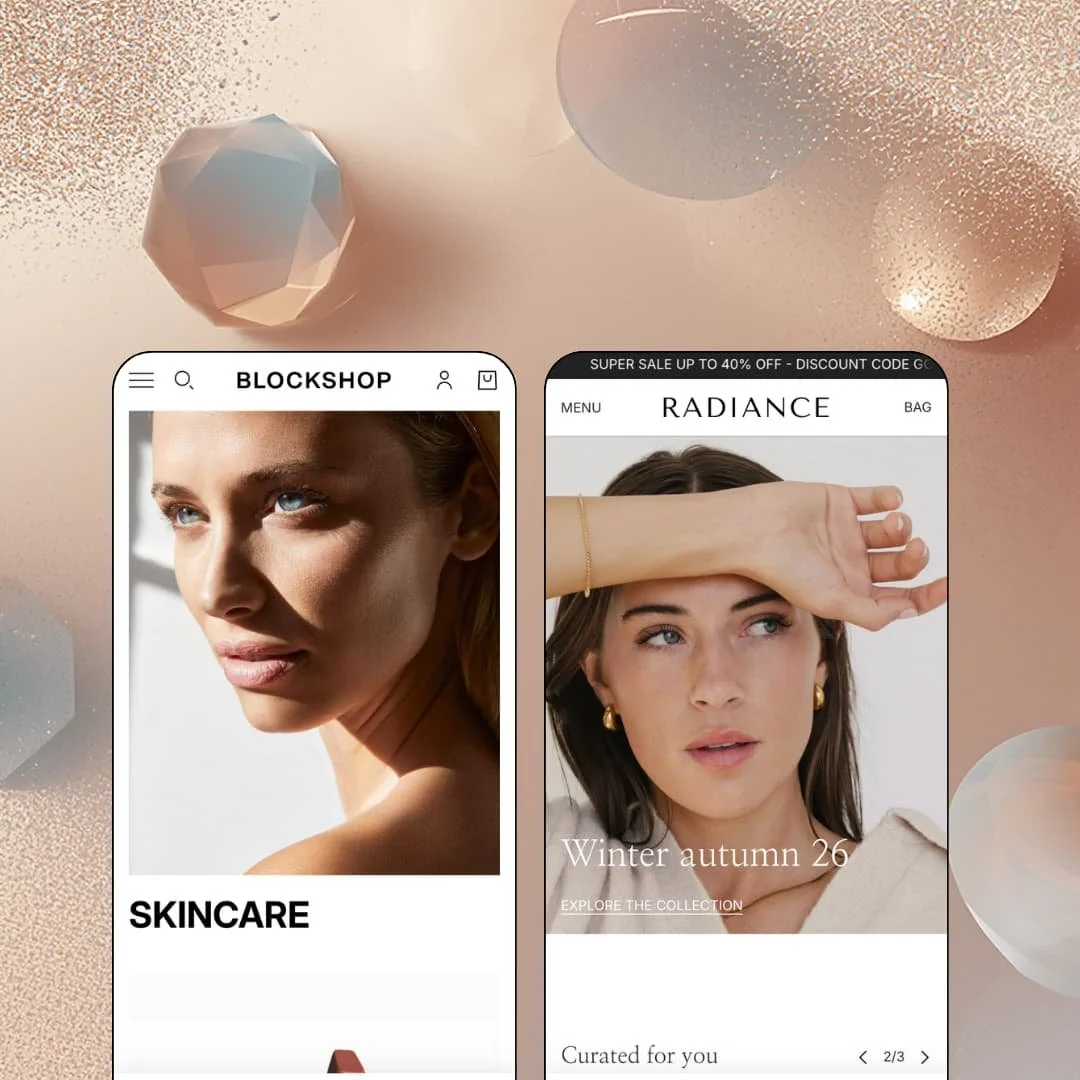
Quiet is an expensive look. Blockshop, Troop Themes' $420 flagship for high-end beauty and jewelry brands, has been in the Theme Store since December 2016 and now ships two presets on Online Store 2.0 architecture: the beauty-staged main preset and Radiance, a fine-jewelry demo. I spent time in both, and the question that shaped this review is whether spacious layouts and editorial surfaces can carry a storefront that never raises its voice. At this price, restraint has to earn its keep.
The product page is built like a landing page
Below the fold, Blockshop stacks description tabs, ingredient and material spotlight blocks, usage guides, categorized per-product FAQ accordions, benefit rows, and testimonial slots into a single scrolling argument for the product. A sticky add-to-cart bar pins the price, the chosen variant, and a Change link to the viewport, so the buy action survives however deep the reading goes. The button never scrolls away. That is the right architecture for beauty and jewelry brands selling considered purchases across catalogs in the 11-to-100 product range, where one product page has to do the persuasive work a sales associate would.
Restock demand gets captured natively
No app required. The back-in-stock form appears inline under the variant picker the moment a selection is unavailable, collecting the email on the spot instead of losing the shopper to a dead button. For restock-driven, small-batch jewelry and accessory makers whose best pieces sell through in days, that single field turns sold-out states from a revenue leak into a launch list.
Quick-buy is layered through the whole storefront
Every product card resolves to an action: Quick add for single-variant items, Choose options where a picker is needed. It goes further than cards. Even the search overlay opens pre-staged with four purchasable product tiles before a query is typed, and quick view rounds out the set, which means an impulse-driven shopper can complete a purchase from the homepage, a collection grid, or the search layer without ever committing to a full page load. Mid-market accessory brands with impulse-heavy traffic get the shortest possible path from glance to bag.
Luxury pricing tiers get a clienteling intake
If you sell four-figure or bespoke pieces, the theme's consultation template is the feature that separates it from a styling exercise. It asks real questions. The virtual-appointment page pairs its own FAQ set with a nine-field request form covering preferred date, budget, deadline, and style inspiration, so what arrives in the inbox is a qualified brief rather than a bare contact message. For commission-based jewelers and luxury-tier brands selling considered purchases, that form is the storefront's handshake.
The social proof is all hand-typed
It's theater. The press marquee runs Vogue, ELLE, and Harper's Bazaar logos over quotes a merchant types into a section field, the "Customer results" entries and testimonial rows are equally hand-fed prose, and no rating engine exists anywhere in the theme, so star reviews at product level mean installing and integrating a review app on top of the $420 purchase. UGC-heavy beauty brands running impulse-buy funnels on volume social proof should budget for that gap before it surprises them at launch.
Two presets at the top of the price band
The $420 buys exactly two starting points, a beauty flagship and a jewelry demo. Both are polished. But a multi-brand operator or holding-company setup running stores outside beauty and jewelry starts from a blank canvas at full price, restyling the same section library by hand, and gets no vertical-specific staging in return for sitting at the expensive end of the Theme Store.
Same platform generation as the free baseline
Dawn, Shopify's free default, runs the same Online Store 2.0 architecture Blockshop does, with JSON templates and the standard two-level block nesting. The plumbing is shared. What the $420 purchases is design temperament and section depth, not a newer platform generation, and there is no Theme-Blocks-era nesting underneath. Agencies planning multi-year evergreen builds for clients should weigh that architectural ceiling against the polish before committing.
What it takes to launch
Expect a multi-day content pass across per-product FAQ entries, ingredient and care prose, press-quote rows, testimonial fields, and consultation-page copy, plus promo and shipping-threshold staging alignment and editorial-grade photography to fill the spacious layouts.
-
What works in this preset
The beauty demo greets you with an image hero, two oversized collection tiles for Skincare and Makeup, and a best-sellers carousel where every card already carries a buy action. Nothing shouts. The path from landing to bag is three interactions long, and the "Shop by routine" band at the bottom links Cleanse, Tone, and Moisturize tiles straight to individual products rather than parking shoppers on another collection page.
Open the Base Concealer page and the content keeps unrolling well past the buy box. A five-block ingredient glossary explains hyaluronic acid, retinol, and niacinamide in plain language, a "Glow guide" walks through morning and evening application, and a benefit row stamps all-skin-types, plant-based, and plastic-free claims under the routine cross-sell slot. I clicked expecting a short description and got a small magazine, which is exactly the register a considered skincare purchase needs.
Storefront trim is unusually complete for a demo. The header runs a live English, French, and Spanish language switcher beside a five-country selector, a trust-badge band spells out delivery, returns, and dispatch promises in five tiles, and the slide-out bag tracks progress toward a $100 free-shipping threshold with a note field built in.
Where it stumbles
Makeup is a shade business, and this demo never stages it that way. Variants appear as sizes, a 200ml bottle against a ten-pack of single-use pods, so a merchant building a foundation or lip range around swatch pickers will be staging that shade grammar themselves before the storefront reads like a beauty counter.
-
What works in this preset
Momentum hits before the hero does. A scrolling marquee ticker rotates two announcement messages across the top of every page, and the navigation trades the beauty preset's inline menu for a drawer grouped into two labeled columns, Shop by collection and Our picks, which keeps a nine-collection jewelry catalog browsable without a mega menu's footprint.
The buy box argues before the description does. On the Bead Ring page, four trust lines sit right beneath the size picker, hypoallergenic, tarnish-free, waterproof, free shipping over a threshold, answering the objections a jewelry shopper actually carries into the purchase. Materials and care live in their own tabs with jewelry-specific copy about PVD coating and chlorine exposure. It reads like a counter conversation.
The homepage also thinks in occasions rather than categories. A gift-finder band offers For her, For him, Under $500, and Anniversary entry points, and a dedicated consultation promo routes shoppers toward a private-appointment page, a merchandising posture aimed at buyers who arrive with a moment in mind instead of a product name.
Where it stumbles
I went looking for the luxury and found a discount rail on top of it. The demo crowns copy about heirloom pieces "designed to be worn, remembered, and passed on" with a permanently scrolling 40%-off ticker, and that pairing works against the preset's own positioning; a heritage-jewelry storefront staged this way reads like a sample sale in a velvet room.
One temperament, consistently held
Read both demos back to back and the same visual character holds: generous whitespace, restrained type, motion used as an accent rather than a spectacle. That consistency makes brand fit predictable, because what you see in either preset is what the theme wants to be everywhere, not a costume that changes per demo.
Editorial surfaces carry the selling
Across both presets, the persuasive load sits on story tiles, care guides, ingredient pages, and press rows rather than on discount mechanics. The theme assumes the brand has something to say and gives it rooms to say it in, which is a genuinely different sales posture from urgency-first storefronts.
A veteran that still ships
A December 2016 launch with a June 2026 release on version 13.2.0 is nearly a decade of continuous iteration. The theme's conventions feel settled rather than experimental, and the maintenance cadence suggests the section library will keep tracking platform changes.
One skeleton, two outfits
Both homepages run the same sequence: hero, quick-add carousel, editorial tiles, press marquee, closing brand statement. The presets differ in styling more than structure, so a merchant hoping the second preset unlocks a second layout philosophy will find the same bones under different jewelry.
The content layer is hand-fed prose
Ingredient spotlights, care guides, FAQs, and quotes are all typed into section fields, with no structured metafield data layer powering specs, comparisons, or attribute tables across the catalog. Every product's story is a manual authoring job, and nothing about the architecture scales that work as the catalog grows.
A listed vertical with no preset behind it
The Theme Store files Blockshop under Food & Drink alongside jewelry and accessories, yet neither demo stages consumables, ingredients labels aside. A food or drink brand buying on that classification starts from zero staging in a theme whose demos never once imagined their shelf.
★ 8.0/10
Rating
-
Quick-buy stack, native restock capture, filter drawer, and the consultation template cover most of a luxury storefront's needs; ratings, wishlists, and subscriptions still require apps.
8
-
The section grammar repeats predictably across pages, though the content-heavy product architecture means more fields to fill than a minimal theme demands.
8
-
Drawer navigation with grouped columns, a sticky add-to-cart bar, and the slide-out bag keep the core purchase flow thumb-friendly.
8
-
Both demos run lean: restrained section counts, SVG logo assets, and lazy-loaded imagery keep pages light despite the editorial ambitions.
9
-
The aesthetic is committed to spacious restraint; brands wanting dense grids, loud promo styling, or maximalist color will be fighting the theme's temperament.
7
Frequently Asked Questions
-
Two: the beauty-staged main preset and Radiance for jewelry. The Theme Store's own description still references four ready-made designs, so verify the current preset list on the listing before planning around it.
-
English, French, Italian, German, and Spanish interface strings are included, and the beauty demo runs a live three-language switcher in the header rather than leaving translation as a promise.
-
Radiance runs it as a continuously scrolling marquee rotating two messages; the beauty demo omits the bar entirely. Both are configuration choices, so the loud and silent versions are the same theme.
-
The filter drawer combines a price range input, product-type checkboxes, and a brand list with its own search-by-name field, alongside nine sort orders from relevance to date.
-
Yes, and the feature list flags it as Shopify Plus only, which matters for brands merging colorway products into a single listing.
-
Version 13.2.0 shipped in late June 2026, roughly nine and a half years after the theme's original Theme Store launch, and Troop Themes hosts its own documentation and support portal.
This review is based on hands-on testing of the publicly available preset demos of the Blockshop Shopify theme as of August 2026. Theme features, preset availability, and performance can change with subsequent updates from the theme developer.