
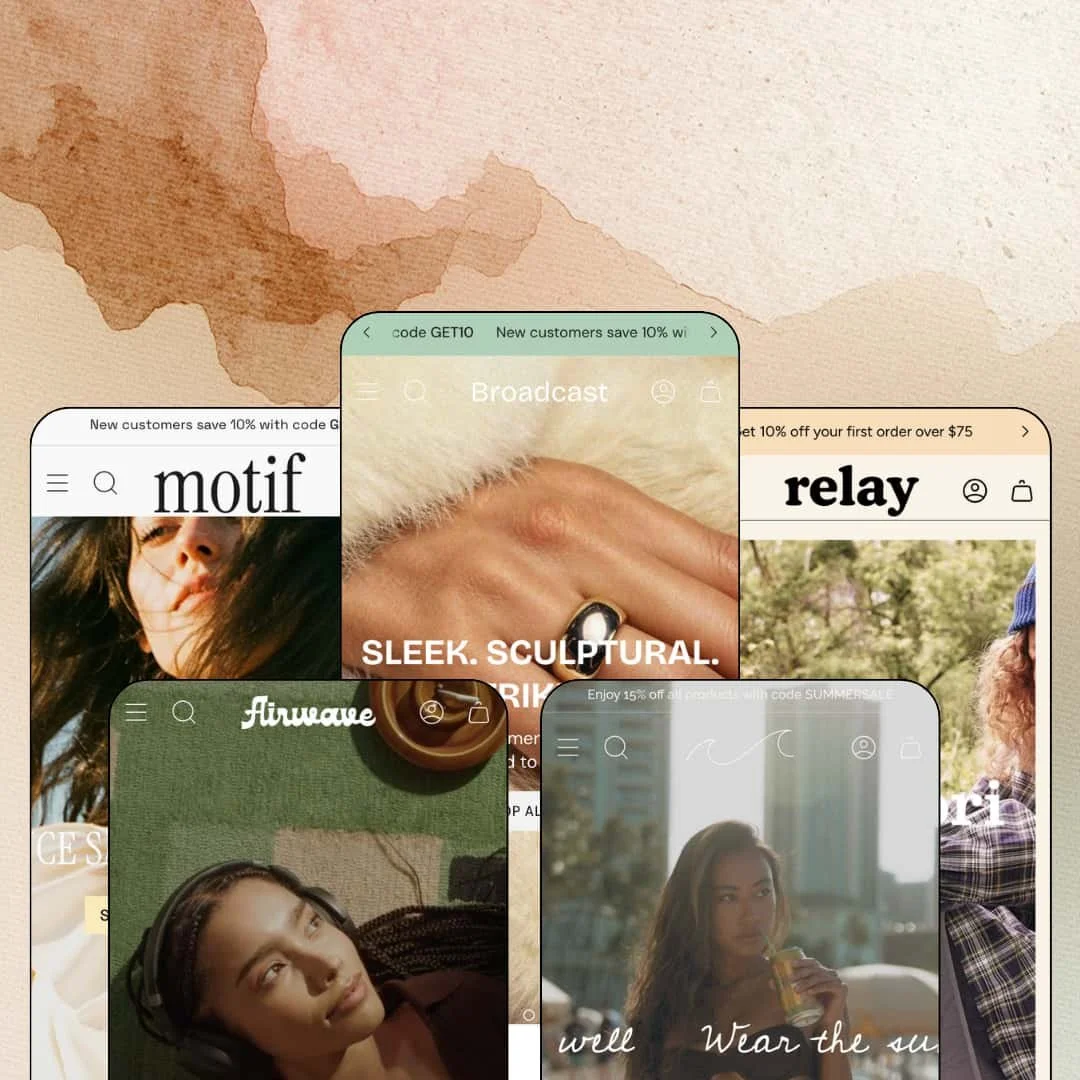
Seven years on the Shopify Theme Store usually turns a theme into a museum piece. Broadcast went the other way: Presidio's $420 flagship launched in March 2019 and was still shipping version 8.1.1 updates in April 2026. It's an Online Store 2.0 build sold with five preset demos that stretch from fine jewelry to kids apparel, coffee, womenswear, and suncare. At this price the question isn't whether the feature list is long, it's whether the depth underneath it is real.
Every inventory state has native machinery
Pre-order buttons, back-in-stock email capture, and stock counters are theme features here, not app hooks; on the jewelry demo, one ring variant renders a working Pre-order button while a sibling variant swaps the whole buy area into a Sold Out notify form with email capture. Sold out stops being a dead end. For drop-model and restock-driven brands running 50 to 500 SKUs, that machinery keeps collecting demand through exactly the inventory gaps where revenue usually leaks away.
If your buyers add on impulse, the cart drawer earns its keep
Stores where margin lives on one more item per order will get the most from this drawer. The slide-out cart runs a free-shipping progress bar, a Pair-with cross-sell slot, a discount-code field, and, in the womenswear demo, a full shipping estimator with address fields, so cost surprises get resolved before checkout instead of causing abandonment there. That's selling, not summarizing. Mid-market apparel and beauty stores with impulse-heavy buying patterns are the obvious beneficiaries.
Fit guidance is data, not decoration
The size-guide modal on the jewelry demo carries a 26-row UK-to-US ring conversion table with millimeter measurements, the kids demo splits its chart into separate tops and bottoms tables, and product pages add a five-point fit scale running from Small to Large. Charts render as real tables. That combination attacks size uncertainty at the moment of decision, which is where returns are born, and it does so for apparel and jewelry merchants selling fit-sensitive goods to considered-purchase buyers without a dedicated sizing app.
One license, five working verticals
Five presets stage five genuinely different businesses, from a five-product coffee roaster to a kids-apparel store pushing 190 pieces, and the same section library holds its shape at both extremes without either demo looking stretched or starved. Both extremes hold. For agencies and multi-brand operators launching stores across unrelated verticals, the preset family covers ground a single demo never could.
Online Store 2.0 in a Theme Blocks era
Broadcast still runs on Online Store 2.0 architecture as of version 8.1.1: blocks nest roughly two levels deep, and the newer Theme Blocks generation with deeper nesting and AI block generation isn't part of this build. At $420, that ceiling matters. Single-brand stores planning multi-year evergreen builds should weigh how long the current architecture stays comfortable before committing at the top of the price range.
Surfaces present, they don't compute
I went looking for logic behind the presentation and mostly found styling. Nothing calculates. Size charts are static tables, the product tabs on the suncare demo are free-form rich-text fields, and the product options system selects variants rather than configuring anything, which means merchants selling spec-heavy electronics or wholesale lines with tiered B2B pricing get display surfaces here and will still need apps for the math.
Depth taxes whoever configures it
A single product template in these demos runs a gallery, accordion tabs, a badge system, a cross-sell slot, a notify form, and a sticky buy bar, each carrying its own settings. Nobody configures that in an afternoon. Broadcast's advantage compounds for teams with time to tune; solo founders launching first stores under 30 SKUs should expect launch week to include long sessions in the settings panel before the store feels intentional.
What it takes to launch
Expect a copy and imagery pass across long storytelling homepages, metafield population for size charts and product tab content, and mega menu re-staging before the store feels owned. Plan one to two focused days per preset.
-
What works in this preset
The jewelry demo reads like a brand book that happens to sell. I kept scrolling and the sell never got louder: alternating image-and-story banners, a made-to-order block, a behind-the-scenes video, and only then the product rows, closing on an Instagram-style photo grid. The pacing is deliberate. For a category where a single purchase can run into the hundreds, giving craft and ethics room to breathe before the first buy button is a defensible sequencing choice rather than indulgence.
Open the Jewelry menu and navigation turns into merchandising. Each collection column lists five live product links under its heading, and two image tiles sit alongside them, one deep-linking straight into a fifteen-piece gemstone collection. That's a menu doing catalog work. Shoppers can reach a specific ring from anywhere on the site in one hover, which matters when the catalog spans over a hundred pieces across six collections.
Trust-building gets dedicated real estate here. A press row cycles six magazine logos above rotating one-line pull quotes, so the endorsements read as an editorial voice instead of a static logo strip. It's a small mechanism. But it turns borrowed credibility into something that behaves like content, which suits a demi-fine jewelry brand whose price points need third-party backup.
-
What works in this preset
I clicked through to the 190-piece Clothing collection expecting a plain grid and found a filtering console. Price inputs, a twenty-entry product-type list, size and availability toggles, thirteen color options, and nine sort orders sit above products that paginate cleanly instead of endless-scrolling into mush. That's real catalog plumbing. Two promo cards, one seasonal and one carrying a first-order code, sit inside the grid itself, so the merchandising doesn't stop where the products start.
Navigation mirrors how parents actually shop. The menu runs a category tree three levels deep and then adds a parallel shop-by-age path from 3Y to 10Y, meaning a gift-buying grandparent who only knows a birthday can still land on the right rack, while the product cards underneath stack badges like Pre-order and Staff Pick next to swatch links with color counts. It's dense without feeling cluttered.
-
What works in this preset
A five-product catalog is a stress test in reverse. Airwave passes it by leading with content: the main menu puts brewing guides for French press, pour over, and cold brew ahead of the shop links, a tri-column events section stages live music nights, workshops, and pop-ups, and press quotes carry the brand's voice between the few product rows. The store never feels empty. For a roaster whose entire lineup fits on one shelf, that editorial ballast is what makes a homepage worth scrolling.
Where it stumbles
The staging choice has a cost for evaluation. Because the demo commits fully to the micro-catalog story, merchants planning a broader beverage or merch lineup will end up judging Broadcast's collection behavior from the kids-apparel demo instead, since that's where the theme is staged under catalog load.
-
What works in this preset
Tabs do quiet work on this homepage. Product rows labeled Most Loved and The Tried & True swap sets in place, so two curated assortments share one slot of vertical space, and a shop-the-look block hangs two purchasable pieces off a single campaign photo. Less scrolling, more catalog exposure. It's the kind of density a womenswear store needs when new arrivals, bestsellers, and seasonal edits all compete for the same fold.
The social wall closes the argument the campaign imagery starts. A follow-us grid plays native video tiles tagged @instagram and @tiktok directly on the page, which lands very differently from a static screenshot strip because the content moves the way shoppers already consume fashion. Above it, a swim edit, a spring story, and a desk-to-dinner tile give the assortment three moods without three pages.
Where it stumbles
The staging argues with its own copy. A last-chance sale hero opens the page and a countdown block near the foot repeats the pressure, on a homepage whose headlines sell timeless pieces and wardrobe icons; this kept bugging me, because the urgency layer reads like it wandered in from a different store's playbook than the one the copywriting is running.
-
What works in this preset
Here the product cards do copywriting. Every card in the grid carries a one-line subtitle under the title, lines like "Daily glow, zero burn" and "High-noon shield, featherlight feel," and the SPF 40 card plays product video right inside the grid. Cards stop being thumbnails. For an eleven-product suncare shop where each SKU needs a distinct reason to exist, that one extra line per card does real differentiation work.
The product page behaves like an answer machine. An estimated-delivery date sits under the buy area, a four-icon strip covers reef-safety, shelf life, and water resistance, a checkmark list confirms vegan and paraben-free claims at a glance, and an on-page FAQ block handles reapplication timing and white-cast worries before a support ticket ever gets written. Objections die on the page.
One component set, five convincing costumes
Read the demos side by side and the same parts keep resurfacing in new clothes: the rotating announcement bar, the complete-the-look slot on product pages, the newsletter closer. That consistency is the point. Re-theming a Broadcast store is a styling exercise rather than a rebuild, because the underlying pieces already know how to dress as five unrelated brands.
A feature list shaped like seven years of merchant requests
In-store pickup display, cart notes, press coverage sections, swatch filters: these read less like launch-week ideas and more like sediment from years of real stores asking for real things. The age shows, in a good way. An update line running into 2026 suggests the accumulation hasn't stopped, which is the pattern buyers should want from a theme priced this high.
The house voice is discount retail
Every demo opens with a code in the announcement bar, GET10 on jewelry and SUMMERSALE on suncare among them, product pages ship "Hurry! Low inventory" strings, and the cart greets shoppers with another coupon prompt. None of it is mandatory, but defaults are identity. Brands selling quiet, considered luxury will spend their first configuration day dialing the theme's instincts down rather than building anything up.
Five wardrobes, one skeleton
Palette, photography, and typography swing dramatically between presets; page anatomy mostly doesn't. Hero, category tiles, product row, story banner, proof section, newsletter: the sequence repeats across all five homepages. Merchants get real range in styling and less range in page shapes, so a store built around a fundamentally different flow will be rearranging sections rather than picking a preset that already thinks that way.
★ 8.2/10
Rating
-
An unusual amount of selling machinery ships in the settings rather than in the app store, and little of it is decorative.
9
-
Depth has a price. Expect a learning curve across per-section options before a store built on this feels intentional rather than assembled.
7
-
The mobile menu stacks submenus with a back-button pattern that keeps deep catalogs navigable, and product pages keep a persistent buy bar in thumb reach.
8
-
Pages load imagery progressively and stay responsive, though the longest storytelling homepages carry video sections that reward pruning.
8
-
Five demos take one component set from warm editorial jewelry to retro suncare without visible strain at either end.
9
Frequently Asked Questions
-
The theme interface ships in English, French, Italian, German, and Spanish. Translating your actual product content remains a job for Shopify's own translation tooling.
-
Version 8.1.1 released on April 10, 2026. Broadcast first listed in March 2019 and has stayed in continuous development since.
-
No preset demo stages a review widget. Ratings and review feeds come from review apps, and the product pages leave placement room for them.
-
Yes. The cart includes an "Is this a gift?" toggle with a message field, alongside a separate order-note field for delivery instructions.
-
Yes. Product cards carry add-to-cart buttons directly in collection grids, and quick view is part of the feature set for checking details without leaving the page.
-
Yes. The jewelry demo links a dedicated lookbook page built for campaign-style browsing, separate from standard collection pages.
This review is based on hands-on testing of the publicly available preset demos of the Broadcast Shopify theme as of August 2026. Theme features, preset availability, and performance can change with subsequent updates from the theme developer.