
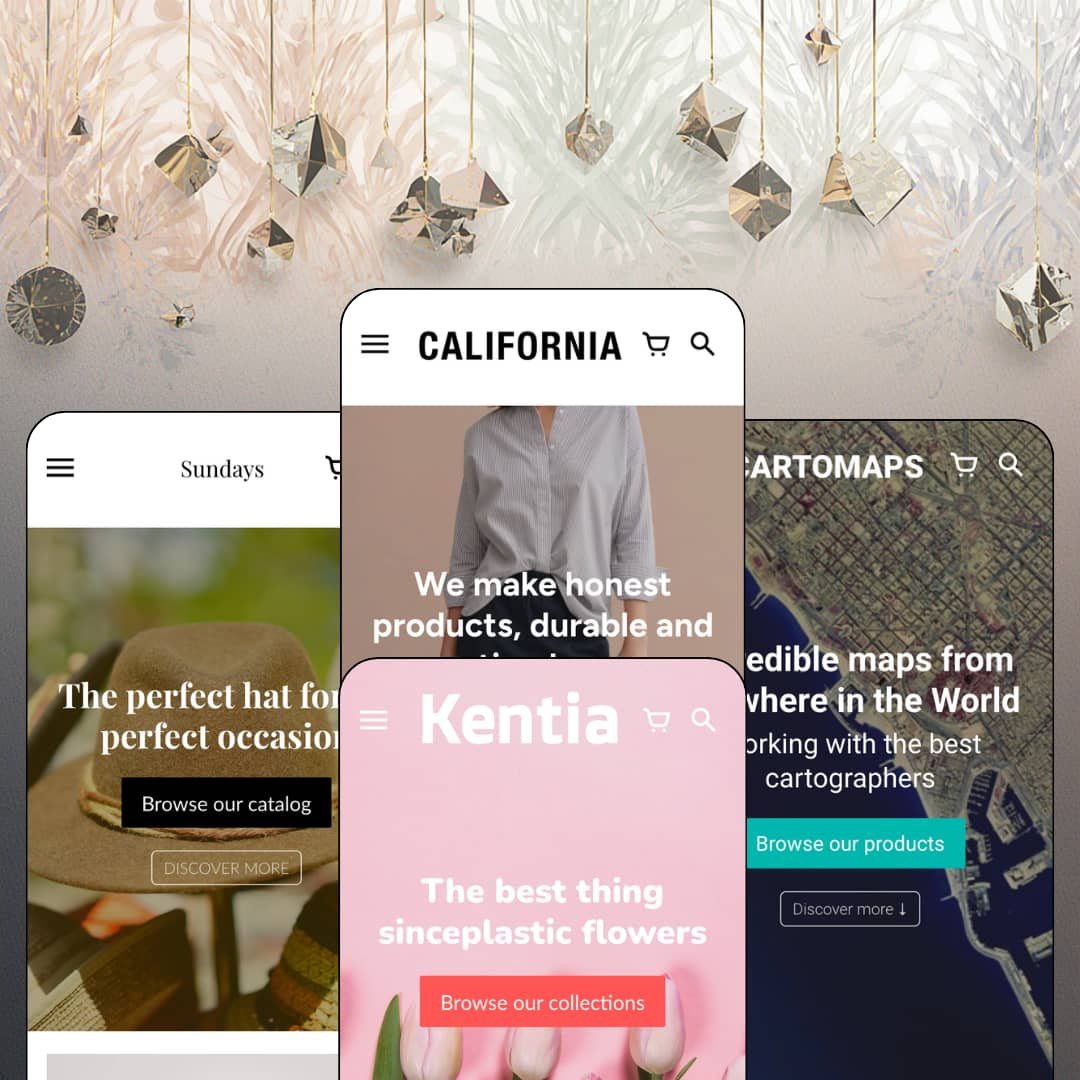
Most Shopify themes sell you the homepage and leave the product page to fend for itself. California flips that priority: across all four of its preset demos, the product page carries nearly as many merchandising sections as the storefront above it, and the homepage itself ends in a fully shoppable product module with live variant pickers. At $240 from Small Victories, this is an Online Store 2.0 theme with JSON templates and sections on every page, and the question a buyer has to answer is whether that product-page-first architecture is worth the price against what a free theme already gives you. I spent time in every demo to find out.
A shoppable product module on every homepage
Every one of California's four demos ends its homepage in a live buy box: gallery thumbnails, price, variant picker, add-to-cart button, and the same trust lines the product page carries. On the namesake preset that's a necklace with a Gold/Silver material toggle; on Anthologist it's a print with two sizes. A visitor can complete a purchase decision without leaving the front page, which matters most when a brand has one hero product and everything else is supporting cast. Single-brand stores under 30 SKUs and drop-model labels launching one item at a time get the most out of this.
The product page is built like a landing page
Do you need the product page to do the selling on its own? California assumes yes. Under the buy box sit merchant-written accordion tabs, a size guide that opens as a modal with a real centimetre measurement table (chest, length, waist, hip across XS to L on the dress I tested), an inline "Any questions?" contact form, a recommendations row, and then a second tier of full sections: video, image-with-text, a FAQ accordion, a quality-promise block. That's a lot of page. For mid-market apparel brands selling considered purchases above $200, it's the difference between a spec sheet and a sales conversation.
A local-retail layer for stores with a front door
In-store pickup is on the feature list, and the namesake demo pairs it with a dedicated store section: address, weekly hours in three lines, and a Directions link that opens Google Maps. That combination turns the homepage into a shop window for the physical location as much as the online one. Boutiques with a single street-front location and a catalog under 100 SKUs, where half the customers are neighbourhood walk-ins, get a theme that already thinks about them.
Trust lines that sit right under the button
California puts a stack of icon-led micro-lines directly beneath add-to-cart: a stock counter ("Low stock: 3 items left"), a shipping threshold, a delivery window, and a free-text line for material or provenance ("Printed on HD Stardream Paper"). They're short. They answer the four questions a buyer asks before committing, without a scroll. Impulse-buy catalogs of prints, accessories, or gifts priced under $150, where hesitation costs the sale, are the natural fit.
Social proof is scenery, not system
California ships no native review or rating mechanism, and its feature list doesn't claim one. The only stars you'll see in any demo are the "5.0 / 5.0 (2 reviews)" line on Lane, which comes from an app. The press-logo rows and "As featured in" strips are images the merchant uploads. The stars are rented furniture. For mid-market apparel or accessories brands with repeat-buyer behaviour, where reviews drive the second purchase, budget for a review app on top of the theme price before you compare it to alternatives in the same range.
Shipping thresholds are promised, not tracked
Every demo prints a free-shipping threshold under the buy button ("Free shipping over $20" on Disruptor, "$75 or more" in the namesake tabs), yet the cart feature set lists notes, pickup, pre-order, quick buy, and a slide-out drawer, and no progress bar toward that threshold. The message is everywhere. The mechanism that nudges a $60 cart to $75 isn't. Print shops and gift stores with average orders under $50 and impulse-buy traffic lose the single best upsell device the threshold could give them.
An Online Store 2.0 theme at a 2026 price
California runs JSON templates, sections on every page, and two nesting levels of blocks. Dawn, Shopify's free default, runs the same generation. What $240 buys over Dawn is the section library, the homepage buy module, the promo and pickup kit, and the EU interface strings in five languages; what it doesn't buy is deeper block nesting, AI block generation, or the mobile-first architecture of the Theme Blocks generation. Agencies building stores meant to run untouched for three years, and multi-brand operators who standardize on one theme across several storefronts, should weigh how long they want to stay on this generation.
What it takes to launch
Expect a multi-day copy pass across product descriptions, tab content, navigation labels, footer contact data, and blog entries before launch, plus a decision on which preset's localization selectors to keep. Budget an additional half day to re-stage the collection pages with filters if your catalog spans more than one product type.
-
What works in this preset
You land on a sign-up incentive, not a product. The hero pairs a brand statement with a "Sign Up for 10% off your first order" subhead and a single Shop now button, and the next section is a numbered six-point manifesto (team, philosophy, providers, shipping) that reads like an About page folded into the homepage. It's a confident staging choice for a brand that sells values before garments. Further down, the homepage embeds a live 32-product catalog grid rather than a hand-picked featured collection, which tells you how California expects small catalogs to be browsed: everything on the front door, no click required.
The mega menu earns its name here. The Shop entry opens into four labelled columns (Featured, Apparel, Home Goods, Jewelry) with three sub-links each, plus a standalone "Shop Alpaca Favorites" promo link pinned at the end of the panel. I clicked through a few of those and noticed the promo slot is a plain link rather than an image tile, which keeps the panel fast but gives you less to work with visually. A language selector sits in both header and footer with four locales staged.
I sat up at the store-hours block near the bottom. It's a dedicated section with an address, three lines of opening hours, and a Directions link that hands off to Google Maps, sitting right above the newsletter. Paired with the in-store pickup option the theme lists, this is California quietly acknowledging that a lot of its buyers also have a door on a street.
Where it stumbles
The preset is staged as a generalist boutique (dresses, overalls, rugs, chandeliers, necklaces under one roof), yet the collection page I opened shows a bare grid with a "More products" link and no visible sidebar or filter row in the demo staging. For a demo that spans four product categories, that's the page where a filter-driven layout would prove the theme's "product filtering and sorting" claim, and the demo chooses not to stage it.
-
What works in this preset
Disruptor is the quick-pitch preset, and it knows it. The whole homepage is three moves: a full-bleed hero ("Incredible maps from anywhere in the World"), a three-point "Why our prints are different?" value row, then two oversized collection tiles labelled Street Maps and Terrain Maps that function as the entire navigation for a 12-product shop. Nothing scrolls for the sake of scrolling. A startup selling one product type in two styles gets a homepage that fits above two screen heights.
This preset stages the richest localization UI of the four. The header carries both a three-language selector and a seven-region country picker (Canada, France, Germany, Italy, Spain, UK, US), and both repeat in the footer. The underlying currency and language switching belongs to Shopify Markets, not to the theme; what California contributes is that the selectors sit cleanly in the header without crowding the cart and account icons, and that the same pattern repeats in the footer.
The product cards here strip down to a badge and a price. Each tile in the 12-product grid shows "Buy From $90.00" or "On Sale $120.00 From $80.00" with the map image doing all the talking, and no title text competing with the artwork. For poster and print merchants whose product is the image, that's the right default. For anyone selling products that need a name to be understood, it's a setting you'd change on day one.
-
What works in this preset
Five top-level links, zero dropdowns. Lane's navigation is Hats, Beanies, Scarfs, On Sale, Our Story, laid flat in the header with no mega menu staged at all, and the homepage opens on a hero followed by three gift-guide collection tiles (Gifts for all, for him, for her). I went looking for the depth California shows in its namesake preset and found none here, by design. This is a six-product accessories shop, and the preset stages it as one.
Lane is where the editorial sections get their full outing. Two image-with-text blocks carry eyebrow labels (OUR FACTORIES, OUR QUALITY) above their headlines, an accordion titled "Our commitments" holds three long-form sustainability entries, a press-logo row follows, and a YouTube embed sits above a full-width newsletter image. Read in sequence, the homepage is a brand manifesto with a product grid in the middle of it. Merchants with real ethical-sourcing stories to tell get a lot of room to tell them.
The footer here is the only one of the four to stage a payment-icon row (Amex, Maestro, Mastercard, UnionPay, Visa) beneath its four columns, and the About column carries an actual two-line brand statement rather than placeholder text. Small thing. It does mean this is the preset to study if you want to see what California's footer looks like fully dressed.
Where it stumbles
The homepage buy module on Lane shows a "5.0 / 5.0 (2 reviews)" rating line under the add-to-cart button, and it's the only preset demo that does. That rating display comes from a review app, not from the theme, and California's own feature list makes no review claim. Staging an app-driven element on one preset and not the others sets an expectation the theme can't meet on its own.
-
What works in this preset
"The best thing since plastic flowers." That's the entire hero copy, over a pink-blossom photograph, with one button. Anthologist is the shortest homepage of the four and the most disciplined about it: hero, a 24-product best-sellers grid showing the first twelve, a sale-priced buy module for a botanical print, and three image-with-text panels (indoor garden, worldwide shipping, happy plants). It ends there, with no newsletter block staged. For an art-print shop with a tight seasonal range, that restraint reads as curation rather than omission.
The sale staging is the densest in the family. Within the first twelve cards, four carry an On Sale badge with struck-through compare-at pricing and one carries a Sold Out badge, and the buy module itself shows a $45 print marked down to $35 with two size variants (50 x 70, 30 x 40) selectable inline. This is the preset to look at if you want to see how California's badge system and compare-at pricing behave on a grid where most of the catalog is discounted at once.
The product page keeps the accordion tabs but rewrites them for the vertical. Shipping talks about rolled prints in protective tubes, "Sustainable materials" covers water-based inks and plastic-free paper, and a third tab answers "Do you have larger sizes?" with a paragraph about artwork resolution limits. Same tab component as the other presets, different job. That's the right way to demonstrate a reusable block.
One grammar, four catalog sizes
Read the four homepages back to back and the same sequence repeats: hero, value row, grid, buy module, image-with-text, newsletter. What changes is how much of it each preset uses. Anthologist runs it in five moves; the namesake preset runs it in fourteen. That scalability, from a six-product hat shop to a 32-product generalist store without swapping section types, is the theme's real argument for a merchant who doesn't yet know how big the catalog will get.
A quiet default voice
None of the four demos stages a countdown timer, a flashing announcement bar, or a discount pop-up on arrival. Promo banners and popups exist in the feature list, but the demos leave them off. Across presets, the staged personality is calm, editorial, and photography-led, which means a merchant who wants that tone gets it without fighting the defaults, and a merchant who wants urgency has to turn it on deliberately.
The same block, retold per vertical
The accordion tabs, trust lines, and image-with-text panels appear on every preset with different copy and different jobs: care instructions for hats, ink specifications for prints, shipping tubes for posters. California's demos show the reuse rather than just listing it, and that's the clearest evidence a buyer gets that the section library bends to the vertical rather than dictating it.
Listed verticals without a preset to match
The Theme Store files California under Jewelry & Accessories and Food & Drink, yet the presets stage a generalist boutique, map prints, hats, and botanical prints. A necklace appears once, in a buy module. Food appears nowhere. Merchants in either listed industry are buying a theme whose demos never show them their own shop.
Prose where data should be
Every trust line, size chart, tab, and FAQ entry across the four presets is typed copy, managed per product or per section. There's no staged metafield-driven specification layer, no structured size data feeding the chart, no attribute rendering from product data. For a handful of products, that's fine. For a catalog at the upper end of the theme's own "11 to 100+" positioning, it's a maintenance cost that grows with every SKU.
Four palettes, one skeleton
The presets differ in photography, typography weight, and colour, and very little else structurally. Navigation depth and section count vary, but the page architecture, footer column pattern, and product-page layout are the same in each. A buyer choosing a preset is choosing a mood board, not a different store.
Rating
★ 6.6/10
-
Homepage buy modules, pickup and store-hours sections, size-guide modal, and a promo kit cover the standard tier well; no native reviews and no cart progress bar leave two common conversion levers to apps.
5
-
Four demos built from the same section sequence mean a merchant learns one homepage grammar and reuses it; the tab and trust-line components are plain text fields, not metafield plumbing.
8
-
Stacked image-with-text panels, a slide-out cart, and a collapsing header menu are all present; the long product-page stack means a lot of thumb travel before the recommendations row on a phone.
7
-
Homepages are image-led with restrained section counts, video is self-hosted rather than embedded on three of four presets, and the product grids load in pages of twelve.
8
-
Palette, typography, and photography carry the differentiation between presets; the underlying page skeleton and footer pattern stay fixed, and there's no staged mega-menu variant beyond the namesake preset's column panel.
5
Frequently Asked Questions
-
Yes. All four demos stage a buy module on the homepage with a working variant picker and add-to-cart button, and the namesake demo's version includes a two-option material toggle.
-
It opens as a modal from a "Size guide" link beside the variant picker and renders a measurement table (chest, length, waist, hip per size) that the merchant writes as a page.
-
The namesake preset stages a multi-column panel with four labelled groups of three links plus a pinned promo link; the other three demos stage either a flat nav or a single dropdown, so column menus are a choice, not a default.
-
A "Low stock: N items left" line appears under the buy button on Disruptor's products, driven by inventory; the other trust lines beside it are free-text, so the surrounding copy is yours.
-
The feature list names English, French, Italian, German, and Spanish for the theme's own UI strings (buttons, labels, form text); your product content still needs translating through Shopify's own tools.
-
The namesake and Disruptor demos stage an "Any questions?" / "Ask a question" form with name, email, and message fields directly beneath the share buttons, so a pre-sale query doesn't require leaving the product.
-
No. They share one section library and one page architecture; the differences are palette, typography, photography, and which sections each demo chooses to turn on.
This review is based on hands-on testing of the publicly available preset demos of the California Shopify theme as of August 2026. Theme features, preset availability, and performance can change with subsequent updates from the theme developer.