
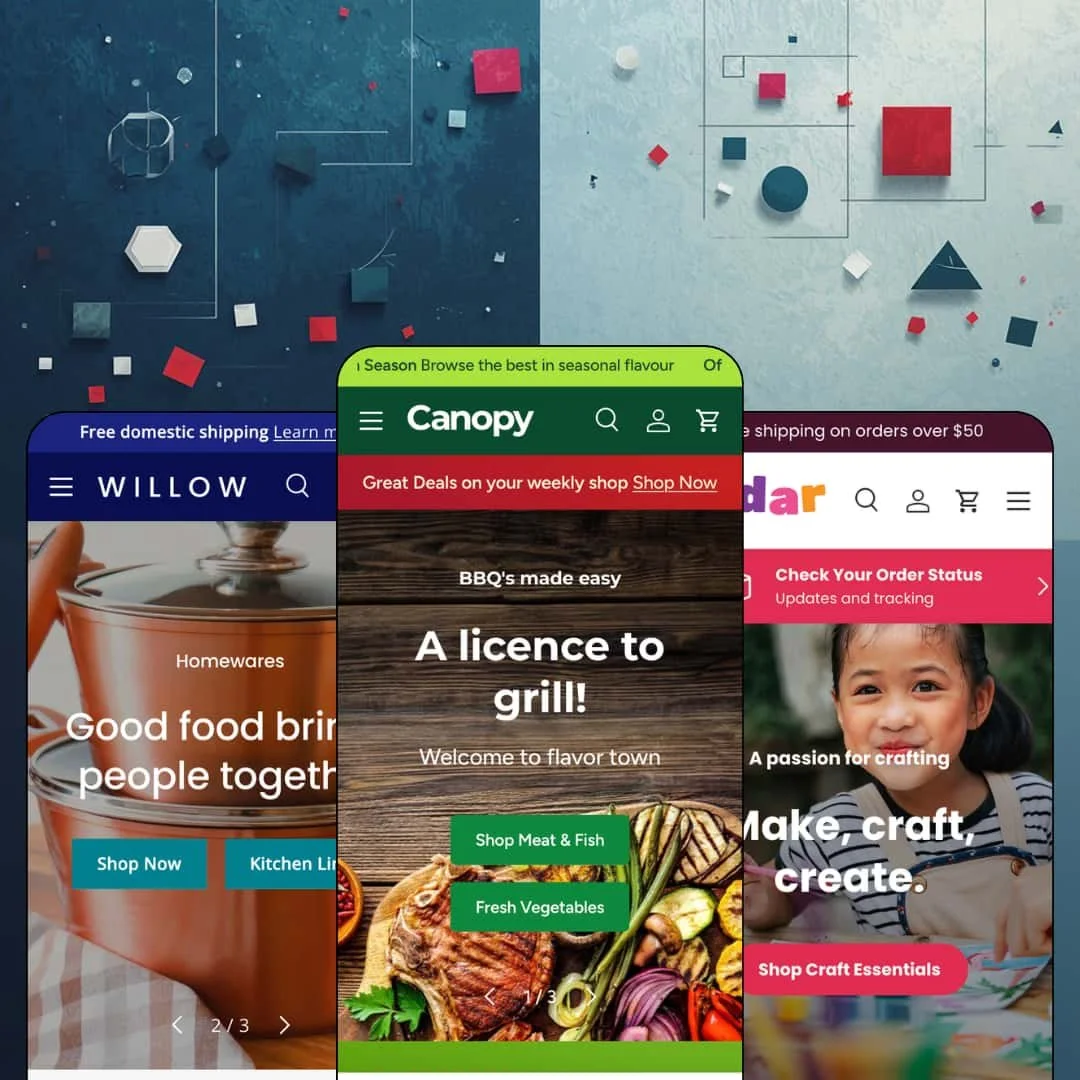
Most premium Shopify themes dress your store up as a boutique; Canopy builds you a supermarket. Clean Canvas pitches its $420 flagship as Amazon-inspired, and the three preset demos, a grocer, a craft-supplies shop and a kitchen homeware brand, all run on the same big-basket logic of scoped search, quantity steppers and offers everywhere. The architecture is Online Store 2.0, maintained since a December 2016 launch and sitting at version 7.3.1 as of an August 2026 update. If your customers buy five things per visit instead of one, this theme was built with you in mind.
Product cards that work like order forms
Collection cards in the grocer demo carry a quantity stepper right next to the add-to-cart trigger, so shoppers set three lemons and two peaches without ever opening a product page. Weight subtitles, per-kilogram unit prices and card-level Pre-order buttons extend the same logic. That's basket velocity, not decoration. For food, pet-supply or CPG merchants running 50-plus SKU catalogs on repeat-purchase behavior, this card grammar is the difference between a webshop and a weekly shop.
Search that understands departments
If your customers arrive knowing they need a saucepan rather than a brand, Canopy's header search meets them there. Every demo ships the search bar with a Product type dropdown that scopes queries to a department before typing begins, mirroring the way big-marketplace shoppers have been trained to search for years. Scoping lives in the header itself. Multi-department stores with 100-plus SKUs and cross-shop-heavy buyers get their most-used element upgraded from icon to instrument.
A native product comparison table
The homeware demo renders a four-product saucepan comparison as a real table: title, vendor, price, description, then metafield facets for sustainability, country of origin and materials. Shoppers compare four pans on one screen. For kitchenware, tools or small-electronics merchants selling considered purchases across 20 to 200 SKUs, this section replaces what would otherwise be a comparison-app install plus the integration work around it.
A coordinated promo kit, voucher codes included
Canopy ships discount plumbing as a set. Copy-to-clipboard voucher sections and popups (the craft demo stages CC15OFFORDER on the homepage and THANKYOU10 in a popup), promo tiles, in-menu banners, a countdown component, rotating announcement messages and a price-match request popup all come from one section library and speak one visual language. Because the pieces were designed together, a single campaign can run through menu, homepage, popup and cart without app glue. Discount-led retailers on budget-to-mid pricing with weekly-offer sales patterns will feel at home immediately.
The stars are rented
This one kept bugging me: rating stars sit on every product card in all three demos, and the grocer's product pages render full review lists with distribution bars, yet reviews appear nowhere on Canopy's own feature list. The display layer is theme work; the engine behind it is an app you install and configure separately. The stars are rented, not owned. Social-proof-dependent verticals like beauty or supplements with review-driven repeat buyers should budget for that app before trusting the demo's density.
The default voice shouts offers
Rollbacks, value-off badges ($0.49 off a pear), 75%-off flash sales, price-match promises: the demo language across all three presets assumes discounting is your brand strategy. You can strip it out, but you're working against the current, because the badge system, the promo tiles and the offer collections are where this theme concentrates its craft. Quiet brands will spend setup time deleting, not adding. Luxury or minimalist merchants with full-price, evergreen positioning should preview carefully before committing $420 to a megaphone.
Online Store 2.0 pricing in a Theme Blocks era
Canopy runs the same Online Store 2.0 architecture that Dawn gives away for free, with its roughly two-level block nesting rather than the deeper nesting of Shopify's newest theme generation. What you're paying $420 for is the merchandising library and a decade of iteration on that base, not a newer foundation. That trade is honest but worth naming. Electronics or fashion merchants planning deep customization, and agencies standardizing on Horizon-era tooling, should weigh the generation gap against the feature depth.
What it takes to launch
Expect a multi-day pass across demo copy and placeholder blog text, metafield population for comparison facets and nutrition data, voucher-code and popup configuration, and menu re-staging across departments before launch.
-
What works in this preset
Open the Groceries menu and you're inside a store directory, not a nav bar. Department tiles carry photography, sub-collections wear their own badges (New In, In Season, Offers), and the Offers panel goes one level deeper by linking straight to individual products like diced chicken, snow crab legs and kaiser rolls. Promo banners sit inside the menu itself. For a shop where customers think in aisles, the menu is the storefront.
The product page carries a grocery-grade data layer. A Nutrition Information block renders energy, fat, saturates, sugars and salt per serving, stat tiles underneath translate the same details into shopper language (7+ days product life, 89% would recommend), and a store-wide disclaimer section closes out the page for labelling accuracy. Fresh-food sellers get real packaging-style surface here.
Urgency is wired in per product, not just per page. The homepage buy module stages Fresh Peeled Shrimp with a quantity picker, per-kilogram pricing and its own countdown slot, and the cart drawer answers with a "Don't miss these deals" cross-sell strip plus a promo image tile. I clicked around expecting a plain drawer and found a merchandising surface.
Where it stumbles
One staging choice reads against the vertical. The "Fresh in Today" grid features a Managers Pick that is simultaneously sold out, which is exactly the shelf a real grocer would restock first, and for a demo selling freshness as its core promise, an unbuyable highlight undercuts the pitch.
-
What works in this preset
Legami, Midori, Blackwing, Berylune: the cards lead with brands. Under each vendor line sit color swatch rows, percent-off badges and a tiered stock readout that steps from In stock through Low stock (16 units) down to Very low stock (4 units). One card even wears a 16+ age badge. Multi-brand stationery sellers get marketplace-grade card density without touching code.
Cedar treats content as inventory. The Crafts menu slots a Beginner's Guide to Knitting card next to a Party Staples collection and a DIY-kit product link, the homepage blog grid sells workshops on candle making, crochet and tie dye, and even the cart drawer promotes the knitting guide beside its cross-sell products. Customers here buy projects, not just supplies. The wiring matches that behavior.
A full buy module anchors the lower homepage. The Cyanotype Kit section runs a multi-image gallery, a vendor link, a quantity picker and add-to-cart without leaving the homepage, so a hero product can convert on the spot. Staged for a considered $45.95 craft kit, the module reads calm rather than pushy.
-
What works in this preset
Where do press logos earn their keep? Willow answers twice: a six-logo bar with Bon Appétit, Cosmopolitan and EatingWell sits directly under the hero slideshow, and further down a quote slideshow pairs Vogue, New York Times and Harper's Bazaar marks with review-style pull quotes. For homeware brands selling on editorial credibility, the proof layer is pre-built.
The Le Creuset casserole gets a landing-page treatment mid-homepage. Feature callouts (Quick Clean Up, Handles like a dream, Great tasting food) surround the product photography, and a separate lifestyle shot pins Glass Jars, the Golden Cutlery Set and the casserole to shoppable markers inside a single image. Storytelling and selling share one section.
Pre-order is staged as a launch tool, not a fallback. A full-width band sells the Retro food mixer on a Pre Order Now call to action, and the homepage buy module below lets shoppers flip the Golden Cutlery Set between Gold and Black through image swatches before adding to cart. I went looking for the point where this homepage stops selling and never found it.
One retail grammar, three temperatures
Read all three demos back to back and the same big-basket machinery holds its shape whether it's selling shrimp, staplers or saucepans. Canopy's character is supermarket logic applied to specialty retail, and it survives the translation. Preset choice becomes a styling decision rather than a capability bet.
Navigation as selling surface
Across every preset, the dropdowns are treated as merchandising real estate: department photography, badge-flagged sub-collections, blog cards, in-menu banners and product-level deeplinks all live inside the menus. Shoppers can reach an individual product from a closed menu in one click, in all three demos. That pattern only registers once you've walked the whole preset family.
A decade of iteration you can see
Launched in December 2016 and updated to version 7.3.1 in August 2026, Canopy carries its age well. The maintenance cadence shows in unglamorous corners: EU interface translations in five languages, right-to-left support and a quick order list are already in the box. Long-lived themes de-risk a purchase in ways a feature list can't capture.
The engine runs on data you must supply
Comparison facets come from metafields, nutrition tables come from metafields, stock wording comes from live inventory thresholds, and badge math comes from compare-at prices. None of that is a flaw; all of it is an operational cost that only becomes visible after reading all three demos together. Skip the upkeep and Canopy quietly degrades into an ordinary grid.
The pitch and the staging point in different directions
The listing sells large-scale, Amazon-style retail and names Jewelry and Accessories among its target industries, yet all three demos stage curated double-digit catalogs and no preset touches jewelry at all. Nothing in the architecture prevents scale. Buyers running genuinely large catalogs are still asked to extrapolate from demos that never demonstrate one.
★ 8.0/10
Rating
-
Card-level ordering, department-scoped search, comparison tables and a full promo kit cover more selling ground than the price tag alone suggests. Reviews remain the one conspicuous outsourced layer.
9
-
The section library is large and the merchandising features want metafields and inventory data, so the theme rewards operators who enjoy configuration. First-time merchants face a genuine learning curve.
7
-
The mobile menu stacks with a back-button pattern and product cards keep their quantity steppers at thumb size. Dense card data demands disciplined badge and image choices on small screens.
8
-
The demo homepages run long, with slideshows, video sections and multiple product carousels per page. Lazy-loaded imagery keeps the weight workable, but merchants should resist stacking every section at once.
8
-
Three visual temperatures from one section library show real range, from farm-shop warmth to gallery-white homeware. The retail-forward grammar itself is the boundary; calm editorial brands will hit it.
8
Frequently Asked Questions
-
Canopy stages a grocer, Cedar an arts-crafts-and-toys shop built on Berylune's real product range, and Willow a kitchen and homeware brand. All three run the same section library.
-
Yes. Beyond the slide-out drawer, the theme offers an always-visible cart sidebar option aimed at large-basket shopping, and a sticky cart keeps checkout within reach.
-
It does. The age verifier is a native feature, and both the grocer and homeware demos stage the 18+ gate.
-
A quick order list feature is included, alongside cart notes and in-store pickup support, which suits trade customers and weekly re-orderers.
-
Product videos, image zoom, rollover second images and multi-image galleries are all in the merchandising set; the craft demo's card galleries cycle through a dozen shots on a single product.
-
Combined listings support is flagged as a Shopify Plus feature, letting related products merge into a single listing on Plus stores.
This review is based on hands-on testing of the publicly available preset demos of the Canopy Shopify theme as of August 2026. Theme features, preset availability, and performance can change with subsequent updates from the theme developer.