
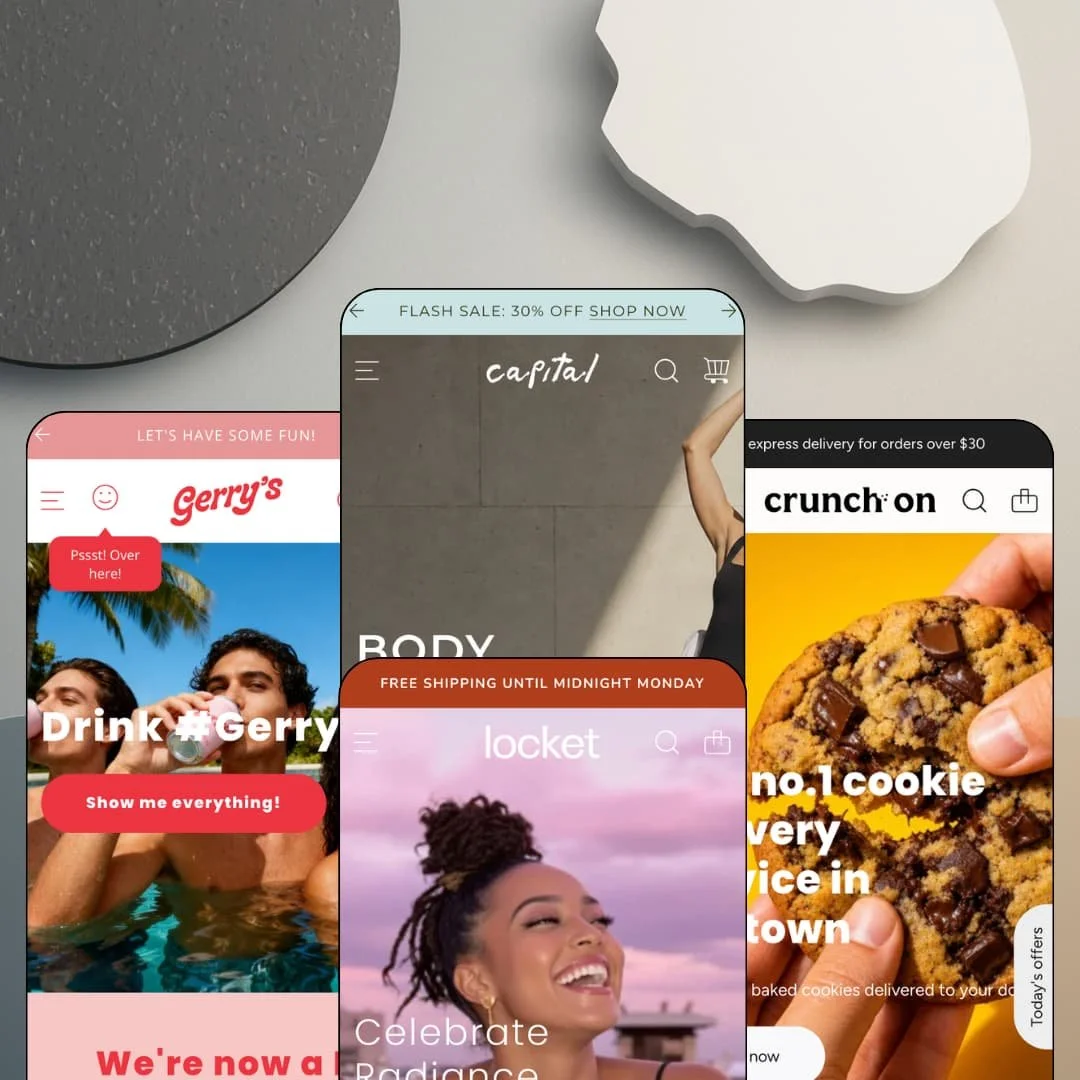
Most multi-preset themes pick one temperament and reskin it four times. Capital's presets run four unrelated businesses instead: a luxury activewear label, a silversmith's jewelry studio, a Manhattan cookie courier, and a hard-seltzer brand with a loud streak. At $420 it sits at the very top of the Theme Store price ladder, so I spent time in all four demos asking whether the toolkit underneath earns the tag.
Ever bought something from a homepage without opening a product page?
Capital's featured-product sections are full buy boxes, not teasers. All four demos stage at least one: the jewelry demo sells a necklace directly on the homepage with material and chain-length pickers plus a quantity stepper feeding straight into the cart, no product page required. That collapses a click. For single-hero-product brands and drop-model merchants running under-30-SKU catalogs, the homepage can carry the entire conversion path on its own.
A native bundle section with per-slot variant picks
The Weekly Specials block in the cookie demo assembles a three-product bundle where every slot has its own variant selector (a twelve-cookie or six-cookie bag) above a single "Add bundle to cart" button. The cross-sell mechanics live in the theme itself. A mixed multipack can be merchandised on the homepage without extra software or a static banner faking the job, which makes this one of the hardest-working sections in the whole package. Food-and-drink and beauty merchants selling mixed multipacks to impulse-led shoppers will get the most from it.
A coordinated promo kit, from offers drawer to shipping bar
Capital runs a full set of offer surfaces that behave as one system: a header-level offers drawer (labeled "Don't miss today's offers!" in one demo), a discount-code popup, a countdown section, a rotating multi-message announcement bar, and a free-shipping progress line in the cart drawer that fills toward the $150 threshold. Merchants can route a single campaign through five placements from theme settings alone. That's the point of a kit. Flash-drop and seasonal-sale operators in mid-market price bands will use most of it within the first month.
Inventory states you can merchandise
Stock status is a styled, configurable layer rather than a binary badge. The activewear demo labels an in-stock short "Ready to ship" while the seltzer demo runs "Selling fast" in the equivalent slot, pre-order and sold-out badges appear on product cards, and back-in-stock alerts plus a stock counter round out the out-of-stock path. Scarcity becomes editable copy. Restock-driven brands with small-batch runs selling to considered-purchase buyers get their urgency tooling without bolting anything on.
Top-ladder pricing on a previous-generation architecture
$420 buys an Online Store 2.0 theme, and at this rung of the price ladder the generation ceiling matters more than anywhere else. Dawn, Shopify's free default, runs the same editor generation with the same JSON-template and section model, so what Capital actually charges for is its section library, its presets, and its conversion tooling rather than a newer foundation. The gap is real, not architectural. Single-brand founders launching a first store with under-30-SKU catalogs should weigh whether they'll use enough of the kit to cover the spread.
The social proof is a display, not a system
Product cards in the seltzer demo show review counts and the jewelry demo prints a 5.0 rating under every price, yet nothing on Capital's feature list collects, moderates, or verifies a single review. The stars are set dressing. Merchants supply a review app, or hand-feed rating fields, before any of it reflects reality, and this kept bugging me the longer I compared the demos to the box contents. Beauty and consumables sellers courting impulse buyers, where ratings do heavy lifting, should price that add-on in from day one.
Subscription storefronts without subscription machinery
The seltzer demo gives Subscriptions a top-level nav item and merchandises four monthly tiers from $22.49 to $79.99, but recurring billing isn't a theme capability, and Capital never claims it is. Selling plans come from a subscription app. So subscription-first businesses with repeat-buyer economics, the coffee-seltzer-refills crowd, are buying the presentation here and sourcing the machinery separately, which is worth knowing before the demo convinces you otherwise.
Four demos' worth of photography to live up to
Every preset is staged with a real brand's asset library: professional activewear shoots, studio jewelry macros, packaging photography, lifestyle campaign imagery. The look is mostly what they brought. Strip those images and the design leans hard on whatever replaces them, from full-bleed heroes to lookbook spreads to Instagram grids, so lean teams and solo founders in luxury-positioned verticals should treat a photography budget as part of the real price of the theme.
What it takes to launch
Expect a multi-day pass to replace four demo brands' worth of copy and imagery, re-stage every promo surface with real campaigns and dates, rebuild menus and mega-menu panels around your own catalog, and fill the newsletter and footer blocks before launch.
-
What works in this preset
Open the Shop menu and the store starts selling before you've clicked anything. The mega menu runs three link columns (all products, new and featured, shop by activity) beside two image tiles pushing a fresh collection and a 30% code, and the About menu swaps the tiles for page panels that deep-link the brand story and a monthly yoga class. Navigation here is a merchandising surface, not a sitemap.
The homepage reads like a brand magazine that happens to have prices. There's a find-your-style quiz teaser near the hero, a collaboration block for a named yoga instructor, a three-part commitments row, and a blog trio on sustainability, and each of those blocks pulls the visitor deeper into the label instead of straight to a grid. That pacing fits the price point.
I clicked into the catalog expecting a plain grid and found small persuasion everywhere. Product cards carry a "Why we love it" caption under the price, and the Filter/Sort drawer stacks availability, a price range, color, size, and product-type facets with live counts against a 95-product catalog. It's quiet, competent large-catalog plumbing.
Where it stumbles
The demo stages a wholesale enquiries page in its Contact menu, which gestures at a B2B channel the theme alone can't run. Price lists, net terms, and customer-specific catalogs are Shopify Plus territory, so activewear brands courting studio and gym buyers get a form here and nothing behind it. Budget for that gap.
-
What works in this preset
This preset would rather set type than shout. A ticker loops "FREE SHIPPING UNTIL MIDNIGHT MONDAY PST" across the page, and one section spells out L O V E L Y, L I T T L E, S M I L E S in oversized letterforms that double as navigation into bespoke, care-guide, and collection links. The graphic design does the persuading.
The best-sellers slider treats each piece like a tiny ad. Every slide pairs the price with a one-line tagline ("Three stones, perfectly balanced") and its own shop-now link, and cards across the store carry the maker's name as a vendor byline, which suits a silversmith selling authorship as much as metal. Small catalog, high touch.
Shop the look gets a jewelry-specific job here. A lifestyle photo carries hotspot markers that pull the pictured necklace and earrings into a product pullout, and the main nav gives a Bespoke commissions page equal billing with the shop, treating one-off work as a first-class product line rather than a footnote.
-
What works in this preset
"$10 off Mega box" sits inside the navigation itself. The Shop Cookies menu ends in a product-level promo link, the top-level split runs by format (bags of six, bags of twelve, boxes) with a parallel Browse By Flavour tree, and even the empty cart drawer is staged with three collection shortcuts so a dead end becomes a menu. The wayfinding is disproportionately thorough.
The whole preset is built around one city. I sat up at the testimonials: each one is tagged with a customer's neighborhood, Turtle Bay, Murray Hill, Hell's Kitchen, while the hero claims the number-one cookie delivery service in Midtown and a banner pairs the branded courier bag with delivery-partner logos, turning generic social proof into local proof. That's sharp staging for anyone selling within a delivery radius.
-
What works in this preset
How do you sell seltzer to people who scroll fast? With numbers and a wink. A counter row claims 2,500+ five-star reviews, nine industry awards, and 99.5% recycled packaging, while the microcopy stays in character everywhere, from the "Pssst! Over here!" offers nudge in the header to a sample-pack pitch that opens with "Go oooonnn, give us a try".
The product page argues its own case top to bottom. Under the buy box a spec list runs ABV, calories per can, sugar grams, and alcohol units, followed by a plain-English ingredients line, and further down the template stacks brand-story panels and a "Don't forget these..." cross-sell row, so a single can listing behaves like a compact landing page. Impulse products need exactly this.
Recruitment gets its own section. A join-the-reps block pitches free merch and event guestlists to would-be ambassadors, and blog cards ship with read-time labels ("4 min read"), small touches that fit a brand selling belonging as much as booze.
Where it stumbles
Popular Flavors is the first product row a visitor meets, and it opens on a sold-out pack. For an impulse-buy vertical the first swipe shouldn't be a dead end, and with half the row's visible slots staged in sold-out states, the demo blunts exactly the urgency this preset exists to generate. Easy fix, odd default.
The demos are real businesses, not showrooms
All four presets are staged with actual brands' catalogs and campaigns, down to working discount codes and populated blogs. What you preview is roughly what a finished store on Capital looks like in production, rather than a placeholder fantasy that flatters the sections. It's an unusually honest way to evaluate a purchase before making it.
Nine years old and still tracking the platform
Version 36.0.4 landed in June 2026 and added Shopify's new account component to the header. A theme that has iterated through thirty-six major versions and still absorbs month-old platform features carries a different risk profile from a preset family that launched last spring; the maintenance cadence is itself part of what the license buys.
The volume knob actually turns
Read across all four demos and one section library runs at two extremes: Locket is quiet, typographic, and nearly promotion-free, while Crunch and Zing are loud, deal-led, and dense with offers. Capital doesn't impose a temperament. The presets prove the range instead of asserting it.
The default voice is a discount
Three of the four demos lead with price promotion: a flash-sale takeover in one, deals drawers in two, intro-offer popups layered on top. Read together, the presets reveal where Capital's instincts sit. Full-price brands can switch it all off, but they'll be working against the grain of how the theme teaches itself by example.
One skeleton under four skins
Strip the styling and each homepage runs the same spine: hero, category tiles, featured-product module, brand story, testimonials, social feed, newsletter. The four businesses differ far more than the four page grammars do. Merchants buying Capital for preset variety are mostly buying art direction on a shared chassis, and a fifth store on that chassis will feel familiar fast.
★ 7.8/10
Rating
-
Bundles, offer surfaces, and inventory states are native and configurable; reviews and recurring billing still arrive by app.
8
-
Four fully staged demos double as worked examples, but each promo surface carries its own settings, so first-launch staging takes real planning.
7
-
The slide-out menu keeps the full three-level navigation intact, and sticky cart plus sticky add-to-cart components keep checkout one thumb away mid-scroll.
8
-
Pages stay lean for how much they merchandise; images lazy-load and the section stack avoids script-heavy gimmicks.
8
-
One section library convincingly plays luxury-quiet and grocery-loud across the presets; typography and ticker treatments carry much of the differentiation.
8
Frequently Asked Questions
-
Yes, all four ship with the single $420 license, and switching applies a different settings-and-sections starting point. Your content doesn't migrate itself, so treat a preset change as a re-staging project.
-
An age verifier is part of the feature set, and the Zing demo is a complete hard-seltzer store, so the alcohol use case is first-party rather than an afterthought.
-
No, Capital ships EU translations of its storefront strings in English, French, Italian, German, and Spanish. Your product content and pages remain your job.
-
Yes, and it's the one feature flagged for Shopify Plus on the listing, so standard-plan merchants shouldn't buy the theme for that capability.
-
Documentation lives at support.eightthemes.com, and in the most recent Theme Store reviews the developer answers merchants within one to three days, including a July 2026 reply thanking a support agent by name.
-
Gift wrapping and cart notes sit in the cart feature set, and the Zing demo merchandises gift cards in $25, $50, and $100 denominations, so the gifting path is staged end to end.
This review is based on hands-on testing of the publicly available preset demos of the Capital Shopify theme as of August 15, 2026. Theme features, preset availability, and performance can change with subsequent updates from the theme developer.