
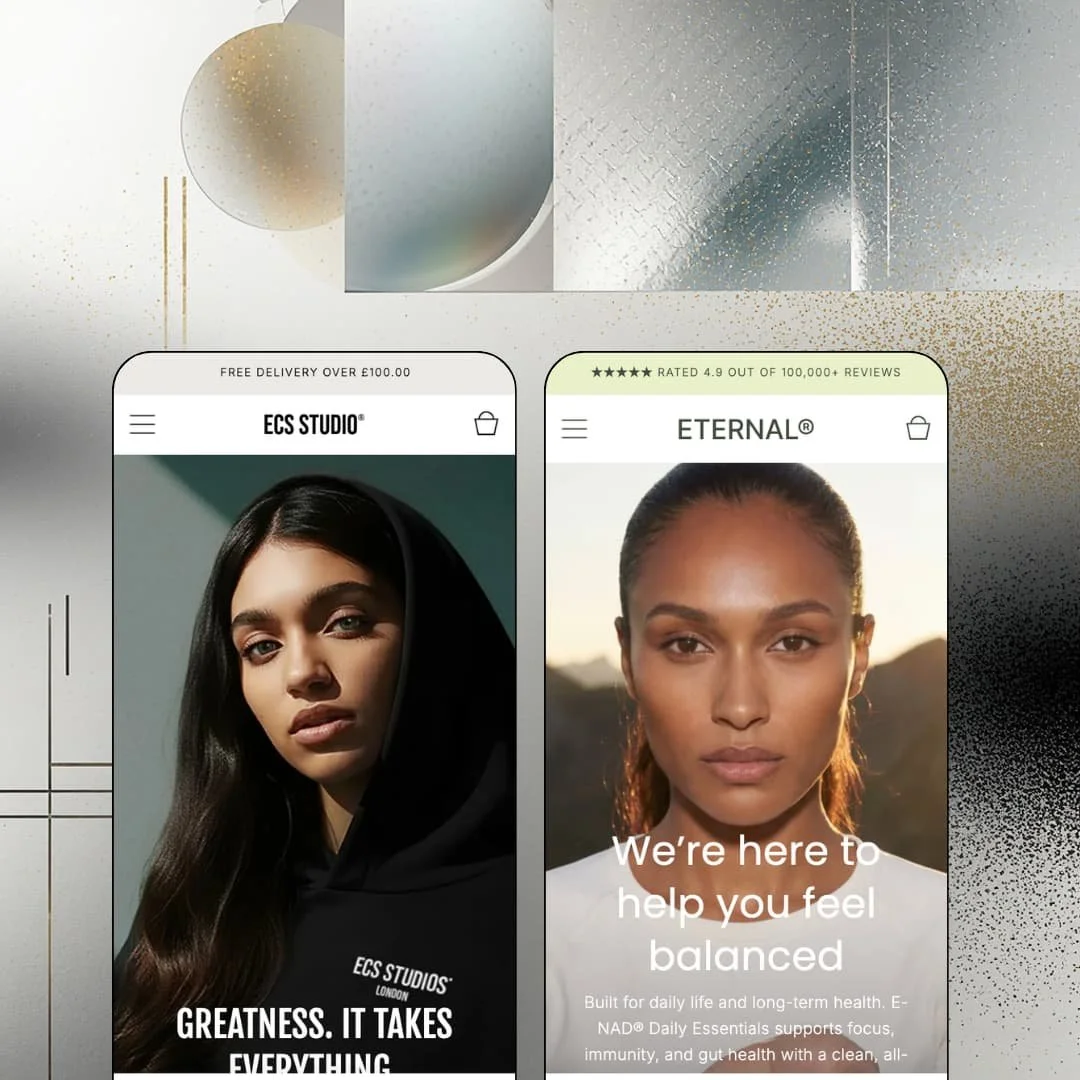
Most Shopify themes treat motion as decoration. Carbon treats it as the brand: scrolling tickers, video feeds and animated feature rows show up on every page of both demos, and E-commerce Studio's Theme Store pitch openly sells that recognisability. The two presets pull in opposite directions, a multi-collection streetwear catalog on one side and a one-SKU supplement landing page on the other, which makes this a useful test of whether the section library bends or breaks. It's an Online Store 2.0 build, launched in May 2025 and now at version 1.1.4, and the question at $280 is whether the conversion kit under all that movement is actually doing the work.
Colourways as linked products that look like variants
Carbon's sibling-variant system, added in version 1.1.2, links separate products into a picker row that reads like a native option. On the Original Hoodie page the "Colour" row offers black, grey, stone and green as pills, and each one is its own product with its own URL, photography, inventory and size availability, so a sold-out green never greys out the black. No custom code required. For apparel and footwear brands with 50–200 SKUs running a drop model, where each colourway needs its own imagery and its own sell-through, that's a workable answer to a problem Shopify's variant model handles badly.
For brands that live on Instagram first
If your customers meet the brand on Instagram or TikTok before they meet the storefront, Carbon's social and video feed sections are built for that handoff. The Carbon demo stages nine feed posts, each with a caption, an avatar and a "Shop the look" tag pointing at one or two products with price and a View product link; Eternal stages eight vertical videos with "Related product" tags, and version 1.1.4 added marquee and carousel layouts for both. The feed is native. No third-party UGC app is needed to get shoppable posts on the homepage, though the content is merchant-curated rather than pulled live from a social API. DTC fashion and wellness brands with impulse-buy price points and a steady UGC pipeline get a homepage that mirrors the feed customers already scroll.
A cart drawer that sells while it's still empty
Open the cart on either demo with nothing in it and you get product recommendations rendered right there: four Studio 24 pieces on Carbon, the supplement on Eternal, each with image, price and a View product link. It works before the first click. The drawer also carries an order-notes field and the subtotal, and the free-shipping progress line that runs in the announcement bar appears again under the size picker on the product page, switching to a congratulations state once the threshold is met. Mid-market brands with 30–100 SKUs and an average-order-value target get the cart tooling for threshold nudges and add-on suggestions without an upsell app.
Can a product page carry the whole pitch?
Yes, and the buy box is where it starts. Under the price on the Carbon hoodie page sit a low-stock line ("Just a few left. Order soon."), the shipping-threshold line and an icon row for express and next-day delivery, followed by collapsible content for sustainability, core features and delivery. The block library behind that includes an announcement slider, a SKU block, media grouping by variant and pinch-zoom on mobile, all added across the 1.0.1 to 1.1.3 releases. Single-hero-product brands and considered-purchase categories like supplements, skincare or small electronics get a product template that argues, not just lists.
Social proof is typed in, not counted
Those five stars are a text field. Both announcement bars open with a star row and a rating line ("Rated 4.9 out of 6,000+ reviews" on Carbon, "100,000+ reviews" on Eternal), and both product pages run a testimonial carousel with five hand-written quotes and avatars under "The hype is real" on one and "Our community matters" on the other. None of it is connected to a review engine. The theme has no native review collection, so the stars stay at 4.9 whether you've sold one unit or one million. Beauty and supplement merchants whose buyers cross-check ratings before a considered purchase will need Judge.me, Loox or a similar app installed and styled before launch.
A replenishment pitch without a replenishment mechanic
Eternal sells a daily supplement, the textbook subscription product, and the buy box offers a single one-time purchase with no subscribe-and-save option, no delivery cadence and no member pricing. I went looking for a subscribe toggle and found one Add to cart button. Carbon's hoodie page promises "Purchasing this product earns 500XP" with no loyalty mechanism behind the sentence. The theme narrates retention. Subscription-driven consumable brands, whether that's supplements, coffee or skincare refills, should budget for Recharge, Appstle or Shopify Subscriptions plus the styling work to make the widget match Carbon's buy box before treating Eternal as a starting point.
The colourway model multiplies your catalog
The sibling-product route the demo takes has a cost. One collection page on Carbon lists 58 products for six garment types, so "Original Hoodie" appears four times in a row with identical names and only the thumbnail telling the colours apart, and the Color filter counts products rather than variants. Every colourway is a separate product to create, photograph, tag, link to its siblings and keep in stock. Apparel merchants with 100+ SKUs across four or five colourways per style, and multi-brand retailers who inherit supplier catalogs, should decide up front whether they're running real variants or sibling products, because Carbon supports both and the demo only shows the expensive one.
Online Store 2.0 at a 2026 price
Carbon launched in May 2025 as an Online Store 2.0 theme and has stayed there through seven releases, which means sections with one level of blocks and none of the nested-block depth or AI block generation the Horizon-era architecture brought with it. Dawn, Shopify's free theme, runs on the same nesting ceiling; what $280 buys over Dawn is the section library, the feeds, the sibling variants and the cart tooling, not a newer engine. That's a fair trade today. Agencies and holding-company operators building content-heavy luxury or furniture catalogs on Carbon in late 2026 should factor in that layout depth beyond section-plus-blocks will mean custom Liquid rather than editor work.
What it takes to launch
Expect a two-to-three-day pass covering announcement-bar strings and shipping-threshold copy, icon-row and trust-row text, newsletter and FAQ headings and store-address blocks, plus the content work of sourcing feed posts and vertical video and deciding how colourways are structured before products go in.
-
What works in this preset
Scroll past the hero and the page starts moving. A ticker of collection names (SS25 Drop, The Sequence Collection, The Archive, Limited Edition) runs beneath a two-tab "Timeless Essentials" switch, and the whole homepage keeps that pace with collection carousels, a limited-edition editorial block for The Convergence and a "Join the community" banner. It reads like a streetwear label's Instagram grid turned into a storefront. Nothing here is subtle. For a drop-driven brand that wants the homepage to feel like an event, that's the point.
The mega menu is where I sat up. "Shop" opens into five columns (Mens, Latest & Greatest, The Original, The Convergence, Studio 24), each carrying six category links plus a View All, with a featured product tile for The Original Hoodie parked inside the menu itself. A sixth "Features" entry does the same for demo pages. That's a lot of depth for a hoodie brand, and it shows the header can carry a real category tree without collapsing into a single dropdown.
"Trending", "Re-Stock", "Sale". Those custom badges sit on the collection cards alongside a vendor line, and the collection page behind them stages filters for Availability, Price, Size, Color and Type with product counts on every option, nine sort orders, and a promotional image tile ("The Original Collection, Timeless essentials") breaking the grid mid-page. I spent time in the filter drawer and it's the tidiest part of the demo. Merchants running seasonal capsule collections get a catalog page that can promote as well as list.
Where it stumbles
The Theme Store pitch says sport. The demo stages loungewear: hoodies, joggers, sweatshirts and shorts under a single "Mens" tree with no womens or kids branch and no performance categories anywhere in the navigation. Sportswear merchants looking for how Carbon handles activity-led browsing or technical product specs won't find it staged here, and will be building that structure themselves.
-
What works in this preset
One product. That's the entire store. The "Shop" link in the header goes straight to the E-NAD Daily Essentials product page, and the homepage does the persuading: a ticker of claims (89% see an improvement in energy, Third-Party Tested, Over 500+ clinical studies), a press-logo strip, a four-benefit feature grid, ingredient cards for Ashwagandha, Rhodiola and L-Theanine with their own thumbnails, a launch countdown for a collagen product, a five-person team grid and a two-category FAQ. I scrolled the whole thing twice. It's a complete supplement landing page built from stock sections.
The product page keeps going long after the buy box. The gallery mixes four stills with two videos that carry their own mute and pause controls, and below the description the same feature grid, ingredient cards, a testimonial carousel, the FAQ block and a full-width video banner repeat the homepage argument for anyone who landed here from an ad. Considered-purchase buyers get every objection answered on one URL. Wellness brands running paid social to a single product page will recognise the layout immediately.
The FAQ section groups questions under headed categories ("Product Basics", "Ingredients & Safety"), each with its own intro paragraph and five collapsible questions, and links out to the full FAQ page from the top and the bottom. That's a small thing that matters for supplement and beauty merchants, where allergen, dosage and safety questions decide the sale.
One section grammar, two opposite stores
Read both demos back to back and the same sections keep reappearing in different clothes: a ticker beneath the hero, a feature grid, a testimonial carousel, a feed, a footer with a street address and opening hours. Carbon uses them to move a multi-collection streetwear catalog; Eternal uses them to hold a visitor on one SKU for a full scroll. That range is the strongest argument for the theme. It means the library isn't tuned to one merchant shape.
The recognisability claim holds
E-commerce Studio sells Carbon on scrolling text and animation, and the demos back it up rather than hiding it: marquees carry collection names on one preset and clinical claims on the other, feeds default to motion, and the countdown, before/after and video sections all lean on movement. Almost all of it can be switched off per section. A brand that wants a quieter storefront can dial it down, but the theme's personality is loud by default, and merchants should pick it for that rather than despite it.
A physical-store layer built in
Both footers carry a "Find Us Here" block with a street address plus weekday and Saturday hours, and in-store pickup sits in the feature list, so the theme assumes some merchants have a door as well as a domain. Retail-plus-online brands, the studio-with-a-shop model the Carbon demo nods to with its "New store now open in Soho" post, get that staged from day one rather than bolted into a rich-text block later.
Two presets, one catalog
Eternal is a landing page with a cart attached, which leaves Carbon as the only preset that demonstrates collections, filters, badges and a multi-level menu in use. Merchants who want the softer wellness aesthetic and a product range are choosing a preset and then rebuilding its catalog pages from the other demo's staging. At $280 that's a narrower starting point than the "two ready-made designs" line suggests.
Listed verticals nobody staged
The Theme Store files Carbon under Jewelry and Accessories and Food and Drink; the two demos stage streetwear and a supplement. Jewelry merchants get no preview of how the gallery handles small reflective products or how the sibling system might map onto metal finishes, and food merchants get no grid of consumables with pack sizes. Both demos are polished, but neither is aimed at the buyers the listing invites in.
Motion needs feeding
Every section that makes Carbon recognisable wants an asset: the video feed wants vertical clips, the social feed wants captioned posts with product tags, the product gallery wants footage with sound, the before/after section wants paired photography. Eternal's demo runs eight videos on the homepage alone. Brands with a photographer on retainer will love it. Brands launching with a phone camera and a Canva logo will publish a storefront where half the sections sit empty or repeat one image, and the theme won't look like the demo until the content catches up.
★ 7.6/10
Rating
-
Sibling variants, native shoppable feeds, countdown, before/after, stock and shipping lines cover the conversion kit; reviews and subscriptions still route to apps.
8
-
Seven releases in nine months added toggles rather than complexity, and the demo pages read as editor-built; the sibling colourway setup is manual product-linking work.
7
-
Separate mobile hero assets, pinch-zoom in the gallery since 1.1.3, and mobile height and font-size controls on banners; marquees and feeds are built for a thumb.
8
-
Image lazy-loading and image-priority tuning on the product gallery keep the Carbon homepage lean; Eternal's video-heavy homepage will depend on how many clips a merchant stages.
7
-
Colour schemes per section, a new header layout option, a border-radius scale down to XXS and marquee-or-carousel toggles on feeds; the loud, animated personality is the constant.
8
Frequently Asked Questions
-
Both. Colour swatches and variant images on product cards are theme features (the latter arrived in 1.1.1); the sibling system is an optional layer for merchants who want a separate product page per colourway. The Carbon demo uses siblings throughout, so test the variant route on a trial store before committing.
-
Eternal is the proof. Its homepage and product page are built from the same feature grid, ingredient cards, FAQ and feed sections, and the header "Shop" link points at the one product rather than a collection.
-
English plus French, German and Brazilian Portuguese UI strings per the release notes (DE and pt-BR in 1.0.1, FR in 1.1.3). Product content and store data are a separate matter handled in Shopify's own translation tools.
-
Seven releases between May 2025 and February 2026, adding sections (countdown, before/after, testimonials, image-with-image) and the Eternal preset along the way. As of this review the last update is seven months old.
-
Yes to both. Quick view moved to section rendering in 1.1.3, and 1.0.1 added style options for the quick-view button on product cards, so the trigger can be a text link or an icon depending on the card layout.
-
Yes, a Before and After section landed in 1.1.0. Neither demo stages it, so beauty merchants should preview it on a trial store with their own paired imagery.
This review is based on hands-on testing of the publicly available preset demos of the Carbon Shopify theme as of September 2026. Theme features, preset availability, and performance can change with subsequent updates from the theme developer.