
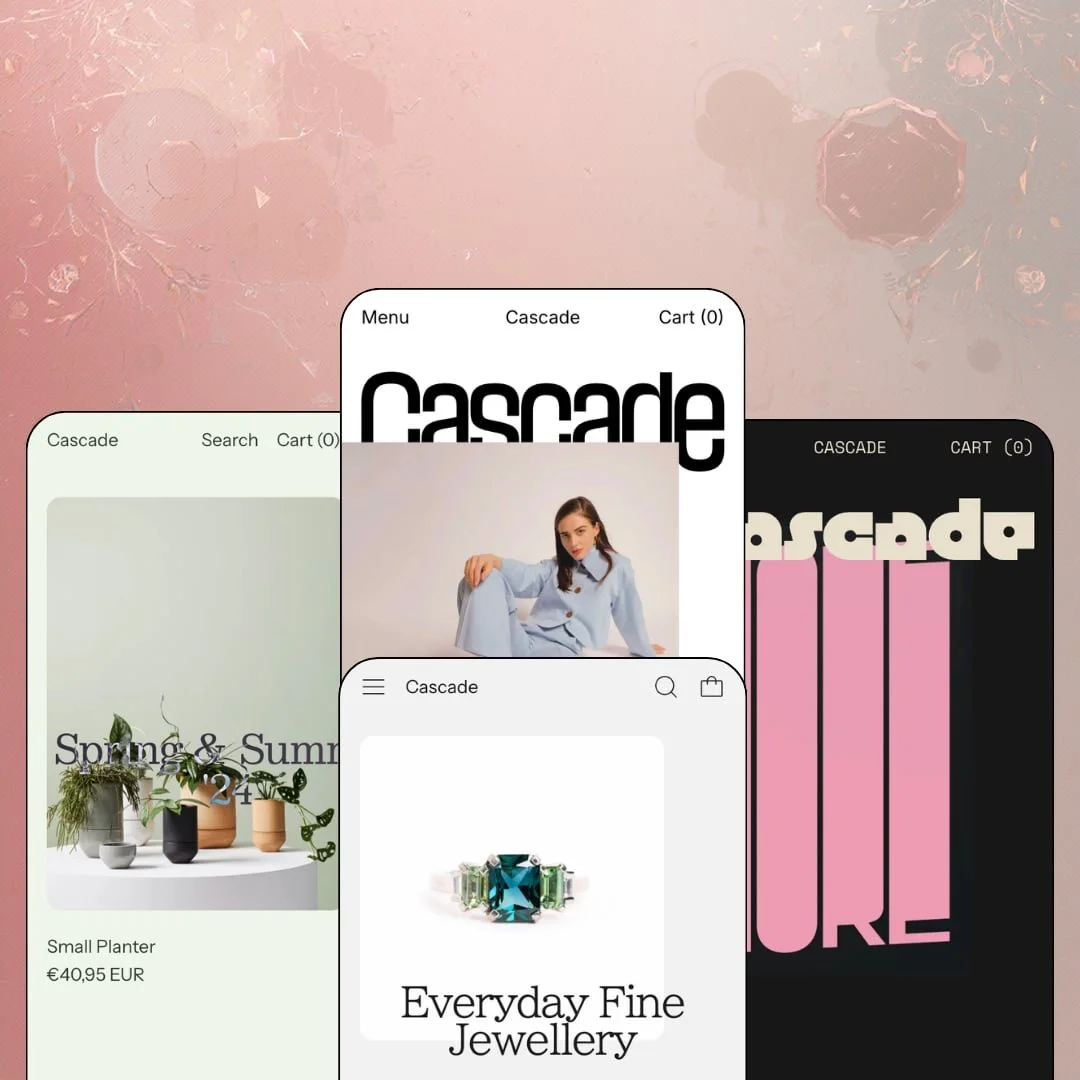
Most Shopify homepages open with a hero banner and make you scroll to reach the actual products. Cascade opens with the products themselves, stacking full-bleed catalog imagery into a downward flow that starts selling before a single headline appears. Switch has run this Online Store 2.0 theme since 2018, and at $350 it ships four presets covering womenswear, botanical homewares, art prints, and fine jewellery. Whether its product-first calm works for you depends almost entirely on what you sell and how loudly you like to sell it.
The homepage sells from the first pixel
Every preset opens on product photography instead of a campaign banner, making the catalog itself the hero asset. That's a disciplined choice. The layout then chains collection sliders, ticker bands, and video blocks into one continuous downward flow, so a visitor moves from first impression to product page without crossing a single decorative dead zone. Single-brand labels selling considered-purchase goods in the 30–100 SKU range get a homepage that works without a banner-design budget.
Built for brands with something to say
Does long copy have to look like filler? Cascade's type settings are tuned for text: brand statements run as full-width editorial blocks, every collection module carries its own description line, and body copy holds its hierarchy at paragraph length instead of collapsing into gray noise. That's worth real money to luxury-tier makers selling commission-based pieces to repeat buyers whose loyalty rests on story as much as product.
Collection pages built for cross-shoppers
A tab row of sibling collections sits directly above every product grid. Category-hopping takes one click. Beside it, a filter-and-sort drawer and numbered pagination keep deep categories manageable, and the arrangement means a shopper finishing one category never has to retreat into the menu to find the next, which quietly shortens the path between related purchases. Apparel and accessories stores with cross-shop-heavy buyers and 50–100 SKU catalogs benefit most.
One product template, three temperaments
The product page reconfigures without breaking. The poster demo runs a compact two-tab layout with an exposed quantity stepper, the fashion demo adds measurement and materials accordions plus a full-width image band beneath the buy area, and the jewellery demo swaps variant selection for narrative copy, all from the same template system. Single-brand stores spanning entry-level pieces and four-figure hero products won't be forcing everything into one shape.
The promotion toolkit is a whisper
I went looking for urgency tooling and found popups. The cart layer ships notes, a slide-out drawer, and a sticky trigger, but the feature set carries no shipping-threshold bar, no in-cart cross-sell slot, and no countdown machinery, so every conversion lever beyond a recommendation row has to arrive by app. Discount-driven stores running frequent flash promotions on impulse-buy price points will find the theme stays quiet on exactly the days they need noise.
Your photography carries the whole store
Weak product shots have nowhere to hide here. Because products open the homepage and fill most sections after it, the demos lean on campaign-grade photography donated by a working fashion label, an artist, and a jeweller, and stripping that quality away would leave the flow with nothing worth flowing past. Budget-tier startups shooting evergreen basics on a phone will fight this theme rather than benefit from it.
A 2018 architecture at a 2026 price
Cascade runs on Online Store 2.0, the same generation as Shopify's free Dawn theme, so the $350 buys presentation depth and preset variety rather than a newer platform layer with nested Theme Blocks or mobile-first architecture. The polish is real. Merchants planning multi-year builds around large, seasonal catalogs should weigh whether the design premium will outlast the generational gap.
What it takes to launch
Expect a one-to-two-day pass covering copy across collection descriptions, ticker lines, About and Lookbook pages, market and currency configuration, and re-staging navigation from the slim demo menus into your own structure.
-
What works in this preset
No banner greets you on the fashion demo. The opening viewport layers oversized product photography (an Alto pant, a Selva raincoat, a Dez blazer) directly against the logotype, and every frame links straight into a product page, so the first click available is already a buying click. I scrolled the full page twice and never hit a section that wasn't product, brand voice, or a route between the two.
Provenance does the persuading here. A campaign video sits mid-page with a single View Lookbook call to action, a ticker band loops "Designed and made in Melbourne" as a typographic stamp, and the Gazette blog carousel closes with sustainability and interview posts. For a label selling origin as much as fabric, that ordering does real persuasion work.
Credibility gets the last word. The lower page stacks a five-logo press row, a newsletter block, and an Our story image link in quick succession, ending the scroll on trust rather than another product push, which suits a boutique whose buyers research before they commit.
Where it stumbles
The demo's navigation stays deliberately slim: one Shop dropdown with an indented Bottoms group, even though a mega menu sits in the theme's feature list. That's staging, not absence. Merchants who want image-rich navigation will build it from a blank slate instead of editing a pre-configured example, which is an hour of setup nobody budgets for.
-
What works in this preset
Swell dresses the same theme in botanical homewares, selling plant stands, wares, and indoor plant stakes in a voice that leads with craft rather than volume. The brand statement about designing "functional plant stands and botanical wares" carries the top of the page, and the register is the quietest in the family. It suits the product.
Two staging choices matter for merchants eyeing this preset. Markdown pricing is prominent, with struck-through compare-at prices sitting beside sale figures across the featured grids, and a services block pitches plant-styling consultation for homes and offices, showing the layout holds a service offer beside a physical catalog without needing a separate landing page.
-
What works in this preset
Posters are a brutal test for a layout because the product is flat, rectangular, and endlessly repeated. Phase passes. The homepage runs a dozen typographic prints by designer Xtian Miller edge to edge, and each card swaps between the flat artwork and a framed in-situ shot on rollover, so the grid itself does the room-staging work a lifestyle banner would otherwise have to do.
Pricing gets staged honestly. The Arc Series slider carries a From $35.00 prefix that fits variant-priced print sizes, sold-out pieces render a clean Sold Out state where the price would be, and the navigation collapses to four flat links (Featured, All Posters, About, Blog), which is exactly the footprint a single-artist catalog needs.
Where it stumbles
I clicked into the featured In Colour slider and found half of it unavailable: three of six staged pieces carry Sold Out labels. Odd choice for a showcase. Whether that reads as scarcity or as a dead end depends entirely on your drop cadence, and print sellers running limited editions should decide which story their sold-out grid tells before copying this staging.
-
What works in this preset
Fine jewellery is where the restraint earns its keep. Sequence stages pieces from a $420 pendant to a $7,970 made-to-order sapphire ring, and the product page absorbs the weight of that price with a twelve-line specification list covering carats, cuts, settings, and provenance, plus a ten-week crafting notice and sizing arranged personally after purchase. Nothing in the layout flinches.
A Visit our store block near the footer lists the street address, opening hours, and a direct Google Maps link. That matters in a category where buyers still want the piece on their hand before four figures leave their account. The ticker band works a different shift here too, looping a line about independent third-party valuation certificates instead of a brand slogan.
Where it stumbles
Ring listings ship without a size selector; the demo routes sizing into a post-purchase conversation, which flatters bespoke commissions and slows down everything else. Stores holding stocked ring sizes will re-stage those products with variant options themselves before launch, and should factor that into their catalog build.
One register, an $8,000 spread
The same page grammar sells a $35 print and a $7,970 commission without changing its voice, and that's only visible when you read the demos side by side. Price elasticity is baked into the design rather than bolted on. Merchants expecting their average order value to climb over the years won't outgrow the presentation.
Restraint as a strategy
Across all four demos there's no discount rhetoric, no blinking urgency, and no motion for its own sake; the default voice stays in the same calm register whether it's selling raincoats or sapphires. That consistency reads as a deliberate position. Brands whose equity depends on not looking like a marketplace get a storefront that holds that line out of the box.
Eight years on the same theme
Launched in September 2018 and sitting at version 5.1.0 as of January 2026, Cascade has been maintained through every major platform transition since. For a one-time purchase with a lifetime license, the developer's staying power is part of the product. Switch has kept this one current far longer than its launch date suggests.
Four skins, one skeleton
Read the demos back to back and one homepage sequence repeats every time: product cascade, brand statement, collection sliders, ticker, video, logo row, newsletter, blog. The differentiation between presets is photography and palette, not structure. Anyone buying Cascade for four designs is really buying one design staged four ways.
The listed food vertical never shows up
Shopify's listing files Cascade under Food and drink alongside Jewelry and accessories, and the native age verifier points the same direction, yet none of the four presets stages a food, drink, or pantry store. The jewellery buyer gets a complete worked example; the wine or pantry merchant gets a feature list and a staging project. That gap deserves a mention before anyone in that vertical clicks buy.
★ 7.8/10
Rating
-
A curated presentation stack (lookbooks, age verifier, product videos, promo popups) with a deliberately thin conversion layer; what ships works well, but the list is short for the price.
7
-
Slim demo staging means little to tear down before rebuilding, and Switch keeps a current documentation hub; navigation and markets need hands-on configuration.
8
-
The slide-out menu keeps nested Shop groups compact, and sticky header plus sticky cart options keep the key actions reachable on small screens.
8
-
Pages run lean, with restrained section counts, a lazy image strategy, and no heavyweight widgets in the default build.
8
-
Four convincingly different temperaments come out of one section library; the flow-first grammar resists only one thing, and that's a promo-heavy layout.
8
Frequently Asked Questions
-
In the fashion demo, each colorway is its own product listing (the same coat appears twice, once per colorway), while color swatches remain available in the feature set for variant-based setups. Plan your catalog structure before importing.
-
Shopify files it for stores carrying 11 to 100-plus products, and the demos stay inside that band.
-
Yes. Lookbooks are a listed feature, and the fashion demo maintains a dedicated Lookbook page in its main navigation.
-
It does; an FAQ page sits in the marketing feature set, so common pre-purchase questions don't need a separate app or a hand-built page.
-
Version 5.1.0 shipped on January 30, 2026, and Switch maintains dedicated Cascade documentation at help.switchthemes.co.
-
Yes; dense copy collapses behind an expandable toggle on the product page, so specification-heavy listings don't push the buy button out of reach.
This review is based on hands-on testing of the publicly available preset demos of the Cascade Shopify theme as of August 2026. Theme features, preset availability, and performance can change with subsequent updates from the theme developer.