
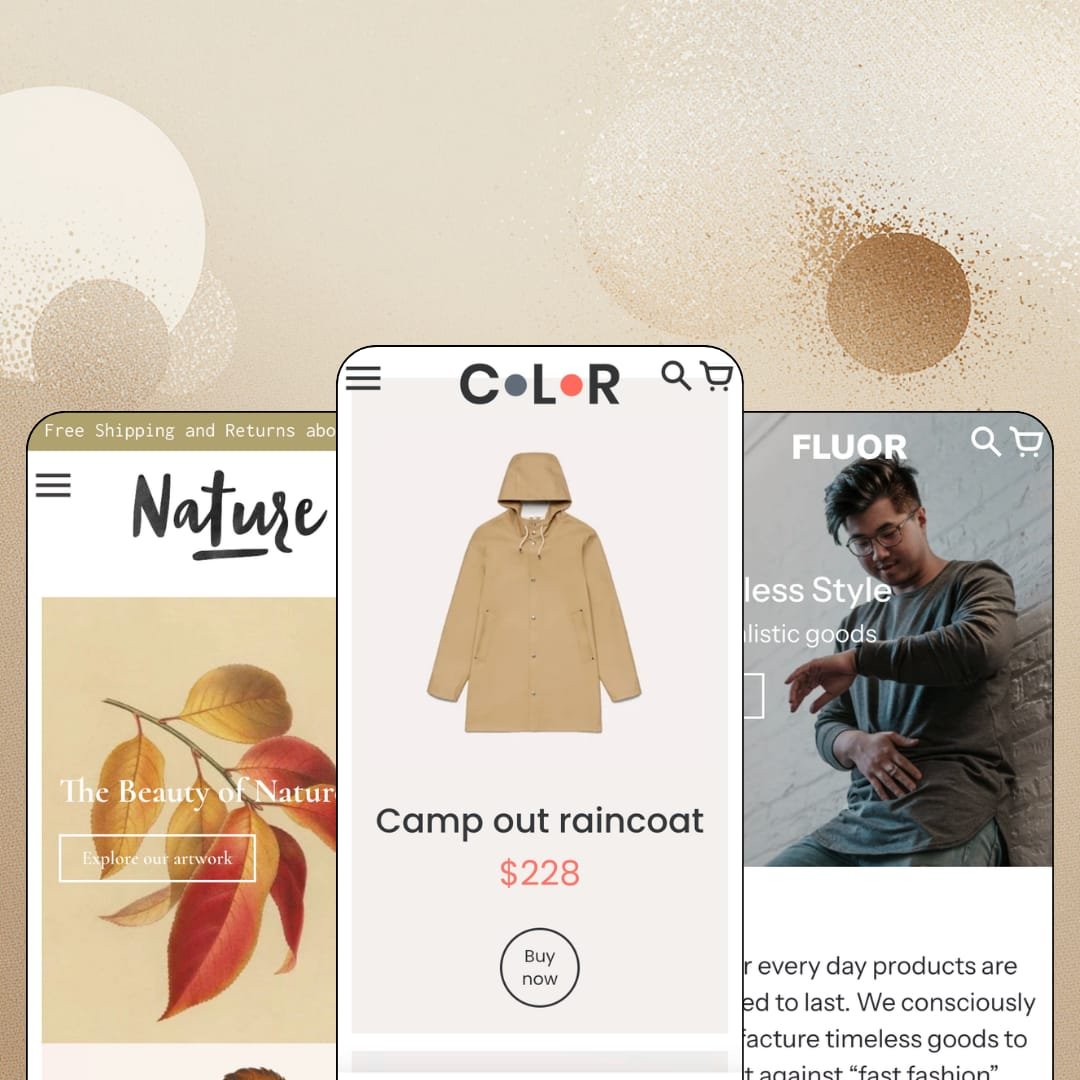
Ten years is several lifetimes in the Shopify theme catalog, and themes from 2016 are mostly either delisted or fossilized. Colors is neither: Small Victories has pushed it to version 10.1.1 as of December 2025, and the $240 build now runs on Online Store 2.0 with three presets covering outdoor gear, menswear, and art prints. What you're buying is a homepage that behaves like a checkout lane, plus a retail layer aimed at merchants who also have a door customers walk through. I spent time in all three demos to see whether the age shows.
The homepage sells finished carts
Featured-product sections are full buy modules, not banners. The main demo stages a $60 gravel helmet with a three-size picker, a live low-stock line reading 10 items left, and a working add-to-cart button, all rendered before any product page enters the picture. For a single-hero brand or a sub-30-SKU catalog selling impulse-priced goods, that collapses the funnel to one screen.
Built for shoppers who don't know their size
Mid-market apparel and footwear sellers shipping across borders get the most from the fit tooling. A size-guide link sits directly beside the variant picker and opens genuine data: the menswear demo carries a chest, length, waist, and hip grid in centimeters across four sizes, maintained as a page the merchant edits once and reuses everywhere. Returns start in the size guess. This attacks the guess.
A retail layer for stores with a door
In-store pickup support ships in the feature set, and a dedicated store-hours section pairs weekday and weekend opening times with a Google Maps directions link right on the page. That turns the storefront into the shop's front sign as much as its sales channel. The maps link is the detail. Single-location retailers running an 11-to-100-SKU catalog alongside a physical counter are the obvious match for this whole layer.
Inventory states change the button, not your app list
Scarcity and waitlists run native. When a product is flagged for pre-order, the add-to-cart button becomes a Pre-order button on its own, which is how a four-figure tent is staged in the demo catalog, and stock counters print exact unit counts once inventory runs low. Restock-driven drop sellers and small-batch makers working in limited runs get both mechanics without touching an install screen.
The social-proof layer does not exist
I went looking for a review widget, a star rating, a testimonial section, anywhere across three demos, and never found one; the published feature list confirms it, running from trust badges to promo popups without a single shopper-generated element. There is nothing to configure. For considered-purchase catalogs, meaning $200-plus outerwear or giftable wall art where buyers read strangers before they spend, plan a review app plus the styling work to make it look native before launch day.
Free-shipping promises the cart never counts
The demos advertise thresholds hard: a $100 free-shipping bar in one announcement banner, a $75 bar in the product-page shipping accordions, a free-worldwide-shipping stamp under buy buttons. The cart toolkit underneath is notes, a slide-out drawer, and a sticky button, and Small Victories' own feature list stops there, so nothing shows a shopper how far she stands from the number being promised. The banner writes a check the cart never counts. Merchants running threshold promotions on low-ticket, impulse-buy catalogs lose the exact nudge that makes those promotions pay.
Ten years of updates, one generation of architecture
Colors runs the same Online Store 2.0 generation as Dawn, Shopify's free default: JSON templates, sections everywhere, and the same roughly two-level block-nesting ceiling under the hood. Your $240 buys the buy modules, the fit tooling, and the retail layer, not a newer engine underneath them. The engine is settled tech. Agency builders and tight-budget merchants planning deep nested customizations should price that difference deliberately before committing.
What it takes to launch
Expect a multi-day pass before launch: placeholder sweeps across hero sections, product tabs, social links, and contact defaults; removal of demonstration notices embedded in product descriptions across all three catalogs; size-chart page population; and a naming and spelling cleanup across collections and menus.
-
What works in this preset
You can put something in the cart before you've scrolled once. The opening slideshow alternates product slides with collection slides, and the product slides carry a name, a price, and a Buy now button, so a $228 raincoat and an $8 flashlight sit one tap from checkout while the page is still warming up. Collection slides for backpacks, popular items, and cooking gear handle the wayfinding in between. That sets the tone.
The Our favourites section embeds a working collection, tabs and all: thirteen tag filters run across the top with item counts, a sixteen-product grid sits underneath, and the section paginates to a second page without ever leaving the homepage. A twelve-tile category grid follows, covering everything from blankets to cookware. Discovery happens here, not in the menu.
Small touches carry the retail mood. A gift-card feature row runs under a highlights-of-the-week label, a five-tile trust strip covers shipping, returns, and recycled materials, and a full-width brand film plays between product blocks so the catalog never feels like a warehouse list. The journal underneath publishes genuine long-form writing rather than three-line stubs.
Where it stumbles
One staging choice kept bugging me: the favourites grid opens on a sold-out titanium cookset, and a second sold-out product sits a row below it. For a preset whose whole argument is buying straight from the homepage, leading the flagship grid with stock nobody can purchase reads against its own pitch.
-
What works in this preset
One entry in Fluor's menu isn't a collection at all. The Shop dropdown nests three levels deep across clothing, footwear, accessories, and bags, then drops a direct product link to a computer bag at the bottom of the flyout, turning the navigation itself into a quiet merchandising slot. Fourteen leaf categories hang off that single dropdown.
Everything else plays like a campaign site. Two full-width videos, an as-featured-in press row with four magazine logos, and a gifts-for-him editorial banner give the twelve-product catalog the surface area of an established label, which is exactly the trick a small menswear brand launching its first season needs. It's staging with a clear thesis.
Frankfurt Trainers is the fit-tooling showcase. The picker runs eleven half-sizes from 6 to 11, and the size-guide link beside it opens a full US, Euro, UK, inches, and centimeters conversion table, so a shopper in Berlin and a shopper in Boston read the same row and order the same shoe. Two product videos and a values banner follow the buy box.
Where it stumbles
The architecture is dressed for a store ten times this size. Those fourteen menu categories mostly resolve to single-item collections, so tapping into sneakers or wallets lands on a one-product page, and the mega menu ends up promising an assortment the staged catalog can't back.
-
What works in this preset
Delight greets you selling. The announcement bar opens with a shipping offer overhead, a newsletter popup dangles 10% off the first order, and a trust row stacks seven tiles, from recycled materials to a first-order discount, before the first product even appears. It's the promo-forward face of the family.
Frame-size merchandising is the quiet showpiece. A $58 bird print steps down to $48 and $38 as the frame size shrinks, each size backed by its own gallery shot plus a close-up, which is precisely how a print seller wants per-variant pricing and per-variant photography to behave. No workaround needed.
Can a five-collection shop feel complete? Here it does: a secondary nav row under the logo lists the whole catalog at a glance, a six-tile category grid repeats it visually, and a long-form blog on the history of biological illustration gives the twelve-print store a proper editorial voice. I clicked through expecting filler and found an actual essay.
One grammar, three store shapes
The same section set produces a 38-product outdoor catalog, a twelve-piece campaign menswear label, and a small-format art shop without visible strain, and none of the three reads like a reskin of the others. Range is the theme's quietest asset. Merchants can trust the preset furthest from their vertical to still translate.
A decade of upkeep is its own feature
The 2016 launch date reads as a risk until the version history corrects you: 10.1.1 shipped in December 2025, documentation lives on a public Notion site, and the interface carries five pre-translated European language sets. Longevity at that level changes the buying calculus, because the real cost of a theme is what happens to it in year three.
Nothing on screen is borrowed
Every visible element across the three demos ships with the theme: the popups, the badge labels, the trust rows, the in-menu promotions, the video sections. There are no app artifacts styled to look native and no dependency surprises waiting after purchase. What the demos show is the actual box.
The listing names verticals the presets never stage
Shopify files Colors under Jewelry & Accessories and Food & Drink, yet the three demos stage outdoor gear, menswear, and art prints. A jeweler or a food brand buys on extrapolation, with no preset modeling their catalog's real shapes: no gift staging, no ingredient panels, no ring-sizing patterns to copy from.
Prose is the only data layer
Across every demo, product information lives in hand-written descriptions and free-text accordions; nowhere does a structured specification row, comparison surface, or metafield-driven table appear. That holds fine for jackets and posters, and it becomes a ceiling the moment a catalog carries measurable attributes shoppers want to weigh side by side.
The demos assume a media library
Full-width videos, brand films, press rows, and photographic heroes carry all three stagings, which means the look leans on assets a first-year merchant rarely owns yet. Budget the photography and video before budgeting the theme.
Rating
★ 7.6/10
-
Buy modules, pre-order states, size tables, and pickup tooling are native; the cart layer and social proof are where the list runs out.
7
-
Online Store 2.0 sections with restrained options and public Notion documentation; the three presets share one grammar, so learning it once covers all of them.
8
-
Slide-out navigation, a sticky cart, and image-led sections translate cleanly to small screens, and the homepage buy modules keep the purchase near the top of the scroll.
8
-
Pages run lean, with restrained section counts, lazy-loaded imagery, and little weight beyond the storefront basics.
8
-
Three genuinely different store shapes come out of one section set, but the playful, bold baseline stays visible underneath every one of them.
7
Frequently Asked Questions
-
The theme UI comes pre-translated in English, French, Italian, German, and Spanish, and the demos additionally run Japanese and Simplified Chinese storefronts through Shopify's localization.
-
Menus nest three levels, and entries can point straight at individual products rather than only collections, so the dropdown doubles as a promo surface.
-
Shopify's own listing files Colors under Some (11–100+), and the tag-based collection navigation is most comfortable in that band; at four-figure SKU counts you'd be fighting the discovery model.
-
Yes. Product cards render computed percent-off badges such as -25% and -50% from compare-at prices, and multi-variant items display From pricing without extra setup.
-
Small Victories is a Barcelona studio; documentation is public on Notion, and support runs through support@smallvictories.co with a dedicated support page per theme.
-
No. Video sections run native on homepages and product pages, hosted through the store's own uploaded files rather than embeds.
This review is based on hands-on testing of the publicly available preset demos of the Colors Shopify theme as of August 2026. Theme features, preset availability, and performance can change with subsequent updates from the theme developer.