
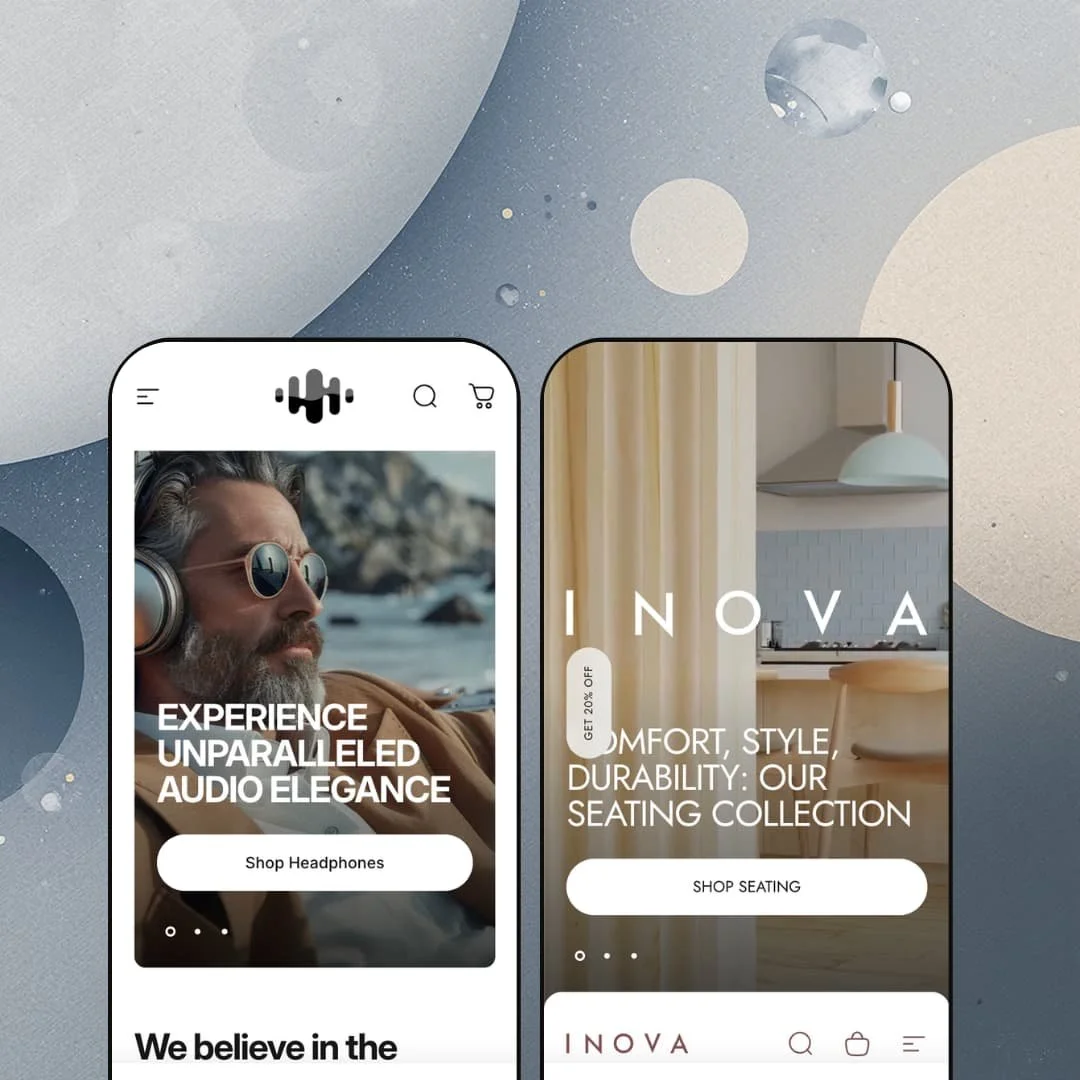
Most premium themes pick one look and stage a single demo around it. Concept does the opposite: it ships two storefronts that barely seem related, a near-black audio-gear shop and a warm Scandinavian furniture catalog, both running on the same Online Store 2.0 section library. The capability question answers itself in about thirty seconds of scrolling. The harder question is how much of that demo polish you're prepared to rebuild from scratch.
A product-spec system that does an app's job
Concept treats structured product data as a first-class citizen. Populate your metafields and the theme renders icon-led spec rows on collection cards and labeled accordions on the product page. The range covers everything from a headphone's driver size and battery life to a portable lamp's brightness and compliance ratings. For electronics, appliances, or any considered-purchase catalog where shoppers compare attributes before they buy, this puts the comparison data inline and folds in what a separate spec-table app would otherwise handle.
A bundle builder that ships in the box
If you run kits, gift sets, or accessory bundles, this section can pay for itself. Concept ships a working bundle builder on its own page: shoppers add three or more items, a running total updates live, and they unlock a discount you set. The demos use 30%. It lives in both presets, so the mechanic is the theme's, not an add-on. For gifting or accessory-heavy stores bundling lower-ticket items, it stands in for a paid bundle app and the setup that app would need.
A visual-merchandising kit, not just a section list
Some themes give you a hero, a grid, and little else. Concept ships a coordinated set of storytelling sections that work together: a before/after image slider, lookbooks with shoppable hotspots, "Shop the Look" video blocks, scroll-triggered media bands, and an image-rollover collage. Treated as one kit, they let a brand build pages that read like an editorial spread, not a catalog dump. The payoff is real. For visually-led labels in fashion, home, or design with strong photography and a story to tell, this is the gap between a store and a lookbook.
Discovery that scales with the catalog
The filtering goes well beyond the Shopify baseline. Collection pages offer swatch-based color filters, metafield-driven filters that reshape themselves by category, a price range, an in-stock toggle, sub-collection tabs, and a "Show on model / Product view" image switch. For stores carrying a few hundred SKUs across multiple attributes, this is the kind of layered navigation that keeps a large catalog shoppable instead of overwhelming. Mid-to-large catalogs in apparel, electronics, or home will lean on it hardest.
Two presets, and they sit at opposite ends
Concept ships two demos, and the distance between them is the catch. One is electronics, the other is Scandinavian furniture, with nothing in between to borrow from. If you sell apparel, beauty, jewelry, or food — especially as a single-brand shop without a designer on call — you don't inherit a near-match starting point; you pick the closer of two fairly distant relatives and rebuild toward your category. Compared with Shopify's free Dawn, which gives you one neutral, vertical-agnostic canvas, Concept's pair is richer but more committed, so a third-vertical merchant has more to undo. Plan for that before you buy.
The polish is bought with content, not toggles
Here's the part the demos quietly hide. Almost everything that makes Concept look expensive depends on content you have to create: the spec accordions need fully populated metafields, the filters need tagged attributes, the lookbooks need styled photography with hotspots placed by hand, the designer pages need writing, the bundles need configuring. Out of the box, with none of that done, the theme looks far plainer than the storefronts you fell for. Strip the structured data out and a lot of the magic goes with it. For lean teams and solo operators, especially anyone launching a smaller catalog against a deadline, the gap between "installed" and "looks like the demo" is the real cost, and it runs larger than the $400 sticker implies.
It's a 2024-generation theme in a 2026 store
This one is about timing, not capability. Concept is an Online Store 2.0 theme, and it's a polished one, updated as recently as this spring. But it predates Shopify's newer Theme Blocks architecture, the nested-block, AI-assisted model that arrived in 2025. I went looking for that deeper block nesting and it isn't here; you get the solid OS 2.0 section editor instead. For merchants who expect to keep a theme for years and want the latest building blocks, especially those planning heavy custom layout work down the line, that generational gap is worth weighing against the price.
What it takes to launch
Budget three to five days of real work, most of it content rather than configuration: populating product metafields for the spec rows and accordions, tagging attributes so the category filters work, building lookbook and "Shop the Look" hotspots, writing designer or brand landing pages, configuring the bundle rules, and replacing the multi-section homepage copy across both presets. If you adopt the bundled EU translations (English, French, Italian, German, Spanish), add a localization pass on top.
-
What works in this preset
The first thing that loads isn't a banner. It's a three-slide video hero pushing headphones, earphones, and waterproof speakers, and it sets the tone for a homepage that never really slows down. Scroll a little and you hit a featured-product block for the Flow Harmony headphones that behaves like a compact product page: a gallery, a row of spec icons (40mm driver, 38h battery, Bluetooth v5.1, USB-C), color swatches, and a "More accessories" cross-sell strip with ear cushions and a steel case. A stock line reads "only 5 items left." For an audio or gadget brand, this is the merchandising you'd otherwise assemble piece by piece.
Below that, the demo leans hard into visual selling. A before/after slider swaps the Flow Harmony between Gold Tone and Crimson Shadow; a lookbook section drops shoppable hotspots onto a styled room shot; and several "Shop the Look" blocks pair short videos with tagged products. There's a countdown banner for a speaker sale and a press row carrying Rolling Stone, Billboard, and Pitchfork logos. I scrolled past a tabbed best-sellers grid sorted by headphones, earphones, speakers, and accessories before the page finally landed on a blog feed. It's a lot, and most of it is genuinely useful for a considered electronics purchase.
The collection pages are where the theme earns its electronics positioning. Open Headphones and the filter rail offers brand, a twelve-option color swatch filter, a price range, and an in-stock toggle, with sub-collection tabs for Wireless, Gaming, Sport, and Limited sitting above the grid. Each card repeats those spec icons, so a shopper comparing battery life across six models never has to open a single product. A "Compare" page also sits in the main menu, which suits buyers who cross-shop on numbers. This is discovery built for catalogs that compete on specs.
Where it stumbles
One thing to flag about the staging rather than the theme: the Concept demo is coded expensive. Headphones list at $999, a showcase speaker climbs into five figures, and the copy talks audiophiles and luxury. If you sell $40 earbuds, the layout still works, but the tone you inherit reads premium, and you'll spend real time dialing it back toward a value message. That's a re-tone job, not a rebuild.
-
What works in this preset
Switch to Inova and the volume drops. The palette warms to a muted mauve, the hero opens on a furniture video, and a four-tile collage (Seating, Sofas, Lighting, Accessories) greets you with hover images that swap on mouseover. Where Concept shouts specs, Inova sells atmosphere. The "Love Where You Live" framing and a quiet "reveal" band introducing the sofa range tell you this preset is built for browsing, not spec-checking.
The product pages are the standout. I opened the Glide Ambient Light and found a sticky add-to-cart bar, a gallery, store-pickup availability ("ready in 24 hours" at a named location), and a set of icon-led accordions covering materials, dimensions, lighting ratings, certificates, and even a designer bio for one Klaus Hoffmann. That last touch ties into a genuinely nice idea: Inova organizes part of its navigation and footer around named "Designers," each with a landing page. For furniture, where provenance and maker matter, that's a smart bit of structure.
The same discovery system shows up, dressed for furniture. On the Sofas page the filters switch to Material (Textile, Oak, Leather, Steel, Aluminum) and Product type (2-Seater, Modular, Studio), and the cards go clean and image-forward, dropping the spec icons that headphones needed. It's the one section library reading the room. A shopper filtering sofas by material gets exactly the controls that category wants.
Where it stumbles
The bundle builder is the awkward fit here. It's the same native section Concept uses, and it works, but pointing a "mix any three and save 30%" tool at sofas that run $4,000 to $7,000 makes little sense. The Inova demo wisely stocks its bundle with trays, vases, and a $245 lamp instead. A furniture merchant will want to aim the section squarely at the accessories end of the catalog.
One section library, two completely different stores
The most telling thing about Concept only shows up when you view both demos back to back. The same underlying system produces a spec-dense, numbers-driven electronics shop and a soft, image-led furniture catalog, and neither feels like a reskin of the other. The contrast is the point. Cards carry battery icons in one and drop them entirely in the other; the filters speak "driver size" here and "Textile or Oak" there. That range is the real achievement, and you only see it across both.
Storytelling runs through the whole theme, not just the homepage
Read both presets and a consistent editorial bias emerges. The storytelling tools aren't confined to a flashy homepage; they reach into the product pages (scroll-story bands, shop-the-look, designer bios) and even the collection pages (sub-collection tabs, promotional tiles, a closing SEO band). Concept's two stores express that bias differently, press logos and a tabbed bestseller grid on one side, named designers and provenance copy on the other, but the underlying conviction is the same. This is a theme that assumes you have a story and gives you room to tell it everywhere.
Both demos are coded for premium price points
Look past the two verticals and the demos share a price posture: expensive. Inova lists sofas from $4,000 to $7,000 and treats a $245 lamp as its budget pick, while the audio store's flagship pricing runs just as high. The photography, the copy, and the white space all assume a premium buyer. A mid-market or value brand, in either category or any other, has to actively pull the staging down-market rather than meet it where it is. The accent is luxury. You'll hear it until you re-tone on purpose.
The theme never shows you a lean version of itself
Neither demo demonstrates restraint, and that turns out to matter. Even Inova, the calmer of the two, packs its homepage and product pages with bands, collages, scroll-media, and a bundle section. Concept offers no reference example of a fast, stripped-back, conversion-direct store anywhere in its two presets. A merchant who wants minimal and quick has to subtract from a maximalist starting point, working against the theme's instincts instead of with them. If your taste runs to clean and sparse, you're building uphill.
Rating
★ 8.6/10
-
Deep merchandising and discovery set: native bundle builder, metafield spec accordions, layered filters, lookbooks, store pickup, back-in-stock. Two features (quantity pricing, combined listings) are Shopify Plus-gated.
10
-
The OS 2.0 editor is familiar and well-organized, but matching either demo means heavy metafield and content setup, and the feature surface is large enough to take time to learn.
7
-
Built mobile-first around carousel swipes and tap-to-close popups; the mobile menu uses a clean slide-out pattern and product pages keep a sticky add-to-cart within thumb reach.
9
-
The theme runs lean on its own, with lazy-loaded WebP imagery, but the demos stack many video and media sections that add real weight if you replicate them wholesale.
8
-
The section library is theme-wide and proves its range across two opposite verticals; color and type tokens shift convincingly from near-black tech to warm, muted furniture.
9
Frequently Asked Questions
-
No. The quantity-pricing and combined-listing features are Shopify Plus-only; on a standard plan you get the rest of the feature set but not those two.
-
Built in. You populate the values as product metafields and the theme renders the icon rows on collection cards and the labeled accordions on product pages.
-
It's native to the theme. The "Build Your Bundle" / "Create your bundle" page is theme-driven, with a running total and a minimum-item rule you set yourself.
-
Choose by how your products sell, not by industry. Start from Concept if buyers compare specs and attributes; start from Inova if they buy on imagery and story.
-
Yes. Product pages display per-location pickup availability and a "ready in 24 hours" style message once you've wired them to your Shopify locations.
-
Yes. Collection pages include a "Show on model / Product view" toggle, which is handy for apparel, wearables, and anything that benefits from a lifestyle shot.
This review is based on hands-on testing of the publicly available preset demos of the Concept Shopify theme as of June 2026. Theme features, preset availability, and performance can change with subsequent updates from the theme developer.