
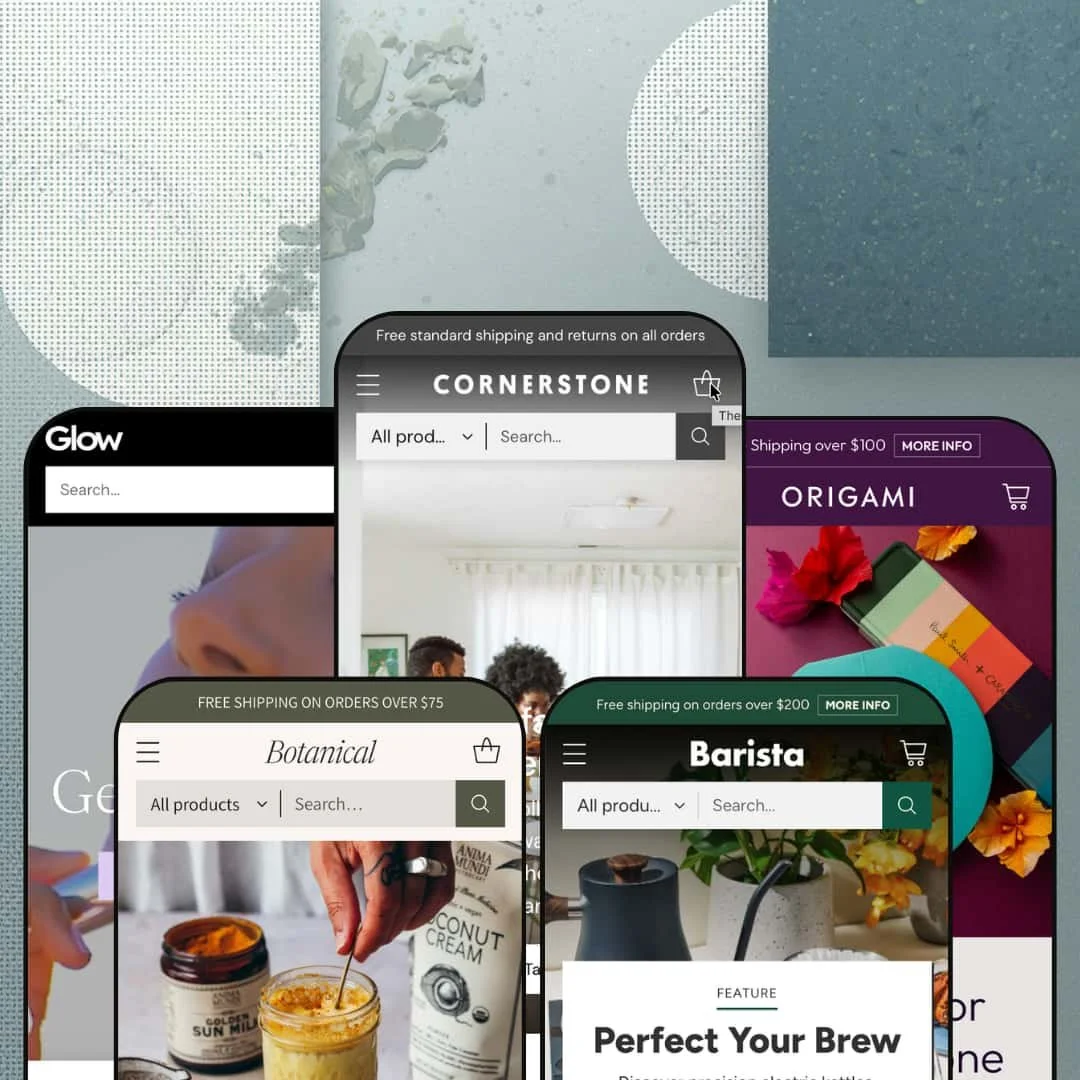
Most theme demos pick one storefront and polish it to a shine. Cornerstone ships five of them, and they read like five unrelated companies: a multi-brand home emporium, an SPF skincare line, a specialty-coffee depot, an herbal apothecary, and a greeting-card studio. Underneath all five sits a single Online Store 2.0 engine built for one job, which is moving shoppers through big, busy catalogues without losing them. The real question is whether that engine earns its $360 everywhere, or only when your catalogue runs as deep as the demos pretend.
Product discovery built for genuinely deep catalogues
The mega menu is the real article, not a dropdown with a new coat of paint. It earns its keep. On the coffee build I clicked into a navigation tree that sorted forty-odd roasters and equipment makers into alphabetised columns while branching brew method into pour-over, press, cold brew, espresso, and syphon sub-trees, none of it leaning on a third-party menu app. The search bar also carries a scope selector, so shoppers hunt inside one collection rather than the whole store. For a multi-brand home or grocery retailer carrying 200-plus SKUs across dozens of vendors, that's the gap between a catalogue people browse and one they bail on.
Merchandising that thinks in brands, not just categories
Plenty of themes let you tag a vendor. Cornerstone actually builds storefront real estate around it. The home demo runs a brand-index block that lists each label with a live SKU count beside it, so a shopper sees at a glance that one maker carries 56 pieces and another 45, then drops them into brand-spotlight sections with their own product rails and a short maker bio. For a stockist or holding-company operation that sells third-party labels and wants buyers to shop by the names they already trust, this turns a sprawling vendor list into a navigable story.
Product pages that flex from spec sheets to colour families
The product page carries two jobs at once. It handles both. On a wellness item I scrolled through stacked accordions for key benefits, a full ingredient list, and a how-to-use panel, while a sticky add-to-cart trailed the variant picker and a size button-group stepped between 4.5, 6, and 8 ounces. A colour-led product solves it another way, linking six colourways as swatch-selectable sibling products so the range reads as a single family. Beauty, supplement, and specialty-food sellers who need ingredient and usage panels, plus considered-purchase shoppers who read before buying, get a page that carries the detail rather than burying it.
A promo toolkit ready for sale season
Flash-sale and restock-driven merchants, and impulse-buy catalogues, get the most from the conversion kit baked in. Sale season is where it shines. The beauty build stages a 30%-off annual-sale block with price-ladder entry points stepping from under $100 down to under $10, sitting above a deal rail where every card wears its own percentage-off badge. Countdown timers, dismissible popups, promo tiles, product badges, and tabbed best-seller rails ship as one coordinated set, so a campaign comes together without bolting on apps. For evergreen catalogues that rarely discount, much of this sits dormant, which is worth knowing going in.
It's built for breadth you may not have
Cornerstone assumes a big, multi-vendor catalogue, and it shows everywhere. The home and coffee builds lean hard on brand-index blocks, vendor-spotlight rails, and four-level mega menus, all of which need real inventory and several brands behind them to look like anything but empty shelving. A five-SKU shop will rattle around inside it. For a single-label DTC brand running under 30 products, you're paying $360 for an engine sized to a job you don't have, and trimming it back to fit is more work than starting somewhere smaller.
The depth is locked behind metafields
The richness on display is data-driven, not decorative. Those ingredient panels, FAQ accordions, brand bios, filter facets, and product badges are wired to metafields and tagged collections, and on the flagship preset several product-page rows ship pointing at metafields that simply have nothing in them yet. The toolkit is there; the content is your job. For a solo operator or small in-house team carrying a 50-to-100-SKU catalogue, reaching the polish the demos show means a sustained data-entry effort, not an afternoon in theme settings.
All that density carries weight
A theme this content-dense asks something of your performance budget. Depth has a cost. The home page alone stacks fifteen-plus distinct sections before the footer, including several product carousels, brand rails, room and style grids, and full-bleed story blocks, and the product pages run nearly as long with image-heavy brand panels beneath the buy box. Lazy-loaded imagery and a restrained build keep it from feeling sluggish. Still, merchants selling image-led catalogues to mobile shoppers on patchy connections should plan to be deliberate about image sizes and section count rather than dropping in every block on offer.
What it takes to launch
Expect to budget several days: a full copy pass across hero captions, editorial blocks, testimonials, and About/FAQ narrative; metafield population for product-page tabs, ingredient or spec panels, badges, and filter facets; mega-menu re-staging for your own category and brand structure; and a localisation and currency sweep if you sell across regions. The demos lean heavily on structured product data, so the gap between install and launch is mostly data work, not design work.
-
What works in this preset
Room-based and style-based entry points greet you before any product does. This is the build the entire theme was drawn around, a multi-brand home-and-décor emporium, and it puts nearly every tool to use. "Shop by room" and "Shop by style" collection cards sit beside a tabbed best-sellers rail that flips between Art & Decor, Seating, and Kitchen & Dining with no page reload, and a "Design Stories" blog feeds editorial underneath. It absorbs a big catalogue gracefully.
Scroll the home page and the urgency layer reveals itself in stages. A seasonal countdown block ticks toward a sale, a dismissible "bi-annual sale" popup offers 20-to-50% off, and a strip of promo tiles slices the discount by department before a value-props row reassures on authenticity, shipping, and returns. None of it feels bolted on. For a décor retailer whose pitch is taste and selection, these conversion cues are styled to match the editorial calm rather than shouting over it.
Navigation is staged for genuine breadth here. The flagship's mega menu fans "By Room" into living room, kitchen, dining, and bathroom sub-trees and splits its brand roster across alphabetised A-G, H-R, and S-Z columns, while a "Browse the catalog" block turns a long product list into a shoppable index. This is the headline job on hard mode. It holds up. A décor shopper hunting one side table among hundreds has a fighting chance of finding it.
-
What works in this preset
Land on Glow and the whole temperature of the theme changes. The mood flips entirely. Gone is the dense brand index; in its place a clean, warm beauty storefront leads with a video hero and a tidy six-tile category grid (Face, Body, Lotions, Oils, Mists, Bundles), each tile carrying a live product count. I dug into the navigation and found skin-type filtering wired in, so shoppers can narrow Face products by Combination, Dry, Mature, or Sensitive. For a single-line skincare brand selling considered routines, the discovery model quietly shifts from "which brand" to "which concern."
In beauty, trust is the whole game. Glow stages a full testimonial section that runs customer quotes beside the exact product each reviewer is praising, tags each one "verified review," and links it straight to the buy button, while a routine video block sells the regimen rather than the single item. Award-style callouts and "best seller" badges pepper the rails. For a skincare brand whose shoppers cross-check ingredients and reviews before committing, the preset stacks reassurance at every step of the scroll.
The bundle logic is the commercial engine. Glow stages "Bundle & Save" and "Daily Essentials" rails packed with duos and kits, and the deal cards carry stacked pricing that shows the saving inline. It's a merchandising model built for basket-building. For a routine-driven beauty catalogue where the goal is multiple SKUs per order, this preset is staged to lift average order value rather than sell one balm at a time.
-
What works in this preset
Specialty coffee runs on knowledge, and Barista sells the expertise as hard as the gear. Knowledge sells the gear. A blog rail surfaces buying guides and how-tos ("Hand grinder buying guide," "How to use your pour-over") with real author bylines, positioning the store as a teacher before a shop. I clicked through expecting filler and found genuine editorial structure. For a roaster or equipment seller whose customers research obsessively before buying a $300 grinder, this content layer is doing real conversion work.
Three tabs, one rail: New Arrivals, Best Sellers, and Barista Picks share a single carousel that re-sorts in place. Below it, a "Latest Deals" strip turns promotions into tidy tiles ("up to 30% off on Chemex," "$20 off sets of four mugs") and an editorial trio (Craft quality, Precision matters, Pour overs) pairs lifestyle imagery with curated product. The staging is calm and confident. For a considered-purchase coffee shopper comparing kit, the preset organises a technical catalogue into something a human can actually scan.
Consumables get their own staging alongside the hardware. Barista threads a single-origin coffee rail (Onyx roasts at "from $20") and a "Brew Like a Pro" guide between the equipment sections, so the store sells the beans and the ritual, not only the machines. It's a smart two-track catalogue. For a coffee retailer balancing high-ticket gear with repeat-purchase consumables, mixing the two keeps casual buyers and gear-heads on the same page.
-
What works in this preset
"How do you want to feel?" is the question Botanical opens with, and it reframes the entire catalogue around outcomes. Instead of product types, the preset leads with benefit-based discovery, sorting an apothecary of tinctures, tonics, and powders into Calm & Balanced, Energized, and Clear & Free, with a "Shop by benefit" grid (Immunity, Stress Relief, Mood Elevator, Detox) echoing it down the page. I noticed the cart drawer itself offers benefit shortcuts. For a supplement brand whose buyers shop by goal rather than ingredient name, that framing meets them exactly where their intent is.
Credibility does a lot of work on this storefront. Certification badges (USDA Organic, Non-GMO, Vegan, FDA Registered) sit beneath a "surveyors of the finest herbal medicines" mission block, and a "Talk to a herbalist" panel invites shoppers to book a consultation rather than guess. It reads as authority, not sales. For a wellness catalogue selling trust as much as product, to a health-conscious buyer wary of marketing claims, those signals carry real commercial weight.
-
What works in this preset
You're selling small, impulse-priced products that live or die on browsing, and Origami is staged for exactly that hunt. The preset (demoed as a greeting-card studio) builds its depth from metadata rather than brand, layering Shop by Occasion, Shop by Style, Shop by Color, and even a "Gift Ideas" set sorted by recipient personality into the mega menu. A mosaic collection grid mixes Cash Cards, Clamshell, Birthday, and Holiday tiles at different sizes. It guides the eye well. For a stationery or small-gift shop where customers arrive by mood ("something for a birthday, something blue"), these faceted entry points do the selling.
Two extras stand out for a gifting catalogue. Origami surfaces a language switcher (English, Español, Français) beside currency, and stages an automatic volume-discount table (buy 6 save 10%, 11-20 save 15%, and up) for shoppers buying cards by the box. The pricing display is the theme's; the discount maths is Shopify's. For a stationery brand selling to bulk and occasion buyers who order in quantity, surfacing the break points on the page nudges larger baskets.
Where it stumbles
Worth knowing what you're buying it for. In a single-maker card catalogue, Cornerstone's brand-and-vendor merchandising muscle, the part that anchors the home and coffee builds, simply has nothing to grip, so the preset leans entirely on occasion, style, and colour facets to manufacture depth. That's the right call for the vertical. But a merchant drawn to Cornerstone specifically for its multi-brand storytelling should recognise that a single-label gift shop won't exercise it. Here you're buying the filtering and the editorial layouts, not the multi-brand apparatus.
One purchase, five very different stores
The strongest thing Cornerstone does only becomes visible when you stop looking at any single preset. That breadth is rare. The same component system credibly renders a multi-brand home emporium, an SPF beauty line, a coffee-gear specialist, an apothecary, and a card studio, with no preset feeling like a reskin of another. For an operator running several brands, or one planning to, that range from a single licence is unusual value, and it means a team can standardise on one toolkit across very different catalogues.
One system to learn, then reuse
Whatever the vertical, the building blocks stay the same: badged product rails, tabbed carousels, promo tiles, testimonial sections, and faceted discovery. A merchant who learns the system on one store can rebuild it for another without relearning the controls. The muscle memory transfers. For a holding company or an agency standing up multiple storefronts, that consistency is a quiet operational win that compounds with every new brand added.
There's no neutral starting point
Every preset is a fully committed vertical build, which cuts both ways. There is no plain, near-blank base to start from; whichever preset you pick, onboarding means dismantling a finished home, coffee, or beauty store and rebuilding it as yours, not nudging a neutral template into shape. That's a teardown, not a tweak. For a catalogue that doesn't map cleanly onto one of the five staged verticals, the head start the demos seem to offer is smaller than it looks.
The voice assumes a curator, not a single brand
Cornerstone's instincts lean toward the stockist, the shop that carries other people's labels and merchandises them by name. Several presets draw real richness from third-party brand storytelling, brand indexes, maker spotlights, logo walls, so a business selling purely its own line inherits an apparatus built for a curator's voice, even when its catalogue is large enough to escape the small-store problem. It's a subtle mismatch, not a dealbreaker. A strong single-brand storyteller can absolutely make it sing, but it will be working slightly against the theme's natural grain rather than with it.
★ 7.8/10
Rating
-
Deep, app-light discovery and merchandising: multi-level mega menus, scoped search, metafield filtering, content-rich product pages, and both true-variant and linked-colour models, with a full promo toolkit on top.
9
-
The power comes with a learning curve, and the demo polish is metafield- and data-gated, so this rewards patient setup over a quick launch.
6
-
Product rails, faceted menus, and a sticky add-to-cart with a variant summary all translate cleanly into a slide-out, stacked mobile layout.
8
-
Lazy-loaded imagery and a restrained build help, but content-dense homepages and long product pages mean weight is something you have to manage.
7
-
The same section library convincingly re-skins across five distinct verticals, which is the clearest evidence of how far the tokens and layouts stretch.
9
Frequently Asked Questions
-
It works, but you'll use a different half of it. The brand-index and vendor-spotlight tools sit idle for a single label, while the category, benefit, and occasion filtering, plus the editorial layouts, carry the load instead. The beauty and wellness demos are essentially single-brand builds, and they hold together fine.
-
Both, and it's a setup choice. The theme supports a normal variant picker for size or style options, and separately lets you group related single-variant products (a colour family, say) as swatch-linked siblings, so a range presents as one product rather than scattered listings.
-
No. The product page exposes a slot for ratings (you'll see a "No Reviews" state where they'd appear), but the reviews themselves come from a dedicated app such as Judge.me, Loox, or Yotpo. The theme provides the placement, not the review engine.
-
Yes, both are on the theme's feature list and surface through the product page and cart, though the actual logic is configured in your Shopify settings rather than the theme. It's aimed at merchants running pickup locations or selling ahead of stock arriving.
-
Yes. Product cards carry a quick-add control that reads "Add to Cart" for single-variant items and "Choose options" when a product needs a size or colour picked first, so browsing-heavy shoppers can build a basket without opening every page.
-
Yes, as a display. The stationery build shows an automatic quantity-discount table (buy more, save more) on the page, which is useful for box and bulk orders; the price shown is the theme's presentation, while the discount itself is handled by Shopify.
This review is based on hands-on testing of the publicly available preset demos of the Cornerstone Shopify theme as of June 2026. Theme features, preset availability, and performance can change with subsequent updates from the theme developer.