
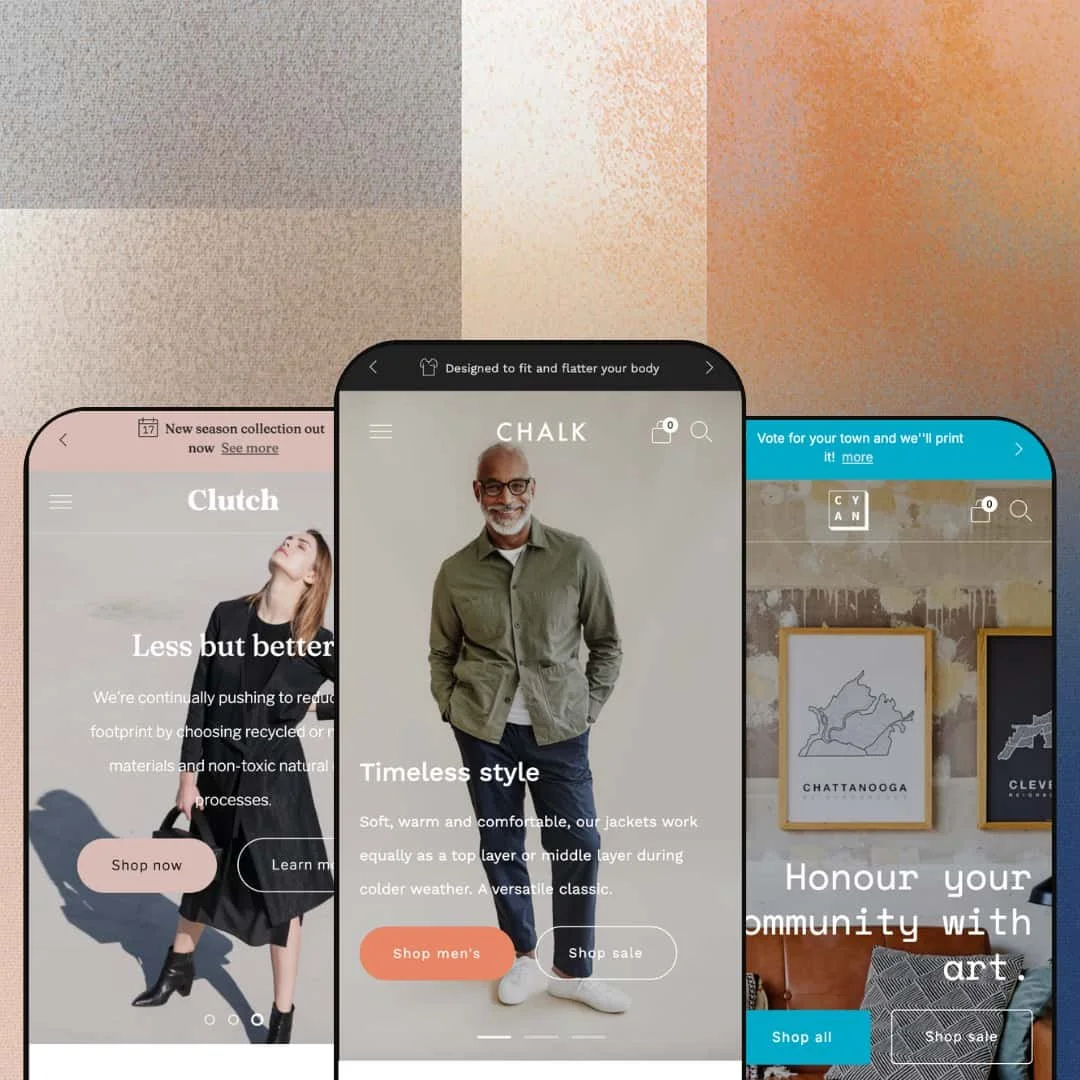
Most storefront navigation is a list of links. Creative treats it like a shop window, and that mindset runs through everything Safe As Milk has built into this Online Store 2.0 theme since its late-2022 launch. One hundred dollars buys three presets staged as an apparel label, a leather-goods brand, and a screen-printed art studio, all running the same thirty-plus-section system. The question worth answering is whose store that system actually serves.
A mega menu that sells, and a mobile menu that navigates
The desktop mega menu pairs nested link columns with photo panels: on the apparel demo, the Tops entry opens five sub-collections beside full product photography. On mobile, the identical tree converts into stacked panels where every level carries its own back control, so a three-level catalog never flattens into one endless accordion. Depth stays legible. For apparel and accessories stores running 50 to 200 SKUs across nested category trees, this is navigation that won't need replacing as the catalog matures.
Variant handling that doesn't buckle
On the art-print demo, one product runs three option axes at once, six colorways by seven frame options by two sizes, with per-variant pricing from a $40 bare print to a $150 framed one, and the selector stays readable the whole way down. The size chooser even embeds its own reference photo and a size-guide link, while the apparel side renders nine color swatches beside a measurement chart in both inches and centimeters. For made-to-order print and framing businesses, and for apparel brands selling considered-purchase configurations, this is the hardest-working part of the theme.
A coordinated urgency-and-gifting kit
Creative bundles its conversion tools into one system around the buy button: stock counters, free-shipping threshold messaging, promo popups, quick buy, cart notes, and gift wrapping with a message field. On the art-print demo, a "Spend $99 to get free shipping" line sits directly above the add-to-cart button with a gift-message field beside it, which is precisely where both nudges earn their keep. No integrations to wire, no scripts to paste. For gift-leaning stores in home goods or stationery with impulse-buy traffic, this stack works from day one.
Built for brands with actual doors
Physical retail gets first-class treatment. The store-locator sections hold addresses, phone numbers, full weekly opening hours, and direct Google Maps links, and the demo staging runs to three city locations, proving the layout scales past a single flagship. Pair that with in-store pickup support in the cart flow and the theme covers the whole click-to-brick handoff. Single-brand retailers with one to three physical locations, from boutiques to hospitality-adjacent shops, will find the offline half of their business already designed for.
Nothing tabular for attribute-heavy catalogs
The merchandising library is image-led end to end, covering galleries, rollover, zoom, a before/after slider, product tabs, and a size chart, but nothing that lays two products side by side or renders attributes as a grid. Tables just aren't this theme's vocabulary. Electronics and furniture merchants whose buyers weigh dimensions, materials, and specs across several products before committing will be building that presentation themselves.
Translations stop at the EU five
Pre-translated interface strings ship in English, French, Italian, German, and Spanish. Five languages, all Western European. Cross-border single-brand stores targeting Nordic, Central and Eastern European, or Asian-language markets will translate every button label, cart string, and form prompt themselves before launch, which is exacting work precisely because shoppers notice a half-translated storefront immediately.
Your photography carries the entire design
Every load-bearing surface here is an image: full-bleed heroes, photo-and-text pairs, image-backed collection tiles, location screenshots. Feed it supplier snapshots and the design deflates. That's the one blunt truth budget-tier drop-model stores running on manufacturer imagery need to hear before spending the $100, because this layout doesn't hide weak assets, it frames them.
What it takes to launch
Expect a one-to-two-day pass covering full copy replacement including popup and announcement messaging, imagery swaps across heroes and content sections, navigation re-staging around your own collections, and contact and location details in the map sections.
-
What works in this preset
Landing on this demo feels like browsing a small menswear label that already knows its customer. The hero rotates three brand messages, and every one of them carries two calls to action, so sale hunters and full-price shoppers get split into separate paths before they've scrolled a centimeter. It's a quietly commercial opening.
The "Get the goods" section runs as a tabbed collection: Jackets & Overshirts, Organic, and On sale switch in place without a page load, keeping shoppers inside one scroll position while the merchandise underneath them changes completely. Product cards stay tidy under pressure, truncating swatch previews into a "+4" overflow counter when a product carries more colorways than the card can hold. Small thing, big signal.
I scrolled through the Canvas Atelier Overshirt page longer than I planned to. The gallery absorbs a frankly enormous image set, well over seventy files on that single product, through a thumbnail rail that stages everything progressively instead of forcing the page to swallow it at once. Below the buy area, adjacent-product suggestions and editorial blocks about fabric care keep the page selling after the cart button.
Where it stumbles
For a fashion-first preset, outfit merchandising runs thinner than the vertical deserves. There's no shop-the-look or image-hotspot section in the library, so styling stories rest on product suggestions and photography rather than tappable looks, and apparel merchants who sell outfits rather than items will feel that ceiling.
-
What works in this preset
Look at the announcement bar before anything else. Two of its three rotating messages carry inline links, one to the contact page and one to the new-season collection, which turns a strip most stores spend on shipping boilerplate into working navigation. That's free real estate, used well.
Mid-page, Clutch drops a plain rich-text brand statement with a collection link embedded straight into the sentence. No image, no card, just a line of voice with a live link inside it. Between photography-heavy sections it lands like a breath, and it hands copywriters a surface that isn't subordinate to an image for once.
The value-proposition row also earns its place: four icon-led promises covering guarantee, shipping, service, and repairs collapse into a swipeable, dot-indicated carousel rather than stacking into a wall when horizontal space runs out. It's a considerate treatment of content that most stores need but few stores style.
Where it stumbles
Clutch sells bags from $199 to $439, which is considered-purchase territory, yet the demo stages trust almost entirely through three Instagram-attributed quotes. The theme ships press-coverage and trust-badge sections, so the tooling exists; merchants adopting this preset will add and configure those surfaces themselves to match the price points on display.
-
What works in this preset
Why would a menu point at products instead of collections? Cyan answers by wiring East, West, North, and South directly to individual city prints, because in a poster shop each product is the destination and a collection page is often just friction between a buyer and the design they came for. I clicked around expecting to get lost and didn't.
One promo tile runs an animated GIF cycling five city designs. It's a small production choice that proves the standard image slots accept motion assets without special sections, which quietly opens the door to lightweight animation anywhere a static image would otherwise sit.
The studio section is the preset's best idea: a "Learn to screenprint" block with a booking call to action sits near the location card, turning a product store into a store-plus-services business. Print studios, ceramics workshops, and any maker brand that also sells experiences gets a staged example of that hybrid.
Where it stumbles
Product-level navigation carries a growth tax. Every new city print means manual menu work, and a drop-driven shop releasing designs monthly will feel that maintenance scale with the catalog until it re-stages the menus around collections instead, which is exactly the kind of restructuring nobody enjoys doing live.
One system, three unrelated verticals
Apparel, leather goods, and screen-printed art share nothing as businesses, yet the same section library reads native in all three demos. That says the design flexes on brand identity rather than depending on vertical-specific gimmicks, which is the property that matters most when your own store resembles none of the demos.
Still alive after four years
Creative launched in November 2022 and shipped version 9.1.0 in June 2026. A theme collecting meaningful updates into its fourth year is a different purchase than one that peaked at launch, especially for merchants planning a storefront they intend to keep for the long haul.
Demos built on real brands
All three presets run licensed catalogs from actual companies rather than stock placeholders. You're evaluating the theme under genuine product photography, real pricing, and honest catalog sizes, which makes the demos unusually trustworthy evidence of how your own store might behave once loaded with real inventory.
There is no dense mode
Across all three presets the pacing stays airy: generous grids, alternating media and copy, plenty of breathing room. Nothing in the system converts this into a utilitarian, information-packed storefront, so merchants who want a homepage that works like a catalog index will be fighting the design language from the first section they place.
A 2022 generation in a nested-blocks era
Creative sits firmly in the Online Store 2.0 generation, which means shallow block nesting and none of the newer nested theme-blocks workflows. That costs nothing today. Merchants planning several years ahead on the newest editor capabilities should simply weigh the generation gap alongside the price advantage.
Rating
★ 7.8/10
-
Thirty-plus sections spanning age verification to before/after sliders, with multi-axis variant support that holds under heavy option counts. Customer-account territory is thin at a single account menu.
8
-
Presets carry most early decisions in the Online Store 2.0 editor. Navigation is the one area that rewards planning before building, since the menus do so much of the selling.
8
-
Deep menu trees stay usable on small screens through panel-by-panel drill-down. Content rows reflow into compact slides rather than stacking into long walls.
8
-
The pages run disciplined for how image-heavy the design is: media loads as you reach it, section counts stay restrained, and nothing decorative blocks the initial view.
8
-
Wide latitude inside its editorial register, since colors, type, and section order all flex freely. The airy pacing itself is the one thing you can't configure away.
7
Frequently Asked Questions
-
Jewelry and accessories plus food and drink, with a catalog-size tag of "some (11–100+)". The demos add apparel, bags, and art prints on top of that official pairing.
-
Yes. An age verifier ships in the marketing toolset, which matters given the food-and-drink tagging.
-
Sold-out states render per variant rather than per product; on the apparel demo, specific size-and-color combinations show as unavailable while every other combination stays purchasable.
-
Quick buy and quick view both ship, so shoppers can add to cart or preview details without opening the full product page.
-
Safe As Milk maintains a dedicated documentation site, publishes per-release version notes, and lists a direct support contact out of Brighton, UK.
-
Every preset stages a linked journal, and the Cyan demo goes further by promoting two specific articles directly inside the main navigation menu.
This review is based on hands-on testing of the publicly available preset demos of the Creative Shopify theme as of July 2026. Theme features, preset availability, and performance can change with subsequent updates from the theme developer.