
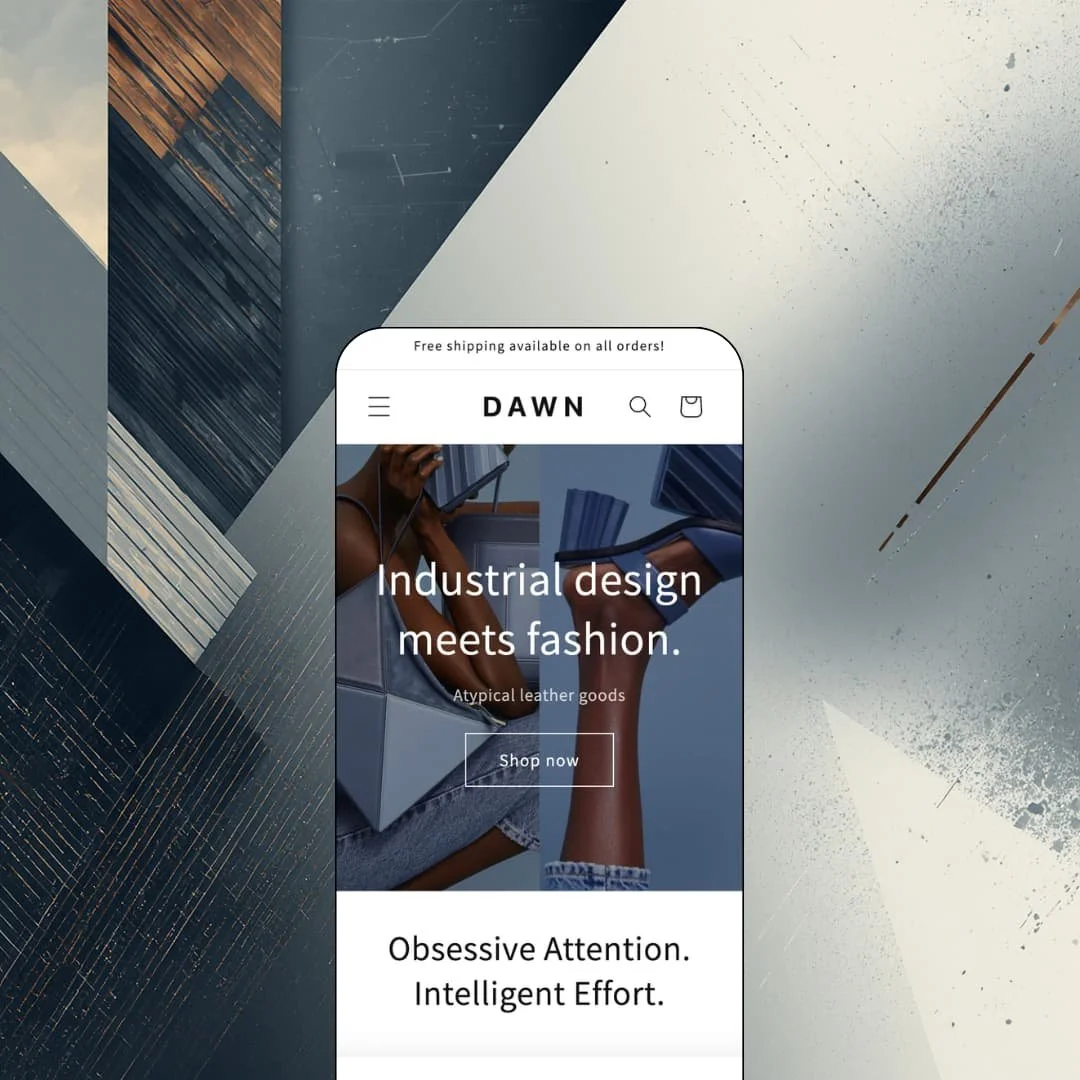
The default theme on every new Shopify store is also one of the lowest-rated listings in the Theme Store. Dawn is free, built by Shopify itself, and has anchored the Online Store 2.0 generation since its launch in August 2021, with steady updates continuing into June 2026. The listing files it under jewelry, accessories, and food-and-drink stores with catalogs of 11 to 100+ products. The real question is whether the starting point Shopify hands you can also be the finish line.
Collection filtering that respects real catalogs
How much filtering should a free theme owe you? More than it delivers here would be hard to ask: the Bags collection runs faceted filters for availability, price range, and twelve color values, each labeled with a live product count, alongside nine sort orders and a dedicated filter-and-sort drawer on mobile. Counts do the guiding. For accessories and apparel stores in the 30-100 SKU range whose shoppers cross-shop by color before anything else, that's a browsing layer you don't have to build.
A gallery built for heavy media
The demo's Small Convertible Flex Bag page carries a 22-image gallery, and the template absorbs it without breaking stride, running thumbnails, per-image modal zoom, and imagery for all four colorways in one continuous strip. That matters when photography is the sales argument. Jewelry and leather-goods merchants selling considered purchases in the $200-600 band can stack angle shots, detail crops, and on-body photos on a single product page instead of rationing media.
Collapsible rows keep spec-heavy pages honest
Materials, Shipping & Returns, Dimensions, and Care Instructions each sit in their own collapsible row under the buy box on the demo's product pages. Long disclosures stay reachable without burying the page. The June 2026 release pushed further in the same direction with a dedicated product-disclosures section and block, which is exactly the surface food-and-drink and skincare merchants need for ingredient lists, usage information, and allergen text that regulators and repeat buyers both read closely.
It stays fast because it stays light
Dawn's pages run a restrained section count, lazy-loaded imagery, and very little script weight, and the demo's homepage makes its entire pitch in roughly eight sections. Speed is the compounding benefit. For single-operator stores pushing paid social traffic at mobile-first audiences, where every added second of load time gets billed against ad spend, a storefront that starts lean protects margin before any optimization work begins.
No urgency layer when the scroll gets long
There's no sticky add-to-cart bar in the feature set, no free-shipping progress meter in the cart, and no countdown tooling; the announcement bar is a single static line. On the demo's flagship product page, that means the buy button sits 22 images and four content rows behind a shopper by the time they reach the care instructions. Momentum has nowhere to land. Flash-drop and restock-driven merchants selling impulse-priced goods under $100 will feel that absence on every mobile session.
The scoreboard is hard to ignore
Dawn sits at 35% positive across 284 Theme Store reviews, with 40% negative outright. That's a rough scoreboard for the platform's own flagship. Recent reviewers describe a cart-drawer update lag reported since 2022 and background-color settings that won't extend to page and app sections, and this kept bugging me as I read through them: these are longevity complaints from merchants who stayed, not drive-by ratings. Merchants without in-house developers, particularly single-operator stores planning to lean on heavy app integration, should weigh how much patience they hold for known rough edges.
Default status cuts both ways
Neutrality is Dawn's design language, and ubiquity is its side effect. The look is everywhere. Because the theme installs as the default on new stores, its spare hero-plus-grid pattern has become visual shorthand for an early-stage shop, and the demo's own vocabulary, two stacked photos and one line of type, comes close to the full range. Escaping that first impression takes real settings work or custom code rather than a preset switch, so luxury-positioned brands and considered-purchase verticals where shoppers judge credibility in the first scroll should budget for that distance up front.
What it takes to launch
Expect a half-day pass across copy, imagery, and menu wiring to move from starter state to launch-ready; there's no metafield population or preset re-staging to absorb.
-
What works in this preset
Landing on the demo feels unhurried. Instead of one wide banner, the homepage opens on two tall photos set side by side, a crouching model with an armful of blue handbags next to a pair of feet balancing a bag mid-air, with "Industrial design meets fashion" carrying the pitch underneath. Further down, a "Back in stock!" collage mixes two collection cards with a single product card, a video block waits behind a clean poster frame, and press quotes from Refinery29 and The Cut run in a two-column row that lends the page borrowed authority without a single popup. It reads calm, and the calm is deliberate.
The product cards earned a closer look. Each one swaps to a second image on hover, carries Sale and Sold out badges in plain text, strikes through compare-at prices, and shifts to "From" pricing whenever a product spans multiple variants. Nothing shouts. For a demo staged around $187 wallets and $545 leather bags, that quiet card language suits the merchandise far better than badge confetti would.
The footer carries more weight than I expected. Two link menus sit beside a short mission statement, a newsletter field, a five-icon social row, a country selector listing twenty regions, and a payment strip running from Visa to Diners Club. That's genuine block variety, not a fixed three-column grid.
Where it stumbles
I went looking for the mega menu the feature list promises. The demo stages Bags and Shoes as plain single-level text dropdowns, six links and three links respectively, so the one navigation feature that separates this listing from a bare-bones build never actually appears on screen. A merchant evaluating the demo has to take the mega menu on faith.
The featured collection leads with sold-out stock. Three of the first four products, including the opening card, wear Sold out badges, and the lead product's page lists all four of its colors as unavailable. Scarcity staging can work for drop-model brands, but for a theme pitching product imagery as the main event, opening on merchandise nobody can buy is an odd choice.
Dawn is less a theme you choose than a baseline you inherit.
After time in the demo I'd call that inheritance fair value. Its character is restraint: legible, media-first pages that never argue with the products on them, maintained on a steady release cadence by the platform itself.
The trade-off is that persuasion, distinctiveness, and brand temperature all have to be added rather than toggled. As a free foundation for a first store or a future custom build, it earns its default status; as a finished storefront, it's quietly asking you to do the finishing.
Rating
★ 6.8/10
-
Filtering, media handling, and disclosure tooling run deep for a free theme, but the conversion toolkit stops at badges and a static announcement bar.
5
-
A small section library and a restrained settings surface leave little to misconfigure; the demo's whole homepage is reproducible in an afternoon.
8
-
The filter-and-sort drawer and responsive image handling cover the fundamentals; long product pages offer no persistent buy control on the way down.
7
-
Lean section counts, lazy-loaded imagery, and minimal scripting keep pages light even when product media runs long.
9
-
One aesthetic, one hero vocabulary, and color settings that merchants report can't reach every surface; changing the character means work, not switches.
5
Frequently Asked Questions
-
Yes. Releases have continued into 2026, and the current version adds support for standard storefront events.
-
Both are available as a theme setting; the demo runs the slide-in drawer with an "Item added to your cart" confirmation.
-
The Theme Store files Dawn under jewelry and accessories plus food and drink, sized for catalogs of 11 to 100+ products.
-
Lookbooks sit on the official feature list, and the demo links a summer lookbook page directly from the main navigation.
-
Individual color options are labeled "sold out or unavailable" on the variant picker, while collection cards carry a plain Sold out badge.
-
It's the codebase Shopify's own theme documentation covers in the Help Center, which keeps handoff to a developer about as low-friction as Shopify theme work gets.
This review is based on hands-on testing of the publicly available preset demos of the Dawn Shopify theme as of August 2026. Theme features, preset availability, and performance can change with subsequent updates from the theme developer.