
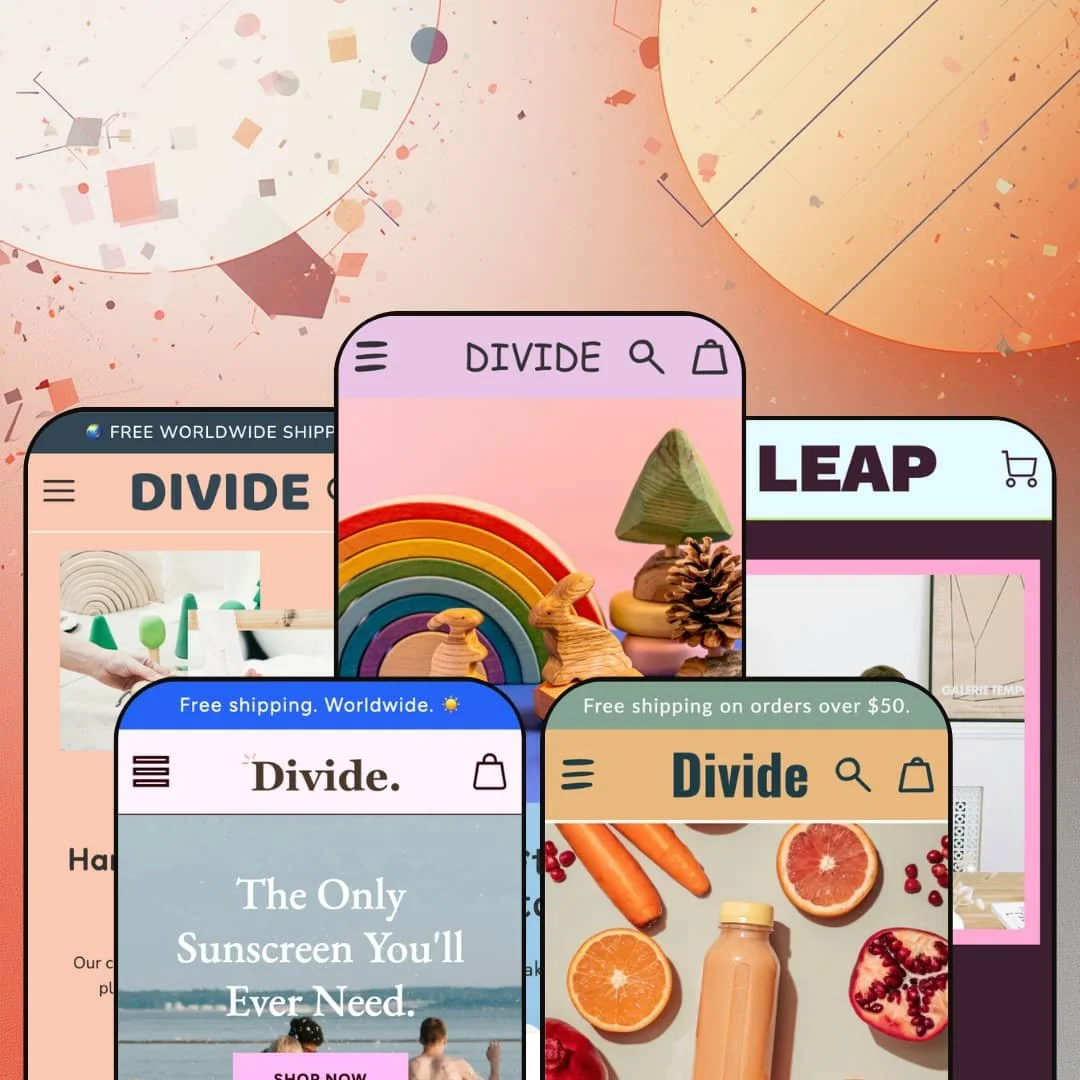
A wooden-toy workshop, a solo marketing freelancer, and a smoothie-booster brand can all run on Divide and still read as three unrelated companies. That range is the whole pitch. Squiggle & Code's $350 Online Store 2.0 theme hands you a deliberately loud design system, built around wavy section dividers, decorative accent shapes, and clickable stickers, then bets that one strong identity can stretch across very different brands. Whether it stretches to yours is the real question, because neutral is the one thing Divide never tries to be.
A design system with a real point of view
The dividers are the headline act: three styles (Waves, Spikes, Blocks) that cut between sections, paired with built-in accent shapes and, since version 3.7.0, clickable sticker blocks. It's the namesake feature for a reason. Together they let a store look designed without a designer, which is the entire reason to pay for personality instead of building it. For a small, founder-led brand in a playful category like toys, kids' goods, or gifting, that out-of-the-box character is worth more than another grid of neutral sections.
Built for founders who sell more than one kind of thing
If you're a solo operator who isn't sure whether you're a product shop, a service business, or a bit of both, Divide is unusually accommodating. One section library covers all three modes: physical goods sold by the unit, services packaged and presented like products with their own pages and calls to action, and a single-item consumable brand built around education rather than range. You're not boxed into one playbook. For a single-brand business in apparel, food, handmade goods, or professional services, that flexibility means the theme can follow you as the business changes shape.
A conversion kit that's already in the box
Countdown timers, product badges, a stock counter, recommended-products rows, trust-badge bars, promo banners, and in-menu promotions all ship inside the theme, designed to work together as one merchandising kit rather than as seven separate add-ons. You're not assembling urgency and social proof from scratch. A small store can switch on a stock counter, a "selling fast" badge, and a recommended-products row and have a working conversion layer the same afternoon. That's most valuable for a seasonal or drop-driven brand with a tight catalog, where a little urgency on a few SKUs does real work.
The product page is a landing page, not a fixed template
Want a product page that tells a story instead of just listing specs? Divide builds the product page from the same sections as the homepage, so on the Elephants demo the buy box is followed by product tabs for Materials and Shipping, a four-tile "Why you'll love it" block, a marquee, and a trust row. You arrange it like a campaign. For a considered, higher-ticket, or gift purchase in a category like handmade goods or wellness, where a shopper wants reassurance before checkout, that modular page turns a single product into a small persuasive landing page rather than a dead end.
The personality is the product, which cuts both ways
Divide commits hard to a playful, slightly handmade aesthetic, and that commitment is non-negotiable in a way the price doesn't fully warn you about. It runs loud by default. Wavy dividers, accent doodles, stickers, and scrolling text are the look, and stripping them out to reach something restrained guts most of what $350 bought you. If your brand is luxury, minimalist, or buttoned-up professional, this is the wrong theme, full stop. A mid-market or premium label chasing quiet, editorial calm will fight the design at every turn rather than ride it.
Tuned for small, curated catalogs, not big inventories
Everything here is built to make a handful of products feel like a lot. The demos run three to a dozen items, the homepages are narrative-first, and the navigation stays shallow because there isn't much to organize. A merchant carrying 500-plus SKUs across many categories, or running a department-store-style catalog, is buying a theme designed for the opposite problem and should pressure-test collection browsing and filtering before committing. This is a boutique theme, and it's honest about it.
Premium personality, fairly standard commerce engine
Most of what makes Divide feel premium is visual; the commerce mechanics underneath are dependable but ordinary. The depth is in the styling. You get product tabs, recommended products, product badges, and tidy section options, all of which work cleanly and none of which break new ground. If you're choosing a $350 theme for advanced merchandising rather than for looks, you'll notice the gaps: there's no native product configurator and no built-in comparison table, and the catalog tools stay basic. Shoppers who need to compare multi-attribute products, or who expect configurator-style options on a single product, will still send you back to the app store.
What it takes to launch
Plan a multi-day build before launch: brand photography plus the custom accent graphics and stickers the look depends on, hero and section copy written across both the homepage and the modular product pages, badge, stock-counter, and menu-promo staging, and, if you sell into the EU, localized strings across the five supported languages. The framework installs in minutes; making it look like the demo is design and copy work, not a toggle.
-
What works in this preset
Scroll the homepage and the personality lands before any product does. A marquee of "Sustainably made" slides across the page, hand-drawn accent shapes frame a photo collage, and a "next product release" countdown ticks away under a gift icon. The shop feels handmade. Most of that character is decoration you switch on, not custom code, which is the point of buying Divide in the first place.
The header is the busiest of any demo I opened. A utility row carries Wholesale, FAQs, and Contact above the main navigation, a country and language selector sits up top, and the cart drawer greets you with a five-star customer quote before you've added a single thing to it. For a gifting brand that lives on trust and impulse, surfacing a review right at the cart is a smart, quiet nudge. It earns its space.
Below the fold, the section toolkit does the storytelling. An about-the-brand block tells the Auckland origin story, a trust row spells out the make-to-order promise with small icons, and a newsletter band dangles ten percent off. None of it is fancy. Stacked together, though, it walks a first-time visitor from "cute toys" to "real brand I can trust" without a single bespoke template.
Where it stumbles
Here's the catch with all that personality: the page has room the catalog can't fill. The demo runs marquees, a countdown, a collage, testimonials, and two trust rows for a range you could count on one hand, so the design can outrun the inventory. A four-product maker leaning on this preset will either pad the page with story and lifestyle content or trim sections back toward what the range can actually support. The proportions take tuning.
-
What works in this preset
Leap is the demo that proves Divide isn't only a product-shop theme. It dresses the same toolkit as a one-person marketing studio, where the three "products" are Website design, Email marketing, and Social media, and the primary call to action is "Book a call" rather than add-to-cart. The illusion holds. I clicked through expecting a store and found a service business instead, and that reframing is more useful than it sounds, because plenty of solo founders sell time, not objects.
What you notice next is the structure underneath the friendliness. A four-step process section lays out Discovery, Strategy, Execution, and Results, each with a plain-language promise, and a long FAQ answers the questions a nervous small-business owner actually asks about timelines and contracts. It is quietly persuasive. The whole thing reads less like a store and more like a tidy pitch deck you can scroll.
The mega menu does real work here too. Hovering "Services" drops a panel that links straight to each individual service page, so the navigation itself doubles as a compact sales menu for a business whose entire catalog is only three offers. It's a small touch. But for a solo operator, that direct routing matters far beyond any hero animation.
Where it stumbles
The clever part is also the limit. Because the services are dressed as products, the buyer journey still ends at a contact form and a booking, not a configurable purchase with deposits, tiers, or add-ons. A studio that genuinely wants to sell packaged retainers and take payment up front will be wiring that flow itself; Leap gives the storefront and the credibility, not the transaction. As a presentation layer it's strong, as a checkout for services it stops short.
-
What works in this preset
This is the shopping-first face of the same playful toy world. A "Free worldwide shipping" bar sits above a Shop mega menu that tucks featured bundle tiles right into the dropdown, and the bestseller grid leans on product badges to do the talking: Staff pick, Bestseller, Sold out, Sale. It reads commercial. I went looking for the merchandising signals a busy shopper scans for, and every one of them was already there.
Click into the catalog logic and a clear two-tier structure appears. The Shop menu splits into Toys and Bundles, a "Shop by collection" band repeats those paths as image tiles, and a dedicated "Bundle & Save" row pushes the wrapped gift sets. For a brand whose whole gifting angle is "let us take the stress out of it," routing shoppers toward pre-made bundles in three different places is a coherent merchandising choice. It is gift-led, start to finish.
The announcement bar and sticky header earn their keep on a shopping-first homepage. The bar holds the worldwide-shipping promise in view as you scroll the grid, and the persistent header keeps search and the cart only a single tap away throughout the session. Small stuff. On a longer, grid-heavy page like this one, that constant access is what keeps a browsing session from stalling.
-
What works in this preset
The quietest, cleanest demo of the set leans all the way into calm. A single hero ("Supercharge your smoothie") opens onto a short rich-text manifesto about organic ingredients and no added sugar, then a three-up benefits row and an autoplaying product video. The restraint is deliberate. A booster brand selling a daily ritual wants credibility over noise, and this preset hands over a layout that breathes.
What sells it is the "Boost your way" flow. Three numbered steps explain how to choose a booster, add a shot, and feel the difference, and a tight three-product grid keeps the choice simple instead of overwhelming. I liked how little the page asked of me. For a small consumable range where the job is to teach a habit, that simplicity is exactly the right instinct.
Where it stumbles
For a wellness brand, the staging is almost too lean. A two-item nav and a three-product range give a supplement seller very little room to build the education, ingredient detail, and reorder or subscription prompts a habit-based product leans on. Nothing's broken; the preset simply starts you at "minimal," and a real booster business selling routines will be adding structure, not stripping it. Treat is a strong opening mood, less a finished wellness storefront.
It's a point of view, not a blank canvas
Read the demos end to end and the most striking thing isn't any one feature, it's the refusal to be generic. A neutral base waits for you to bring the personality; Divide brings its own and asks you to share it. That's unusual, and for the right merchant it's the entire value, because you're buying taste pre-installed rather than a kit you still have to style. The confidence is the whole point.
Actively maintained, not shipped and forgotten
One thing that only shows up if you check the version history: Divide is still being worked on. The 3.7.0 release in 2026 added clickable stickers and custom social icons and fixed real layout bugs, the steady upkeep that decides whether a one-time theme purchase ages well or quietly rots. Upkeep is underrated. For a merchant who plans to keep this storefront for years rather than months, that ongoing attention is worth as much as any single section.
A narrow band of brands
The headline number oversells the variety on offer. Look past the count and the designs cluster in one archetype: small, playful, founder-led, visually rich consumer brands, with the wooden-toy world turning up repeatedly. The breadth lives in the styling controls, not in the kinds of business on show, so a B2B supplier, a large multi-category retailer, or any brand outside the playful-consumer lane won't find a close starting point waiting. "Ready-made designs" is accurate; "ready-made for your store" is the part to check.
The strong hand can homogenize
The flip side of buying taste is that everyone else can buy the same taste. Because so much of Divide's identity comes from a fixed set of decorative systems, two unrelated stores that lean on the defaults risk looking like cousins, and a shopper who's seen one Divide site may half-recognize the next. Distinctiveness takes extra effort. The very thing that gets a new brand to "designed" quickly is also what can flatten it, unless the owner invests in genuinely custom imagery and accent art.
★ 8.2/10
Rating
-
The bundled conversion and merchandising kit (countdown, badges, stock counter, trust rows, product tabs, recommended products, mega menu, product video) covers a small store's needs well, but the commerce mechanics are conventional, with no configurator or native comparison tooling.
8
-
Demo-level results come from settings rather than code, and a complimentary video guide walks a first-time owner from install to publish.
9
-
Layouts adapt cleanly, the Move demo ships a dedicated mobile hero image, and a slide-out menu plus a sticky-header option keep navigation reachable on small screens.
8
-
The leaner presets like Treat stay light with lazy-loaded imagery and restrained section counts; the busier toy demos carry more weight from accent graphics, multiple hero images, and video.
8
-
The divider, accent-shape, and sticker systems plus modular home and product sections give wide latitude inside the theme's playful aesthetic; pushing toward a minimal or luxury look means switching much of that off.
8
Frequently Asked Questions
-
Divide ships pre-translated interface strings for five languages (English, French, Italian, German, Spanish), so buttons, form labels, and theme text are covered out of the box. Your product descriptions and currency conversion, though, are handled by Shopify's own market and translation settings, not the theme.
-
The star ratings you see on a product page come from a reviews app rather than the theme itself; Divide provides the placement and styling, and the app supplies the actual review data. Budget for a reviews app if customer ratings are part of your plan.
-
Version 3.7.0 introduced clickable sticker blocks, small decorative graphics you can now link to a page or product. They're meant for playful promos and accents, and they fit the theme's hand-made personality.
-
Yes. In-store pickup is included, and the cart also supports order notes, which is handy for a local maker handling pickups or gift-message requests.
-
The Move demo sells bundles as ordinary products priced as a single SKU, like its "Wildlife Bundle," so it's manual bundling rather than a dynamic builder. Shoppers who want to assemble their own mix-and-match bundle would need a bundle app on top.
-
The theme includes mega-menu support, and the demos range from a simple services dropdown to a Shop menu with featured-product tiles built right into the panel. For a small-to-mid catalog, that's plenty of structure to work with.
This review is based on hands-on testing of the publicly available preset demos of the Divide Shopify theme as of June 24 2026. Theme features, preset availability, and performance can change with subsequent updates from the theme developer.