
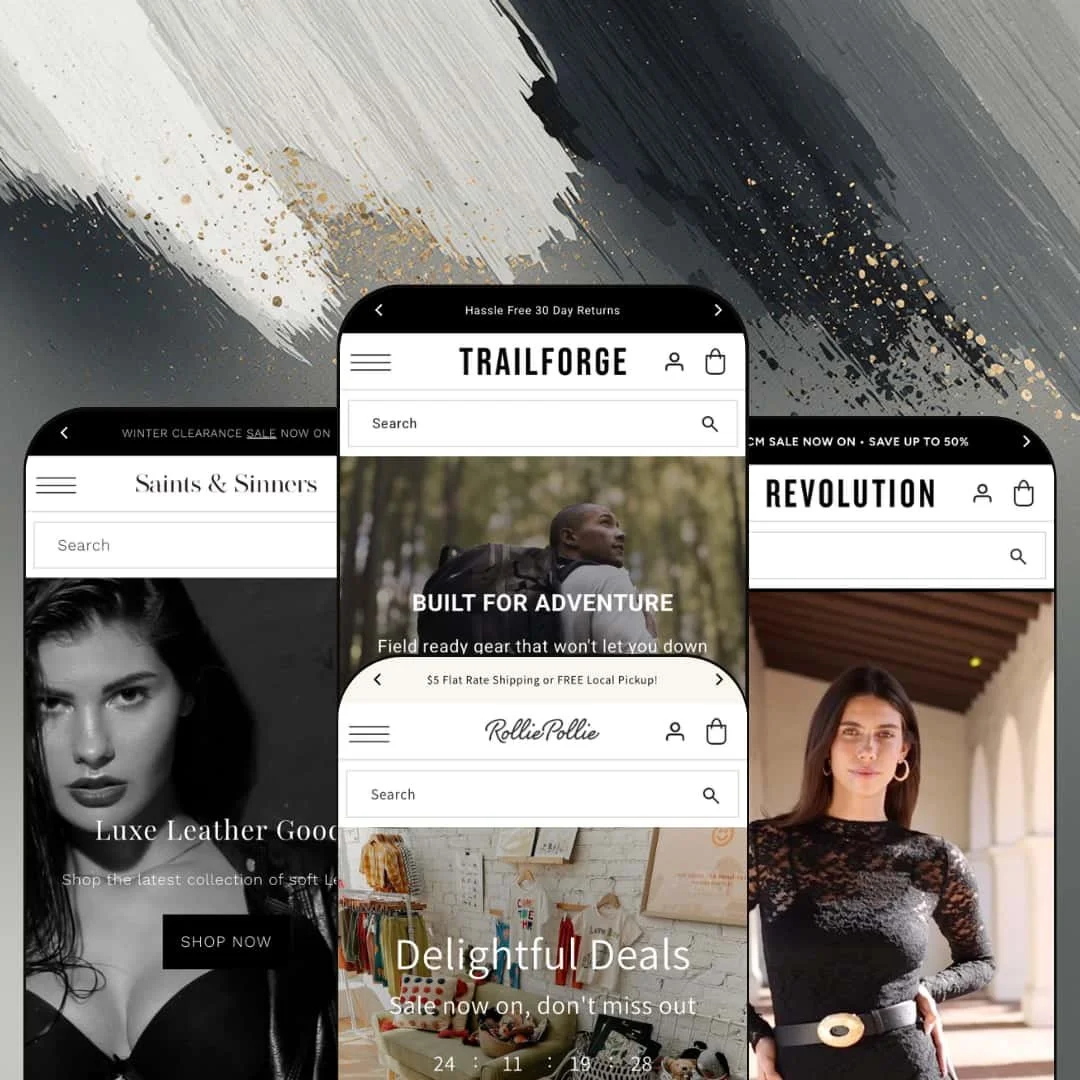
Most Shopify themes are built to sell what's sitting in stock. Drop is built around what's coming, what's back, and what's about to disappear. We Are Underground's Online Store 2.0 theme costs $180 and ships four presets, and every one of them treats the calendar as a merchandising tool: countdowns, coming-soon staging, restock reveals. If your store runs on release cycles rather than a static catalog, this is a theme that speaks your language natively.
A complete release cycle without an app install
Countdown timers, coming-soon staging, back-in-stock alerts, and stock counters all ship on the official feature list as one coordinated drop mechanic. That matters. A product can move from teaser to launch to low-stock warning inside the theme editor, with no separate alert widget to install, restyle, and reconcile with your typography. For single-brand sneaker and streetwear stores running weekly drops to impulse-driven buyers, this cycle is the core of the purchase.
Quick-buy that respects variants
Dawn, Shopify's free baseline, hands multi-variant quick-adds off to a pop-up chooser; Drop prints the option row on the card itself, so a shopper taps S, M, or L and adds straight from the collection grid. No detour. For apparel and footwear stores in the 50-300 SKU range converting impulse buyers from category pages, that one removed step compounds across every session.
Navigation that sells, not just sorts
Mega menu panels accept promotional link rows, social icons, and a support-contact strip alongside the column links, and in-menu promos appear on the feature list rather than as a demo hack. Menus become small landing pages. For multi-brand kids retailers and gift shops carrying 100 to 500 SKUs, where customers browse by brand or age before they browse by product, that panel real estate does genuine discovery work.
A merchandising kit for products that need explaining
Product tabs, usage and ingredients blocks, size charts, image hotspots, a before/after slider, and product video support form a coordinated merchandising kit for the product template. Pages read like pitches. For gear brands and skincare labels selling considered purchases, where a $200 pack or an active-ingredient serum has to justify itself before the add-to-cart, that stack is the difference between a spec sheet and an argument.
The volume knob starts at loud
Countdown banners, marquee tickers, stock counters, promo popups, and promo tiles are headline features, and the presets wear them proudly. This theme does not know how to whisper. Luxury jewelry houses and furniture brands selling considered, evergreen purchases will spend their customization hours dialing urgency out rather than building atmosphere in, and the layout language keeps nudging back toward the sale.
Five languages, then you're on your own
Pre-translated theme strings cover English, French, Italian, German, and Spanish. That's it. Cross-border brands running multi-market storefronts beyond that list, whether a Dutch-speaking Benelux boutique or a shop courting Nordic and Japanese customers, will be hand-translating button labels, cart text, and form strings before launch day.
Homepages with an appetite
Every preset stacks a dozen-plus sections deep, with several eight-product carousels and full purchase modules embedded mid-page. Restraint is your job. The theme will happily let you publish a homepage that scrolls forever and loads accordingly, and for mobile-first stores selling low-ticket impulse goods to social traffic, where every second of load time bleeds sessions, curating down to eight sections is real editorial work the preset won't do for you.
What it takes to launch
Expect a multi-day pass covering campaign copy across heroes and tickers, scheduling of countdown and coming-soon events against a real calendar, product spec metafield population, contact detail replacement, and mega menu re-staging around your own collection tree.
-
What works in this preset
Scrolling this demo feels like flipping through a printed gear catalog that someone taught to sell. The Trailforge staging commits hard to technical outdoor gear: waterproof duffles, packable slings, travel packs, all shot on neutral gray. Midway down, a Spotlight section embeds a complete buy box for the SEG28 Backpack, with gallery thumbnails, a quantity stepper, an accordion of details, and a working add-to-cart, so a returning customer can purchase the hero product without ever opening its page. That's a homepage doing product-page work.
"45 liter capacity, meets most airline carry-on requirements." The Gear Focus section pairs a full-bleed product image with a column of short annotated claims like that one, plus a narrative paragraph on the SEG45's segmented design and its sealing zippers. It's long-form selling for a considered purchase, and it's assembled from stock sections rather than custom code.
The FlatPak Toiletry Bottles page shows the product template at full stretch. Fifteen gallery images, a visible SKU, and an "Only 3 left!" stock line sit above slide-out drawers for delivery and repair policies, while a Details block below pulls brand, weight, product type, and live inventory straight from the product data. Further down, a "Goes well with" row lets shoppers choose a variant and add it without leaving the page. I kept coming back to how much landing-page weight this one template can carry.
-
What works in this preset
Black leather, white space, and a clock that keeps appearing. Unveil stages a fashion label built on anticipation: a full-screen video hero opens the page, and product cards in the Trending row play short clips instead of static photos, which is rarer on cards than in heroes. The mood is monochrome editorial, and the sections stay out of the photography's way.
The Look Forward carousel is the preset's thesis. Unreleased products carry Coming Soon badges, a featured vegan-leather boot shows a dated availability line for late August, and a Notify Me email field promises an alert the moment it drops. I went looking for the seam where a third-party waitlist widget would show, and the staging reads as one continuous system instead.
A scrolling marquee repeats "New Drops coming soon" between sections, and a countdown block anchors the end-of-season sale banner. Repetition is the point. The whole homepage teaches the visitor that this store rewards coming back, which is exactly the behavior a drop-model fashion label lives on, and the sections enforce that rhythm visually rather than leaving it to copywriting.
-
What works in this preset
Would a kids boutique really need flash-sale machinery? Flash mostly answers by not using it that way. The demo stages a warm neighborhood shop for tots, with a $5 flat-rate shipping announcement, a free local pickup line, and a "new products every Wednesday" promise doing the trust work right at the top.
Navigation here is the standout. The menu routes shoppers by brand through filtered collection links for Jellycat, HABA, and friends, and by age through 0-1, 1-3, and 3-5 paths, which mirrors how parents actually shop for children. A gift shop could lift this structure wholesale.
A featured Animal Print Socks block sits mid-homepage with size and color options plus a live add-to-cart, and the header carries a currency selector spanning a full country list. Small store, wide reach. The staging argues that a local boutique can still merchandise like a much bigger operation.
Where it stumbles
The preset's name promises urgency the staging doesn't chase. Beyond a hero countdown over the Delightful Deals banner, the demo reads local boutique first and fire sale second, so merchants shortlisting presets by name should judge this one by its screenshots rather than its title. That's not a flaw in the shop it builds; it's a labeling quirk worth knowing before you commit a rebuild to the wrong starting point.
-
What works in this preset
I scrolled through Reveal expecting a rerun of Unveil and found a different retail logic instead. Where Unveil sells anticipation, Reveal sells the markdown: cards carry computed savings labels like "Save $23.00" next to struck-through compare-at prices, and a BFCM ticker loops trust messages between sections. This is the boutique-on-promotion preset, staged for a womenswear shop that moves inventory in waves.
The currency selector arrives configured with 28 real markets, from euros and pounds to yen and won, instead of a single-currency placeholder. That detail matters for staging honesty. A cross-border seller can watch the header behave with an actual market list before buying, rather than discovering the layout implications after install.
A Back in Stock spotlight gives the Tiara Satin Top full launch treatment: a restock ticker overhead, size and color pickers, an "in stock, ready to ship" reassurance line, and purchase controls right on the homepage. Restocks get event staging here. For a boutique whose popular sizes sell through and return, treating a restock as news rather than a quiet inventory update is the preset's smartest instinct.
Range you can verify
The same section library restyles from technical outdoor gear to pastel kids retail to monochrome fashion purely through color schemes, typography, and imagery. The personality lives in the design tokens, not in preset-exclusive tricks, and the four demos let you confirm that range with your own eyes before spending a cent.
A maintained product, not a launch artifact
Drop launched in December 2021 and stands at version 5.3.0 as of May 2026. Four and a half years of visible iteration means you're buying into a living update stream, which matters more over a store's lifespan than any single feature on the list.
Social proof wired to the catalog
Across the presets, press accolades and customer testimonials link out to the exact products and collections they praise instead of floating as decoration. It's a quiet cross-preset pattern with real logic: trust content doubles as navigation, and a compliment becomes a click path.
It assumes you run a marketing calendar
Drops, restocks, seasonal windows: every preset presumes scheduled campaigns with dates, fresh copy, and inventory choreography behind them. A merchant without that operational cadence inherits sections with nothing to announce, and an expired countdown is worse for trust than no countdown at all.
A 2021 core in a Theme Blocks world
The architecture is Online Store 2.0 through and through, with the shallow block nesting of its generation and none of the Horizon-era nesting depth or AI-block workflows. That's no dealbreaker for most stores, but teams standardizing on Shopify's newest editor patterns should know which generation they're adopting.
★ 7.8/10
Rating
-
The release cycle, merchandising sections, and cross-sell hooks arrive theme-native. At $180 that's a dense package with few genuine gaps.
8
-
Sections have clear, single jobs and the presets show them working. The flip side is choice: staging a homepage this dense takes editorial judgment.
8
-
The slide-out menu stacks three navigation levels cleanly, and sticky cart plus sticky add-to-cart keep the buy action reachable on very long product pages.
8
-
Lazy-loading is in place, but the homepages lean on stacked carousels, embedded purchase modules, and large galleries. Speed depends on merchant restraint.
7
-
Four presets prove the token system's range across wildly different verticals. The ceiling is the layout language itself, which stays promotional even at its calmest.
8
Frequently Asked Questions
-
Yes. The campaign sections, from countdowns to coming-soon carousels and tickers, are optional, and the catalog, collection, and product templates work as a conventional store without any of them.
-
Back-in-stock alerts sit on the official feature list as theme functionality, and the demos capture emails on unreleased products without any visible third-party widget in the flow.
-
Flash. Its demo organizes discovery around labels and age ranges rather than a single house brand, which maps directly onto boutiques stocking many vendors.
-
No. The feature list tags combined listings as Shopify Plus, so standard plans merchandise colorways with regular variant swatches instead.
-
Version 5.3.0 shipped on May 13, 2026, roughly four and a half years after the December 2021 launch, and the release notes are public on the Theme Store listing.
-
Yes. The $180 license includes Drop, Unveil, Flash, and Reveal as switchable presets, so you can rebuild toward a different vertical later without repurchasing.
This review is based on hands-on testing of the publicly available preset demos of the Drop Shopify theme as of August 2026. Theme features, preset availability, and performance can change with subsequent updates from the theme developer.