
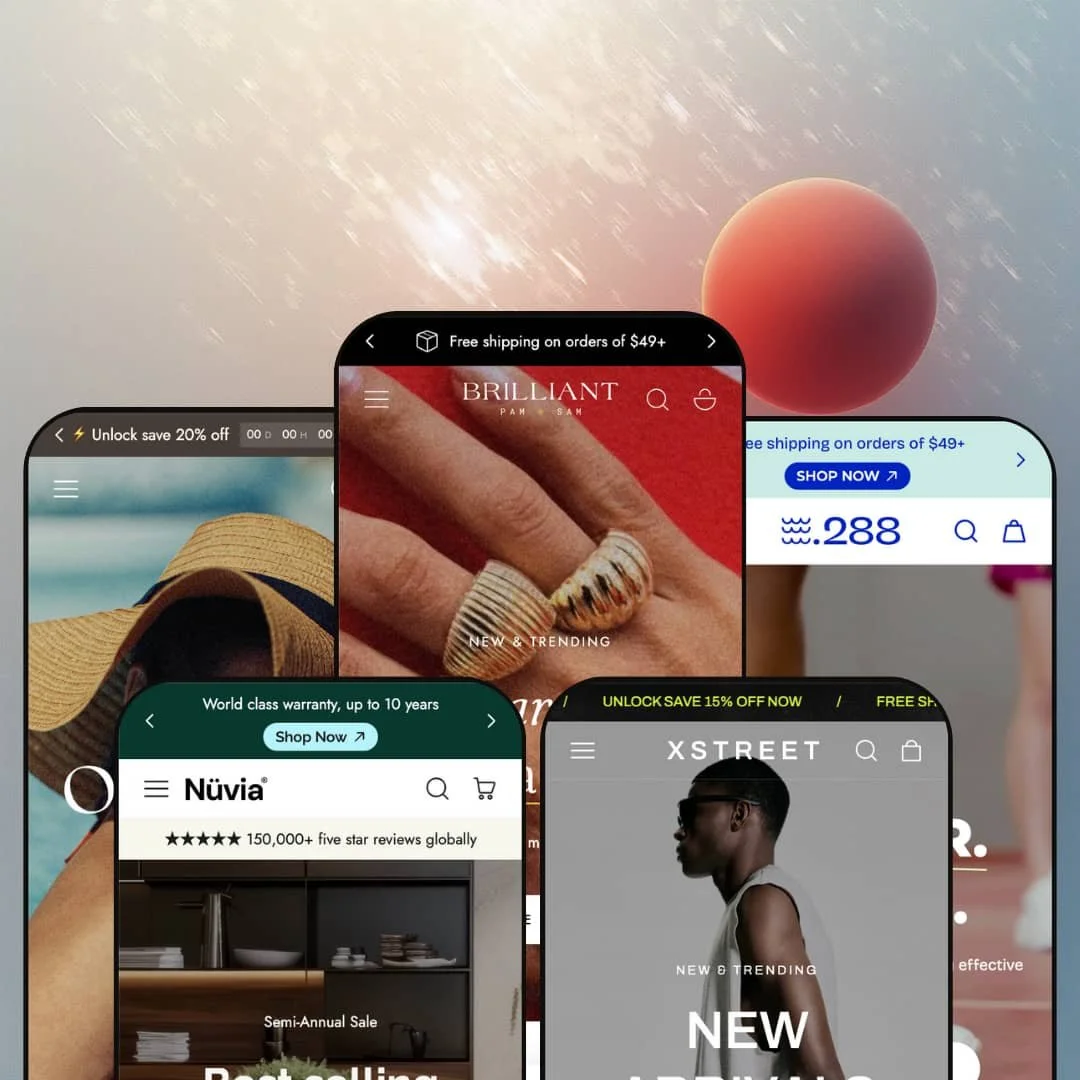
Most five-preset themes change the fonts and call it a family. Edge changes the store: demi-fine jewellery, multi-brand streetwear, swimwear, footwear and furniture each get their own navigation logic, card behavior and product-page staging. It's an Online Store 2.0 build from OranThemes at $340, a price where a handsome hero section stops being enough. What matters is whether the selling tools run as deep as the styling, so that's where I spent my time.
A mega menu that merchandises, tab by tab
Edge's tab mega menu, added in the February 2026 releases, gives each top-level collection its own tab with a thumbnail, three live best-seller cards with quick add, a counted link such as Earrings (36) and a promo tile alongside. Shoppers can buy from the navigation. For jewelry or apparel merchants with several departments and 100 to 500 SKUs, that turns the header from a directory into a second homepage, and it's staged in both the jewellery and furniture demos, so you can watch it handle two very different catalogs.
A cart drawer that does more than count
Dawn's cart drawer stops at line items and an order note. Edge's adds a gift-wrap checkbox, a tabbed strip for order notes, a shipping-rate estimator and a discount-code field, an optional terms-and-conditions checkbox above checkout, payment icons with a short trust message, and an empty state that shows three collection cards instead of a dead end. None of it needs an app. For gift-heavy, mid-market brands in jewelry or homeware, where the add-on and the promo code decide the order value, that's a meaningful share of the cart work already done.
Sizing help built into the buy box
On the streetwear demo's product page, a three-point fit scale (Small, True to size, Large) sits above the options, the first gallery image carries a model caption reading 170 cm, EU 36, and the Size chart link opens a conversion table across UK/US, Japan and EU sizing, with the fit guide fed from metafields since the August 2025 update. That's three answers to one question. Will it fit? For apparel and footwear merchants whose shoppers buy carefully and return often, putting all of it beside the size picker is the most direct lever on return rates the theme offers.
A changelog that keeps adding tools
How much can a theme grow in its first nine months? Edge shipped twelve releases between July 2025 and April 2026, and they weren't cosmetic: two new presets, a compare table section, a specification table block for product pages, sibling products on cards, high-variant product support, a brand and vendor list, and new gallery layouts all arrived after launch. That's real momentum. Single-brand merchants and small agencies planning to sit on one license for years, with evergreen catalogs instead of seasonal rebuilds, are the ones who benefit from a developer that adds tools as well as patches.
The social proof is staged, not earned
Every star you see in these demos needs something outside the theme to make it true. Card ratings read from product rating data that an app has to supply, the one working review widget (on the jewellery product page) belongs to the Judge.me app, and the louder claims are plain text: a Customer Reviews section of typed quotes with typed "11 days ago" stamps in the footwear demo, and a "150,000+ five star reviews" strip above the furniture hero. It's a laugh track, not a crowd. Considered-purchase brands in jewelry or furniture at mid-market prices and up should budget for a review app, plus the integration time, before any of those stars mean something.
Colorways multiply the catalog
Edge's answer to colour variants is sibling products: each colour is its own product, linked to the others through metafields so they appear as pills on the card and product page. It looks great. It also means the footwear demo's Arizona collection lists 82 products that are colour and material versions of one sandal, and every new colour is a new product to create, photograph, price and link by hand, because the combined-listing alternative on the feature list is reserved for Shopify Plus. Footwear and apparel brands with ten or more colours per style and a one- or two-person operations team should cost that upkeep before committing.
Last-generation architecture at a current-generation price
Shopify's Theme Blocks generation, with deeply nested blocks and AI-assisted block generation, reached the Theme Store in May 2025. Edge launched that July on Online Store 2.0. The practical difference shows up when you want something the section library didn't anticipate: on this architecture blocks nest only a level or two inside a section, so a custom layout that puts a product card inside a column inside a tabbed banner means code, not drag and drop. Agencies building bespoke layouts for clients, and luxury-tier single brands with art-directed pages, will feel that ceiling sooner than a merchant happy inside the presets.
What it takes to launch
Expect two to three days: rewriting the shared product-tab, press and testimonial copy, populating metafields for sibling colours, fit guides and specification tables, rebuilding the tab mega menu and promo tiles around your own collections, and reassigning products in hotspot, lookbook and shoppable-video sections.
-
What works in this preset
Princess, Oval, Cushion, Pear, Asscher, Round, Heart, Emerald. That's the second thing on the homepage: a row of eight gemstone-shape icons, each linking to its own collection, and it tells you immediately that this demo understands how people shop for stones. The Shop menu repeats the idea with a By color column that routes to white gold, 18K gold, rose gold and freshwater pearl. Attribute-led entry points like these are cheap to build once the collections exist.
Open a product and the gallery leads with video before a single still. Below the title you get a stock line, a delivery-date estimate, a returns promise and a four-point benefit list, and then a Complete The Set block where each suggested piece has its own Add button, so a bracelet can join the ring without leaving the page. A sticky bar follows you down with the chosen variant and a Change link. I clicked the share row out of habit and found WhatsApp and a copy-link button next to the usual networks.
Product cards do real work here. Rings show their sizes as pills (6, 7, 8) right on the card, the halo ring shows carat weights the same way, and single-option pieces fall back to colour dots with a Quick view trigger, so the grid adapts to whatever the product needs instead of forcing one pattern. Small merchant-written labels such as Certificate, Pre-order and New sit on the image. It's tidy.
Where it stumbles
The engagement ring is where the staging slips. Its only option is labelled Size, but the three values are carat weights, so there's no finger size to pick, even though the size-chart popup beside it carefully converts ten ring sizes between millimetres, US, UK and German standards. I went looking for an engraving or gift-note field on the same page; product options are on the theme's feature list, and this demo doesn't put them to use. Bridal and gifting jewellers will need to set up both before launch.
-
What works in this preset
Kapital next to Stüssy next to Hiking Patrol: this is a multi-brand streetwear shop, and the cards are built for it. Every card carries a vendor line that links through to that label's products, and sizes appear as pills on the image, S to XL for tees, W32 to W38 for denim, UK8 to UK11 for trainers, which means a shopper who knows their size can add from the grid without opening anything. For a store where half the traffic arrives knowing the brand and the size, that matters. Fast in, fast out.
Look closely at the Drill shorts card. A tiny ticker reading "Exclusive on Xstreet" scrolls across the image, a marquee badge the merchant sets per product, and it gives drop-culture stores a per-product shout without touching code. Colourways are handled as linked products: the Gauze pocket tee shows Ivory, Pink and Light Blue as thumbnail pills, each with its own URL, photos and stock. Under the hero, a plain text link strip (SS25 Sale, Coffee Jazz Rap Special, Peace HBX) acts as a second, campaign-led menu.
Where it stumbles
Brands are the organising idea of this store, yet the demo only reaches them through those vendor links. A brand and vendor list section shipped with the theme in February 2026, and Layer's demo doesn't deploy it, so a merchant carrying forty labels will be building the A to Z page, and the menu route to it, on their own. Not hard. Just not done for you.
-
What works in this preset
The first screen sells no product at all. Sundown opens on what the theme calls Hero Branding: the wordmark stretched across a full-bleed beach photograph, with a small rotating seal that reads Scroll down, Explore the shop, and a trust row directly underneath covering returns, shipping and payment. It's a confident, brand-first opening, and swim labels that live on Instagram imagery will feel at home.
Swimwear shoppers think in shapes, and this demo lets them shop that way. A Styles for Every Body row uses ten line-drawn silhouettes (Balconette, Square Crop, Triangles, High Waist, Ruched and so on), the menu adds a By Fit column with routes such as Bust Support and Swim Dress next to a By Style column with matching icons, and cards carry a small activity label like Surfing where it applies. Numeric sizes 4 to 16 show as pills on multi-size pieces. I noticed the icons before I noticed the photography.
Where it stumbles
Bikinis are bought as sets, and this demo sells them as strangers. The Willow Bra is photographed with the Logan Pant in every frame, yet they're separate products and nothing in the grid pairs them, so the shopper adds a top and then goes hunting for the matching bottom. The theme's cross-sell block can do that job on the product page. A swim brand will want the pairing visible earlier, and that's merchant-side work.
-
What works in this preset
Halfway down the page the videos start selling. A carousel headed Discover Ergonomic Comfort runs five short clips, and each one has a product chip pinned to it with thumbnail, price and an Add button, so the sandal on screen can go into the cart while the clip is still playing. Above it, a lifestyle image uses hotspots to open two compact product cards. Both keep the shopper on the homepage, and both are ordinary sections any preset can use.
Under the sale banner: Women's, Men's, Kids. That plain link row does the segmenting a shoe store needs before anything else, and the Shop menu backs it up with a By Style column of thumbnail links (Arizona, Boston, Eva, Gizeh) beside four image promos. Cards carry merchant-written labels such as Ship 24h and Best seller, and the footer's service row promises free pickup with eligible orders ready in under four hours. Useful, unflashy retail plumbing.
Where it stumbles
One section reads against the vertical. A before/after slider sits under the heading See the Transformation, a mechanic made for skincare results or renovation photos, and here it wipes between a white clog on a studio background and a lifestyle shot, which compares nothing. Footwear merchants would get more from that slot with a sole cutaway or a worn-in pair beside a new one. As staged, it's filler.
-
What works in this preset
Furniture sells in context, and Linea's demo knows it. A Get Inspired section sits under five room tabs (The Sofa, The Living Classic, The Holiday, The Bedroom, The Decoration), swapping the photograph and listing the pieces in that room as compact cards with price and an Add button, which is about as close to walking a showroom floor as a homepage gets. A separate Shop the look image does the same with hotspots over a styled corner. Both work.
Service promises get real estate here. Directly under the hero, an icon row covers fast delivery, a phone number, lifetime warranty and free design services, the Shop menu gives every category its own line icon and splits Indoor from Outdoor, and the footer runs four link columns with trade and delivery routes before a long brand-story text block that collapses behind Show more. I scrolled through it twice to be sure: nothing here is furniture-specific code, it's the same section library dressed for a slower, higher-ticket sale.
Where it stumbles
The New Signatures row leads with stock you can't buy. Three of its six pieces are sold out, including the $1,125 Pia Chair and the $1,000 Boucle sofa, which is an odd first impression for a showroom. And the quick Add buttons that suit an $85 planter feel out of step beside a $1,000 bed in the shoppable video; considered purchases want dimensions and delivery terms before a cart button. That's a staging choice, not a limit.
Editorial sections that carry a cart button
Across the five demos, the content sections rarely stop at looking good. Videos carry product chips, lookbook images open product cards, and room or collection tabs list buyable pieces. The pattern is consistent enough to call a design principle: wherever Edge shows a picture, it tries to put a price next to it.
One product card, five dialects
Ring sizes, carat weights, EU shoe sizes, numeric swim sizes and furniture colour dots all run through the same card, along with merchant-written labels and an optional vendor line. Reading the presets side by side, that adaptability is what makes the family convincing; the verticals differ in data, not in templates. A merchant who adds a second category won't need a second theme.
A retail layer in every demo
Each demo keeps a Stores page in its menu, two of the footers advertise pickup within four hours, the jewellery header reserves a utility row for a phone number and a store link, and in-store pickup is on the feature list. Edge assumes its merchant might have a front door. For brands with even one physical location, that assumption saves work.
A default voice that's always on sale
Read all five headers and carts in one sitting and a habit emerges: countdown bars in three announcement strips, a promo-code prompt inside every cart drawer, sale banners on every homepage, including the ones pitching heirloom jewellery and lifetime-warranty furniture. None of it is mandatory. But the promo kit is the theme's most developed muscle, and quiet, full-price brands will spend their first week switching things off.
Five skins over one homepage skeleton
Strip the photography and the homepages share a running order: hero, counted collection list, tabbed product grid, gift banner, video, journal, Instagram, trust icons. The presets diverge in navigation and product-page staging; page architecture barely moves, so a merchant choosing between two of them is mostly choosing fonts, colour and demo content. That's fine value, but five names promise a wider spread.
Hungry for art direction
Video heroes, a parallax gallery built from transparent cut-out images, text that reveals inline product photos as you scroll: the signature sections all assume a brand with a photographer and a retoucher on call. With stock imagery they flatten quickly. Budget for content as seriously as for the license.
★ 7.6/10
Rating
-
Tab mega menu with live products, a well-stocked cart drawer, fit tools, shoppable video and hotspots; review mechanics and colour grouping rely on apps or manual product linking.
8
-
The section library is broad and well labelled, but sibling colours, fit guides and spec tables all run on metafields the merchant has to populate product by product.
7
-
Heroes load separate mobile images, the mobile menu stacks the mega menu into back-button panels with the same thumbnails, and a sticky bar keeps the chosen variant and Add to cart in reach.
8
-
Images are lazy-loaded and sized responsively, and the April 2026 release sped up mobile gallery loading; the demo homepages run past twenty sections with several videos, so trimming is on you.
7
-
Multiple gallery layouts, card borders and sizes, button and badge styling, footer and menu options; Online Store 2.0 block depth caps how far custom layouts go without code.
8
Frequently Asked Questions
-
Yes. Support for high-variant products arrived in the February 2026 release, alongside a fix pass on variant selection for mobile two months later.
-
A Compare table section and a Specification Table block for the product page were both added in October 2025, and a spec table can also sit inside a collapsible row. You supply the data yourself.
-
Once, by the developer's own account: an October 2025 release fixed an issue where merchants lost the default product template on install, and the patch shipped a day after the release before it.
-
Pre-order is on the feature list, and two demos stage it: the Avril necklace in the jewellery store and the Drill shorts in the streetwear store both carry a Pre-order label on the card.
-
Right-to-left layout is a listed feature, and the release notes show it being maintained, with specific fixes for product cards, the product page and the mobile menu arrow.
-
OranThemes, based in Hanoi, with documentation on GitBook and support through a contact form. The latest release is dated April 17, 2026, and nothing has shipped in the five months since.
This review is based on hands-on testing of the publicly available preset demos of the Edge Shopify theme as of September 17 2026. Theme features, preset availability, and performance can change with subsequent updates from the theme developer.