
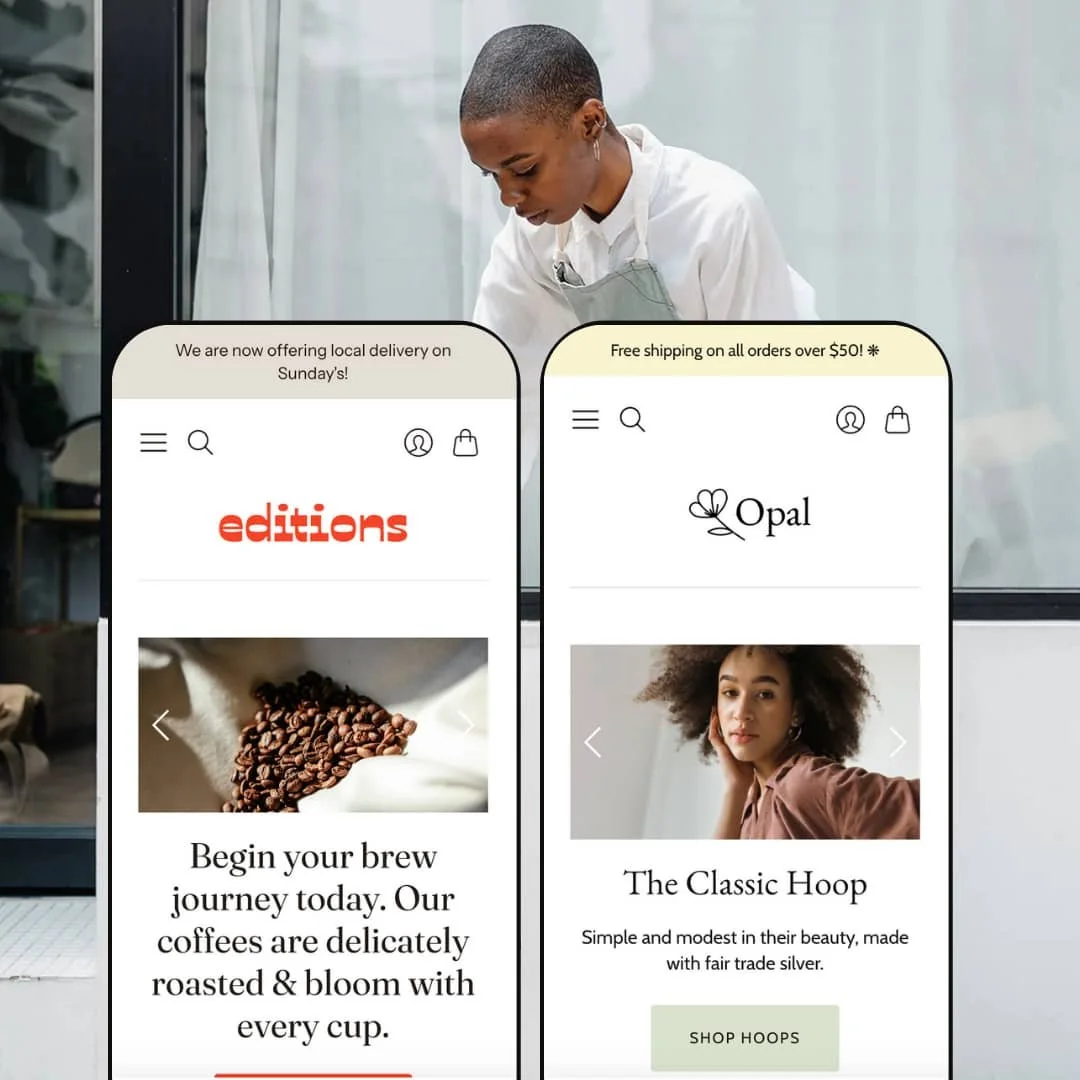
Editions positions itself as a contemporary Shopify theme with a minimal yet expressive look. The Blockshop preset leans into coffee‑shop chic, using a video hero and an earth‑tone palette to draw visitors toward curated beans and brewing tools. Opal shifts to a jewelry‑boutique vibe, with airy product photography and refined typography guiding the first click. Across both demos, navigation is anchored by a sticky header with a menu of clear categories, a visible search icon and a slim announcement bar. Product grids favour Quick Shop overlays rather than second images, and the checkout flow in these demos relies on a classic cart page.
Pros.
〰️
Pros. 〰️
✚ Quick Shop modals that respect context
Across both demos, Editions uses Quick Shop overlays on product cards, opening a modal with the key purchase details rather than redirecting immediately to a product page. That keeps shoppers anchored in the grid they were browsing, which is especially helpful when they are comparing several similar items. The modal includes quantity and option controls while still leaving the underlying grid visible in the background, so it feels like a temporary zoom rather than a full context switch and reduces the sense of getting lost.
✚ Structured navigation and search
The theme’s sticky header carries a focused navigation menu, an always‑visible search icon and a slim announcement bar. In practice this means that category changes, site‑wide search and key promotions are always within a single movement, even when you are deep in a long page. Shoppers get a sense that the store is coherent and easy to traverse, rather than a collection of disconnected pages, and they can recover quickly if they take a wrong turn.
✚ Story‑first layouts and content blocks
Both Blockshop and Opal interleave commercial modules with content sections such as journal posts, testimonials and brand notes. That structure encourages merchants to tell a story around their products instead of treating the homepage as a bare catalogue, because editorial material is always close at hand. For shoppers, this creates a more magazine‑like flow where inspiration, education and purchase options sit close together and make browsing feel less transactional.
✚ Consistent product‑page skeleton
Product pages in Editions share the same skeleton: a primary media area, purchase controls, descriptive copy and some form of related‑products or “pairs well with” suggestions. Breadcrumbs at the top help visitors keep their bearings, while accordion‑style details keep specifications from overwhelming the layout and allow readers to expand only the sections they care about. The benefit is that once shoppers understand one product page, they understand them all, which reduces friction when browsing several items in a row and encourages deeper exploration.
✚ Flexible presets, consistent core
flexible preset options that maintain core functionality while offering distinct aesthetic approaches. Even though Blockshop and Opal stage very different storefronts, they rest on the same underlying interaction model. That consistency lets merchants swap presets or remix sections without relearning how carts, Quick Shop or product media behave, which is reassuring when planning theme updates. It also means shoppers moving between different Editions‑powered stores will encounter familiar patterns, which can make the theme feel quietly trustworthy.
Cons.
〰️
Cons. 〰️
🚫 Dropdown‑first variant handling
Editions uses dropdown menus to handle sizes, weights and other options in the demos tested. This approach is functionally clear but visually flat, especially for products like jewelry where colour or finish can be as important as the name on the label. Shoppers must read text carefully rather than choosing from more visual swatches, which may slow down decision‑making when many similar options exist, and merchants who rely heavily on visual variety may feel constrained.
🚫 Quick Shop requires deliberate hover and click
The Quick Shop overlays only appear after a hover and click on desktop, and the add‑to‑cart action happens inside a modal rather than directly on the card. For some shoppers this is a comfortable, deliberate pattern that reduces accidental adds, but others may never trigger the overlay if they skim quickly through the grid. It trades speed for context and safety, which may or may not match the behaviour of buyers who are used to one‑tap adds.
🚫 Long, scroll‑heavy product pages
Because Editions stacks copy, media and supporting content in tall columns, product pages invite a lot of scrolling. This makes them pleasant to read and ideal for brands that want to tell a fuller story with paragraphs, images and recommendations, but it can be slightly awkward when a shopper decides to buy while partway down the page. They will often need to scroll back to the main purchase section rather than encountering a persistent call‑to‑action, which introduces a small but noticeable extra step.
🚫 Auto‑rotating sections with subtle controls
Some supporting sections, such as testimonial sliders, auto‑rotate through content with relatively understated controls. The motion keeps the page feeling fresh and adds social proof without requiring clicks, yet visitors who want to re‑read a specific quote or pause the sequence do not have bold navigation to rely on. This makes those blocks feel more like ambient decoration than fully interactive panels, which is not ideal if you intend them to be a primary sales argument.
-
The Blockshop preset frames Editions as a specialty coffee experience. The hero imagery focuses on brewing rituals and warm tones, so the first impression feels cosy and tactile rather than purely utilitarian. The overall typography is sturdy and functional, which suits a shop selling equipment and beans rather than delicate, decorative products.
What works in this preset
The most distinctive design decision in Blockshop is the homepage video hero. It plays a looping scene from the coffee world, and the rest of the page is staged around that motion so the brand feels alive as soon as the site loads. Because the hero takes so much visual space, the sections beneath it can be comparatively simple; collections and featured products sit in calm, light backgrounds that keep the focus on the moving imagery above and make the whole layout feel cohesive.
Blockshop’s colour direction pushes heavily into warm neutrals and muted highlights, echoing roasted beans, wood and ceramic in a way that reinforces the brand’s focus. That palette makes copper kettles, grinders and bags of beans look richer and more substantial, which is exactly what a roaster wants from a storefront. It also gives the preset a grounded feel that differs noticeably from the cooler, more delicate tones used in Opal and makes the coffee imagery appear especially inviting.
The homepage sequencing is tailored to a roastery as well. Coffee beans, brewing tools and subscription offers appear in an order that subtly nudges shoppers from one‑off bags into recurring purchases, so it feels like a guided journey rather than a random list of sections. That narrative arc turns the preset into more than just a skin; it reads like a specific type of business plan, where education, tasting and equipment are tightly connected and the homepage tells that story step by step.
Where it stumbles
Most of Blockshop’s limitations are shared with the theme overall rather than being caused by this preset. If you find the core patterns discussed in the conclusion too rigid—such as how Quick Shop and product pages behave—you will feel those same constraints here, because the preset simply dresses them in coffee‑centric imagery. There are no major extra quirks introduced by Blockshop beyond those shared behaviours, so its weaknesses largely mirror those of Editions as a whole.
-
Opal reimagines Editions as a modern jewelry boutique. The first screen shows soft, sunlit portraits and close‑ups of polished metal, with generous white space that lets each piece breathe. Typography is lighter and more refined than in Blockshop, so price points and product names feel suited to fine jewelry rather than everyday consumables.
What works in this preset
Opal’s biggest win is how it uses photography and space. Product shots and lifestyle imagery are given plenty of room, so bracelets, rings and necklaces stand out crisply against pale backgrounds instead of being crowded by text. That minimal composition makes the site feel aspirational and high‑end, even though it uses the same underlying theme as Blockshop, and it encourages shoppers to focus on surface, shape and shine.
The “Shop Essentials” section on the homepage acts as a curated tray of hero products. It pulls a handful of best‑selling pieces into a simple grid that puts the large, uncluttered images front and centre rather than surrounding them with dense copy. As a result, shoppers can treat this section as a seasonal edit or a capsule collection without getting lost in the full catalog, and merchants can rotate featured items to match campaigns.
Opal also leans into supporting content for jewelry buyers. Sections that highlight lookbooks, styling appointments and journal posts sit close to product modules, so inspiration and commerce live in the same scroll and feel part of the same story. That particular mix of visual lookbooks and service‑oriented appointment links works especially well for brands that rely on editorial storytelling, such as gifting guides and behind‑the‑scenes studio stories that show how pieces are worn in real life.
Where it stumbles
As with Blockshop, most of Opal’s behavioural constraints come from Editions itself rather than this preset, so you will notice the same interaction patterns described in the conclusion. One small stylistic drawback is that the emphasis on pale backgrounds and fine lines can make some interface elements feel slightly delicate, so shoppers with less visual acuity may have to look twice at subtle text or controls. That delicacy suits the jewelry imagery but can occasionally ask more effort from visitors who prefer bold, high‑contrast interface elements.
Niche Suitability
Not Ideal For
-
Editions is ideal for merchants who care about storytelling and want their storefront to read like a magazine or lookbook rather than a bare product grid. If you have strong photography and a clear brand narrative, the presets provide enough structure to bring that content to the surface without needing heavy custom development.
-
Merchants who demand highly visual variant handling, ultra‑fast one‑click add‑from‑grid flows or heavily bespoke product‑page layouts may find Editions a little too opinionated. If your priority is raw transactional speed over editorial framing, you might prefer a theme that leans harder into compressed product cards and more aggressive cart patterns that minimise intermediate steps.
-
Medium — configuring Editions does not require advanced technical skills, but getting the most out of it depends on thoughtful content and strong imagery. Merchants who are willing to invest time in photography, copy and section ordering will see the theme’s strengths clearly, while those who rely on sparse assets may find it harder to make the storefront feel rich.
Final Recommendation
★ 7.4/10
Rating
-
Editions covers the standard Shopify feature set and layers Quick Shop modals and structured product pages on top. The theme feels capable rather than experimental, with most interactive complexity concentrated in the grid and modal behaviour.
7
-
Navigation, search and breadcrumbs make it straightforward to move around, and once you understand one product page, you understand the rest. Some flows, like opening a Quick Shop modal and then confirming a cart page, add steps that trade simplicity for clarity.
7
-
On smaller screens, navigation, search and purchase controls remain easy to reach within the same overall page structure. However, patterns built around hover on desktop naturally translate into extra taps on touch devices, which can make quick comparisons slightly slower.
7
-
In testing, pages and overlays felt responsive and animations stayed smooth. Even the video hero in Blockshop did not noticeably bog down navigation once the page loaded.
8
-
Blockshop and Opal show that Editions can support quite different aesthetics while keeping its core intact. Merchants get enough freedom through presets and sections to align with their brand, as long as they are comfortable working within the theme’s editorial framing.
8
FAQ
〰️
FAQ 〰️
-
👑 Yes. From the demos tested, Editions works especially well for lifestyle products such as coffee and jewelry, where imagery and story carry as much weight as specifications. The Blockshop preset reads like a roaster’s site, while Opal feels at home for a jewelry studio that wants a lighter, more polished look.
-
📱On phones and tablets, navigation and search stay easy to reach at the top of the page. Interactive patterns that rely on hover simply turn into tap‑to‑open behaviours, so nothing critical disappears on touch devices even though the layout feels different from desktop.
-
🎨 Presets, typography and colour settings give you room to align Editions with your brand voice. Within each page, modular sections let you rearrange heroes, product grids and content blocks to emphasise different parts of your story without needing custom code.
-
⚡ In day‑to‑day browsing, both demos felt quick, with pages and Quick Shop modals loading without noticeable delay. The theme does not lean on heavy transitions, so navigation remains snappy even on longer pages filled with imagery and content.
-
👕 Variants are managed through dropdowns on both product pages and Quick Shop modals. The pattern is reliable and clear, but it is more text‑heavy than a swatch‑based approach, so merchants with many similar options should label them carefully and expect shoppers to read rather than scan colours at a glance.
-
🔎 Editions uses sensible heading structures on key pages and provides space for rich copy, which gives merchants room to target relevant queries. As always, results will depend more on how you write titles, descriptions and on‑page content than on the theme alone, but the layout does not get in the way.
-
💱 Language and currency options are handled through Shopify’s own settings and standard selectors rather than through any separate system inside Editions. In practice, that means configuration happens at the platform level, while the theme simply displays whatever choices you have set up.
-
⚙️ Because Editions relies on standard Shopify sections and templates, most mainstream apps that inject widgets, reviews or extra blocks should integrate cleanly. Merchants can use apps to extend areas the theme does not specialise in, such as advanced reviews or loyalty programs, without fighting against the underlying layout.
-
🛒 Yes. You can preview Editions directly in the Shopify theme store, and the Blockshop and Opal demos used in this review act as live sandboxes. That makes it easy to test how your own catalogue and content might feel in the theme before committing.
This review is based on hands‑on testing of the publicly available ‘Blockshop’ and ‘Opal’ demos of the Editions Shopify theme as of 2025‑11‑23. Theme features, style availability, and performance can change with subsequent updates.