
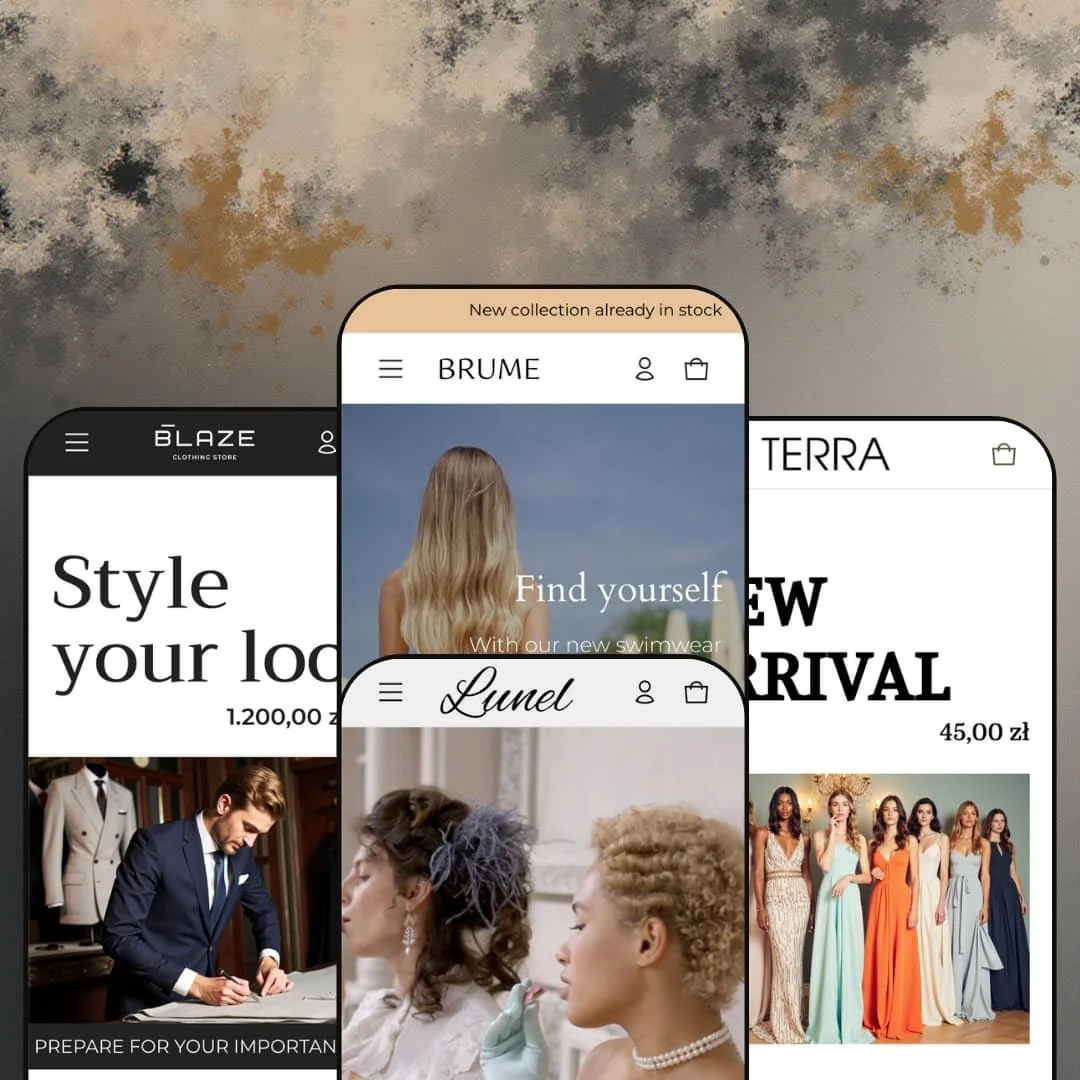
Most themes sell you a shopping cart with pictures attached; Elemento wants the pictures to be the shop. Hero images carry live price tags, lookbook photos are dotted with product hotspots, and the four presets (Elemento, Brume, Lunel, Terra) all bend toward soft goods: menswear, swimwear, jewelry, womenswear. At $390 it sits in the premium tier, which means the bar is industry specialization and distinctive tooling, not just a clean layout. It runs on Online Store 2.0 architecture, built by KROKOD sp. z o.o., and the question is whether image-first merchandising alone justifies the price.
Shoppable imagery is the spine, not a bolt-on
The Elemento demo tags its hero with a live product price and drops a three-product hotspot overlay (belt, suit, watch) onto a lifestyle shot further down the page. Both patterns pull price and product name from the catalog, so a merchant updates the product and the image updates with it, which turns campaign photography into a maintained sales surface instead of a static banner that goes stale the moment a price changes. No app, no manual caption. For apparel and accessories brands in the 50–300 SKU range whose buyers cross-shop outfits rather than single items, this is the feature to buy the theme for.
Size guides wired to the picker
Why do so many fashion product pages bury the size chart in a tab? Elemento places a "Size guide" trigger directly beside the size selector on the Blue Men's Suit and Beach Lavender Bikini demos, and the modal it opens holds a measurement table with chest, waist, and hip ranges in both centimeters and inches, keyed to US sizing. The buyer never leaves the buy box. Apparel and swimwear merchants running 100+ SKUs across five or more sizes, where fit-related returns are the margin killer, get the tool exactly where it's needed.
The cart drawer does more than list items
The slide-out cart ships with an order-comments field and a shipping estimator that takes country, province, and zip code, plus a "tax included and shipping calculated at checkout" line under the total. That's rare for a drawer rather than a full cart page. A buyer in Germany can check shipping to their region before committing, which matters for cross-border DTC brands at mid-market price points where an unexpected shipping figure at checkout is the abandonment trigger. It's staged on every preset.
Collection pages built for sideways browsing
The Bikini collection on Brume opens with a full-width banner, a chip row of six related collections beneath it, a filter panel (availability, size, color, price range), and then seventeen products with both a Load More button and numbered pagination. The chip row is the piece worth noting. Buyers move from Lavender to Peach to Swimsuit Tops in one tap without touching the header. For color-drop or seasonal-capsule merchants with 200–2,000 SKUs organized into many small collections, this is the browsing pattern that keeps people inside the catalog.
Two reviews since a July 2025 launch
Elemento carries a 100% positive rating built on two reviews, which is a sample size, not a track record. Both reviews praise the developer's support responsiveness, and the release notes show a 1.1.0 update in September 2025 that fixed a footer disappearing on the Elemento preset, which is at least a sign of active maintenance. Still, that's thin. Single-brand merchants and agencies committing a client to a $390 theme have no meaningful body of long-term feedback to check against, and merchants running on this theme for a year won't exist yet.
Four presets, one vertical family
Every demo is fashion or accessories: suits, swimwear, jewelry, dresses. The Theme Store page lists ingredients or nutritional information, usage information, and a before/after image slider among the features, and it tags the theme for food and drink, yet none of the four presets stages a single one of those sections, so a merchant outside soft goods buys the capability on trust. I went looking and found nothing to evaluate. Food, supplement, and skincare merchants with 30–150 SKUs and repeat-buyer economics should treat Elemento as unproven for their category until they've built a test page themselves.
Navigation is a text list everywhere you look
Every dropdown in every demo is a plain column of links. Brume's Catalog menu is the widest at fifteen entries and it's still just text, no image tiles, no featured product, no promotional slot, even though "In-menu promos" and "Mega menu" appear on the feature list. If it's a selling point, show it. Multi-category merchants with 500+ SKUs and cross-shop-heavy buyers who want visual navigation as a merchandising channel will need to build and verify that in the editor rather than trusting the demos.
Below the buy box, every product page goes quiet
Across all four demos the product page beneath the add-to-cart button is a description accordion, a placeholder collapsible row, and a "You may also like" strip. The Elemento preset adds a video block and text columns; the others don't. That's thin for considered purchases. Luxury jewelry at 5.000 zł and tailored suits at 1.500 zł are decisions buyers research on-page, and a theme that puts product images first should also show how spec tables, care guides, and material details get organized, which is left as an exercise for the merchant here.
What it takes to launch
Expect a multi-day pass across placeholder copy in footers, popups, and collapsible rows, a rewrite of editorial image-with-text blocks that carry unrelated demo text, brand naming and currency defaults across all presets, and metafield population for size guides and any spec content before launch.
-
What works in this preset
You land on a tailoring shot, and there's already a price on it. The hero carries a "Style your look" tag that resolves to a 1.200,00 zł stretch suit, so the first scroll on this menswear demo is also the first product touchpoint. Below it, a scrolling ticker cycles three promo lines ("Prepare for your important event", "Clearance", a collection call-out) as a horizontal marquee rather than a static bar, which gives the homepage a sense of movement without loading a slideshow.
The best-seller area is built as a tabbed row rather than a flat grid. Three collection tabs (Classic Suits, Elegant Men's Suits, Bottoms & Footwear) each swap in four cards with a "See more" link, and I noticed the same tab pattern reappears further down under the brand statement, so the demo leans on it twice. That's a lot of product exposure per pixel. For a store where suits, shirts, and accessories sit at very different price points, this keeps each family visible without stacking three separate featured-collection sections.
Social proof is staged as a full sequence rather than one block. A brand-logo strip of six images sits above a lookbook image tagged with a belt, a suit, and a gilded watch (122 zł to 2.000 zł), then a five-quote testimonial section and a three-column trust row (free shipping threshold, 24/7 support, 30-day returns) follow before the Instagram grid. It reads like a considered menswear pitch.
Where it stumbles
The product page carries the right tools for tailoring but doesn't organize them for it. The Blue Men's Suit demo exposes Type (Double/Triple), Size, and Color as three separate pickers with a size-guide modal, yet the descriptive layer beneath is one paragraph and a video block. For a suit at 1.500 zł, fabric weight, lining, and alteration policy are the questions buyers ask, and the demo product page leaves that space to the About/Advantages/Contact text columns instead of product-level detail.
-
What works in this preset
This is the preset that shows the theme's catalog side. The Catalog dropdown opens into a fifteen-entry list spanning color collections (Black, White, Lavender, Peach, Emerald & Khaki), product-type collections (Tops, Bottoms, One Piece), and Best Sellers, and the Bikini collection page then adds a chip row of six sibling collections directly under the banner. Buyers can move sideways between color stories without going back to the menu. For a swimwear brand that merchandises by colorway, that's the right navigation instinct.
A video hero replaces the image banner here, and the homepage below it is almost entirely editorial. Two image-with-text blocks pull blog excerpts (sunlight and mood, a swimwear-brand feature) with "Read more" links, three stacked image tiles carry emoji-heavy seasonal captions, and a rich-text block sets up a 2024 bikini story before the newsletter and "Last news" grid. Product rows are limited to a single five-card "Perfect match for you" strip. I sat up at how confidently the demo treats content as the conversion path.
The FAQ page is a proper accordion, not a text dump. Six collapsible entries cover international shipping, delivery windows by region, sizing, tracking, returns, and swimwear care, each closed by default. Small, but useful.
Where it stumbles
For a preset staged around color collections, the product page doesn't lean into color. The Beach Lavender Bikini demo exposes Size and a single Lavender color value, and the gallery holds two photos with the first repeated as a third. Swimwear buyers comparing lavender against peach against emerald would expect the colorway family to surface on the product page itself, and this demo routes that comparison back to the collection chips instead.
-
What works in this preset
Restraint is the pitch here. A video hero, a "Beauty in the little things" tagline over a pendant link, then straight into a bracelet banner with a four-unit countdown (days, hours, minutes, seconds) and a Shop Now button. Everything below is product: a six-card bracelet row, two-tile collection list, a Pendants/Bracelet/Earrings tab set, a four-card featured strip, and a fourteen-product pendant grid under a second image banner. I counted more than thirty product cards on one homepage and almost no prose.
Every card here reads "Add to cart", not "Choose options". Because the jewelry demo runs single-variant products, the quick-buy button on each card commits straight to the cart instead of opening a picker. For a jewelry line with one size per piece and prices from 1.500 zł to 8.000 zł, that removes a click on every impulse addition, which is exactly where the theme's product-first positioning pays off for a luxury-priced catalog of under 100 SKUs.
The footer is the leanest of the four. Logo, brand text slot, four link columns (Collections, For customers, Best sellers, Rings), newsletter, copyright. Payment icons and country selector aren't staged, which suits the quiet visual register the demo is going for.
Where it stumbles
A countdown timer on a diamond bracelet banner is a tonal mismatch. Urgency mechanics belong on a swimwear clearance or a menswear seasonal drop, and staging one as the second thing a jewelry buyer sees undercuts the luxury framing the rest of the demo works hard to build. The product page compounds this: the Silver Transformer Bracelet at 5.800 zł ships with a description paragraph, a "Collapsible row" placeholder, and a stock counter reading "70 available". Metal purity, stone details, care instructions, and packaging are the conversion levers at that price, and the demo doesn't stage any of them.
-
What works in this preset
The lookbook is where Terra earns its keep. One editorial photo carries six product hotspots (a grayish classic dress at 530 zł, a brown casual coat at 1.400 zł, a cappuccino coat at 1.510 zł, and three more), each with a thumbnail, price, and "View more" link surfacing on the image itself. That's a full outfit merchandised from a single asset. For a womenswear brand shooting campaign imagery anyway, it turns the photography budget into a shoppable surface without building a separate collection.
Terra also doubles the ticker and the tabbed rows seen elsewhere, but stages them for a different rhythm. A "Free shipping worldwide" marquee splits the collection list from the tabbed featured section (Colorful, Black & White & Gray, Top & Suits), and a second image banner for Casual Coats introduces its own four-card product row with a Shop Now button. The "Last news" grid adds article tags (Art, Expression, Retro, Runway, Colors) above each post title, which none of the other demos bother with.
The header drops the account icon entirely. Logo, four-item nav, cart count. That's it.
Where it stumbles
The editorial blocks between the product sections don't hold up on a dress catalog. One image-with-text pair carries a paragraph about mid-century poster design and a 1972 logo, with a "Read more" link that goes nowhere, and the copy sits between a "Comfort. Warmth. Convenience." banner and the best-seller strip. The layout works; the staging reads against the vertical, and a merchant will need to rebuild that middle third of the homepage with fashion-relevant copy before it makes sense.
One homepage grammar, four skins
Read all four demos back to back and the same sequence appears every time: hero, collection list, tabbed product rows, editorial image-with-text, social proof, Instagram grid, footer. That consistency is a real advantage for anyone who will switch presets mid-build or manage several stores on the theme, because section behavior learned on one demo transfers directly to the next.
Promotional tooling is staged, not just listed
Marquee tickers on Elemento and Terra, a countdown banner on Lunel, promo image tiles on Brume, a promotion popup on the Elemento preset. The urgency and announcement layer is visible in use across the family rather than parked on a feature list, which makes it easier to judge how the pieces look before installing.
Editorial and commerce share the page
Every preset threads blog excerpts into the homepage as image-with-text blocks and closes with a "Last news" grid, and Terra adds tag labels above each post. Content-led brands that publish alongside selling get a layout that treats articles as merchandising, not as a separate blog template bolted on the side.
The presets are variations, not vertical builds
Because the section sequence is so consistent, the four presets differ in imagery, color, and ordering far more than in tooling. Nothing in Lunel is jewelry-specific; nothing in Brume is swimwear-specific beyond the demo products. A merchant hoping a named preset brings vertical logic with it will find it brings a mood board.
Dawn's bones show through
Compared against Dawn, Shopify's free baseline, Elemento shares its product-card labeling, its "Filters and sort" collection panel, its Load More pattern, and its breadcrumb treatment almost unchanged. The additions (hotspots, ticker, size-guide modal, cart estimator) are meaningful, but a merchant paying $390 is buying a merchandising layer on a familiar chassis rather than a new one.
Header depth is the flattest part of the design
The header composition is fixed at logo, text navigation, account, and cart across all four demos, with Terra dropping the account link entirely. For a theme that invests this heavily in what happens below the fold, the top of the page is where the least design thinking is visible.
Rating
★ 6.8/10
-
Hotspot imagery, size-guide modal, tabbed product rows, and the cart shipping estimator are the substance; navigation and product-page depth are where it thins out.
7
-
Consistent section grammar across presets shortens the learning curve, but the volume of placeholder and off-vertical demo copy adds real cleanup before launch.
7
-
Tabbed rows collapse to horizontal scrollers and the cart drawer keeps comments and estimator reachable, though hotspot-dense lookbooks get crowded on narrow screens.
7
-
Video heroes on two presets and thirty-plus product cards on Lunel's homepage add weight; images load lazily and section counts stay moderate elsewhere.
7
-
Four presets prove the sections re-skin cleanly, but the header, footer, and product-page compositions stay close to identical across the family.
6
Frequently Asked Questions
-
Yes. The hotspot lookbook on Terra tags six products onto one image with thumbnails, prices, and links, and the Elemento hero carries a live price tag on the banner itself.
-
The demos render a measurement table inside a modal triggered next to the size picker; the content is merchant-supplied, so budget time to populate it per product type.
-
The cart drawer includes an estimator with country, province, and zip fields on every preset, alongside an order-comments box.
-
Brume ships with six switchable languages in the footer selector and around thirty country/currency entries; the other presets stage fewer, with Lunel showing none.
-
For single-variant products, yes; Lunel's cards commit straight to the cart, while multi-variant products on the other presets show a "Choose options" button instead.
-
Both are staged on Brume: a Load More button and numbered page links sit below the seventeen-product grid.
-
The developer links a GitBook-hosted docs site and a separate support portal from the Theme Store page; the 1.1.0 release notes reference added header customization options.
This review is based on hands-on testing of the publicly available preset demos of the Elemento Shopify theme as of September 18 2026. Theme features, preset availability, and performance can change with subsequent updates from the theme developer.
FAQ
〰️
FAQ 〰️
-
👑 Yes. The Default and Lunel presets are staged for menswear and jewellery, respectively, and the demos emphasise product imagery alongside conversion-minded shopping patterns. It is a strong fit when presentation and brand tone need to carry as much weight as the catalog.
-
📱In testing, the theme behaved smoothly on mobile, with grids and cart interactions adapting cleanly to smaller screens. Desktop hover interactions translated into tap-driven overlays, and navigation condensed into icon-style patterns that remained easy to use.
-
🎨 Each preset supports editable colours, fonts, images, and sections. Merchants can swap hero content, adjust section order, enable or disable countdown timers, and choose between quick view and quick add patterns depending on the shopping experience they want to emphasize.
-
⚡ Testing showed fast page loads and smooth animations, and the slide‑out cart appeared promptly after adding items. The main watch‑out is content weight: heavy imagery and video sections may slow performance if not optimised.
-
👕 Yes. Product pages and quick‑view modals display swatches and variant selectors. Single‑SKU items can open a quick view, while multi‑variant items can route shoppers to the product page for option selection.
-
🔎 The theme supports built‑in blog content and includes structured elements such as star ratings, alongside standard metadata fields. Merchants can use content sections and blog publishing to support ongoing search visibility.
-
💱 Yes. The Default and Brume demos surface currency and language selectors in the footer, and the same selectors can be enabled in other presets through theme settings.
-
⚙️ Yes. Elemento uses standard Shopify sections and templates, and it can be extended with apps for reviews, loyalty programmes, or subscriptions when needed.
-
🛒 Yes. The theme’s four presets are available as live demos via the Shopify Theme Store. Merchants can also try the theme in their store before purchasing by installing the free trial via the Shopify admin.
This review is based on hands‑on testing of the publicly available preset demos of the Elemento Shopify theme as of January 06 2026. Theme features, preset availability, and performance can change with subsequent updates from the theme developer.