
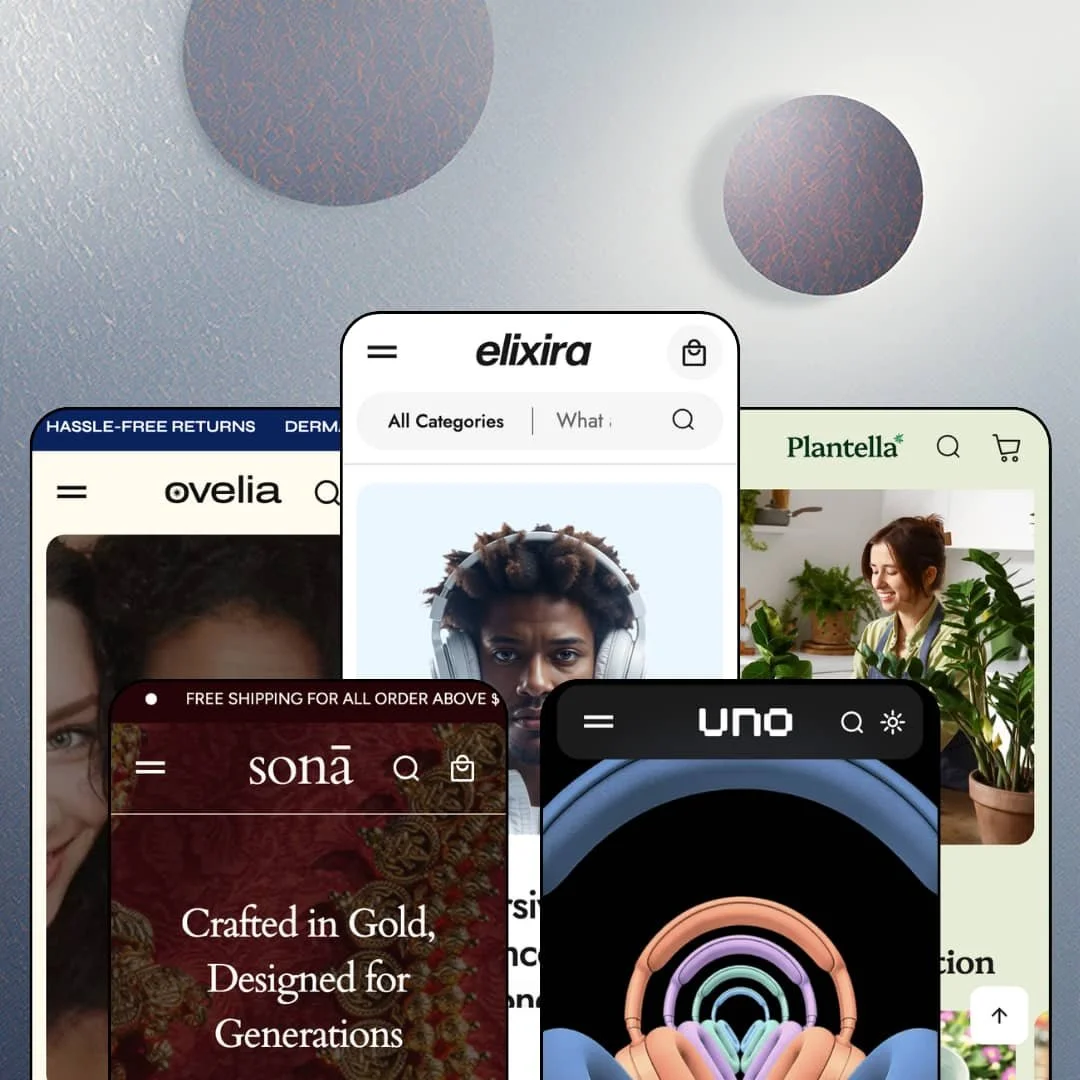
Most budget Shopify themes ship one preset and call it a day. MUUP's Elixira ships five, spanning a headphone superstore, gold jewellery, houseplants, unisex skincare and a single-product headphone launch, all built on Online Store 2.0 architecture and all covered by one $140 licence. I spent the better part of a day across the demos looking for where the money ran out. The list is shorter than the price suggests, and more specific than I expected.
One bundle builder, four verticals
Every multi-product demo runs the same native bundle section: pick three items from a product grid, watch a running total build in a side panel, and take 30 percent off at add-to-cart. It's a theme section, not an app. The mechanic reads identically whether the grid holds earbuds, bangles, succulents or shampoo, which means the merchandising logic survives a preset switch without a rebuild. For accessory-heavy electronics sellers with 30 to 200 SKUs and cross-shop-heavy buyers, or skincare brands selling routines to repeat customers, this is the section that earns the licence fee.
Against Dawn, the header is where the gap opens
Dawn gives you dropdowns and an icon. Elixira's header stacks a category-scoped search bar with a "Most Searched Products" panel, a three-level mega menu that mixes link columns with product tiles and a promo image, a rotating ticker above it, and on phones a fixed bottom bar with home, shop, cart, search and account. That's discovery tooling a Dawn store would need apps or custom work to match. For multi-category electronics or garden stores with 100 to 500 SKUs and a browsing-heavy, high-ticket audience, the header alone justifies the step up from free.
The product page is built like a landing page
Below the buy box, the theme stacks a product video block, a captioned showcase carousel, a scrolling stat ticker, a what's-in-the-box grid, prev/next product arrows at the top of the page, and a sticky add-to-cart bar that carries the variant selector with it. I scrolled a long way. Each block is optional, but together they turn a single SKU into a scroll story without leaving the product template. For single-hero-product brands and electronics sellers in the $150 to $600 band whose buyers research before they commit, that's the page structure the demo sells hardest.
If your catalogue has specs, the filters read them
If you sell products with real attributes, this is the Pro that matters most. Collection pages expose metafield facets with product counts (Model, Features and Year alongside Colour and Availability), nine sort orders and sub-collection chips with their own counts, and a compare drawer on the product page pulls the same fields into a spec card. Populate the metafields once. For electronics and parts merchants with 50 to 500 SKUs and spec-driven, comparison-shopping buyers, that's the difference between a filter sidebar and a catalogue tool.
The stars are typed in, not earned
Every demo runs a testimonial section with a rating number, a headline, a quote and a name, and on the Elixira and Uno demos those quotes appear again on product pages, but none of it connects to a review engine, a product record or a customer. The numbers are editor fields. Product cards carry no rating row at all. For beauty brands and electronics sellers whose buyers read reviews before a $150 purchase, budget for Judge.me or a comparable app from day one, because the theme's social-proof layer is decoration.
Every preset shouts about discounts
A countdown section, a "Flash Sale!" block, a cart-drawer countdown, promo tiles with percentage-off straplines and a 10-percent-off newsletter popup ship staged on four of the five demos, and the heritage-gold jewellery preset runs the same flash-sale clock as the earbud store. You can switch each one off. The default voice, though, is discount-first, and merchants who never run sales will spend their first hour removing urgency they didn't ask for. For luxury jewellery or premium skincare brands with evergreen pricing and a repeat-buyer audience, that's a positioning fight before launch.
Colourways get no grouping layer
Combined listings are flagged Shopify Plus in the feature list, and the theme offers nothing of its own for sibling products: the Uno demo lists six separate "Uno Nova" entries in its Shop menu, one per finish, while the base product also carries the same five colours as variants. Pick one model and live with it. Card swatches swap image and price within a product, which is fine, but a non-Plus merchant with ten finishes across a range either stuffs every colour into variants or accepts duplicate listings. For fashion or headphone brands with multi-colourway ranges of 20 to 100 SKUs on a standard plan, that's catalogue architecture the theme leaves to you.
What it takes to launch
Expect a two-to-three-day pass covering product-description cleanup across every preset, buy-box trust and delivery copy, cart and ticker threshold copy, metafield population for filters and the compare drawer, testimonial replacement, and dark-mode logo assets if you pick Uno.
-
What works in this preset
Scrolling the Elixira homepage feels like walking a big-box audio aisle that someone finally tidied. A three-slide hero gives way to five offer tiles, one per category, then a "Top hot deals" grid where cards carry quick view, a second image on hover and colour swatches that swap price per finish. Halfway down, a complete buy box for the Aria 100 bookshelf speakers sits inside the homepage, with three finishes priced from $160 to $360 and a live stock count of 25, so a shopper can check out without ever opening a product page. I bought nothing, but I could have.
85%. 50mm. Two numbers pinned to a headphone photo in the hotspot section, each with a caption and a Learn More link into the Sonic Pro 800 page, do more selling than the paragraph above them. Just above it, the before/after slider has been repurposed: instead of two states of one image it holds the Dark Grey and Light Grey colourways of the same headphone, each half with its own View Product button. That's a comparison tool doing colourway duty, and it works.
The cart drawer sells. It opens with a free-shipping progress line, its own countdown, a "Buy this with" strip of ten cross-sell cards, an order-note field and a login nudge, and the empty state suggests the Best sellers collection instead of a blank panel. On a phone the whole thing sits above a fixed bottom bar with home, shop, cart, search and account icons, which is the mobile pattern that kept me from reaching for the hamburger.
-
What works in this preset
Gold on red silk sets the tone before a single product loads. The hero slideshow is the preset's signature move: every slide carries three product cards beneath its headline, a bangle, a statement ring, a chain, each with quick view, so the banner is shoppable rather than decorative. The header runs transparent over the image and only picks up a background once you scroll.
Sona's collection list uses five hover-reveal tiles (Necklaces, Earrings, Bracelets, Anklets, Rings) that expose a View Collection label on mouseover, followed by a promo-tile grid where each collection gets its own strapline, from "flat 20% off" on rings to "anklets starting at $99". The three-panel story section that Elixira uses for technology claims returns here as "Purpose in Every Detail", numbered I, II and III in Roman numerals. Same section, different accent.
"Made of 22k pure gold with polished finish." The Material accordion on the Elara Slim Ring page reads like a jeweller wrote it, and the page keeps that register: a product video titled Traditional Saree, a stat ticker claiming 45+ artisan hours per piece, and an unbox grid that swaps the electronics template's quick-start guide for a velvet box, a certificate of authenticity and a polishing cloth. The Shine Shared testimonial block frames purchases as wedding heirlooms, which is exactly the copy a heritage-gold brand would want to steal.
Where it stumbles
Rings ship in Gold or Rose Gold and "Free size". No ring-size option is staged anywhere, and the size chart the theme lists as a feature never appears on a Sona product page, so a jeweller selling sized rings or adjustable-length chains will need to add the option, wire the chart and restage the buy box before the preset matches the vertical it names.
-
What works in this preset
"Water twice a week, bright indirect light, pot size six inches." The Care Instructions and Size & Dimensions rows on the Areca Palm page carry horticultural data rather than placeholder prose, and the product page's showcase carousel becomes "Why Choose this Plant" with six benefit captions while the unbox grid becomes a Plant Health Card and care guide. No new section type was needed for any of it.
Plantella's header stacks a utility bar above the navigation: social icons on the left, a rotating announcement in the centre, language and country selectors on the right, then a green-toned menu whose Shop flyout ends in a "Best seller hand tools" promo image. Product cards drop the quick-view label the other presets use and carry a direct Add To Cart button instead, which suits a catalogue where nobody needs to pick a size first.
I noticed the ticker copy before I noticed the products. "Grow with Patience, Bloom with Love" scrolls between the collection tiles and the deals grid, and again before the blog row, where cards carry Gardening Tips and Styling & Inspiration tags. It's the calmest of the five demos, and the greens carry through the footer logo strip and the cart drawer's Plants suggestion for an empty basket.
Where it stumbles
Every plant is a single-variant product with no pot-size or height option, and no care-level badge (light, water, pet-safe) is staged on any card even though the theme's badge system runs on the other presets. Those are the sorting axes plant buyers actually shop by. Merchants choosing Plantella for a nursery catalogue will be staging that layer themselves.
-
What works in this preset
Ovelia is the quiet one. The hero copy ("Skincare That Doesn't Overpromise. Just Works.") sets a clinical, unisex register, the collection list is a four-tile row of Skin, Hair, Body and Fragrance, and the Shop mega menu carries a body-care lifestyle image with a single-line caption rather than a product tile. Fewer moving parts, tighter voice.
This is the one demo where the before/after slider does what a beauty vertical needs it to do: the two halves are labelled Before and After, and the Radiance Cream Cleanser sits linked beneath both with a View Product button, so the result claim and the purchase path share one screen. The three-panel story section follows with Clinically Proven Ingredients, Made for All Genders and Sustainable & Minimal, each with its own photograph.
Testimonials carry ages next to first names (Riya, 26; Peter, 35), a small choice that sounds like a skincare brand rather than a template. The language switcher stages three interface languages, English, French and German, and the country selector runs to 27 markets, the widest staging of any preset except Uno.
Where it stumbles
Every product ships as a single "Default Title" SKU. No 50 ml versus 100 ml choice, no refill option, and no ingredient accordion on the product page even though the ticker promises "Ingredient-led" formulas and the theme lists an ingredients block among its merchandising features, which leaves a skincare merchant with size ranges and INCI lists to stage the buy box from scratch.
-
What works in this preset
One product, five colours, and a light switch. The header carries a dark-mode toggle that swaps the logo along with the palette, and next to the cart icon sits the product's price and a Buy button, so the Uno Nova is one tap away from any scroll position on the page. I clicked the toggle several times, for no good reason.
Uno's homepage has no collection grid at all. It runs a full-bleed hero, a "Get the highlights" slider, an adaptive-sound feature block with two icon columns, five colourway tiles under "Take a closer look", a feature grid whose images swap on hover, a benefits row, and a hotspot image with the same stat counters as the flagship preset. The order reads like a product keynote rather than a store.
The product page carries a twenty-image gallery and a two-axis picker, five finishes crossed with Aluminum or Titanium, and closes with a "Pair Uno with" cross-sell block and two product-level testimonials. Six interface languages are staged in the switcher, from Spanish to Brazilian Portuguese, and the sale price sits struck through against a $599 compare-at figure.
Where it stumbles
A benefits tile promises "Engrave your headphones with your initials or favourite emoji", but the buy box carries no text field, no line-item property and no engraving step anywhere in the flow, so the preset sells personalisation it hasn't wired, and a single-product brand that leans on engraving will be adding an options app or custom work before the promise is true.
One section library, five vocabularies
The same three-panel story section, showcase carousel, stat ticker and unbox grid carry audio specs, artisan hours, watering schedules and dermatology claims without changing shape. That's the strongest argument for the five-preset model: a merchant who pivots from plants to skincare keeps the section muscle memory, and a merchant who outgrows one vertical isn't relearning the editor.
A release cadence that actually moved
Version 1.0 landed in April 2025; 5.0 arrived in July 2026 with four presets, dark mode, pre-order support and flexible content blocks added in between. Ten releases in fifteen months is the pattern I'd want to see from a young theme. The Theme Store rating, 100 percent positive across five reviews, is too small a sample to weigh in either direction yet.
Budget-tier price, mid-tier section count
At $140 the reasonable bar is one preset and a core feature set. Elixira clears it with five presets and a section library that reaches into hotspots, before/after sliders, product video blocks, in-menu product tiles and a category-scoped search, and the presets differ in palette, typography and section order rather than in a locked feature set.
Four presets, one skeleton
Ticker, hero, collection tiles, deals grid, three-panel story, countdown, top-rated grid, testimonials, blog row, icon row, newsletter: the order barely moves between Elixira, Sona, Plantella and Ovelia. Only Uno breaks the pattern. The skins are real; the structural variety mostly isn't.
Electronics-shaped defaults leak into the other verticals
The compare drawer's default rows read Model, Weight, Year and Dimensions; the unbox grid's template is a gadget box with a quick-start guide and a warranty card; the buy-box trust row is a headphone seller's list. Sona, Plantella and Ovelia each restage those surfaces, but the seams show, and the non-electronics merchant does the translation work the electronics merchant doesn't.
The numbers layer is copy, not data
Stat tickers (95 percent satisfaction, one million units sold), artisan-hour counters, and the delivery-window line under every Add To Cart button are typed into the editor. Nothing on those surfaces reads inventory, orders or shipping profiles, so the theme's most confident-looking numbers are also the ones a merchant has to keep honest by hand.
★ 7.4/10
Rating
-
Native bundle builder, metafield facets with counts, compare drawer, hotspot and before/after sections, dark mode and pre-order since 5.0; social proof and colourway grouping stay app-dependent.
8
-
Sections are consistent across presets and the editor exposes granular colour and typography controls, but the compare drawer and filters only pay off once metafields are populated.
7
-
Fixed bottom navigation bar, sticky add-to-cart with variant selector, mobile-specific hero and hotspot images, and a per-section mobile colour scheme option for the slideshow.
8
-
Homepages run long (thirteen-plus sections with tickers, video and a bundle grid on the flagship), though images lazy-load and the 4.0.5 release targeted layout shift and thumbnail load.
7
-
Five palettes and a dark mode prove the tokens stretch, and Uno proves a keynote layout is possible, but four of five demos share one homepage order.
7
Frequently Asked Questions
-
Yes. It shipped with version 5.0 on July 6, 2026 and appears on the Theme Store listing, even though the other four demo stores still label it "Coming Soon" in their preset menus.
-
Since 5.0, yes, with a separate dark-mode logo slot and colour scheme; the Uno demo puts the toggle in the header next to search.
-
At docs.muup.co, filed under the theme's earlier name Elektra. The flagship demo still runs on an elektra-theme-demo address, so don't be thrown when the URLs don't say Elixira.
-
Three levels in the demos: top item, column heading, link, with product tiles and a promo image available per flyout.
-
Version 5.0 added pre-order product support, and the product page already shows unit-level stock counts, so back-orderable SKUs can be flagged from the buy box.
-
English, French, Italian, German and Spanish are included; the demos stage French, German and Spanish switchers live, and Uno adds Italian and Brazilian Portuguese.
-
Two, in fact: a sticky add-to-cart bar on product pages that carries the variant selector, and on Uno a price-plus-Buy button that lives in the header on every page.
This review is based on hands-on testing of the publicly available preset demos of the Elixira Shopify theme as of September 2026. Theme features, preset availability, and performance can change with subsequent updates from the theme developer.