
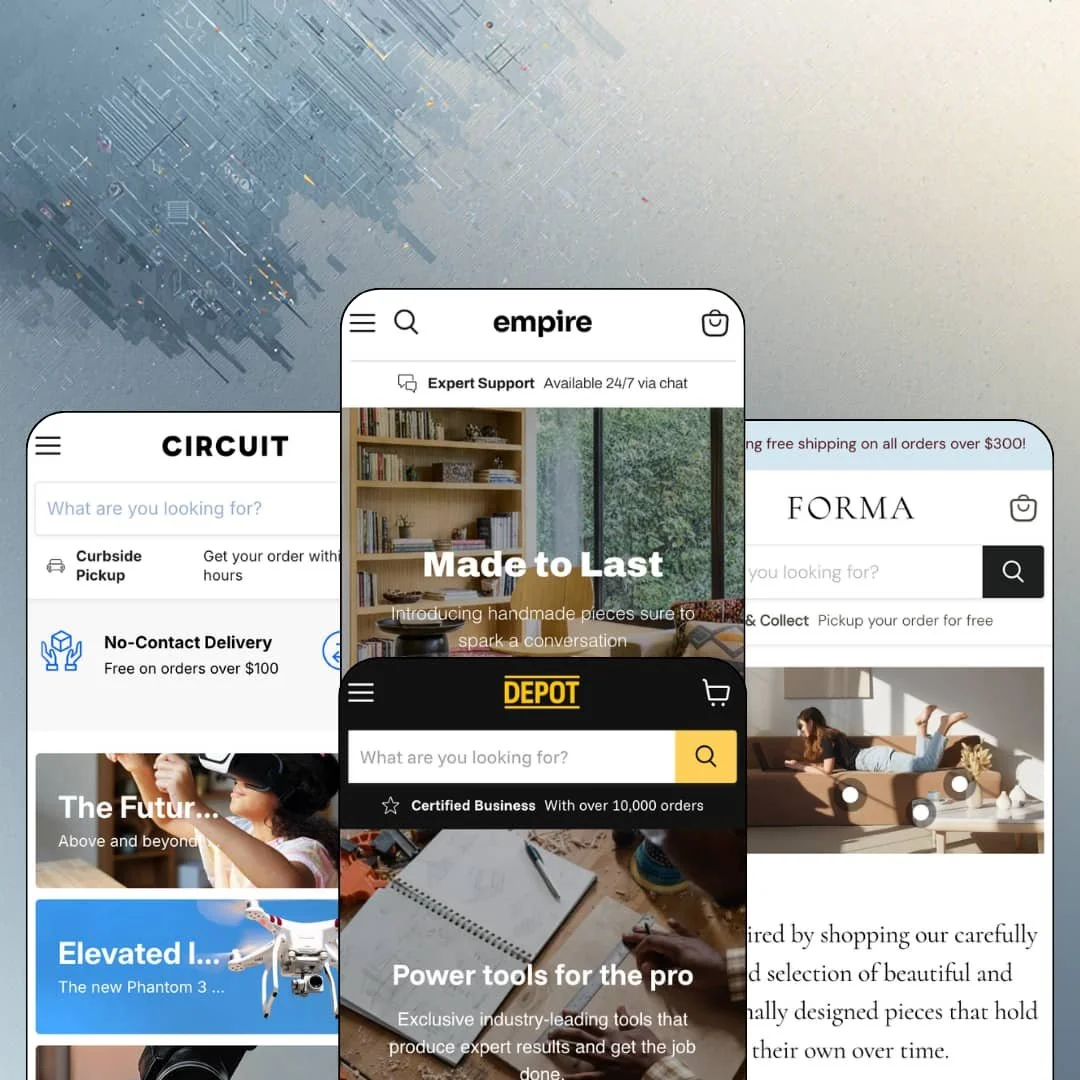
Most premium Shopify themes pick an aesthetic and defend it. Empire, Pixel Union's $360 big-catalog theme from June 2017, picks a job instead: making a large, unruly inventory feel like an organized store you can actually shop. It runs on Online Store 2.0 and is still under active development, with version 13.0.0 landing in May 2026. I spent time in all four preset demos to see whether a theme approaching its tenth year still earns a premium price.
A comparison tray without the app aisle
How do shoppers choose between six near-identical impact wrenches? Empire answers with a Compare checkbox on every product card that collects selections into a tray, where two or three items sit side by side for review. The cap is three items. For electronics and tools merchants running 100 to 500+ SKU catalogs full of considered-purchase buyers, this keeps spec-shopping on your store instead of scattering it across browser tabs.
A collection engine sized for deep catalogs
Collection pages ship with a faceted filter sidebar showing live product counts per option, a price range field, and availability toggles. Nine sort orders come standard, relevance included. A grid-or-list view switch and a sidebar block listing sibling collections with their counts round it out. Everything a shopper needs to move through a thousand products without dead ends is present on one screen. That depth matters most for multi-brand retailers and single-vendor distributors whose 500+ SKU catalogs would otherwise bury their own bestsellers.
Inventory states as a selling tool
Stock display is configurable down to the format. Circuit counts units on cards while Depot runs status labels like "Low stock," and pre-order and coming-soon states render on cards and product pages alike, straight from inventory data. Merchants get urgency and expectation management from numbers they already maintain, with no extra install. Restock-driven and pre-order-heavy sellers in hardware and electronics verticals gain the most, since their buying cycles turn precisely on whether an item is here now or three weeks out.
Scoped search for the fifty-category store
Distributors with dozens of product types get a search bar that thinks like their catalog. Fifty-plus categories, one dropdown. Empire's header search pairs the input with an All Categories dropdown, so a query can be narrowed to one product type before it runs, and Depot's demo exercises that dropdown across its full parts taxonomy. Multi-category shops and single-brand distributors with large, deep catalogs get parts-counter search behavior on an ordinary Shopify storefront.
The default voice sells discounts, not brands
Empire assumes you're always running a sale. All four demos lead with clearance links, countdown deals, percent-off tiles, and savings badges, making promotion the theme's resting personality rather than an occasional mode. Luxury and single-brand editorial merchants selling considered purchases will spend their first configuration days removing urgency furniture instead of adding capability, and the theme gives them little narrative architecture in exchange.
The stars are not in the box
Those stars come from a review app. Empire supplies the placement on nearly every demo card, and it does render ratings cleanly in grids and on product pages, but the review engine itself is a separate install with its own data to collect or migrate. Impulse-buy consumer verticals and stores past 100 SKUs that depend on card-level social proof should budget that integration before their storefront looks anything like these demos.
An Online Store 2.0 foundation at a 2026 premium price
The $360 buys features, not generation. Dawn, Shopify's free default, sits on the same Online Store 2.0 generation as Empire, so the money here buys the comparison tray, the scoped search, and the inventory tooling rather than a newer architecture, with none of the Theme Blocks era's deep block nesting. Agencies and holding-company operations planning heavily customized, long-horizon builds on large catalogs should weigh that generational ceiling against the feature set before committing.
What it takes to launch
Expect one to two days of work before launch. Plan a copy pass across mega-menu labels, testimonial content, and blog entries, then re-stage promo thresholds, sale pricing, stock-display settings, and menu structures for your chosen vertical.
-
What works in this preset
Walk into the Supply demo and it reads like a well-run gift shop before a single product loads. The Gifts mega menu splits into four buying logics at once: By Price, By Recipient, By Occasion, and By Sustainability, each with five destinations. That is gifting merchandising done as navigation. A shopper who only knows "something under $50 for a coworker" has a path in two clicks, which is exactly the problem gift retail needs solved.
The homepage sells directly. A featured-product module stages the Stackable Dish Set with all three size options, a quantity field, and an add-to-cart button in place, and the availability line changes with the chosen size. Buying happens without ever visiting the product page, which suits a store built around low-consideration gift purchases where every extra click sheds buyers.
Deals get a full production here. The demo runs a countdown section for limited-time offers, a Deals of the Week carousel, promo tiles for clearance and open-box angles, and a testimonial band where each quote links straight to the product being praised. It is a lot of promotional machinery in one scroll, and it shows how Empire expects a high-volume gift retailer to keep the floor busy year-round.
-
What works in this preset
Vendor names do real work here. Every product card carries its brand as a clickable label, so DJI, Canon, or Withings leads to that vendor's own collection, and a logo band deeper on the page repeats the same routes visually. For a multibrand electronics retailer, that turns the brand into a first-class browsing axis instead of a line of small print.
I noticed the trust plumbing before the products. A four-tile service row sits at the very top of the homepage covering no-contact delivery, free returns, chat support, and financing, and the announcement bar states the free-shipping threshold above it. Electronics buyers spending $899 on a lens want those reassurances early. Circuit stages them first.
Card-level merchandising stays dense without collapsing. Cards mix unit-precise stock lines like "Only 1 left!" with "5+ in stock," dollar-amount savings badges, swatch toggles for color variants, and quick-shop buttons, all in one grid. The result feels like a serious retailer rather than a boutique, which matches what a gadget shopper expects.
-
What works in this preset
I clicked a menu link labeled Impact Kits and landed on a collection already filtered down to full kits. Depot's mega menu deep-links into pre-filtered collection views, so "Tape Measures" opens the measuring collection narrowed to that product type. For a catalog of interchangeable hardware this is quiet but valuable work, because the navigation performs the filtering for the shopper before a single sidebar checkbox ever comes into view.
The distributor costume is convincing. A utility-bar note advertises certified-business status, the featured product renders its SKU right beside the price, and dedicated Where to Buy and Services pages round out the wholesale-adjacent look. Contractors and purchasing managers recognize this layout from industrial suppliers, and Depot reproduces it faithfully on Shopify.
The homepage opens with a section literally built around comparison. "Compare Impact Tools" lines up five wrenches and drivers and ends in a "Compare more products" link, staging the theme's comparison behavior as the primary way to shop this catalog. It is a smart demonstration of intent. Tool buyers weigh torque and price across near-identical models, and Depot organizes the homepage around exactly that habit.
Where it stumbles
The B2B look promises more than any theme can deliver. Quantity-break pricing, customer-specific catalogs, and net terms live in Shopify Plus and app territory, so Depot gives you a distributor's storefront with a consumer checkout behind it. Merchants shopping for a true wholesale portal should know they are buying the wardrobe, not the warehouse logic, and plan the account-side tooling separately.
-
What works in this preset
One couch photo carries five price tags. Forma's hero is a shoppable lifestyle image with hotspot callouts pinning the lamp, sofa, vase, and tables in the scene to their product pages, prices included. For furniture retail, where customers buy the room rather than the object, this section closes the gap between inspiration and cart better than any grid could.
Navigation runs on two tracks. The main mega menu organizes by room across Living, Dining, Office, Bedroom, and Kids, while a secondary strip under the header sorts the same catalog by piece, from chairs through lighting. A Brands column lists twenty-one design labels from Muuto to Ferm Living, so the multibrand structure that Circuit hints at gets its fullest staging here.
Editorial credibility gets its own real estate. A press section quotes Apartamento, Architectural Digest, and Forbes under their logos, a full-width statement band declares the curation philosophy, and a video section carries the brand film. Forma proves the same skeleton can slow down and speak design-store when the vertical demands it.
Where it stumbles
The card grammar undercuts the gallery mood. Compare checkboxes, stock lines, and savings badges hang off products costing $3,980, which reads as marketplace chrome on considered, high-ticket design. Merchants selling luxury furniture to slow, deliberate buyers will spend configuration time muting card elements that Circuit and Depot want switched on, because restraint is a setting here, not the default.
One grammar, four believable stores
The same skeleton reads as a gift shop, an electronics retailer, a tool distributor, and a design store without breaking character. Empire's identity is retail infrastructure rather than a visual signature, which is why the preset family covers such distant verticals convincingly. Merchants buy a store system and choose its costume second.
Nine years old and still shipping
Version 13.0.0 arrived in May 2026 with refactored sections, new page templates, and metafield support, on a theme first released in 2017. That cadence is the strongest longevity signal a buyer can get. A theme still receiving architectural attention this deep into its life is unlikely to strand its merchants next year.
Reassurance as a layout primitive
Every preset stages trust as recurring furniture: utility-bar service notes, four-tile benefit rows, press logos, avatar testimonials. Read across all four demos, credibility-building is not a section you add but a rhythm the theme keeps returning to. For conversion-focused merchants, that instinct is baked in rather than bolted on.
Retailer voice, thin storytelling layer
Across all four presets the homepage vocabulary is grids, tiles, and carousels, with editorial sections appearing as brief interludes. Brands whose sales depend on narrative, founder story, or campaign-driven content will find few dedicated structures for it. Empire tells shoppers what is in stock far more fluently than why the brand exists.
The features eat data
Scoped search categories, filter facets, stock displays, and brand menus all feed on disciplined product types, tags, vendors, and metafields. I went looking for what happens without that discipline, and the answer is that the signature systems simply go quiet. A loosely organized catalog switches off exactly what the money bought.
A visible seam in the track record
Empire holds 79% positive across 480 Theme Store reviews, with 16% negative, a mixed but substantial record for a theme this long-lived. Recent entries praise support responsiveness while older frustrations linger in the history. Buyers should skim the latest review page and weigh the current trajectory over the lifetime average.
★ 7.4/10
Rating
-
Comparison tray, scoped search, faceted filtering, and native inventory states cover big-catalog retail unusually completely; social proof still requires an app.
9
-
The editor structure is conventional Online Store 2.0, but the sheer count of merchandising systems means many settings to learn and tune per vertical.
7
-
The slide-out menu carries the full multi-level category structure, and quick-buy plus the cart drawer keep the dense card grammar workable on small screens.
7
-
Demo homepages run long, stacking a dozen-plus sections with multiple product carousels, so image discipline and section restraint fall on the merchant.
7
-
Four distinct verticals from one skeleton prove real range, though it flexes store types more readily than art direction; the utilitarian retail register persists everywhere.
7
Frequently Asked Questions
-
The May 2026 release removed tag-based collection filtering in favor of faceted filters, added metafield swatch support, and introduced new About, Locations, Services, and FAQ page templates.
-
Yes. The slide-out cart displays a running amount remaining until the merchant's free-shipping threshold, and each demo runs its own threshold to prove the setting.
-
An age verifier ships with the theme, and 13.0.0 added a preview mode so merchants can test it before switching it on for restricted products.
-
In-store pickup is part of the feature set, and the demos stage pickup messaging in their service rows and utility bars for local-fulfillment merchants.
-
It targets wholesale-style repeat buying, letting returning customers assemble orders faster than product-page browsing; distributors should test it in the demo against their reorder workflow.
-
Pixel Union, the Vancouver-based developer behind several long-running Shopify themes, handles support through its own help desk with dedicated Empire documentation.
This review is based on hands-on testing of the publicly available preset demos of the Empire Shopify theme as of August 2026. Theme features, preset availability, and performance can change with subsequent updates from the theme developer.