
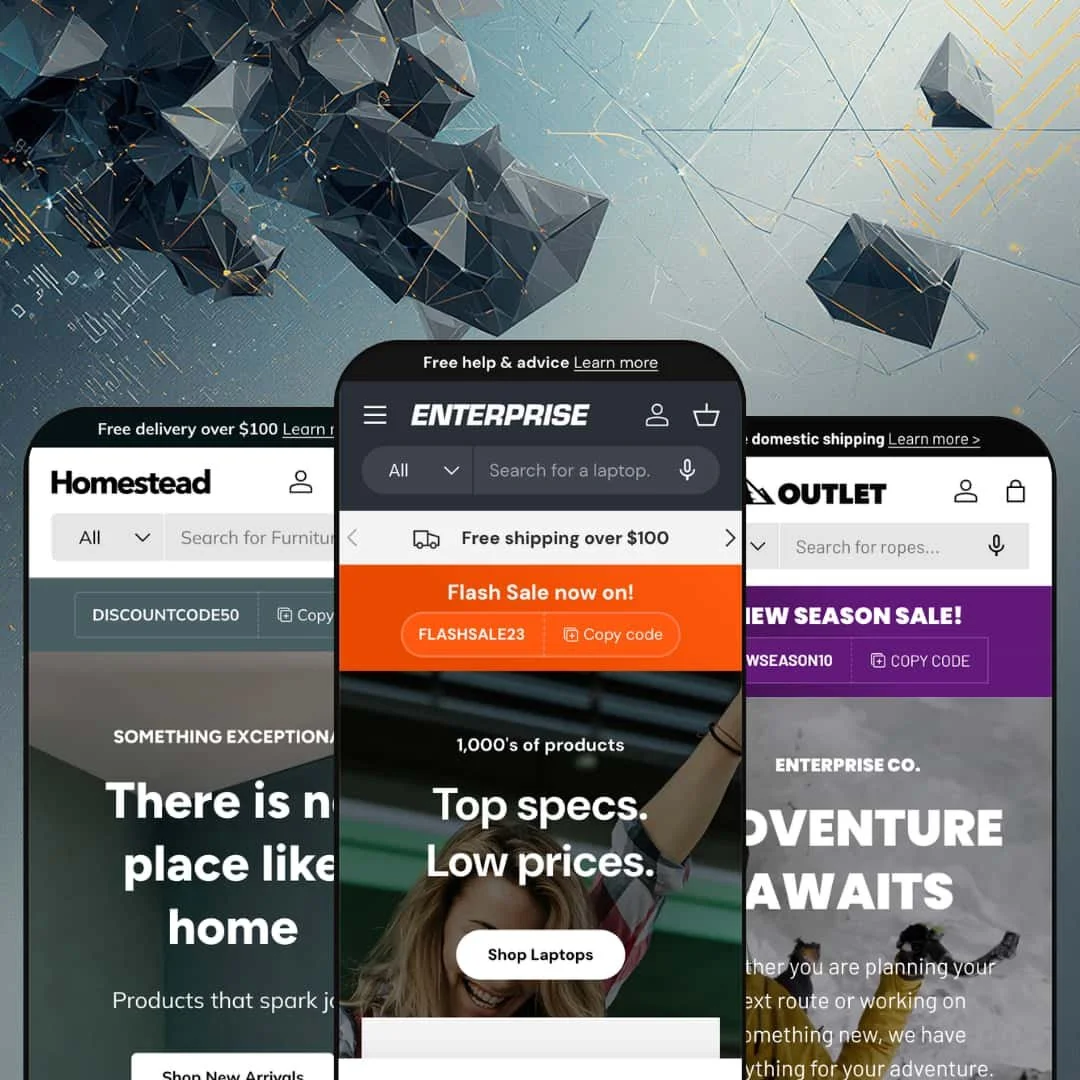
Most premium Shopify themes sell you a look. Enterprise sells you a promise: delete your conversion apps and keep the conversions. Clean Canvas builds that pitch into an Online Store 2.0 theme with flash messages, tailored popups, stock counters, and comparison tables baked in, then stages it across three vertical presets: Enterprise for electronics, Outlet for sports and apparel, Homestead for homeware. At $420 you're paying for the stack, so this review keeps asking one question: does it earn its keep?
The built-in conversion stack replaces a real app budget
Flash messages, tailored per-page popups, countdown timers, stock counters, back-in-stock alerts, promo tiles, and an age verifier ship as one coordinated conversion-feature bundle, configured from the theme editor rather than bolted on afterward. That's the entire sales pitch, and it holds. Every one of those surfaces appears live across the three demos, from "Popular right now" flash messages on product pages to exit popups offering a return discount. For high-SKU electronics or apparel merchants running flash-drop and restock-driven sales cycles, consolidating that stack into the theme removes both recurring app fees and the script weight those installs inject.
Metafield-driven comparison tables, rendered natively
Enterprise renders multi-product comparison tables from merchant metafields, staged on the electronics demo as a five-camera facet grid covering sensor type, pixel count, variants, and price, appearing both on the homepage and beneath individual product pages. Buyers get side-by-side spec truth without leaving the page. For electronics, appliance, and furniture merchants with multi-attribute catalogs and considered-purchase buyers, this one section replaces a comparison-app install plus the integration work of wiring product data into it.
Navigation built for catalogs that sprawl
If you run a multi-department store, five hundred SKUs and up, with shoppers who cross-shop between categories, Enterprise's navigation depth is the feature to test first. Three-tier mega menus with image columns, inline promo labels, guided drill-down finders, breadcrumbs, infinite scroll, and swatch filtering all point at the same problem: getting a shopper from "somewhere in here" to the right product page quickly. It holds up in every preset.
Speed as an actual design constraint
What does a $420 theme without external JavaScript libraries actually feel like? Lean. Clean Canvas wrote the front end from scratch, and the build shows it in restrained section weight, lazy-loaded imagery, and none of the third-party script sprawl that a bolted-on app stack drags into a storefront over time. For budget and mid-market merchants buying paid social traffic to impulse-buy price points, where every extra loading moment costs a bounce, that discipline is worth more than another preset would be.
Three presets is thin cover at this price
$420 puts Enterprise in the most expensive bracket of the Theme Store, and it answers that bar with depth rather than breadth: one visual system, three vertical stagings, no page-builder layer. The value case rests entirely on the conversion stack. For subscription-driven DTC brands, or merchants whose review history and loyalty data already live inside an established app setup they can't abandon, much of what the price pays for is redundant on day one.
The theme's personality is a megaphone
Urgency is not a feature here, it's the aesthetic. Stock counters, flash messages, coupon tickers, countdown sections, price-match popups, and exit-intent offers set the tone across all three demos, and this kept bugging me the longer I browsed: quiet, image-led brands would spend their entire setup switching things off. That's a lot of noise. Luxury single-brand jewelry or furniture makers selling to considered-purchase buyers will fight the theme's instincts instead of riding them, and while everything is toggleable, they'd be paying a premium for a toolbox left in the drawer.
A 2023 architecture at a 2026 price
Enterprise is Online Store 2.0, full stop: JSON templates, sections everywhere, block nesting capped at the shallow levels that generation allows. It is not a Theme Blocks build. Agencies and multi-brand operators managing 500-plus-SKU rollouts who have standardized their 2026 workflows on deep block nesting and AI block generation will hit that ceiling, and at this price the architecture generation deserves a hard look before committing a store, or ten of them, to the codebase.
What it takes to launch
Expect a multi-day pass covering full copy replacement across three brand narratives, metafield population for spec tabs and comparison tables, mega menu re-staging with department imagery, popup and flash-message configuration, and a review of the five bundled translation sets before launch.
-
What works in this preset
Landing on the electronics demo feels like walking into a big-box retailer that knows exactly where everything is. The "Shop our range" section walks shoppers through a three-step drill, picking first a department, then a category, then a product type, with each step illustrated by product thumbnails instead of text links. For a store carrying five departments and dozens of sub-collections, that finder does real navigation work above the fold. It's fast, too.
The mega menu runs three tiers deep and treats every tier as merchandising space. Top-level departments open into image-led category columns, categories expand into named product lists, and promotional labels like "Huge Savings" and "New Arrivals" sit inline next to individual menu entries so campaigns surface before a shopper ever reaches a collection page. I clicked through every department and never lost my place. Promotional banner tiles close out each panel with campaign links.
An empty basket, and then the surprise: the slide-out cart ships with its own cross-sell carousel. "Hot deals on tech" rotates six discounted products inside the drawer before a shopper has added anything, which turns the cart from a receipt into a recovery and upsell surface with free-shipping messaging staged one scroll away. The empty state sells.
Where it stumbles
The staging pulls hard toward discount-retail energy even where the catalog doesn't. I sat up when a four-thousand-dollar pair of loudspeakers appeared alongside price-match popups, countdown sales, and "Selling fast!" flash messages, because that pairing reads odd for a hi-fi buyer working through a considered four-figure purchase. Nothing here is broken. It's a tonal choice that merchants at the premium end of electronics will want to restage.
-
What works in this preset
Outlet is where Enterprise stops looking like a superstore and starts telling stories. Video heroes open the homepage, the navigation carries a full "Experience" wing with eight athlete profile pages and an integrated stories blog, and a lookbook sits one click from the main menu. That editorial layer matters for apparel. Brand-building and shelf-stacking coexist here instead of competing.
Product cards on the collection grids render color swatches as photographic thumbnails, so a jacket with three colorways previews all three finishes before the click, and the product page pairs those image swatches with a plain size row from XS to XL to keep a two-axis selection legible. I spent time flipping colorways here. The picker never left me guessing which variant was active.
Shoppers who hit a product that hasn't launched yet get a proper moment instead of a dead end. The demo stages a shell jacket as "Coming Soon," swaps the buy button for a newsletter capture, and explains the wait in brand voice. For drop-model brands releasing seasonal capsules, that pre-launch state plus built-in back-in-stock alerting covers two moments where demand otherwise leaks away.
Where it stumbles
The name and the staging argue with each other. "Outlet" promises clearance racks, but the demo is a full-price technical-apparel brand site with athlete storytelling and $465 parkas, so merchants picking presets by name will land somewhere unexpected. Read it as the apparel-and-sports preset and the confusion disappears.
-
What works in this preset
"Seating: up to 50% off. Floor Lamps: up to 40% off." Homestead's Sale & Offers navigation wing is built entirely out of offer-labelled menu entries, which is the in-menu promo system doing its most aggressive work anywhere in the preset family. Sale becomes a browsing mode, not a banner.
Scrolling this homepage feels closer to a brand catalog than a shop. A founder story, certification links for textile and forestry standards, a scrolling brand marquee, and annotated lifestyle photography all stack between the product carousels, giving a homeware buyer the trust and texture signals that category shops on. This preset stages both.
The three-slide hero rotates full-bleed lifestyle imagery with dual calls to action per slide, one routing to new arrivals and one to sale, so both shopper intents get an exit from the very first screen. Pause and slide-pacing controls are staged in as well.
One thesis, carried through everywhere
Read all three demos back to back and the same conviction shows up in each: this is a theme for merchants who think like retailers, not like brand curators. Announcement bars carry copyable discount codes in every preset, carts cross-sell in every preset, menus merchandise in every preset. The consistency is the point; nothing in the preset family argues with anything else.
One data model across three verticals
The metafield rendering that displays camera sensors in the electronics demo displays fabric compositions in the apparel demo and materials in the homeware demo without changing shape. That cross-vertical consistency only becomes visible when you read the whole family, and it means a merchant who outgrows one vertical staging can carry structured product data into another without rebuilding it.
A mature codebase with a visible release rhythm
Launched in April 2023 and sitting at version 2.3.0 as of April 2026, Enterprise shows the cadence of a theme that gets maintained rather than shipped and forgotten, from a developer with over a decade in the Theme Store. For a purchase this size, that operational history is part of what you're buying.
Three outfits, one body
Preset variety here is content and colorway, not layout personality; strip the imagery and the electronics, apparel, and homeware demos resolve to the same tight retail grid with the same section rhythms. Merchants expecting three genuinely different design languages from a multi-preset purchase will find one language spoken with three accents.
No signature moment
Across the whole family, hero treatments stay conventional: slideshow, video, split banner. The craft goes into machinery rather than spectacle, and stores whose positioning depends on a memorable first-screen design statement will need to build that moment themselves on top of what Enterprise provides.
★ 8.0/10
Rating
-
The conversion stack, comparison tables, and guided finders give merchants a long feature list to configure before any app enters the picture.
9
-
Everything is editor-configurable, but metafield-driven surfaces like spec tabs and comparison tables render nothing useful until structured data work is done.
7
-
Slide-out navigation with back-button stacking, sticky add-to-cart, and swatch-led product cards translate the dense desktop merchandising into a workable small-screen flow.
8
-
The homepage runs lean for how much it merchandises: no external library payloads, lazy-loaded imagery, and restrained section weight even on the busiest preset.
9
-
Deep configuration inside one retail-oriented visual language; the section library is broad theme-wide, but the aesthetic range is narrower than the preset count suggests.
7
Frequently Asked Questions
-
No. The only Plus-gated item on the feature list is combined listings; the popups, comparison tables, and translations all run on standard Shopify plans.
-
From product metafields you populate yourself. The demos show fully populated data, but a fresh install renders nothing in those sections until the fields exist.
-
The interface strings come pre-translated in English, French, Italian, German, and Spanish. Product content itself still needs translating through Shopify's own localization tools.
-
Both are built in. Products can be staged as pre-order or coming-soon with notification capture, and back-in-stock alerts run without a separate app.
-
They aren't. The section library and feature set are identical theme-wide; the presets differ in staged content, typography choices, and color tokens, so you can start from any preset and restage toward a different vertical.
This review is based on hands-on testing of the publicly available preset demos of the Enterprise Shopify theme as of July 2026. Theme features, preset availability, and performance can change with subsequent updates from the theme developer.