
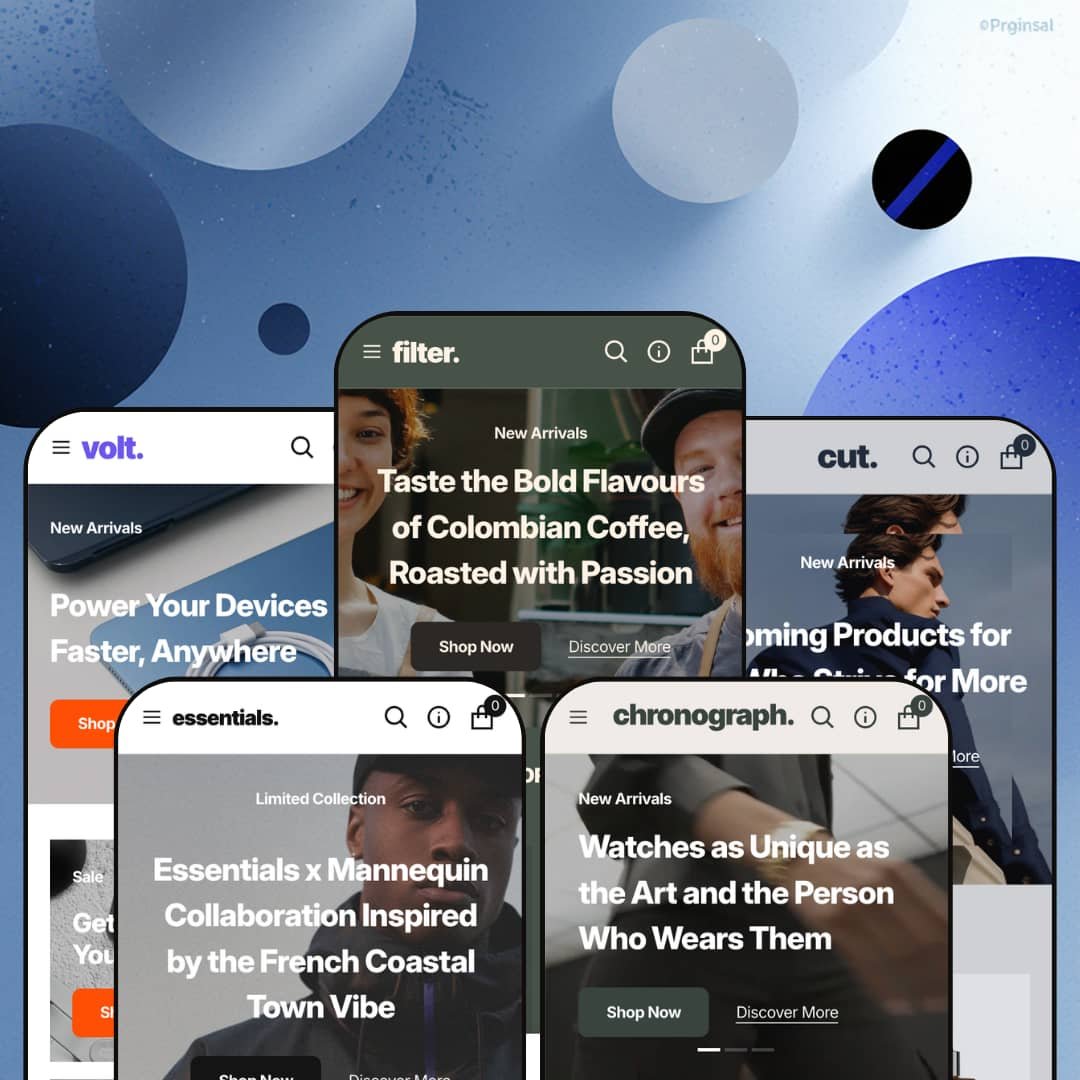
Most premium Shopify themes pick a single vertical and build everything around it. Essentials takes the opposite bet, shipping five presets that each dress the same Online Store 2.0 framework for a completely different kind of store, from streetwear to single-origin coffee. For a $320 theme, the question isn't whether the demos look polished, since they clearly do. It's whether one underlying template can serve five very different merchants, and that's what I went looking for across the preset family.
Five storefront blueprints from one license
For a merchant who hasn't locked in a single product category, the five-preset spread is the real argument here. That breadth is rare. Streetwear, luxury watches, men's grooming, consumer electronics, and specialty coffee each get a tailored starting point, with vertical-appropriate collections, demo content, and FAQ copy rather than one demo recolored five times. Dawn, Shopify's free baseline, hands you one starting point to mold; Essentials hands you five, each already dressed for a different kind of store. For agencies and multi-brand operators who'd otherwise license separate themes per project, one $320 purchase covering five distinct blueprints changes the math.
A merchandising kit that keeps shoppers on the page
Quick view, quick-add, recommended and recently-viewed products, and product badges work together as one coordinated merchandising layer across the catalog. The effect is fewer dead-ends. A shopper can preview an item, add it, and keep browsing without bouncing between full pages, while a Deal-of-the-Week block can spotlight a single product with its full variant picker and size guide right on the homepage. For an impulse-driven catalog with cross-shopping buyers, like apparel or accessories where carts get built from several quick adds, that on-page momentum is exactly what you want to encourage.
Storytelling sections that go beyond the hero
What does "immersive visual storytelling" actually buy you past a big hero image? In Essentials it's a section library built for it: full-bleed slideshows, a video banner that can carry a homepage or sit mid-page, and image-hotspot blocks that turn a single lifestyle shot into a set of shoppable points. The imagery leads, not the grid. For a visually-driven label, think lookbook-led fashion or a demo-heavy electronics line, those sections give the storefront a place to land between the product grids.
Real control over the product page
The product template ships with multiple gallery layouts (columns, thumbnail carousel, and stacked thumbnails), color swatches that render as variant pickers, accordion tabs for description, specs, and returns, and a related-products row. That range lets you present a media-rich hero product and a plain accessory from the same catalog without either looking wrong. On the Base Cap demo, the color picker swaps between green, black, and white as clean swatches rather than a dropdown. It's a small touch that reads as premium. For a catalog mixing visually-driven variants with simple SKUs, apparel color runs alongside one-option add-ons, the per-product flexibility keeps every page looking deliberate.
Built for a curated catalog, not a sprawling one
Essentials is architected as a curated, editorial storefront, and that shapes everything from the hand-picked bestseller grids to the promo-banner rhythm. The Shopify Theme Store itself slots it at an 11-to-100-plus catalog size, and the demos bear that out: every preset showcases a tight, merchandised assortment rather than dense category browsing. A merchant running 500-plus SKUs across many sub-collections, a large multi-category retailer or a broad-inventory operation, will be working against the theme's natural grain and leaning hard on the collection filters to compensate. The merchandising model rewards focus.
One design language, five coats of paint
Strip away the photography and the palette swaps, and the five presets share one personality: the same trust-prop row, the same FAQ accordion, the same hero-grid-promo-blog rhythm, the same thin minimalist type. It's one theme wearing five outfits. The cohesion is genuinely well-executed, but the aesthetic range is narrow, so a brand wanting a maximalist, dense, or playfully expressive identity won't find it in the preset list. For a fashion house or a design-forward label cross-shopping for a distinctive signature look, this is a refined template restyled, not five different design directions.
Current-generation polish, not next-generation architecture
Essentials is a well-built Online Store 2.0 theme, which means JSON templates and the section-and-block editor most merchants already know. What it isn't, in mid-2026, is one of Shopify's newer Horizon-era themes with deeply nested blocks and AI-assisted section building. For most stores that distinction won't matter at all. But for a merchant specifically betting on the newest editor model, or an agency planning heavy in-editor structural customization across many builds, it's worth knowing you're buying proven current-generation rather than the latest architecture.
What it takes to launch
Expect a couple of focused days before launch. Whichever preset you pick, plan a full content pass to replace the borrowed demo imagery and placeholder catalog, populate product variants and any size or spec metafields, restage the mega menu to your real collections, and align brand naming across the storefront; if you're shipping in several of the bundled EU languages, add localization time on top.
-
What works in this preset
You land on a full-bleed hero slideshow rolling through three streetwear campaigns. The restraint is immediate. Type stays thin, the imagery does the talking, and the layout gives every shot room to breathe instead of boxing it into a busy grid. For an apparel label with strong campaign photography and a tight seasonal drop, that confidence carries straight into the storefront and sets the tone before a shopper scrolls once.
Below the fold, the category tiles split the catalog into Tops, Bottoms, Sweatshirts, and Hats with hover imagery. It's a clean way to route a focused apparel range. The product cards carry colorway swatches right on the grid, so a shopper sees a bucket hat in white, black, and purple before clicking through to the product. For a streetwear catalog where color is half the buying decision, surfacing it that early on the listing is a smart default.
Where it stumbles
As the namesake preset, Essentials is also the most neutral of the five. Where Chronograph leans hard into watches and Filter commits fully to coffee, this one stays closer to a general-purpose template, so an apparel brand chasing an immediately distinctive identity will do more art-direction work here than the preset alone provides. For merchants who want a strong out-of-the-box streetwear signature rather than a polished blank canvas, that neutrality is the trade.
-
What works in this preset
A looping video hero is a risk on a watch store, because motion can cheapen a luxury pitch fast. Here it doesn't. The clip sits behind restrained type and gives the timepieces a sense of motion and craft without tipping into showroom kitsch. For a watch or jewelry brand selling at $300 and up, where the product photography is the entire argument, that video-led opening does real work.
The before-and-after slider earns a pause. I dragged the handle across two states of the same shot, and for a category built on detail and finish, the interaction does genuine selling rather than decoration. It's the one preset that clearly shows the theme's storytelling sections being put to work on the product. A considered-purchase brand with provenance to demonstrate gets a natural home for it.
-
What works in this preset
"Grooming Products for Men Who Strive for More" sets the tone, and the demo actually commits to it. The copy reads like a grooming brand wrote it, the FAQ answers real questions about cruelty-free sourcing and product recommendations, and the split into Facecare, Haircare, and Bodycare matches how someone shops a routine. The tailoring goes deepest here. A skincare or men's-care label with a small, curated line will find less to rewrite in this preset than anywhere else in the family.
A "Bundle & Buy" banner pitches a trial-sized kit partway down the page. For a routine-based category, that nudge toward sampling before committing fits how people actually buy grooming products, and it slots into the layout without feeling bolted on. It's a small thing. But it shows the section library bending to a vertical's sales logic rather than fighting it.
-
What works in this preset
Volt is where the colorway handling gets a workout. Almost every product on the page, from power banks to chargers to cables, carries three or more swatches, and the grid stays legible even when each card is juggling black, white, blue, and gray. For an electronics catalog where the same SKU ships in several finishes, that swatch density on the listing is genuinely useful and saves a shopper a lot of clicking around.
The collection grid breaks the catalog into Projectors, Power Banks, Cables & Adapters, and Chargers with their own imagery. It organizes the range sensibly. I clicked through a couple of the tiles and the routing held up cleanly. Tech shoppers who arrive knowing the category they want get a fast path straight to it.
Where it stumbles
The page also stacks a lot of discount messaging. Between a first-purchase offer, a rewards-program banner, a seasonal sale block, and a storewide-discount strip, the preset leans hard on price as the hook. That sells urgency well, but for an electronics brand trying to signal trust and quality rather than bargain pricing, the promo density pulls against the premium read the minimalist shell is otherwise reaching for.
-
What works in this preset
How do you sell a taste a screen can't deliver? Filter's answer is provenance. The collections are split by country, the product names read like a roaster's menu, and the "From $XX" pricing quietly signals that each bean comes in multiple weights or grinds. For a specialty roaster with a single-origin range and a story per lot, that structure mirrors how the catalog actually thinks.
What I kept noticing is how well the minimalism suits the product. Bags of coffee against generous whitespace look considered, almost editorial, the way a good roaster's own site does, and nothing on the page competes with the packaging. A food-and-drink brand with strong packaging design and a premium-grocery positioning gets a layout that flatters the product rather than shouting over it.
The craft holds across every preset
Plenty of multi-preset themes have one strong flagship demo and four afterthoughts. Essentials doesn't. The spacing, type, image treatment, and section transitions stay at the same high level whether you're in the streetwear flagship or the niche coffee build, which is the kind of consistency you only notice after clicking through all five. That evenness is a real signal about how the theme will behave once you start arranging your own sections.
The restraint flatters strong product imagery
The same minimalism that limits aesthetic range is also the theme's quiet advantage. It cuts both ways. Because the layouts stay out of the way, strong product and lifestyle photography does the selling and looks expensive doing it. For a brand that already invests in great imagery, the neutrality reads as elegance rather than absence, and the theme effectively disappears behind the product the way a premium storefront should.
The design assumes you arrive with great assets
Across all five presets, the layouts lean hard on large, high-quality photography and video to do the heavy lifting. That's a strength when the assets are there and a problem when they aren't. A merchant without professional product and lifestyle shots will watch the generous whitespace turn from elegant to empty, because there's little visual structure to fall back on when the imagery is weak. This theme rewards a photography budget.
Image-led pages run long, especially on phones
The flip side of all that full-bleed media and generous spacing is page length. Every preset's homepage is a long, image-dense scroll, and on a phone that means a lot of large media loading in sequence before a shopper reaches the lower sections. For mobile-first or deal-driven shoppers who skim fast, the long-scroll, big-image rhythm asks for more patience than a tighter, denser layout would. It's a deliberate aesthetic choice with a mobile cost.
★ 8.2/10
Rating
-
A broad section library, a coordinated merchandising toolkit, and five vertical-ready presets cover most storefront needs; it slips a point only against the newest-generation editor features it doesn't carry.
9
-
The familiar Online Store 2.0 section editor and ready-made presets give a fast start, though making any preset genuinely yours takes a real content and configuration pass.
8
-
The mobile menu and responsive sections are clean and considered; the big-media aesthetic just makes for a long, image-heavy scroll on phones.
8
-
Lazy-loaded imagery and a restrained script load keep things reasonable, balanced against heavy hero media and the video-led options on some presets.
8
-
There's plenty to arrange across sections and per-product layouts, but every arrangement lives inside one minimalist visual language rather than a range of looks.
8
Frequently Asked Questions
-
Yes. The five presets are starting points inside a single theme, so you can change presets in the editor, but expect to re-stage your content and imagery into the new layout rather than have it carry over automatically.
-
No. Across the presets the demo products run from roughly $17 coffee to $495 watches, and nothing in the theme assumes a price tier. It adapts to whatever you're selling.
-
Not natively. On Shopify, star ratings and review walls are app-driven (Judge.me, Loox, Yotpo and similar), so Essentials gives you the product-page layout and you add a review app for the social-proof piece.
-
A fair amount. The demos run on borrowed product photography (the footers openly credit the photographers) and placeholder catalogs, so plan to swap in your own products, images, and copy for whichever preset you choose.
-
They're two layouts for the same collection filtering: the drawer slides filters in from the side to keep the product grid full-width, while the vertical layout pins them in a sidebar beside the products. It's a layout preference you set per the look you want.
-
Yes. The current release is version 1.4.2 from April 2026, and the developer, Noord, has a track record of regular updates, so the theme is being maintained rather than left to age.
This review is based on hands-on testing of the publicly available preset demos of the Essentials Shopify theme as of June 13 2026. Theme features, preset availability, and performance can change with subsequent updates from the theme developer.