
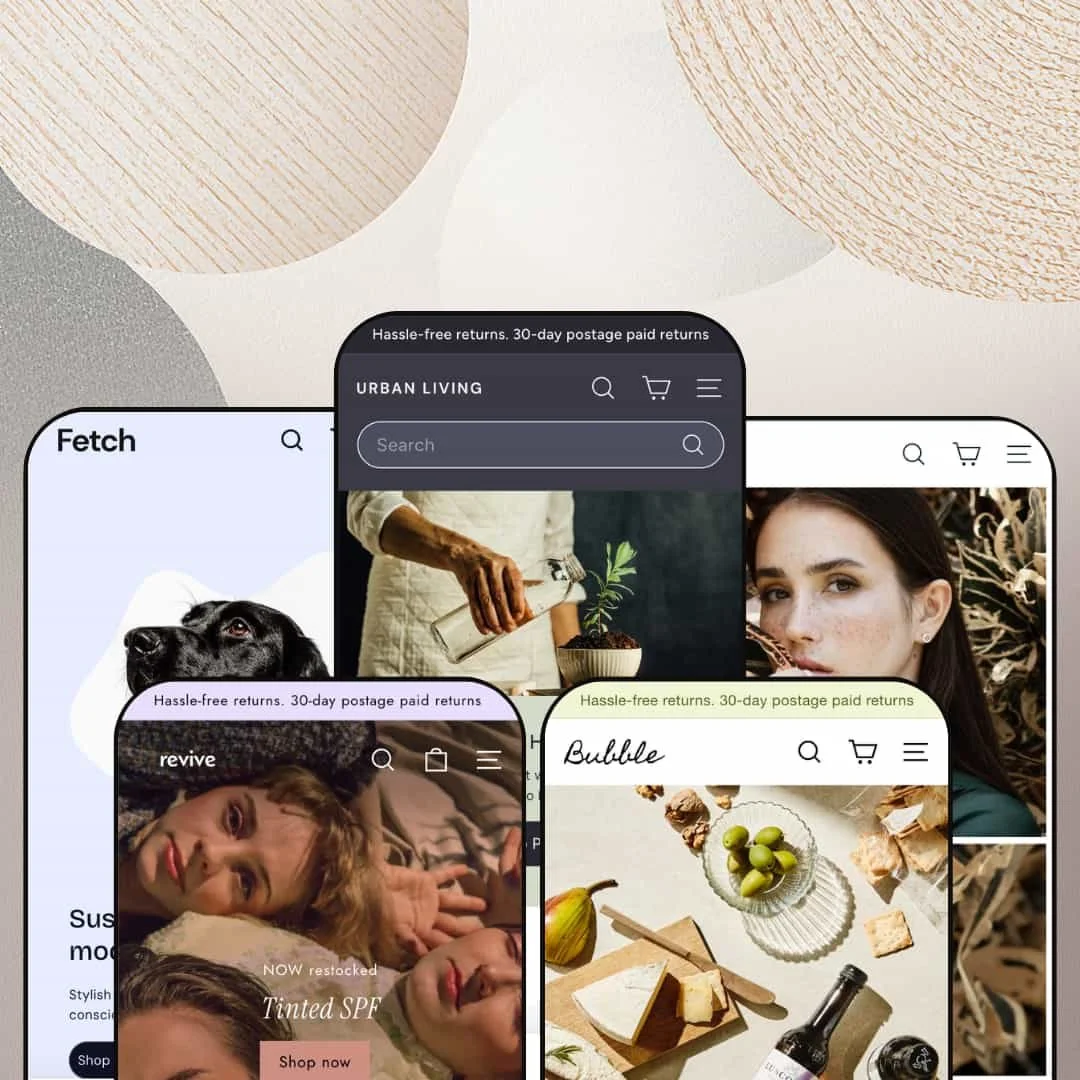
Most premium Shopify themes chase a look. Expanse chases throughput: Archetype Themes built it in 2021 for stores where thousands of products need to be found, filtered, and cross-sold without the design collapsing under the weight. It's an Online Store 2.0 theme with five presets, and at $420 it sits at the very top of the Theme Store's price range. Whether a system engineered around inventory pressure still earns that number in 2026 is the question this review keeps coming back to.
A discovery system sized for four-figure SKU counts
Navigation depth is the core product. The menu tree runs three levels deep on the Homestyle branch alone, splitting into Decor, Kitchen, Tabletop and more than two dozen sub-collections, backed by multi-category sidebar filtering and an enhanced predictive search treatment on collection pages. That puts a buyer three clicks from any of a thousand products, with far fewer dead-end collection views along the way. Multi-brand retailers and consignment operations carrying 500-plus SKUs are the merchants this pays off for daily.
The promo kit operates as one machine
Countdown timers, promo popups, promo tiles, in-menu promotions, trust badges, and stock counters ship together as a coordinated merchandising kit rather than scattered toggles. Spritz demonstrates the pairing logic: percentage-off tiles for two brand collections sit directly beneath the free-shipping banner, stacking three incentives in one viewport. Urgency surfaces reinforce each other instead of competing. Stores running flash drops or aggressive seasonal sale calendars at budget-to-mid-market price points get their entire promotional toolbox in the license.
Why buy one vertical when the license covers five?
That question is the strongest argument for the price. Expanse stages a home-goods superstore, Revive a beauty stockist, Spritz an age-gated beverage boutique, Fetch a color-driven accessories shop, and Gem a consultative fine jeweler, each a distinct retail strategy rather than a recolor. Agencies and holding-company operators juggling clients across food and drink, pet, and luxury jewelry categories can standardize on one system and re-stage per project. The purchase amortizes across builds.
Cross-selling runs on every commercial surface
Opening the cart drawer triggers a "Goes great with" recommendation row before checkout. Product pages stack a vendor rail, a collection rail, and a recently-viewed strip beneath the buy box, so a shopper who arrives for one item exits through three more offers without a single app install handling the basics. Attach-rate machinery this complete usually needs integration work. Gift shops and accessories catalogs in the 50-to-500 SKU range serving cross-shop-heavy buyers will feel the difference in average order value.
The architecture is a generation old at a top-of-market price
Expanse runs on Online Store 2.0: JSON templates, sections everywhere, block nesting capped at roughly two levels. It predates Theme Blocks entirely, so there are no eight-level nested blocks and no compatibility with AI block generation, tooling that Shopify's newest editor generation ships as standard. Selling 2021 architecture at 2026's ceiling price takes nerve. Stores planning multi-year builds with in-house developers, and evergreen catalogs expecting to grow into deeper customization, should weigh whether they're buying into an editor generation Shopify has already moved past.
The DNA is promotional, and configuring against it is real work
Pressure is the default posture. Countdowns, popups, stock counters, and promo tiles are the theme's native vocabulary, and marketing and conversion is the longest category on the feature sheet at twenty entries deep. Luxury and considered-purchase merchants running a single brand will disable most of that inventory-pressure machinery, and at that point a meaningful share of the $420 bought surfaces that stay switched off. The theme can go quiet, but quiet is the configuration, not the default.
Pre-translated strings stop at five languages
Theme UI strings ship in English, French, Italian, German, and Spanish, and nothing beyond that set. Button labels, form text, and cart strings for every other market are manual locale work before launch, on top of the product-content translation merchants handle anyway. A mid-market apparel or beauty brand selling into the Nordics, Poland, or Japan inherits a translation task the feature list's "EU translations" line quietly scopes out.
What it takes to launch
Expect a multi-day pass covering placeholder copy in secondary sections, cross-preset store-brand naming, mega menu re-staging, and metafield-backed product tabs and size charts before launch.
-
What works in this preset
A menu that sells before you land anywhere. The Brands entry spans four alphabetized columns running from ACME Studio to W & P Design, each link wired to a vendor query, and the dropdown closes with a live product tile that can go straight into the cart without leaving the navigation. For a retailer carrying sixty-plus brands, the header stops being wayfinding and becomes shelf space.
I scrolled the homepage the way a bored shopper would, and it kept producing reasons to stop. A twelve-tile category grid sits mid-page, a shop-the-look module pins products onto a styled room photo, and a store-story block with pickup hours anchors the bottom. Even sold-out items stay staged in the look module. The cadence reads like a department store floor plan rather than a landing page.
The product page treats variants as real inventory, not decoration. On the Pulcina moka pot, size and color run as separate button rows, the red colorway carries an explicit sold-out label while black stays purchasable, and the template surfaces distinct low-stock and backorder messages. Buyers get honest availability signals before they commit.
-
What works in this preset
Shoppers here browse by problem, not product type. The By Skin Type menu routes acne-prone, anti-aging, dehydrated, and pigmentation concerns to their own collections, sitting alongside conventional category and brand trees. Beauty buyers who know their symptom but not their solution get a direct path, which is exactly how skincare purchasing actually happens.
Social proof gets real estate instead of a footnote. The testimonial carousel pairs each five-star review with a customer photo and a city attribution, from Brooklyn to Montreal, and a video content block further down pitches hair-treatment education with a shop-all handoff. It reads like a store that expects skeptical first-time visitors.
Where it stumbles
The staging commits to stockist breadth over brand depth. Revive presents as a multi-brand beauty retailer with alphabetized vendor menus, so a founder-led skincare label wanting regimen-based selling, routine builders, and ingredient storytelling will be re-staging most of what the demo shows. The pieces exist; the arrangement serves a different business.
-
What works in this preset
You hit a wall before the store. Spritz gates entry with an age-verification prompt, complete with a rejection state that turns under-18 visitors away, which is the first thing merchants in alcohol-adjacent, CBD, or other regulated categories should notice. Compliance staging is demonstrated, not just promised on a feature sheet.
Curation does the merchandising work in this small catalog. Staff Pick badges flag house favorites on product cards, and a gift-ideas menu carves the range into occasions and price brackets. It shows the theme's discovery tools scaling down to a boutique posture without looking empty.
-
What works in this preset
Color leads, category follows. The primary menu opens with Shop by Colour before Shop by Category, and product cards ship two photos each so the rollover state previews a second angle right in the grid. For accessories where the buying decision is aesthetic first, that inversion of the usual navigation order is smart staging.
I clicked through the walk-kit ladder expecting a discount widget and found catalog architecture instead. The collar sells at $40, the walk kit at $70, kit plus bag holder at $90, and the full bundle at $120 with an Offer badge, each staged as its own product. Average order value climbs through SKU design rather than a popup, which any store selling combinable accessories can copy directly.
Where it stumbles
Fit guidance lives in the wrong place for a pet store. Sizing help sits in a blog post titled "How to Measure a Dog for a Harness" while the product pages go without a staged size chart, even though the size-chart section ships with the theme. Merchants in this vertical should plan to deploy it on product templates themselves, because returns on ill-fitting harnesses are a margin problem the demo doesn't model.
-
What works in this preset
The navigation speaks hero-SKU grammar. Menu leaf nodes under Engagement are individual products, The Halo, The Crown, The Signature, rather than collections, and the announcement bar rotates two messages instead of repeating one. A made-to-order jeweler with a dozen signature pieces needs exactly this structure, and most demos never think to show it.
Consultative selling gets staged, not just claimed. A Book an Appointment page anchors the main menu, and the engagement-ring product page carries an eleven-icon diamond-cut education grid covering emerald through asscher shapes. High-ticket buyers who research for weeks before purchasing find the store already speaking their language.
Restraint is the design statement here. Native video plays in a full-width section, a lifestyle gallery replaces promo tiles, and testimonials run long-form with purchase-occasion tags like Anniversary Gift and Custom Ring Selection. The same theme that stages a big-box floor on Expanse goes quiet and editorial when the vertical demands it.
Every surface carries a selling slot
Read all five demos back to back and a pattern emerges that no single preset reveals: navigation, cart, product-page footers, and even blog modules all hold merchandising positions. There is no purely informational layer anywhere in the system. The theme's underlying thesis is that attention, wherever it lands, should be convertible.
Density is a dial, not a destiny
The same section library produces maximal retail pressure on one preset and near-editorial calm on another. That spread is the real flexibility story, more meaningful than any color-token count, because it shows the system tolerates opposite retail philosophies without breaking its own visual logic. Few theme families demonstrate both extremes with live demos.
Presets encode strategies, not palettes
Each demo ships a complete retail playbook: compliance gating in one, consultative appointment selling in another, bundle-ladder catalog design in a third. A merchant studying the preset family is effectively reading five short case studies in merchandising. The staging itself is documentation.
Mobile flattens the personality
Every preset collapses into the same expandable accordion drawer on small screens, and the distinct desktop identities, big-box, boutique, luxury, converge toward one pattern. The vertical character merchants pick a preset for lives mostly at desktop widths. On phones, where the majority of traffic arrives, the five stores feel like siblings.
The demo effect is photography-dependent
Under all five presets sits one skeleton, and what separates them is disciplined art direction more than layout divergence. Merchants without strong product and lifestyle imagery will not reproduce what the demos promise. The theme rewards photo budgets; it does not substitute for them.
★ 8.0/10
Rating
-
Discovery, promotion, and post-purchase-path selling are all covered natively, with breadth that matches the tier. Regulated-category tooling like age gating is included rather than outsourced.
9
-
Section richness cuts both ways; first-time merchants face a long wall of switches and staging decisions. The Online Store 2.0 editing itself is standard drag-and-drop.
7
-
Menus collapse into a clean expandable drawer and product cards keep quick-add within thumb reach. Vertical flavor thins out at phone widths.
8
-
Image lazy-loading and restrained media use keep even the densest demo disciplined. Merchants stacking every promo section should still expect to trim.
8
-
Five presets stretch from big-box density to consultative calm on one token system. Deep restructuring eventually hits the two-level block nesting ceiling.
8
Frequently Asked Questions
-
Yes, pickup availability display is built in, and the Expanse demo leans into it with next-day local pickup messaging and a locations page.
-
It is. RTL rendering ships with the theme, which matters for Hebrew and Arabic storefronts where many themes require CSS surgery.
-
Both are present: quick shop opens a product modal from the card, while add-to-cart buttons fire directly from grids for single-variant items.
-
The Fetch demo stages a compact catalog convincingly, so it works. You'd be paying for discovery machinery designed around much larger ranges, though.
-
No. The feature sheet flags combined listings as Shopify Plus only, so standard-plan merchants should exclude it from their evaluation.
-
Version 9.1.0 landed April 24, 2026, adding the Shopify Customer Account Web Component and a cart-page fix, continuing a steady release cadence since 2021.
This review is based on hands-on testing of the publicly available preset demos of the Expanse Shopify theme as of July 2026. Theme features, preset availability, and performance can change with subsequent updates from the theme developer.