
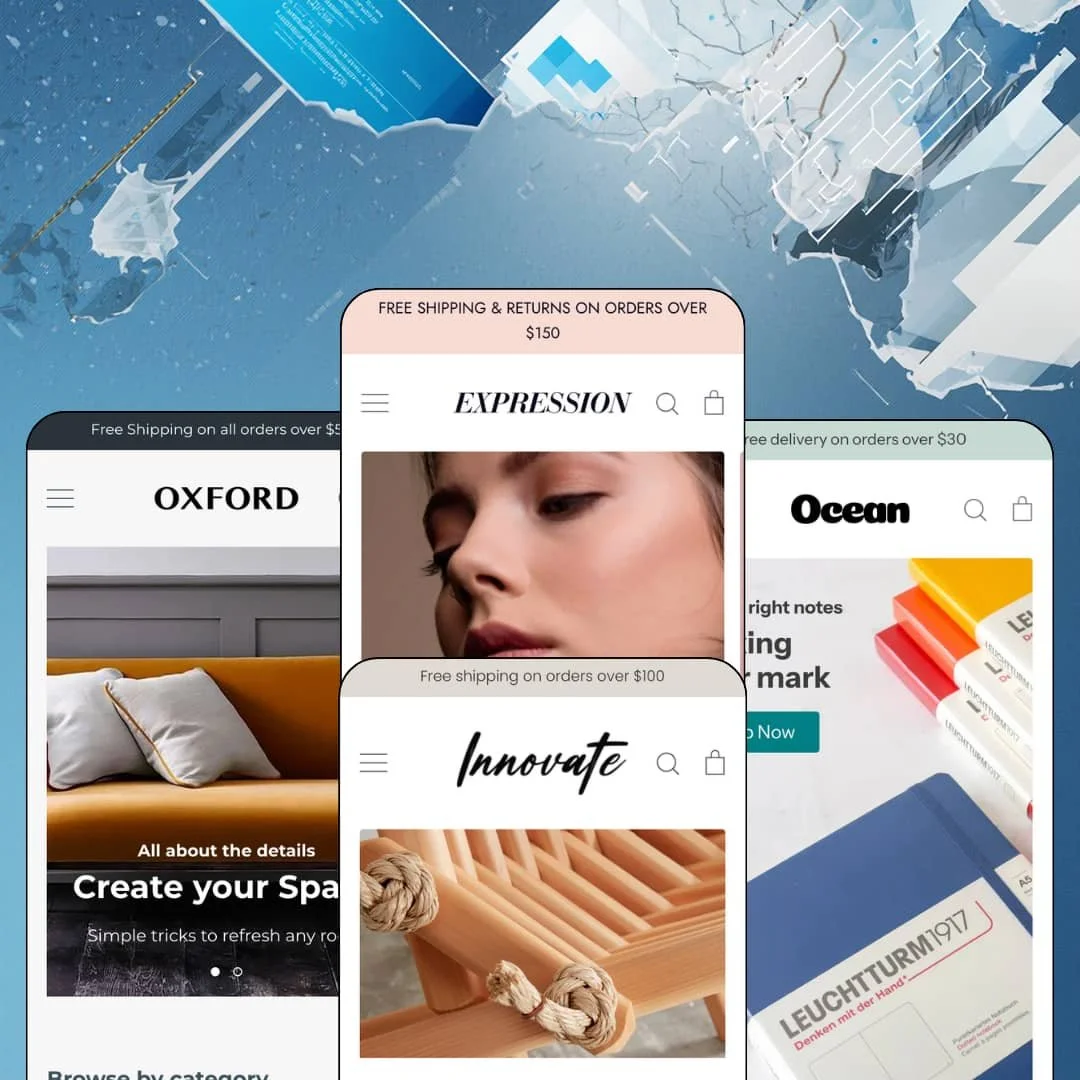
A theme that describes itself as "promotion-focused" in its own browser-tab title is telling you who it's for before you've scrolled an inch. Expression, Clean Canvas's $220 four-preset family, wears that badge across a handmade-jewellery store, a 100-plus-SKU furniture retailer, a curated lifestyle shop and an art-and-beauty preset, and the interesting question is whether the same sale-tile grammar serves all four. It runs on Online Store 2.0 with a release history that stretches back to December 2016 and a 10.0 update in late 2025 that added Extended Variants, Combined Listings and native swatches. I spent time in three of the four demos and read the fourth through its Theme Store material, because the Ocean storefront blocks automated visits.
Header as a utility layer, not just a menu
Open the search and you get a panel with two editable link menus beside the query box. Oxford stages "Our Collections" and "Quick Links" there, Innovate stages "Shop" and "Quick links," and both put an email-capture field labelled "Get on the list" or "Stay on trend" in the header itself alongside the announcement bar and, in Oxford, a clickable "For help call" phone number. That turns the header into a place where a furniture store or a wholesale-enabled home brand can surface a phone line and a newsletter before the shopper has scrolled. It costs nothing to configure.
Product tiles that carry a quote
Why keep a product grid and a testimonial section on separate parts of the page? Expression fuses them: the "New Arrivals," "Featured products" and "Testimonials" sections in the three demos each render a product card with price beside a customer quote, name and town, so a $42 ring or a $1,359 storage bed arrives on the homepage with its own social-proof line already attached. For a handmade jewellery maker or a considered-purchase furniture retailer with under 100 SKUs, that's the section that replaces a separate reviews carousel and a separate featured-products block with one that does both.
Backorder messaging and pickup as native product-page states
Add a variant with zero stock and continue-selling enabled, and the buy box prints "is backordered and will ship as soon as it is back in stock" beneath the button. Below that, the pickup block names the location, the ready-in-24-hours promise and a View store information link that expands to a full address with a Google Maps query. For a single-location retailer with a physical shop, whether that's a maker studio or a furniture showroom, both states are on by default. Neither needs an app.
Three-tier navigation with a counted filter rail
For merchants comparing this theme to Shopify's free Dawn baseline, the discovery layer is where the $220 shows. Dawn stages a single-level dropdown; Expression's Oxford demo runs Shop into two sub-categories and eight grandchildren, and its collection page renders Availability, Price, Product type, Fabric Color, Leg options and Size facets with per-value counts, eight sort orders and pagination. A 100-to-500-SKU furniture or hardware store with multi-attribute products gets a filter rail it can actually ship with.
The stars come from an app Shopify shut down
The Innovate product page shows a review widget with a five-bar rating histogram, a "Write a review" link and "Based on 2 reviews," and the grid stars across all three demos read "4.0 / 5.0, 1 review" in the same style. That's the classic Shopify Product Reviews app, which Shopify discontinued in 2024, and the theme's own changelog references a 2022 setting to hide those grid ratings. The stars are a museum piece. A beauty brand or a considered-purchase furniture store that needs live review collection will install Judge.me or a peer and restyle from scratch.
The default voice is a sale voice
Every demo leads with a discount. The jewellery preset puts "Sale" second in the main nav and stages "10% off!" on a homepage card, Oxford's grid shows "Save 47%" on an armchair, Innovate's Staff Picks open with "Save $20.00," and the browser-tab title of all three storefronts describes the theme as ideal for promotion-focused stores. For a luxury jewellery house or a full-price craft furniture brand that never discounts, nothing here breaks, but every promo tile, badge and popup will need switching off rather than on, and the demos give no picture of what the theme looks like at full price.
Online Store 2.0 at a 2026 price
Expression sits on the Online Store 2.0 generation, with JSON templates, section groups since version 8.0 and blocks nested to the usual two levels. That's the same generation as Dawn, which is free, and while the update cadence is healthy the 10.0 release of December 2025 added Extended Variants and native swatches rather than the deeper block nesting of the Theme Blocks era. For a subscription-driven beauty startup or a multi-brand lifestyle store planning to lean on AI-generated blocks and Horizon-style page assembly, $220 buys a 2021 architecture.
What it takes to launch
Expect a multi-day pass across demo-store disclaimers in every product description, third-party product data and vendor links, placeholder phone numbers and social handles, option-label and menu-copy clean-up, filter-value normalisation and sold-out staging across all three live demos before launch.
-
What works in this preset
The homepage opens with a row of five mini collection cards, and they're not all collections. One links to earrings, one to the About page, one to the blog, one to a single product with a "10% off!" strapline, and one to new necklaces. That mixed-link-type card row is the theme's signature homepage move, and for a maker with a 30-piece catalogue it does the job of a mega menu without asking the customer to open anything.
Stockist logos get their own strip. Seven retailer marks scroll beneath the earrings banners, and further down three editorial image-and-text columns handle jewellery care, where-to-buy and press cuttings as equal siblings. I noticed the same three columns reappear beneath the product buy box on the ring page, so the brand-story layer follows the shopper from homepage to product without the merchant re-staging it, which is exactly what a single-maker jewellery brand with limited copy resources needs.
The ring page keeps the buy box short. Two material bullets sit under a one-line description, the vendor name links to a vendor collection, and the single "White" option renders as a labelled swatch rather than a dropdown. It's a quiet product page.
Where it stumbles
Jewellery sells on variants, and this demo barely stages any. The Quarter Circle Terrazzo Ring ships with one colour and an adjustable band, the earrings grid shows single-price pieces with no size or metal axis, and nowhere in the demo could I find a ring-size picker or a size-chart trigger even though the theme lists a size chart among its merchandising features. A merchant selling rings in eight sizes will be the first to test that block, not the demo.
-
What works in this preset
Three tiers deep, and it holds. Shop opens into Beds & Mattresses and Sofas & Armchairs, each of which opens again into four child collections, and the mobile menu stacks the same hierarchy with back-buttons. For a furniture retailer running 28 sofas and armchairs across fabric, leg and seat-count options, that third level is the difference between a navigable catalogue and a wall of tiles.
The showroom section is the one I'd copy. Address, three lines of opening hours and a Directions link that opens Google Maps sit in a plain two-column band near the footer, and the same band repeats under the sofa product page so a shopper reading about a $1,865 sofa can plan a visit without leaving the buy flow. Add the free-fabric-samples image-and-text block and the "As featured in" press logo row and this preset reads like a real bricks-and-clicks furniture business rather than a template.
Below the sofa grid, a promo tile appears. It's a full-width "Shop the Sale!" banner that lives after the last product card on the collection page, and it turns pagination dead space into a merchandising slot.
Where it stumbles
Six of the twenty sofas on the homepage grid are sold out, and the Harper Modern Sofa product page I clicked through to is one of them, with the fabric and size options rendered as plain dropdowns rather than the colour swatches the theme advertises. The collection filter rail also shows what happens when option data arrives unnormalised: the Size facet lists "2 Seater", "2 Seater Sofa" and "2 Seater from $2,444.00" as three separate checkboxes. The theme renders whatever the catalogue gives it, and the demo gives it a mess.
-
What works in this preset
The Ocean storefront blocks automated visits, so I read this preset through its Theme Store page and the demo-navigation label the other three storefronts give it: "Beauty and Art." The Theme Store files Ocean under the art industry and pitches the same three pillars as the rest of the family, a customisable sidebar, mini collection cards and editorial image-and-text columns. For a print-seller or a small skincare line, that sidebar is the mechanism to watch, because it lets a low-SKU store run a permanent side-column of links and promotions without a mega menu.
Feature parity is theme-wide. Everything listed for the family, from lookbooks to swatch filters to the stock counter, ships with Ocean as with the others, so the preset choice is a visual starting point rather than a functional one.
-
What works in this preset
Three stacked hero bands, each with two buttons. "Handpicked for you" pairs Shop Latest Arrivals with Shop Sale, "Fantastic Furniture" pairs New Arrivals with Bestsellers, and the third does the same for Objects, so a lifestyle store with three departments gets six entry points above the fold without a slideshow. I scrolled through it twice to be sure there was no carousel hiding a fourth slide; there isn't, and the page is faster for it.
The Staff Picks grid shows twelve products with "From $24.00" price-ranging on multi-variant items and "Save $20.00" badges expressed as dollar amounts, a badge-style choice the Oxford demo makes differently with percentages. The product page for the Selvedge Linens carries a "Country of manufacture: Copenhagen, Denmark" line beneath the pickup block, which is the kind of free-text product-detail slot a curated importer will use for provenance, and the Size and Color options render as clickable button groups rather than dropdowns.
A blog section sits on the product page. Two articles with dates and excerpts follow the review widget, so the store's editorial voice stays visible even on a $32 tea towel.
Where it stumbles
The search panel offers two menus, "Shop" and "Quick links," and the ten links between them point at the same three collections plus Sale and Staff Picks. "Seconds" opens Objects, "New Arrivals" opens Furniture, "Most Searched" opens Staff Picks. That's staging rather than a theme limit, but it means the demo never shows what the sidebar-style search panel looks like when a store actually has ten destinations.
One grammar, three retail models
Read all three live demos and the same homepage skeleton appears: announcement bar, header with search panel, hero, mini collection cards, product-plus-quote section, editorial columns, newsletter. What changes is the catalogue underneath, and the skeleton copes with a 30-piece maker store, a 100-plus-SKU furniture retailer and a curated importer without any preset needing sections the others lack.
A decade of updates without a rebuild
The version history runs from 4.0.0 in December 2016 through 10.0.1 in March 2026 with no gap longer than a few months, and the 2025 release folded in Extended Variants, Combined Listings, native swatches and Shopify-native structured data. Merchants who bought Expression in 2019 are running the same theme with today's variant features. That continuity is rare and worth weighing against the architecture-generation caveat.
The editorial layer travels with the shopper
Every demo carries its image-and-text columns, showroom band or blog block onto the product page as well as the homepage. The brand story isn't a homepage-only section; it's a template-wide layer that appears wherever a shopper lands, which suits stores whose products need context to sell.
Food & Drink is listed, and no preset serves it
The Theme Store files Expression under Jewelry and Accessories and Food and Drink, yet the four presets stage jewellery, furniture, art-and-beauty and home objects. A merchant arriving from the Food & Drink filter finds no menu-style product listing, no nutrition staging and no grocery-style cards in any demo, and will be assembling that vertical from the generic section library alone.
Prose where structured data should be
Across the demos, product detail lives in free text: two material bullets on a ring, a "Country of manufacture" line on a towel, a paragraph on a sofa with fabric and size buried in dropdowns. Nothing in any demo renders a specification table, a comparison view or a metafield-driven spec block, and for the furniture and electronics-adjacent catalogues the Oxford preset is built to carry, that's the layer a shopper expects before a four-figure purchase.
Every section wants a photograph
Hero bands, mini collection cards, editorial columns, image-and-text blocks, press logos and the newsletter band are all image-backed, and the three live demos run on licensed photography from real brands. A store without a professional photo library will see the homepage skeleton collapse into empty frames faster than with a text-first theme.
Rating
★ 7.0/10
-
Native backorder, pickup, stock counter and promo tooling ship theme-wide; review collection and any spec-table layer depend on apps.
6
-
Section groups, sections on account pages and a two-menu search panel keep configuration inside the editor, and the developer's own reply on the Theme Store frames quick setup as a design goal.
8
-
The mobile menu stacks three navigation tiers with back-buttons and the cart page shows unit and sale pricing, but the product page runs long with editorial columns and blog blocks below the buy box.
7
-
Innovate's homepage replaces a slideshow with three static hero bands, images lazy-load throughout, and the section count per page stays restrained.
8
-
Four presets share one skeleton; badge style, sidebar and card rows are configurable, but the layout grammar is consistent enough that a preset choice is mostly a palette choice.
6
Frequently Asked Questions
-
It renders star ratings in the grid and a review widget on the product page, but both come from the Shopify Product Reviews app the demos still run, which is no longer available. Plan on a third-party review app.
-
Yes. The Oxford demo stages a "For help call" link beside the announcement bar, and the same slot carries a newsletter field in the other presets.
-
Three levels. Oxford runs Shop into Beds & Mattresses and Sofas & Armchairs, each with four child collections, and the mobile menu mirrors the hierarchy.
-
Version 10.0.0 from December 2025 added Extended Variants and Combined Listings support, and the Innovate demo renders Size and Color as button groups. The demos stage at most two option axes, so larger matrices are untested here.
-
The Oxford demo uses a showroom band with address, hours and a Google Maps Directions link, and the product-page pickup block expands to a full address with a map query.
-
Oxford. It's the only demo staging three-tier navigation, a full collection filter rail and the showroom section, and its product page assumes fabric and size options.
-
Version 10.0.1 landed in March 2026 as a bug-fix release on top of the December 2025 feature update, and the changelog shows a release at least every few months since 2016.
This review is based on hands-on testing of the publicly available preset demos of the Expression Shopify theme as of August 2026. Theme features, preset availability, and performance can change with subsequent updates from the theme developer.