
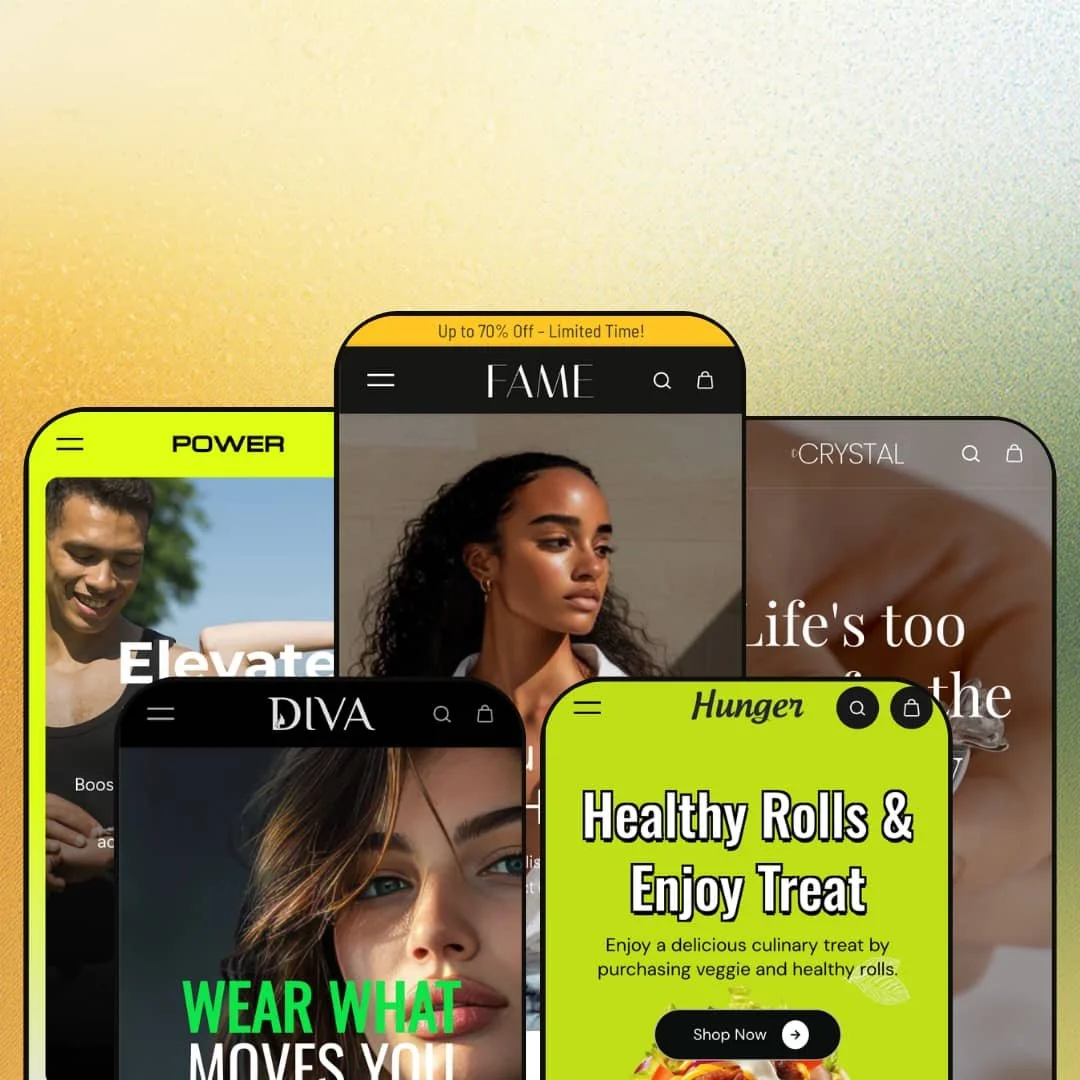
Most $200 Shopify themes commit to one storefront personality and defend it. Fame ships five: a dark editorial fashion store, a shouty streetwear store, a gym-gear shop, a jewelry boutique, and a food-ordering front, all built on Online Store 2.0 architecture by Shine Dezign Infonet. That's an unusual amount of ground for a single license to cover at this price. The question this review keeps circling is whether one section library can serve five verticals convincingly, or whether the range is costume-deep.
Five verticals from one license
Dawn gives you one storefront personality for free; Fame sells you five for $200. The presets aren't palette swaps but separately staged verticals spanning two fashion registers, fitness, jewelry, and food, each with its own navigation logic and homepage composition. That math changes for agencies and holding-company operators who launch stores across unrelated product types, because a single theme investment becomes a reusable starting point rather than a one-store decision. One purchase, five believable openings.
A full buy-box lives on the homepage
The featured-product section renders a complete purchase flow directly on the landing page: the staged coat exposes a five-color swatch row, four size buttons, a twenty-variant matrix, a quantity stepper, and an add-to-cart button, no click-through required. Shoppers go from arrival to cart in one scroll. For merchants selling on impulse-buy behavior with catalogs under 30 SKUs, where one hero product carries the store, removing a page load between interest and cart is a genuine conversion lever.
Transformation selling is native
Some products are bought on proof, not description. The Fashion Makeovers section stages a draggable before-and-after image comparison, the merchandising pattern that transformation-driven categories lean on hardest. For beauty, fitness-apparel, and grooming merchants selling to considered-purchase buyers who need visual evidence before committing, this section replaces what would otherwise be an app install plus integration work with a native, editor-configurable block.
Inventory pressure, rendered on the card
Product cards can print live unit counts. The food preset stages this throughout, with cards reading exact remaining stock down to the unit, so scarcity communicates at browse level instead of waiting for the product page. It's urgency without popups. Merchants running flash-drop or restock-driven sales patterns in consumables and food categories get a persistent, low-friction scarcity signal that doesn't interrupt the shopping flow the way overlay-based urgency tools do.
Loud is the factory setting
Scrolling sale marquees, discount ribbons, and letter-spaced promotional type are Fame's native voice, and the jewelry preset makes the tension obvious: five-figure rings staged inside a ticker announcing hot deals while stocks last. Quiet isn't in this theme's vocabulary. Luxury-tier merchants selling to considered-purchase buyers, where restraint is the brand, will spend their customization budget muting the theme rather than extending it, and the promotional grammar resurfaces in section after section as they build out pages.
The homepage is hungrier than small catalogs
This kept bugging me across the demos: the section library invites very long homepages, and thin catalogs can't feed them. The dark fashion demo surfaces the same maxi dress in three separate homepage carousels because the assortment runs out before the sections do. Repetition reads as padding. Merchants with under 20 SKUs and evergreen assortments will either prune the homepage hard or watch the same products recycle in front of shoppers who already scrolled past them.
Menu depth is hand-curated
Across the presets, dropdown columns link to individual products rather than stopping at collection level, which means the navigation is a manually maintained artifact. It looks rich in a demo. In production, every product swap ripples into menu curation work, and the pattern strains badly for multi-brand operators running 500-plus SKU catalogs where assortments turn over monthly and nobody wants navigation maintenance as a recurring task.
What it takes to launch
Expect a multi-day pass covering copy replacement across long multi-section homepages, market and currency configuration, menu re-curation, size-chart and metafield population, and full imagery replacement for whichever preset you adopt. Two to three days is realistic before launch readiness.
-
What works in this preset
Dark editorial is a hard register to fake, and this preset mostly doesn't. The homepage layers a seasonal collection grid over long-form brand-story blocks with full paragraphs of positioning copy, which gives the storefront a magazine cadence instead of the usual grid-of-cards rhythm. It reads slow on purpose. That pacing suits apparel brands that sell identity before product.
A tabbed collection module does quiet heavy lifting further down. One section rotates between three collections through inline tabs, so a merchant can merchandise multiple assortments in the vertical space one carousel would normally occupy, and swap the featured collections seasonally without touching layout.
I went looking for the search experience and found it staged with intent: the overlay serves product suggestions complete with prices and color swatch dots before a query finishes. For stores where shoppers arrive hunting a specific piece, that head start matters more than any hero banner.
-
What works in this preset
"WEAR WHAT MOVES YOU" is the first thing the preset yells at you, in oversized display type over a split hero. The whole preset commits to volume: scrolling sale ribbons, letter-spaced CTAs, marquee headlines stacked between product rows. For streetwear and trend-driven apparel where the brand voice is supposed to shout, the staging does the shouting for you.
The mega menu is staged as a six-branch department tree spanning innerwear, fusion wear, western wear, handbags, leather goods, and accessories. Each branch carries its own sub-column of category links. That's department-store information architecture, and seeing it pre-built saves real planning work for merchants mapping a wide apparel-plus-accessories range.
Where it stumbles
The navigation promises six departments; the homepage merchandises roughly one. Nearly every product row below the hero pulls from the same apparel pool, so the leather-goods and accessories branches the menu advertises never earn visual space on the landing page. Merchants adopting Diva for genuine multi-department range will re-stage the homepage to match the breadth the menu claims.
-
What works in this preset
I scrolled through expecting recolored fashion sections and found staging that actually understands gym retail. Equipment guides pair product photography with icon-annotated benefit callouts, jump ropes and ab wheels get their own explainer cards, and a merchant testimonial wall cites named stores. The vertical feels researched rather than reskinned.
Mobile gets its own art direction here. The hero loads a separate mobile-specific banner asset instead of cropping the desktop image, a small decision with outsized effect on how the store reads on a phone screen. Fitness shoppers skew mobile-heavy. Ship the right crop and the first impression survives.
-
What works in this preset
Where does a $200 theme put a jewelry store's credibility? Crystal answers with structure: shop-by-metal-type navigation, gemstone collection trees, and a header that swaps between dark and light logo files depending on context. Those are the organizing conventions jewelry buyers expect from established retailers, staged out of the box.
Urgency merchandising gets a dedicated lane. A countdown deal banner anchors the mid-page, and a limited-edition carousel sits beside sale-badged cards, giving drop-style jewelry sellers a ready scarcity toolkit without leaving the homepage.
Where it stumbles
The demo stages its rings and chains without size variants. Anyone who has sold rings knows sizing is the operational center of the category, so merchants will build the full variant structure themselves before launch, and the demo offers no reference for how a size-heavy jewelry product page should be configured in this theme.
-
What works in this preset
Food moves fast, and the preset is built around that pace. An autoplaying dish video sits in the popular-items band, promo cards advertise tiered offers per category, and the color palette runs warm and appetite-driven. It looks like a place that sells tonight's dinner, not a template wearing a chef's hat.
The navigation compresses to four top-level links, which is exactly right for a takeaway-style operation where the menu is the catalog. A service icon strip covering events, delivery, guarantees, and support rounds out the trust layer a local food brand needs above the footer.
Three years of visible maintenance
Fame launched in May 2023 and sits at version 7.0.4 as of May 2026, with recent release notes covering account-component changes that track Shopify's own platform evolution. That cadence is the difference between a theme and a preset dump. Buyers inherit a codebase that has been actively reconciled with three years of platform change, which lowers the odds of stranded functionality later.
One design system underneath five costumes
Read all five demos back to back and a consistent grammar emerges: identical drawer behavior, consistent card anatomy, the same section mechanics restyled per vertical. Teams that learn to build in one preset can staff any of the others without relearning the editor logic, which quietly compounds the multi-store value the preset family promises on the surface.
Vertical identity is homepage-deep
The five verticals diverge on their homepages and converge almost everywhere else. Product pages, utility pages, and cart flows share one architecture across the family, so the jewelry boutique and the burger shop start feeling like siblings two clicks into the store. Merchants wanting vertical specialization to persist through the full shopping journey will be extending the theme, not just configuring it.
Motion is load-bearing
Animated marquees, scrolling text bands, and kinetic promotional hooks are the connective tissue holding Fame's visual identity together in every preset. Strip the motion for a calmer brand and a surprising share of what distinguishes Fame from a generic Online Store 2.0 frame goes with it. The design's personality and its animation are the same asset, which limits how far the theme bends toward stillness.
Rating
★ 7.4/10
-
The 35-plus section library covers before/after sliders, image hotspots, countdown banners, homepage buy-boxes, and card-level stock counters. Breadth is the theme's genuine strong suit.
8
-
Online Store 2.0 editing keeps configuration approachable, but hand-curated menu trees and long section stacks mean staging a launch-ready homepage takes real hours.
7
-
Presets ship separate mobile-specific hero assets and a persistent bottom utility bar with menu, search, home, account, and cart, a phone-first navigation pattern that respects thumb reach.
7
-
Imagery lazy-loads and assets stay disciplined, but homepages stack a dozen-plus sections with repeated marquee bands, so staying lean depends on merchants pruning what the demos pile on.
7
-
Five distinct preset identities from one library, running the range from near-black editorial fashion to white-space jewelry minimalism, demonstrates unusual stylistic elasticity for the tier.
8
Frequently Asked Questions
-
It can work, but it ships with setup work. The hero CTAs say SHOP MEN/SHOP WOMEN, the FAQ block has e-commerce sizing questions left in, and the about-us footer link is broken. The services grid, opening-hours block, and clinic-address section are genuinely useful for a service business once the demo content is cleaned up. Smile is workable for dental, salon, or similar service verticals after a content pass.
-
Theme UI strings come pre-translated in English, French, Italian, German, and Spanish, and right-to-left layout support is included for RTL markets.
-
A slide-out cart drawer is the staged default across the presets, and sticky cart behavior is part of the cart feature set.
-
Yes, an age verifier ships in the marketing feature set, relevant for alcohol, tobacco-adjacent, and other gated categories.
-
Version 7.0.4 landed in May 2026 with account-component changes; the theme has shipped continuous updates since its May 2023 launch.
-
Gift wrapping and cart notes are built into the cart feature set, enough to run basic gifting flows without adding an app.
This review is based on hands-on testing of the publicly available preset demos of the Fame Shopify theme as of July 2026. Theme features, preset availability, and performance can change with subsequent updates from the theme developer.