
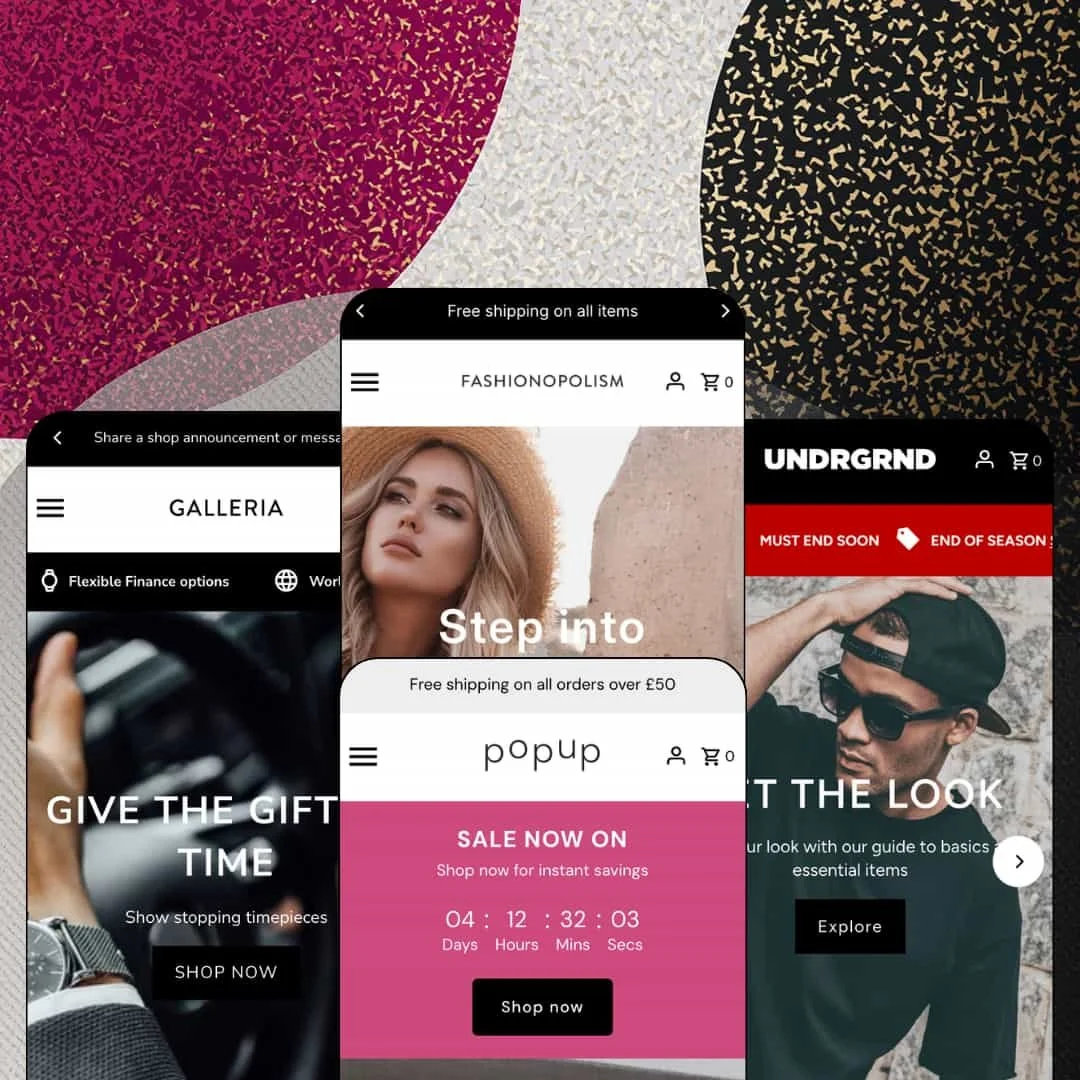
Most themes with "fashion" in the name stay in the wardrobe; Fashionopolism spends three of its four demos selling stationery, Swiss watches and menswear knits instead. That spread is the pitch: one $200 licence, an Online Store 2.0 section library, and enough promo hardware to run a sale in any of those verticals without leaving the editor. The question for a buyer in 2026 is whether a theme that launched in 2017 and now sits at version 11 still earns its place against newer families. I spent time in all four demos to find out where the answer is yes.
Variant chips on the card, not behind a click
On the Fashionopolism demo, the Eliza Top card carries Khaki and Black swatches plus 6 to 12 size chips, and every chip is its own variant URL. No modal, no detour. That collapses the browse-then-select loop into one tap from the grid, and it keeps Quick Shop as a fallback rather than the only route. For apparel merchants with 50 to 200 SKUs and a restock-driven sales pattern, where shoppers return to grab their size, that's the difference between a grid and a shelf.
How many apps did your last sale take?
Fashionopolism ships a coordinated promotion kit: a countdown header block (Salon's "SALE NOW ON" strip with days, hours, minutes and seconds), promo tiles with discount codes, a marquee ticker, a newsletter popup and a Pre Order badge on cards. They're sections and settings, not integrations. For mid-market apparel or gift brands running seasonal or flash-drop calendars, the sale can be built and torn down inside the editor.
A gifting layer with real inputs
The Navitimer buy box includes a "Personalize with engraving" text field, and the Theme Store list adds gift wrapping and cart notes to the same family. Orders arrive annotated. Engraving as a line-item property means the instruction travels with the order instead of arriving by email later. For jewellery, watch or luxury-accessory merchants selling considered, gift-season purchases, that's a capability that would otherwise be scoped as custom work.
Merchants selling small baskets get a cart that keeps selling
Slide-out cart, sticky cart and a "Featured items" cross-sell carousel come as one unit; every demo's drawer pulls four products in the moment something is added. The shopper stays on the page. For stationery, homewares or accessories stores with sub-$60 average orders and impulse-buy behaviour, where the second item is the margin, this is the section that earns its keep.
The testimonials are captions, not evidence
Salon's "Recent Reviews", Horology's four-quote block and Haute's four-quote block are typed text sections with a headline and two lines each, and no rating engine sits behind any of them. No stars anywhere. Merchants in repeat-buyer, mid-market apparel or beauty who need verified review counts will be installing a review app on day one, and the theme's own quote sections become decoration.
Product data is prose, even where the vertical needs a table
The Navitimer's case size, dial colour, movement and reference number are typed as bullet points inside the description. Nothing reads them. For watch, electronics or eyewear merchants with 50-plus SKUs and considered-purchase buyers who compare 41mm against 43mm across brands, the absence of a metafield-driven spec or comparison section means that comparison happens in another tab, not on your store.
Nine years in, still Online Store 2.0
Haute's footer states it plainly: "Fashionopolism is an OS 2.0 theme for Shopify", and version 11.0.2 arrived in May 2026 as a bug-fix release. Dawn, Shopify's free theme, is also OS 2.0, so the $200 here buys the section library and promo kit, not a newer architecture. Merchants who plan to be on the same theme in 2028, or agencies standardising client builds on the deeper block nesting of the Theme Blocks generation, should weigh whether a section library alone justifies the licence. It's a fair price today.
What it takes to launch
Expect a multi-day pass across hero and slideshow imagery, announcement and utility-strip copy, footer link groups, collection tiles, product tab content and size-chart tables, plus catalogue curation to replace aged demo stock and sold-out staging before launch.
-
What works in this preset
You land on a two-slide hero, and by the third scroll you're already choosing a size. The "Our Newest Looks" grid runs nineteen cards, and every card carries its own picker: numbered chips from 6 to 16 on the dresses, XS to L on the tops, plus colour swatches like White/Blue on the Marley Skirt or White/Sage on the Gracie Set. Each chip is a direct link to that variant. Quick Shop sits on the card too.
The buy box on the Ava Dress is where the apparel focus shows. A size chart table converts Australia/UK, USA and European sizes side by side, the model's height, bust and waist sit under the price, and a stock string reads "Only 6 left!" beside the size buttons. Product Details, Returns and Shipping fold into tabs beneath. Nothing here needs an app.
Trust is layered rather than shouted. A press-logo row (Vogue, Allure, Elle and three more) sits above the newsletter, a three-icon band promises free shipping over $100, four-way payments and free returns, and "Featured Dresses" tiles show the Emilia, Bella and Rumi with prices and a Shop Now button each, so the homepage sells individual products, not just categories.
Where it stumbles
Every product page opens with a countdown block reading "Sale Now on, Save up to 50% on selected styles", while the Sale collection holds three items. For a boutique that trades on new-in freshness, staging the urgency block as a permanent product-page fixture reads against the preset's own merchandising, and it's the first thing a merchant will want to move or remove.
-
What works in this preset
One search bar can't carry 124 items across five departments, and Salon doesn't ask it to. A "Start Shopping" section stages a cascading select: pick Bathroom, Cleaning, Kitchen, Stationery or Gifts, then narrow again. Below it, collection tiles carry live counts (Kitchen 43 Items, Stationery 28, Bathroom 21), which tells a browser how deep each aisle goes before they click.
Salon also demonstrates the theme's homepage buy module. The "Versatile Goods" block drops the Doughnut Hooks product straight onto the homepage with its full gallery, description, quantity stepper and add-to-cart, and the copy underneath explains the set of three and the 7cm diameter. For a gift shop that wants to push one hero item per week, that's the section to lean on.
Variant chips aren't only for sizes. The Animal Melamine Plates card offers Lion, Fox, Tiger, Whale, Giraffe, Owl and Bird as tap targets, the Calepino notebooks offer Red-Ruled, Green-Graph and Blue-Plain, and the Duralex glasses run Small to Large. A Recent Articles grid with dates and excerpts sits lower down, giving the preset an editorial tail.
Where it stumbles
The buy module is staged with a sold-out product. The one section built to convert straight from the homepage shows a greyed button and no purchase path, and a Sold Out ribbon sits on the notebook card in the first grid too. For a homewares preset selling sub-£30 impulse goods, availability is the pitch, and the demo undercuts it.
-
What works in this preset
"Flexible Finance options. Worldwide Shipping. Guaranteed Authentic." That utility strip runs under the header on every page, with a phone-number slot at the end, and it sets the register for a store selling $7,000 to $50,000 watches. The header above it renders a language selector (five languages staged) next to the currency selector, and the mega menu splits into three headed columns: Shop by style, Shop by Brand with six maisons, and an Information column with shipping and returns.
I clicked through to the Breitling Navitimer, and the buy box treats the purchase as considered rather than impulsive. The vendor name sits as a label above the product title, a "5 Year International Warranty" line and a "Secure online shopping" line sit under the price, payment icons follow, and a product video plus two editorial blocks on Swiss craftsmanship run below the fold. Previous/next arrows link to the neighbouring watches in the collection.
Brand is a navigation axis here, not a footnote. Four logo tiles for Tag Heuer, Omega, Breitling and Audemars Piguet deep-link to brand collections, a "Highlights" section tabs between Dress Watches and Most Wanted, and the footer repeats all six brands as quick links. A multi-brand retailer gets three ways in.
Where it stumbles
The staging doesn't match the price point. The Navitimer I opened is sold out, the Trending grid lists a Royal Oak Offshore three times at three prices, and the announcement bar still carries its default text. At $10,000 a piece, a buyer expects the demo to look curated, and this one looks unattended.
-
What works in this preset
Haute is loud, and on purpose. A scrolling ticker repeats "END OF SEASON, SALE NOW ON, UP TO 50% OFF, MUST END SOON" across the top, a promo tile below the hero stacks "UP TO 50% OFF ALL BASICS, USE CODE BASICS", and the Cream Knit Sweater card wears a "Pre Order" badge next to "New in". This is the preset that shows the promo toolkit at full volume.
The "Seasonal Looks" section tabs between Sweaters, Shirts and Jackets, eight cards per tab, and every card carries S/M/L/XL chips that link straight to the variant. It's a compact way to put twenty-four products above the fold without a page of scrolling. The Zip City Shirt shows the sale-badge maths, "Save $10.49" over a struck $99.99.
Lower down, a three-column band pairs Free Delivery (spend $100, 2-3 day for most of the U.S.), Free Returns and Free Support with a contact link, and Hoodies/Basics/Accessories image tiles route to collections. The cart drawer's "Featured items" carousel then surfaces four sweaters the moment you add something, which is the cross-sell doing its job in a preset built for add-on baskets.
Where it stumbles
For a menswear demo, the variant model is thin. Every product runs a single S-to-XL axis with no colourway, so the colour swatches the theme renders elsewhere never appear, and the ticker's 50% promise sits over a catalogue with exactly one discounted shirt. The staging shouts louder than the stock.
One grammar, four dialects
Read all four demos in a row and the same skeleton surfaces every time: slideshow, product grid, image-with-text tiles, trust band, newsletter. What changes is how the sections are dressed, which is exactly what a multi-preset licence should prove. A merchant who outgrows the Salon look can rebuild as Horology without relearning the editor.
Trust is a layout decision here
Warranty lines under the price, payment icons beside the button, three-icon delivery bands, press rows: every preset places reassurance inside the purchase path rather than in a footer paragraph. That posture is consistent whether the item costs £5 or $49,999.
Listing says food, demos say otherwise
The Theme Store files this theme under Jewelry & Accessories and Food & Drink. Watches cover the first only by a generous reading, and nothing in the family covers the second. A café or grocery merchant would be building from a fashion preset.
The default voice is a sale
Countdowns, tickers, code tiles and "Save $" badges appear in three of the four demos. Brands that don't discount will spend their first day removing urgency, not adding it.
The layout is hungry for photography
Full-bleed slideshows, half-width image tiles and three-column collection banners repeat across every preset. Without a campaign shoot, those slots fill with stock imagery, and the demos already show the seams.
Rating
★ 7.0/10
-
Card-level variant chips, countdown and ticker sections, engraving field, cross-sell drawer and a five-language interface rendered in the header cover most of a mid-catalogue store's needs without apps; social proof and structured product data are the gaps.
7
-
Sections are conventional and consistently named across presets, so the editor learning curve is short; the promo defaults mean subtractive setup for brands that don't run sales.
7
-
Card chips and Quick Shop stay tappable at phone widths and the cart drawer keeps the shopper on-page; tickers and countdowns stack tall on small screens.
7
-
The demos lean on lazy-loaded imagery and a restrained section count per page; the largest homepage (Haute) still carries twenty-plus product cards above the newsletter.
7
-
Four distinct visual registers from one section set is convincing; the shared skeleton also means a fifth look will resemble one of the four.
7
Frequently Asked Questions
-
Yes. The Ava Dress shows "Only 6 left!" beside the size buttons, and the stock counter is a theme-level setting rather than a demo trick.
-
Yes. Size and colour chips on each card link to the specific variant, and a Quick Shop button opens a modal for anything with more options.
-
The Salon demo stages a featured-product section with gallery, description and add-to-cart on the homepage itself.
-
The Horology demo's product page carries a "Personalize with engraving" text field in the buy box, so the instruction is captured with the order.
-
Up to three headed columns; Horology uses Shop by style, Shop by Brand and Information, and the Fashionopolism demo splits By Type and By Collection.
-
It includes a "Featured items" carousel of four products, so a cross-sell appears the moment something is added.
-
The developer lists EN, FR, IT, DE and ES translations for the theme's own strings; the Horology demo also stages a Portuguese (Brasil) option through the store's own language setup.
This review is based on hands-on testing of the publicly available preset demos of the Fashionopolism Shopify theme as of August 2026. Theme features, preset availability, and performance can change with subsequent updates from the theme developer.