
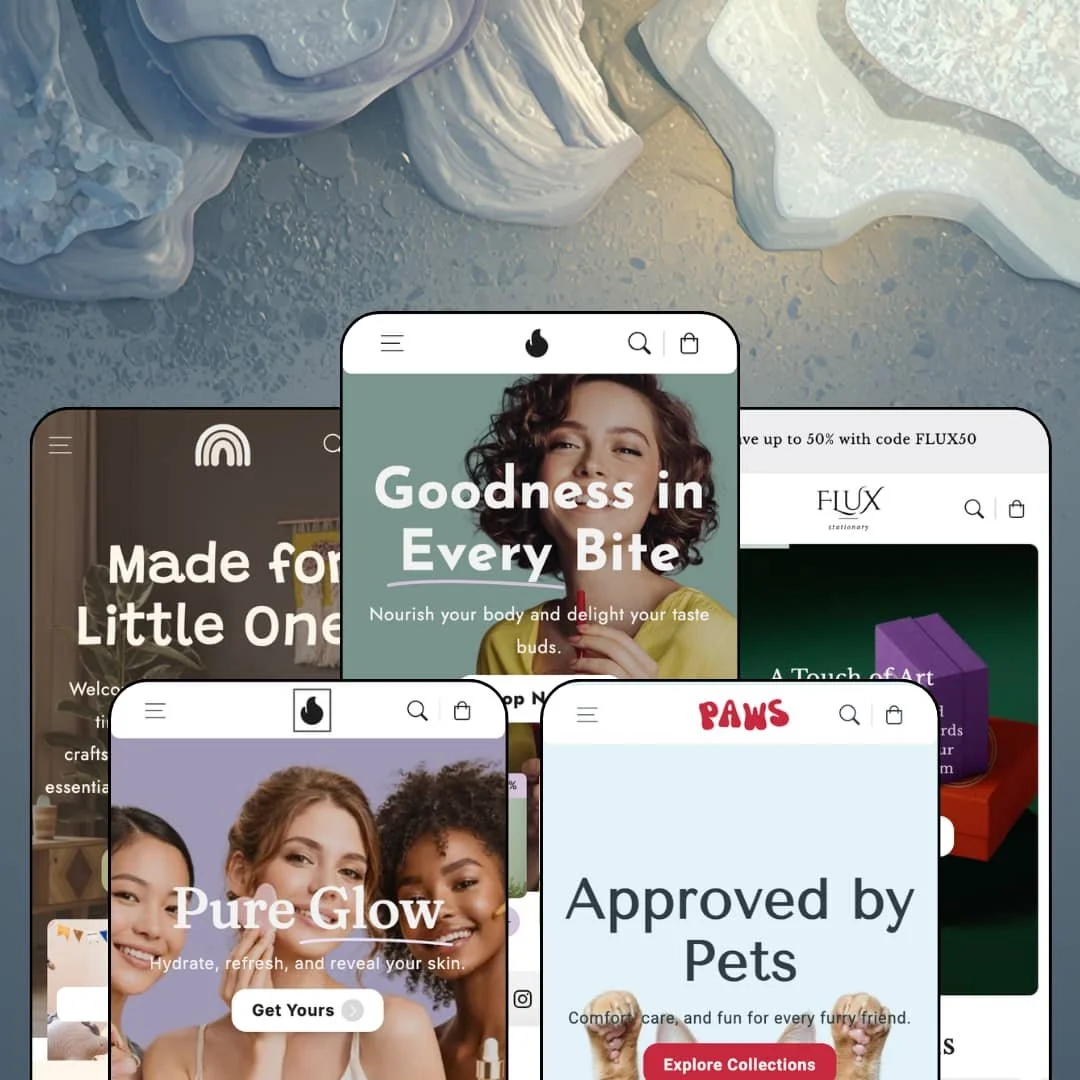
Most multi-preset Shopify themes pick neighboring verticals and swap the palette. Flux jumps from protein powder to facial oil to greeting cards to plush toys to pet beds, five presets that share nothing but a section library, and somehow keeps its footing. Mana Themes built it on Online Store 2.0 with a catalog of 40+ sections, and the demos are unusually transparent about what you're buying: the storefront navigation literally labels the product-page layouts on offer. Whether that transparency survives contact with the demos' own staging turned out to be the more interesting question.
A quick-order table that treats variants like a wholesale sheet
On the Blueberries Powder page, the 100g, 200g, and 300g variants render as table rows, each with its own image, price, and quantity stepper, feeding a running order subtotal with a remove-all control at the bottom. Buyers stock up in one screen. Paws and Olivelle stage the same layout for pet supplements and facial oils, confirming it travels. For food, supplement, and CPG brands selling multi-size consumables to repeat purchasers across 11–100 SKU catalogs, this replaces a bulk-order app install plus the integration work that comes with it.
Navigation that merchandises instead of merely pointing
Scribbly's Cards menu is a product rack. Thank You, Merci Beaucoup, Warm Wishes, Happy Holidays, and Birthday Wishes each get an image tile with an individual sale or New strapline, and a spotlight slot pushes one boxed product with its own badge and link. Menus become shelf space. Gift-led stationery and kids boutiques under 100 SKUs, selling to impulse buyers who decide from a picture, get their best products in front of shoppers before a single collection page loads.
Three product-page grammars, labeled in the open
Want to know exactly what a product page will look like before spending anything? Every demo carries a Product Layouts menu, and Paws goes furthest, listing "3 Column Layout," "2 Column Layout," "Quick Order Layout," and "Color Variants" as clickable links, so the classic two-column, the Amazon-style three-column, and the streamlined single-column can all be audited live. That's unusually honest selling. Stores mixing impulse items with considered purchases, and single-brand DTC operators who want a different page grammar per product line, can assign these per template instead of rebuilding pages.
An events section for brands that also exist offline
If your brand runs workshops, tastings, or classes, whether you're a hospitality-adjacent seller or a community-driven evergreen store, Flux ships a native event card format. Each card carries a date badge, a ticket price, weekday and time, a venue line, and a booking button; Fuel stages a cooking workshop and a fitness session, Olivelle a facial-ritual evening. It's a page type you'd otherwise fake with image banners and buried contact links, and here it's a section you drop in and fill.
Social proof is staged, not wired
Testimonial sections appear on every demo, complete with avatars, quotes, and linked product cards, and Olivelle crowns its band with an "Over 3,000 Happy reviews" heading. None of it connects to anything; the feature list ships no product-review mechanic, so collecting and displaying real ratings means a review app plus integration work on top of the $300. The praise is scenery. For beauty and pet-supply DTC brands selling considered purchases where trust does the converting, that's a budget line, not a toggle.
The default voice sells discounts before it sells products
Out of the box, everything shouts a percentage. Menu tiles carry 10–30% straplines across all five demos, announcement bars push welcome codes, homepage bands run limited-time countdown sections, and even the navigation spotlight slots arrive pre-badged with sales, so the theme's default grammar assumes promotion-led selling from the first pixel. A brand can strip this back. Luxury-tier single-brand boutiques and considered-purchase categories like fine stationery or premium skincare should expect to spend their first configuration days turning the volume down.
Replenishment verticals, no replenishment mechanic
Three of the five presets sell things people finish: protein powder, facial oil, pet food. Nothing in the feature list handles subscriptions. Subscribe-and-save selling therefore requires a subscription app wired into these product layouts before the replenishment positioning actually holds, and that dependency lands on exactly the presets most likely to need it. Subscription-driven brands in consumables, whose buyers reorder monthly rather than browse seasonally, should price that app and setup in from day one.
An Online Store 2.0 theme at a 2026 premium price
Flux launched in January 2025 on OS 2.0, and Dawn, Shopify's free baseline, sits on the same architecture generation with the same block-nesting ceiling. What the $300 buys is the section library, the layout system, and the merchandising surfaces, not a newer platform tier. That's a fair trade for many stores. Agencies configuring storefronts for multiple brands, and merchants planning deep custom layout work who expect Theme-Blocks-era nesting, are paying premium money for last-generation architecture.
What it takes to launch
Expect a multi-day pass across the content layer before launch: rewriting cross-preset copy that traveled between verticals, replacing placeholder labels and announcement strings, correcting sale-price relationships, restaging inventory states, and completing the staged secondary-language localization.
-
What works in this preset
Discovery staged as editorial
I scrolled the Fuel-branded demo the way a shopper would, and the homepage kept handing me reasons to keep going. Collection tabs sit directly on the page with live product counts (Best Sellers 14, New Arrivals 15, Save Big 16), and further down a numbered Top Picks list ranks six products with prices, strike-throughs, and one-line blurbs, a ranked bestseller format you'd otherwise assemble by hand out of image sections. It reads like a magazine that takes orders.
A product page built like a landing page
The Advanced Layout page for Blueberries Powder stacks more selling surface than many full homepages: accordion blocks that open onto full-width photos, three content tabs, a five-entry FAQ block, a delivery-estimate line under the buy box, and a promo text slot reserved for limited-time messaging. That's a lot of page. For a consumable where the description alone won't close the sale, the density is the point, and every block is a section a merchant can keep or cut.
Where it stumbles
Nearly every card on this homepage reads Sold out, from Spaghetti Carbonara down through the entire Save Big carousel, while the badges still shout -30%. It looks like a store the morning after a clearance. A food demo with empty shelves argues against its own urgency toolkit, because the countdowns and sale straplines are asking for a purchase the inventory staging refuses to allow.
-
What works in this preset
Drop-downs as shop windows
Two of Olivelle's drop-downs aren't menus so much as display cases. The Beauty Sets menu stages five curated sets between €219 and €349, each with an image tile and its own sale strapline, and the Specials menu does the same for whole categories. A shopper can window-shop the store's most expensive items without ever reaching a collection page, which is exactly where high-ticket gift sets want to live.
An editorial register the other presets don't attempt
The skincare demo leans softest of the five. A headline interleaves inline product images mid-sentence, a looping brand-logo row and a full product video break up the grids, and four long editorial cards (Clean Beauty, Tools, Ritual, Vegan) give the page an unhurried spa cadence. Beauty buyers shop mood before ingredients. This preset understands that.
Where it stumbles
I went looking for a set-builder behind those Beauty Sets and found ordinary products wearing bundle clothing. The €349 Luxury Self-Care Spa Set is a single SKU photographed as a bundle; there's no per-slot variant choice, no swap-a-component mechanic, nothing configurable. For a preset whose entire pitch is curated sets, the bundling is presentation only, and merchants wanting real set configuration will be shopping the app store.
-
What works in this preset
Colorways that stay inside one card
Apricot, Sage, Lavender, and Rose sit as text swatches beneath nearly every card title, so a four-color envelope reads as one product instead of four listings. Small thing. It matters, because paper goods live and die on color families, and this staging keeps a tiny catalog from padding itself out with duplicate products just to show its range.
A header that earns its two rows
The stationery demo runs a utility bar above the main navigation: two stacked announcements (a FLUX50 code and a free-shipping threshold at 70€), with the social icons and country selector lifted up and out of the way. The main nav stays clean at three menus. For a small-catalog boutique, that sep
-
What works in this preset
A menu that browses like a shelf
Open the Furniture drop-down and you're looking at five specific products, not category links: a side table, an armchair, an elephant chair, a stool, a rocking chair, each with an image tile and a badge like "Most Popular" or "20% Sale." The navigation is doing merchandising work before the homepage even scrolls. For parents shopping quickly with one hand, that shortcut has real value.
Long-form storytelling with room to breathe
The kids demo commits to essay-length editorial: four image-and-text cards run multiple paragraphs each on furniture, seating, fashion, and baby outfits, and a five-image gallery strip follows. It's the most content-hungry staging in the family, and it shows what the theme looks like when a brand actually has things to say rather than three bullet points.
Where it stumbles
I noticed the apparel staging skips fit entirely. Rompers, knit sets, and sweaters at €59 to €89 are staged with color swatches and nothing about sizing; the demo simply doesn't deploy the theme's size-chart block anywhere in the babywear flow. Baby clothing is a fit-critical, gift-heavy category, and a demo that stages it without size guidance leaves the preset's own vertical argument half-made.
-
What works in this preset
Department-store wayfinding for three species
Cats, dogs, and birds each get their own aisle. The collection architecture splits food, toys, and accessories per species, a "Top Offers of the Week" tile row cross-promotes between them, and a second hero mid-page pivots the scroll from dog gear to cat comforts. It's the most navigationally ambitious preset of the five, and it makes a case that Flux can hold a store where one shopper needs three unrelated categories in one visit.
The deepest footer in the family
Paws stages a four-block footer with actual retail texture: store hours and a support phone line, rows for order tracking and returns, a community block inviting forum posts and meetups, and a newsletter with an explicit marketing-consent checkbox. Footers are where themes reveal their block libraries. This one shows range the other demos leave on the table.
Five genuinely different verticals from one license
Food, beauty, stationery, kids, and pets are not neighboring categories, and the preset family still reads coherent because the section library is broad enough to restyle rather than rebuild. A merchant who pivots niches, or an operator running two storefronts on separate stores, gets a range from one purchase that normally means buying twice.
Multilingual staging that's actually deployed
Every demo runs a live secondary locale, German across all five, with French and Spanish switchable on several, so the EU-translation pitch is demonstrated in working storefronts rather than merely listed. For European merchants that's a meaningful difference: you can flip the switcher and read the interface strings yourself before buying.
Feature parity across the family
Reading all five demos back to back, the same tabbed grids, ranked lists, promo bands, and trust rows recur in every vertical. Choosing a preset means choosing an art direction, not a feature tier, which removes a real anxiety from the buying decision on multi-preset themes.
One skeleton, five outfits
Read the five homepages in sequence and the running order barely moves: hero, collection tiles, tabbed grid, ranked list, countdown band, testimonials, blog, newsletter. Differentiation lives almost entirely in photography and palette. Two Flux stores in the same niche will risk looking like siblings, and standing apart means reordering sections yourself rather than inheriting a distinct structure.
The listing promises jewelry; the presets don't
The Theme Store files Flux under Jewelry & Accessories alongside Food & Drink, yet nothing in the preset family stages jewelry or accessories in that sense. Accessory and jewelry merchants start from an unrelated demo, re-art-directing a supplement or pet store into a category with very different photography and trust needs.
A hand-typed content layer
The editorial depth that makes these demos feel rich is prose: multi-paragraph image cards, manually captioned promo tiles, hand-written ranked-list blurbs. No structured-data pattern is staged to feed any of it, so content maintenance scales with catalog size, and every seasonal refresh becomes a writing project rather than a data update.
★ 8.2/10
Rating
-
Quick-order variant tables, a three-layout product system, event cards, in-menu merchandising, and a filter set with price ranges, brand counts, and image swatches cover most storefront jobs; reviews and subscriptions remain app territory.
9
-
The demos double as documentation, with layouts labeled in the nav and a Features page on every store; the sheer count of promo surfaces means real configuration time to tune the voice.
8
-
Sections ship dedicated mobile hero images and the header collapses into a drawer with the full menu tree; the essay-length editorial cards make for long mobile scrolls.
8
-
Homepages stack well over a dozen sections with video blocks and large imagery; webp assets and restrained image widths keep it workable, but a lean build takes deliberate pruning.
7
-
Five art directions come out of one section library, three product-page grammars are assignable per template, and menus restyle into image showcases or product racks.
9
Frequently Asked Questions
-
The listing counts 40+ sections, and the demos surface some less common ones in the wild: a before/after image slider, image hotspots, a stacked announcement utility bar, and inline-image headlines.
-
Interface strings come in EN, FR, IT, DE, and ES. The demos run live German on all five stores, with French and Spanish switchable on several.
-
Yes. The slide-out cart carries a code field with inline validation messaging plus a cart-note field, and gift wrapping sits on the feature list as well.
-
It's native, alongside a stock counter that prints exact units; the supplement demo shows "100 in stock" directly under the price.
-
Mana Themes, the Shopify arm of the Anariel Design studio in Germany, with documentation at manathemes.com. Version 2.7.1 shipped on August 10, 2026.
-
Quick view and quick buy are both native, and cards across the demos carry a second rollover image so shoppers preview the alternate shot without leaving the grid.
This review is based on hands-on testing of the publicly available preset demos of the Flux Shopify theme as of August 2026. Theme features, preset availability, and performance can change with subsequent updates from the theme developer.