
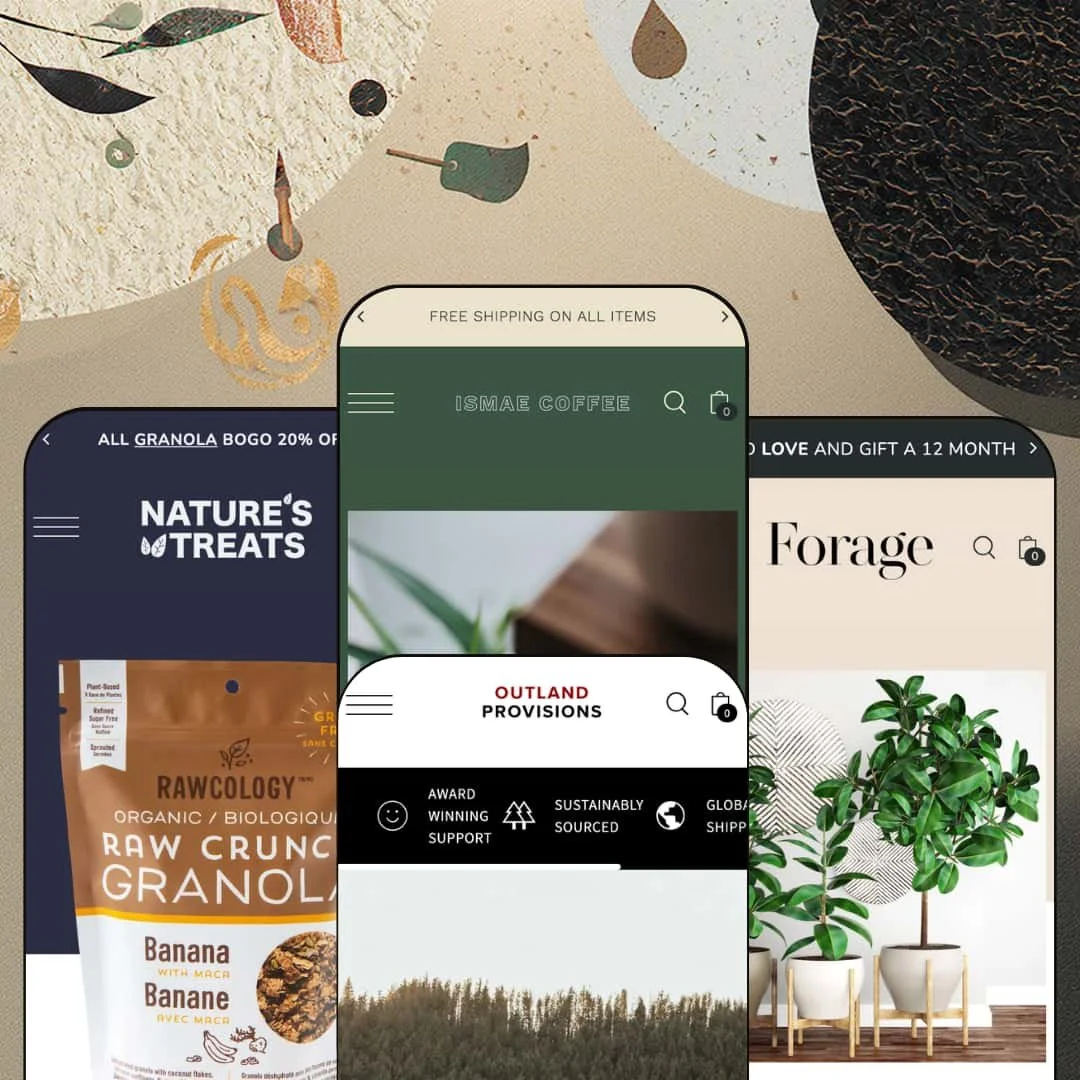
Most food-and-drink themes assume the entire sale happens on a screen. Foodie assumes you also have a counter, a phone line, and a lunch rush to feed. We Are Underground has kept this $150, four-preset Online Store 2.0 theme in active development since its 2021 launch, with the latest release landing in February 2026, and the demos stage everything from a multi-location coffee roaster to a packaged granola brand. The question for 2026 buyers is whether a budget-priced hospitality specialist still earns the install over newer-generation options.
A menu section that thinks like a menu
What does a granola brand's product list have in common with a flower shop's? In Foodie, both can run through the same menu section: products grouped under collection headings, each line carrying its description snippet, its variant options, and a from-price, laid out like a printed menu instead of a card grid. Slice's Treat Menu shows the full version, splitting Granola, Coconut Chips, and Oat Clusters into three headed groups with 1-, 3-, and 6-pack options listed inline. That's a rare shape for product display. For cafes, bakeries, and takeout-driven food businesses with 20 to 100 menu items and heavy repeat buyers, this section replaces the PDF-menu link and gives every line item a live path to the cart.
Header operations for shops with a front door
The header carries a utility row built for businesses that answer a phone: number display, order links, and a rotating announcement stack that cycles through several messages instead of holding one static line, all before the logo row begins. On the Grind demo, that stack rotates free-shipping, 90-day-returns, and installment messages while keeping a call link and a sale link pinned in place. It's ops, not decoration. For brick-and-mortar retailers running an online store alongside a physical location, and for local-delivery food businesses fielding phone orders, this is header space doing real sales work.
Social proof without the install
Foodie ships a testimonial section that pairs each quote with a product photo, the reviewer's name and location, and a direct link through to the product being praised. Grind's version runs three of these side by side, every one clickable to the shirt it reviews. No stars, no syncing, no third-party widget to style. For young single-brand food and beverage stores in their first year, before review volume justifies a dedicated app like Judge.me, this covers the social-proof slot with content the merchant curates by hand.
The homepage can close the sale itself
Impulse-driven brands with one hero product get a real tool here: a featured-product section that embeds the full buy box, with gallery, variant button groups, quantity, and add-to-cart, directly on the homepage. The coffee demo stages it with live size and color pickers on an apparel item; Slice stages it with a granola in three pack sizes behind a four-image thumbnail gallery. A visitor never has to leave page one. That compresses the path from landing to cart into a single scroll, which matters most for sub-30-SKU catalogs where one product carries most of the revenue.
It pitches subscription businesses it can't power alone
Grow's hero gifts a 12-month plant subscription, and the coffee demo's announcement bar pushes "Shop Subscriptions now!" The demos sell subscriptions the theme can't. Recurring billing and plan selection live in app territory on Shopify, through Shopify's own Subscriptions app or tools like Appstle and Recharge, and Foodie ships no plan-selector UI of its own to meet them halfway. Subscription-first coffee roasters and plant-club operators built around repeat deliveries should budget the app integration as part of launch, not as a later upgrade.
Built for dozens of items, not hundreds
Every discovery surface in this theme is curated: menus, tiles, featured grids, two-level navigation. That's a deliberate shape. Nothing in the four demos pushes past a handful of collections, and Shopify's own listing files Foodie under catalogs of roughly 11 to 100 products, which matches what the section language assumes about how people shop it. Filtering and swatch filters sit on the feature list, so the mechanics exist, but I went looking for depth and found curation, a design stance that suits a short, known range far better than a long one being narrowed. Specialty grocers carrying 500-plus SKUs and multi-brand pantry retailers restocking weekly will outgrow this shape.
An Online Store 2.0 build heading into 2027
Foodie runs on the Online Store 2.0 generation: JSON templates, sections everywhere, blocks capped at shallow nesting. Version 6.2.0 landed in February 2026 with support for the new Shopify customer account component, so upkeep is real. Maintenance is active. Still, the architecture predates the theme-blocks era, and Dawn, Shopify's free default, sits on this same generation, which means the $150 buys Foodie's vertical section library rather than a newer editing model. Single-brand merchants planning multi-year evergreen builds around the newest editor workflows should weigh that trade before committing.
What it takes to launch
Expect a multi-day pass covering menu-section curation for every collection, product-description subtitle markup across the catalog, mega-menu restaging, a full copy and imagery replacement, and a review of the five bundled language files before launch.
-
What works in this preset
Land on this demo as a customer and the top of the page reads like a cafe, not a catalog. A phone number, Pickup and Delivery order links, and a rotating pair of announcements sit above the navigation, so the operational questions a hungry visitor actually has get answered before any product appears. It reads like hospitality. That framing carries through the whole page, from the tasting-note taglines under each coffee ("Peach and Rosewater", "Maple syrup sweetness") down to the cafe imagery.
Open the Shop entry and the mega menu splits into two headed columns, Coffee and Merch, each with four sub-links, plus a promo row underneath pushing gift cards and apparel. The Ismae Menu section further down is the preset's centerpiece: coffees and pastries listed like a printed menu, with weight options from 250g to 2kg and grind choices (Whole Beans, Espresso Grind, French Press) printed inline next to each item's from-price.
I clicked through every one of the six cafe location cards, Belltown to Echo Park, and each carries its own photo and details link, turning what's normally a buried contact page into homepage merchandising. A compact three-city list sits higher up as a second entry point. For a business whose website exists partly to route people to a physical counter, that's a genuinely useful pattern.
Where it stumbles
Merch takes half the menu. For a roaster flagship, apparel, phone cases, and mugs get equal architectural billing with the coffee itself, which is a staging decision that dilutes the food-first case this preset exists to make and leaves the beans sharing the spotlight with a hoodie.
-
What works in this preset
An off-grid apparel label is a strange neighbor in a theme named Foodie, and that is exactly why this demo matters: it proves the section library isn't welded to food. The hero runs dual CTAs into a scrolling marquee of alternating drop and collection links, and the page closes with a YouTube story embed, a blog feed, and an Instagram-style gallery, which together read like a small lifestyle brand rather than a template.
Ten gallery images, each with a zoom control. I sat up at this product page, because it's the deepest staging in the family: tabbed Product Details, Returns, and Shipping content, care microcopy directly under the size buttons ("Fits true to size", "Machine wash cold"), a trust-badge row, and a sale countdown bar mounted above the gallery.
Grind also stages the header's language and country selectors in full, running six locales with the theme's bundled interface translations doing the string work while the country picker lists European markets. It's the one preset where a buyer can watch the localization UI live instead of taking the feature list's word for it.
Where it stumbles
One thing kept bugging me here. The preset with the family's richest product-page staging demonstrates it on t-shirts, so merchants shopping Foodie for its named vertical have to mentally translate the strongest product-page work back into food terms, and nothing in the food-facing presets restages it at the same depth.
-
What works in this preset
"The Flower Bar" is the cleverest staging in this preset: the menu layout recast for bouquets, six arrangements listed with stem-count options of 12 or 24 and a from-price each, exactly how a florist's counter card reads. It's small and warm. The same shape that lists espresso grinds elsewhere here sells sunflowers, which says more about the theme's flexibility than any feature list could.
Everything else sells the shop as a place a customer might walk into: a 2,500-square-foot retail space promoted in its own image section, an Instagram grid, collection tiles with visible item counts, and a newsletter line ("Get the latest dirt...") that shows someone enjoyed writing the copy. Plant shops trading on neighborhood warmth will find the tone already dialed in.
-
What works in this preset
Shoppers with dietary rules get their answer in one glance: a value-badge strip runs Organic, Gluten Free, Vegan, Keto, Low Sugar, and Peanut Free across the page before the best-seller grid even arrives. That's smart CPG staging. Combined with vendor lines and flavor taglines on every product card, the page front-loads exactly the claims a packaged-food buyer scans for.
One menu on desktop, another on mobile. The demo assigns a shorter, product-led menu to the mobile drawer (Granola, Oat Clusters, Coconut Chips plus info pages) while desktop carries a merch-led structure, a split worth copying for any store whose phone traffic wants different doors than its desktop traffic does.
Promo merchandising leans on the announcement stack, where a linked BOGO line for granola rotates with a free-shipping tier for 3-packs at the very top of the page, and a looping ticker of brand claims closes the page at the bottom, bracketing the whole scroll in offers.
One codebase, four different businesses
Read the demos back to back and the surprise is range: a coffee roaster, an outdoor apparel label, a plant shop, and a packaged-snack brand, all staged from one section library without visible strain. The name undersells it. Merchants shouldn't rule Foodie out just because their product isn't edible.
Physical commerce as a first-class citizen
Across the family, the theme keeps insisting the store has a real-world footprint, treating phone contact, pickup, and location content as merchandising rather than as an afterthought on a contact page. No single demo carries that identity alone; it only becomes visible when you read all four together, and every preset contributes a piece of it.
A repeating conversion rhythm
Scrolling tickers, rotating promos, testimonial rows, and doubled newsletter capture recur in every preset, top and bottom of the page. The theme has an opinion about homepage pacing and applies it consistently, which makes switching presets feel like re-skinning one store rather than learning four different ones.
A heavy content appetite
Story sections, recipe blogs, Instagram grids, location photography: every preset assumes the merchant arrives with a deep media library and an editorial voice to match. Launch it with stock photos and an empty blog and the design deflates. Merchants without in-house photography should price that production into the project from day one.
The locality identity cuts both ways
The same physical-world orientation that gives Foodie its character becomes dead weight for pure-DTC brands with no counter, no phone line, and no locations to show. In that scenario a meaningful slice of the section library goes unused, and what remains is a competent store that has lost much of what made this theme distinctive in the first place.
Rating
★ 7.4/10
-
The menu section, embedded homepage buy box, and testimonial row do serious conversion work for a $150 theme; subscriptions, wishlists, and star ratings remain app territory.
7
-
Online Store 2.0 sections throughout, with small and legible presets; the subtitle tag written inside product descriptions is the one convention merchants must learn.
8
-
Slide-out navigation with support for a mobile-specific menu assignment, plus sticky-cart support for thumb-reach checkout on long pages.
7
-
The homepages run lean, with restrained section counts, lazy-loaded imagery, and no heavy embeds weighing down the demos.
8
-
Four distinct color-and-type identities from one library prove real range, though the section voice stays hospitality-flavored wherever you take it.
7
Frequently Asked Questions
-
Version 6.2.0 shipped on February 27, 2026, adding bug fixes and support for the new Shopify customer account component, continuing a release cadence that has run since the 2021 launch.
-
They're driven by a subtitle tag written inside the product description itself (a [#subtitle]...[/subtitle] marker), so plan a small markup pass across your catalog to use them consistently.
-
Yes. The Grind demo stages one as a sale bar mounted directly above the product gallery, and the feature list confirms it as a standard theme component.
-
The theme provides the header links and page staging; the actual in-store pickup mechanics run through Shopify's local pickup settings, which Foodie supports per its feature list.
-
English, French, Italian, German, and Spanish interface strings are bundled, and the Grind demo runs its language selector live so you can inspect the switching UI before buying.
-
We Are Underground, based in Tunbridge Wells in the UK, maintains public documentation on weareunderground.com and handles requests through a dedicated support address listed on the Theme Store page.
This review is based on hands-on testing of the publicly available preset demos of the Foodie Shopify theme as of August 2026. Theme features, preset availability, and performance can change with subsequent updates from the theme developer.