
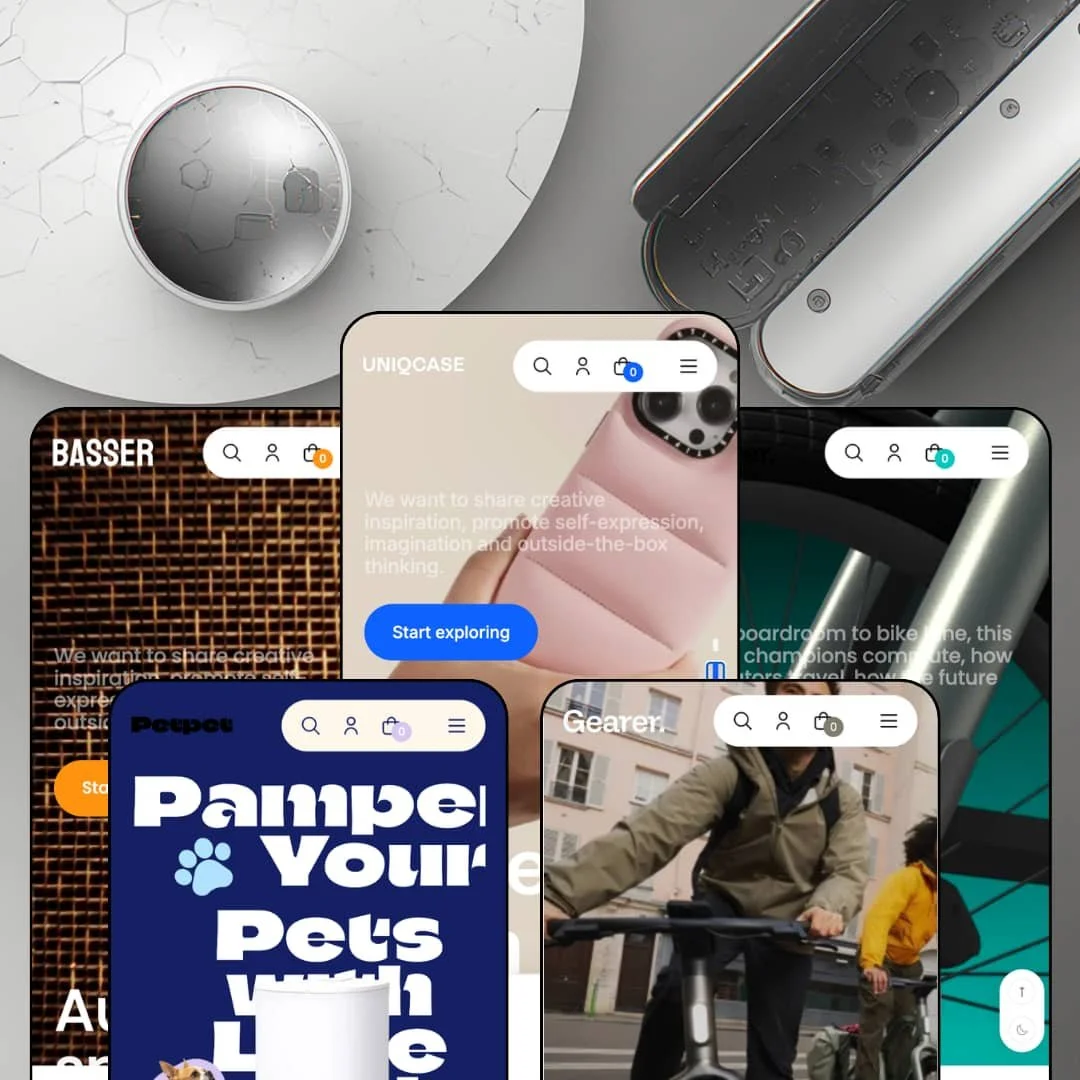
Open any of the five Futurer demo stores and the main menu tries to sell you the theme before the store sells you a product. Xotiny's Online Store 2.0 build lists at $320 and spreads its presets across phone cases, high-end audio, e-bikes, a one-product bike launch, and smart pet gear, with each demo carrying a live library of section pages, home templates, and product-page layouts right in its navigation. That transparency is rare, and it cuts both ways: you can inspect everything before paying, including the places where the staging runs thin.
Spec surfaces wherever a buyer hesitates
Futurer puts structured product data at three separate decision points: grouped spec tables under the product gallery, a product-specification section that pairs a data list with a buyable card, and spec rows inside quick-view panels on collection cards. Shoppers comparing technical products get numbers at the moment of comparison instead of a paragraph to decode. Data sits where doubt sits. For electronics and gadget merchants running 11 to 100 SKU catalogs where purchases are considered rather than impulsive, this is the difference between a browse and a shortlist.
A native bundle kit with two grammars
The homepage bundle builder takes three or more items for a tiered 10% discount and keeps a live running total, while a separate combo section sells a fixed pair at a combined price through one add-all button. Both ship as theme sections. That gives merchants an attach-rate play on day one without an install, and the two mechanics cover different intents, deliberate kit-building versus grab-the-pair convenience. Accessory sellers with impulse-buy catalogs and average-order-value targets will get the most out of it.
Want to see a section before you pay $320?
Every preset answers yes. The demos carry a Theme Features menu linking live pages for individual sections, multiple home templates, up to five product-page layouts, and three collection filter grammars, effectively shipping the documentation as clickable storefronts. You evaluate the exact building blocks, staged with real products, before spending anything. Solo founders launching a 20-SKU accessory shop and single-product hardware brands alike can audit their entire future page structure from the demo menu.
Motion is the house material
Video hero slots, video product cards, a video testimonial strip, and full-bleed mid-page video bands run through the demos, joined by display headings that animate letter by letter. Motion does the selling. The result is a storefront that feels like a product film rather than a grid, which suits launch-driven DTC hardware brands running campaign cycles around each release. It's a distinct identity in a theme market that mostly animates on hover and stops there.
Social proof is presentation, not machinery
The testimonial rows, avatar strips, and video-feedback slots are all merchant-filled display sections, and the VERIFIED USER label under each quote is a text style. Trust here is typography. No review engine, star system, or rating source ships with the theme, and none appears on its feature list. For considered-purchase electronics catalogs and new brands without an existing reputation, that means budgeting a review app and its integration on top of the license before the trust layer becomes real.
The data layer is fed by hand
Those spec tables belong to the template, not the product. They are content blocks a merchant fills per layout, and nothing in the demos shows them drawing from product metafields, so the rows do not travel with the item they sit under. It works at 20 products. At 200, every spec change means editing section content by hand, and merchants running large technical catalogs with frequent revisions should price that maintenance into the decision.
An Online Store 2.0 build at a 2026 price
Futurer launched in March 2025 already on the OS 2.0 generation, with its block nesting ceiling, while Dawn delivers the same architecture for free. The foundation is aging. What the $320 buys is the section variety, the bundle mechanics, and the staging range, not a newer foundation. Merchants planning years ahead on this license are betting on Xotiny's update cadence rather than on architectural headroom.
What it takes to launch
Expect a multi-day pass across product-page accordions, spec-table content, testimonial and video slots, search suggestions, and language and market defaults, plus replacing licensed demo product data across all five stores before launch.
-
What works in this preset
Five product-page layouts sit one click apart in this demo's own menu: info tabs, media slide, pill variants, radio variants, and per-variant image galleries. Each is a real product you can poke at, not a screenshot. I clicked through all five, and the differences are genuine layout decisions rather than color swaps, which matters when your catalog mixes a $10 Kevlar sticker case with a $250 Calio.
Scroll far enough down the homepage and it starts assembling carts for you. A tiered bundle block invites shoppers to add three or more items for 10% off, keeps a running total, and checks the whole selection out with one button, while a separate fixed combo pairs two cases at $36 instead of $40 with a single add-all-to-cart action. Two distinct bundle grammars on one page is unusual staging discipline. Both are native sections, not app embeds.
There's data inside the cards themselves. Quick-view panels in the Best Sellers strip open with Depth, Weight, and IP-rating rows sitting directly above the buy button, so a shopper comparing cases never leaves the grid. It's a small touch. It also previews the theme's whole merchandising argument in miniature.
Where it stumbles
The preset's resting state is a clearance event. The announcement bar runs a permanent 50% promise, a top-level menu item is labeled with a discount, and most product cards carry self-computed percentage badges, yet one band down the page the same store pitches itself as everyday luxury. For a cases brand built on design credibility rather than price, that default takes rewriting before it takes photographing.
-
What works in this preset
The catalog tops out at $98,899. Basser stages Scandinavian-style flagship speakers next to $249 portables inside the same restrained card grammar, and the grammar holds, which is the real test for a store selling four-figure and five-figure audio without visual panic. One best-seller card even plays a product video in place of a still, so motion carries the pitch where photography would flatten it.
Testimonials here don't float in their own carousel. Each quote is paired with a purchasable product card, quote left, $1,099 speaker right, so praise and price tag share a viewport. I sat up at that pairing, because it turns a decorative section into a merchandising one. The same page closes with a homepage FAQ accordion covering warranty and pairing questions before a buyer ever opens a product page.
Where it stumbles
The Best Sellers row leads with a $4,750 speaker that is sold out. For a preset whose entire argument is confidence at high price points, opening the social-proof position with an unbuyable flagship reads against the vertical. A high-end audio buyer arriving from the Theme Store sees scarcity where the staging intends authority.
-
What works in this preset
You're weighing a $3,699 e-bike, and the homepage answers like a spec sheet. The product-specification section pairs a buyable Cross ST card with a data list reading 60cm height, 360Wh battery, 3h20m charge, 18.9kg, 25 km/h top speed, and aluminum build. This is the Theme Store's data-driven pitch actually staged, and it works. Numbers do the persuading before the product page loads.
Filtering gets three separate showrooms. The demo menu links live collection pages for horizontal filters, a vertical filter rail, and a drawer layout, plus a grid-banner variant, so you can test how a 20-bike catalog browses under each pattern before committing to one. That's a decision most merchants otherwise make blind after purchase.
Video is the house material here. The top best-seller card runs footage instead of a photo, and a full-bleed ride video anchors the Agile Ride band mid-page, which suits a vertical where motion literally is the product.
Where it stumbles
I went looking for a frame-size picker and found colorways instead. Cross ST ships three colorway variants and Classic sells as a single configuration, while fit is the first question any e-bike buyer asks at this price. The staging proves the theme can sell hardware, but not that it can sell hardware that has to fit a body, and a bike merchant will need to build that sizing story without a demo to copy from.
-
What works in this preset
One product, and the whole homepage is its pitch. Solo walks a single VELO XX1 e-bike through stat callouts, a founding-story band, a smart-features chapter, and lands on a full buy module with color and material pickers plus add-to-cart at $2,500, so the entire page functions as one long product page. The narrative sections earn their keep. Nothing here asks for a catalog to exist.
This preset also stages a section the other four only link to: a video-feedback strip built from customer-style clips rather than typed quotes. For a considered $2,500 purchase, moving social proof into video is the right register, even though the slots are display placements a merchant fills with their own footage.
-
What works in this preset
Layered parallax panes open the page, with the AI feeder sliding between foreground and background art the way a hardware launch site would stage it. The storytelling continues into an app-download band with device mockups and an alerts narrative, which positions the store closer to a product microsite than a shop. Pet tech is a crowded shelf. This staging picks a lane and commits to it.
Lower down, a homepage buy module sells a dog harness with a live XS-to-L size picker and add-to-cart at $52.80, proving the direct-purchase grammar from Solo carries into a multi-product catalog. The navigation reinforces that urgency: menu entries for Leash, Collar, and Grooming deeplink straight to product pages instead of routing through collections, cutting a click from every path to checkout.
Where it stumbles
The flagship feeder is staged as a lone $130.90 SKU. In this preset demo, no set, no bowl pairing, and no multi-pet configuration accompanies a product whose own description centers on multi-cat households, so the attach-rate story a pet-tech merchant lives on goes untold here. Merchants choosing Mealtime will be staging those combinations themselves.
The grammar holds from $10 to five figures
Read all five demos in sequence and the same section kit credibly sells sticker-priced accessories, four-figure bikes, and speakers costing more than a car. Few preset families stretch a single design language across that price span without the cheap end looking overdressed or the expensive end looking discounted. Futurer's restraint in cards and type is what makes the stretch work.
It scales down to one product
Solo is the quiet proof of range: the theme collapses into a single-SKU launch funnel without a collection page in sight, while the flagship demo runs a full multi-collection catalog. One license covers a merchant's arc from one-product validation to a built-out store, which is a genuinely useful property for hardware founders who don't know yet which of those they'll be in a year.
The default voice is a discount
Across the preset family, announcement bars, menu labels, and self-computed percentage badges push markdown messaging as the starting condition. Brands whose positioning depends on price integrity will spend their first configuration session dialing the theme's voice down rather than up, and the demos offer no quiet-brand reference staging to copy.
The listing and the staging tell different stories
The Theme Store entry files Futurer under jewelry and food and drink, yet no preset stages either vertical, and the listing's own summary text counts three ready-made designs while five appear. None of this affects the software, but merchants shortlisting by industry filters will arrive expecting references the demos never deliver.
The identity has a content bill
Video in the hero, video in the cards, video testimonials, campaign photography behind parallax panes: the look that sells this theme assumes a media pipeline behind it. Merchants without ongoing footage production will watch the motion identity degrade into static placeholders, and the animated display type rewards short, art-directed copy that most product teams don't have lying around.
Rating
★ 7.8/10
-
Native bundle builder with running totals, spec surfaces at three decision points, quick view, three filter layouts, and promo tooling; the trust layer needs an app to become functional.
8
-
The self-documenting demo menus and a dedicated section-builder page shorten the learning curve considerably; hand-maintained spec content adds ongoing editorial work.
8
-
Sections ship paired desktop and mobile image slots, the cart is a slide-out drawer, and the mobile menu uses a back-button stacking pattern that keeps deep navigation orderly.
7
-
Homepages carry several autoplay-ready video slots plus letter-animated headings, so media curation falls on the merchant; product pages themselves stay comparatively lean.
7
-
Fifty-plus sections, four home templates on the flagship demo, five product-page layouts, three filter grammars, and a section-builder concept give unusual layout latitude for the tier.
9
Frequently Asked Questions
-
Solo. Its demo runs an entire homepage as a single e-bike funnel, ending in a buy module with variant pickers, and never relies on a collection page.
-
Only Combined Listings carries the Shopify Plus flag on the feature list; everything else, including bundles and quick buy, runs on standard plans.
-
The feature list includes EU translations for English, French, Italian, German, and Spanish, and the demos run country selectors with roughly thirty markets.
-
Version 3.1.0 arrived on July 27, 2026 and, per the release notes, mainly expanded the section library alongside performance refinements.
-
Xotiny, based in Hanoi, runs support at support.xotiny.com and documentation at docs.xotiny.com; recent Theme Store reviewers repeatedly credit fast customization help.
-
Yes, the feature list covers a countdown timer, stock counter, promo popups, promo banners, and in-menu promos, alongside cross-selling and press-coverage sections.
This review is based on hands-on testing of the publicly available preset demos of the Futurer Shopify theme as of August 2026. Theme features, preset availability, and performance can change with subsequent updates from the theme developer.