
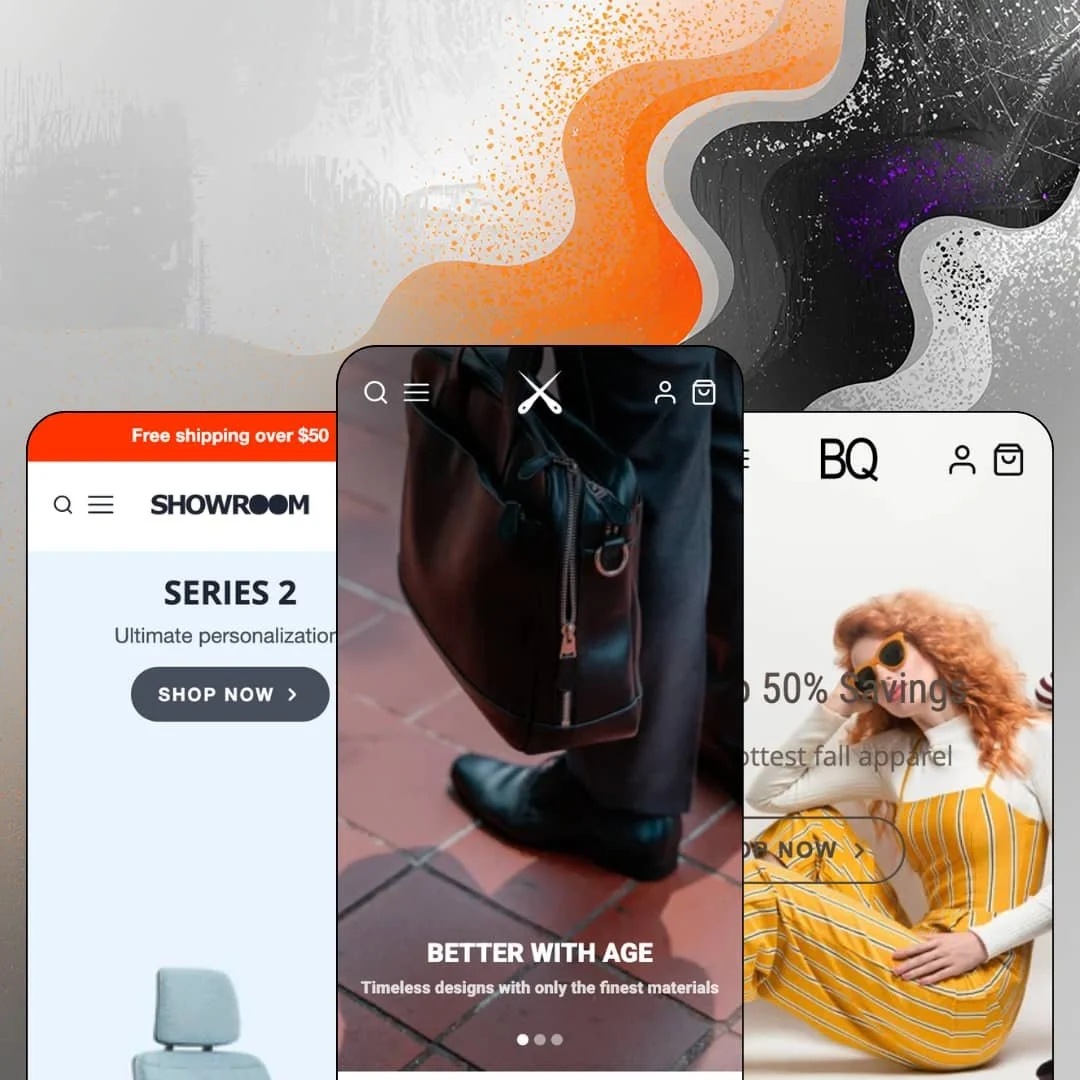
Most multi-preset Shopify demos dress one store in three coats of paint. Galleria stages three genuinely different retail postures instead: a dense tech-gear catalog, a fast-turnover fashion boutique, and a furniture showroom that treats the buy button almost as an afterthought. Mile High Themes has kept this Online Store 2.0 theme in active development since early 2018, shipped version 4.1.0 in June 2026, and sells it for $300. The real question is whether an image-first design born eight years ago still earns premium money today.
The homepage can close a sale by itself
One section embeds a complete buy experience directly on the homepage: full image gallery, color and size pickers, sold-out states grayed per variant, and a working add-to-cart button. No detour. For under-30-SKU boutiques and impulse-driven drop sellers, that removes an entire click between landing and cart, which is exactly where casual mobile traffic leaks.
Product pages built like landing pages
Who says the product template starts at the title? Galleria lets merchants stage a banner section above the buy area and stack image-text rows, tabbed shipping and brand-story content, and a per-product testimonial block below it, turning a single product URL into a self-contained pitch. That's serious ammunition for high-deliberation categories like furniture or premium leather goods, and for single-hero-product brands running paid traffic straight to one page it can replace a separate landing-page build.
A genuine brick-and-mortar layer
The theme renders local retail properly. Product pages display a pickup-availability block naming the store location and a ready-in-24-hours window, and a dedicated store section presents opening hours with a directions link. Merchants running a single physical location alongside their online catalog, especially in gift-heavy or same-day categories, get their offline channel treated as a first-class surface instead of a footer address.
Mega menu doubling as a promo surface
Dropdowns here hold more than links. The menu architecture supports multiple grouped link columns sitting next to image promo tiles, so seasonal pushes and clearance campaigns live inside navigation itself, and individual products can be linked directly as menu entries. It's compact but it compounds. For 50-to-100-SKU catalogs with strong gifting seasons, the menu becomes a merchandising channel that costs no homepage real estate.
Discovery runs on hand-feeding
Nearly every browse path I traced routes through manually curated material: hand-picked product link lists, manually assembled gift and staff-pick collections, and image tiles that each need their own art and copy. Only the recommendations row populates itself. That's sustainable curation work for a boutique, but for 500-plus-SKU catalogs or restock-driven operations with weekly assortment churn, the pitch about large inventories collides with a merchandising model that assumes a human re-staging surfaces by hand.
The look is rented until you can shoot it
Strip the photography out and Galleria turns plain fast. The layout holds; the room feels bare. The furniture demo's entire aesthetic runs on professionally licensed brand imagery that buyers explicitly cannot reuse, and the other demos lean on pro lifestyle shoots at every scroll depth. Budget-tier startups and single-founder shops without a photo library should assume the demo look is a photography invoice away, not a settings toggle.
A 2021-class architecture at a 2026 price
This is an Online Store 2.0 theme: JSON templates, sections everywhere, solid editor behavior. Dawn ships that same generational foundation for free, which frames what the $300 actually buys, namely Galleria's section library, visual range, and merchandising staging rather than any newer architectural layer like deeply nested blocks. The code is maintained. It isn't modern. Merchants comparing options in this bracket who care about long-term editor flexibility more than day-one visual polish should weigh that trade consciously.
What it takes to launch
Expect a multi-day pass covering full storefront copy, photography sourcing to replace demo imagery that can't be reused, mega-menu and curated-collection re-staging across the navigation, and per-product editorial sections for any hero items.
-
What works in this preset
Landing on this demo, you get the theme's thesis in one screen. Instead of a single rotating banner, the homepage opens with the column slideshow: three side-by-side panels, each carrying its own headline, caption, and destination, so a bag store can pitch craftsmanship, origin story, and range without forcing visitors to wait through slide transitions. It reads calm. It also gives every panel a permanent job rather than a timed cameo.
The catalog surfaces are where I spent the most time. Collection pages open with a row of sub-collection image tiles before the grid, then run a filter sidebar with per-option counts and a price range you can type into directly, which matters once a store crosses a few dozen products and shoppers stop browsing linearly. Sorting covers the expected spread from best-selling to date-based ordering.
Product depth carries the pitch too. The Atlas bag page runs an eleven-image gallery with an expanded viewing mode, and a live inventory line reading three units left sits right above the add-to-cart button. Small detail, real pressure. For a demo built around considered $250 to $450 purchases, that urgency cue is staged exactly where hesitation happens.
Where it stumbles
The flagship homepage stacks a lot of storefront: slideshow, category grid, product carousel, six promo tiles, an embedded video, testimonials, a store section, blog teasers, and a newsletter block. For a theme sold on imagery, the demo's answer to every merchandising question is another full-width section. The scroll gets long before the footer arrives, and merchants copying this staging wholesale will bury their lower sections.
-
What works in this preset
Could a boutique moving weekly drops actually run this? The staging says yes. Product cards carry vendor labels above the title, so a multi-brand shop selling consignment lines or wholesale-sourced apparel gets brand attribution on every tile without custom work. Cards also swap to a second image on hover, which fashion shoppers use as a free second look.
The promo cadence is the quiet strength here. I scrolled through a five-tile run pitching restocks, weekly picks, and category pushes in alternating image blocks, and the rhythm holds together because each tile keeps one short headline, one italic subline, and one button. That restraint is a template merchants can actually maintain week to week.
Where it stumbles
Fashion is gallery territory, and the theme literally carries a gallery in its name. Yet this demo leans entirely on promo tiles and a product carousel for visual storytelling, so merchants wanting the lookbook-style presentation will be staging that showcase themselves before launch. It's a curious choice for the one preset aimed at apparel.
-
What works in this preset
This preset barely sells and that's the point. The homepage is a stack of full-bleed editorial banners about hybrid work and learning spaces, punctuated by a single embedded brand film, and product pricing doesn't appear until you click through. For furniture, architectural products, or any considered purchase where the environment sells the object, this restraint reads intentional rather than empty.
The product page follows through on it. The Karman chair carries a sixteen-image gallery against a stripped buy box holding just a price and a button, so the photography does the persuading while checkout stays one click away. High-ticket merchants who invest in imagery get a page structure that actually rewards them for it.
Where it stumbles
The header is staged as a flat row of eight category links with no dropdown layering at all. For an eight-category seating catalog spanning office, healthcare, and outdoor lines, that leaves wayfinding entirely to collection pages. The demo proves the showroom look; merchants will need to build the showroom navigation themselves.
One skeleton, three retail temperaments
Read across all three demos and the same section grammar stretches from catalog density to boutique tempo to near-silent showroom without changing its bones. That range is the theme's actual product. Most of what separates the presets is deployment discipline, which means merchants aren't locked into the posture they start with.
An unusually long maintenance runway
A theme launched in February 2018 that's still receiving versioned updates in June 2026 has survived multiple platform transitions under the same developer. For merchants who fear buying an abandoned theme more than they fear missing a trendy feature, that eight-year track record is a durability signal few purchase pages can offer.
Video treated as a merchandising material
Across the demos, video appears as embedded players inside hero and editorial contexts rather than as a bolted-on section type. The theme's handling suggests moving-image content was designed in from the start, which suits brands whose products demonstrate better than they photograph.
The listed verticals have no reference build
The Theme Store files Galleria under jewelry, accessories, and food and drink, yet the three demos stage bags, womenswear, and office furniture. A jeweler or food merchant evaluating this theme has to mentally translate someone else's vertical at every scroll, and that translation gap is precisely what preset demos exist to remove.
Photography carries weight the structure doesn't share
Viewed together, the presets reveal a consistent division of labor: sections frame, images persuade. There's no structured product-data layer, comparison surface, or spec-driven presentation anywhere in the family, so categories that sell on attributes rather than atmosphere will find the theme's persuasion toolkit pointing the wrong direction.
★ 7.6/10
Rating
-
Pickup rendering, pre-order support, stock counters, in-menu promos, and lookbook tooling cover the merchandising checklist; discovery depth depends on merchant curation rather than automated structure.
8
-
Sections-everywhere editing keeps assembly straightforward, but the image-heavy grammar means pages look unfinished until real assets land.
7
-
The column slideshow collapses into anchored mobile slides, galleries keep thumbnail navigation, and card layouts stack cleanly at small widths.
8
-
Markup stays lean with CDN-sized responsive images, though media-dense homepage staging with embedded video players gives merchants plenty of rope to slow themselves down.
7
-
Three demonstrated postures from one section library, with per-section color and layout control; the aesthetic ceiling is set by your photography, not the theme.
8
Frequently Asked Questions
-
It replaces a single rotating hero with three simultaneous vertical panels, each holding its own headline, caption, and link, so no message waits its turn behind a timer.
-
The feature list includes English, French, Italian, German, and Spanish theme-string translations, meaning interface labels and buttons, not your product content.
-
No. Despite those being listed industries, the three presets stage tech bags, women's fashion, and office furniture.
-
Version 4.1.0 shipped June 8, 2026, and the release history stretches back to the theme's 2018 launch.
-
A slide-out cart drawer is part of the feature set, alongside cart notes for order-level instructions.
-
Yes, a dedicated lookbook page is staged in the flagship demo's navigation, and the gallery sections behind it are available storewide.
This review is based on hands-on testing of the publicly available preset demos of the Galleria Shopify theme as of August 2026. Theme features, preset availability, and performance can change with subsequent updates from the theme developer.