
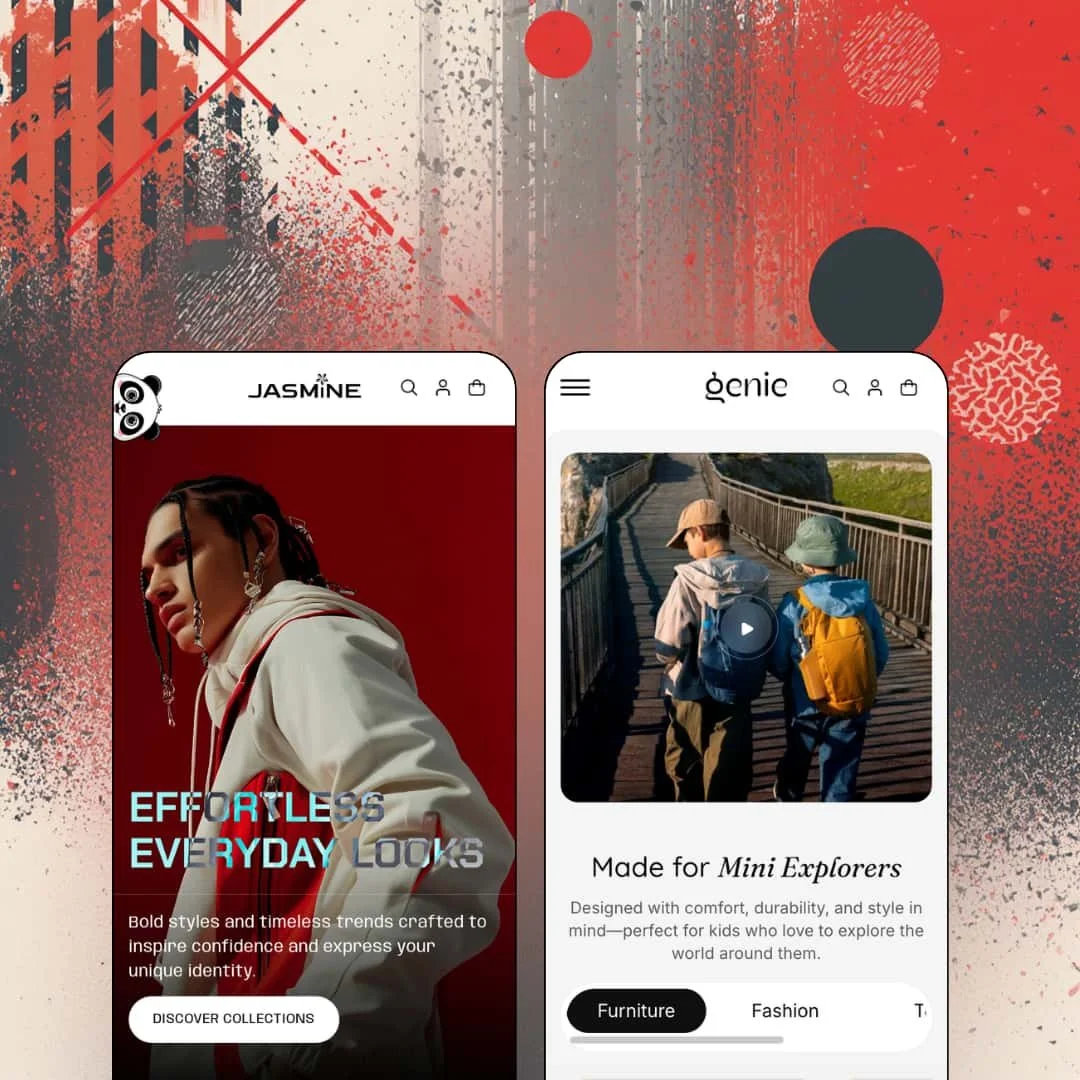
Most kids' store themes borrow their playfulness from stock photography; Genie draws it into the theme itself, with a peek-a-boo icon that pops up in the viewport corners, rainbow text effects, and a shapes section that ships unicorn and crown options. Shine Dezign Infonet lists it at $100, which puts a two-preset Online Store 2.0 theme (a kids' store called Genie and a fashion preset called Jasmine) at the bottom of the paid tier, so the question isn't whether it's cheap but whether the decoration hides thin commerce underneath. I spent time in both demos, the product pages, and the catalog filters to find out.
An ornament layer built for kids, not bolted on
Genie's decorative vocabulary is native to the theme. Version 1.0.1 added unicorn and crown options to a shapes section, color settings for an illustrated footer, and rainbow effects in the collapsible-content and animated-text sections; version 1.1.0 added the peek-a-boo icon that appears in the viewport corners. None of it needs custom code. For toy, nursery, or children's-apparel brands with under 100 SKUs and an impulse-buy audience, that layer is the difference between a store that looks like a kids' store and one that says it is.
Shoppable hotspots with a click-or-hover switch
Is a lookbook worth anything if it doesn't sell? Genie's Shop the Look section places hotspots on a styled image and opens a product card with price and link on each one, and since 1.1.0 the merchant chooses whether the card appears on click or on hover. That turns a lifestyle photo into a shelf. Apparel and furniture merchants with 30 to 100 products who shoot room or outfit scenes get a merchandising surface that pulls double duty as brand content.
A product page that stacks content in three formats
A product page with a lot to say can turn into one wall of text. Genie splits it into an icon-tab row, tiled accordions, and an animated text block with inline doodles, and adds a sticky promotional bar block and a stock counter to the buy box. Each format does one job. Quick facts, expandable policies, brand voice. Considered-purchase categories like kids' furniture or premium outerwear, where parents read before they buy, benefit most from that split.
Navigation that goes three levels deep with product-level links
Three levels, product links at the bottom, and a mobile drawer that stacks each level behind a Back button so a shopper never loses their place: that's the header in the Genie demo, running Catalog to Funbox to individual products such as Cuddles Teddy and Cub Chair. The search overlay opens pre-filled with four recent searches. Dawn's opens empty until you type. Multi-category stores with 50 to 100 SKUs across toys, apparel, and furniture, and a cross-shop-heavy audience, get a header that does the routing the homepage can't.
One review in fifteen months
Genie launched on June 11, 2025 and carries a single Theme Store review, posted in July 2026, with 100% positive from a sample of one. That is one data point, not a track record. Merchants running a seasonal kids' brand or a flash-drop fashion label, where a theme bug during a launch week costs real revenue, should treat that as an open question rather than a reassurance.
The social proof is stage dressing
Both demos run a testimonials carousel with names, cities, and portraits. None of it is connected to anything; the quotes are typed into section settings, and no product card in either demo shows a rating. The quotes are props. Any merchant in a trust-sensitive vertical (baby products, mid-market outerwear) with a repeat-buyer audience will need a review app for the product page and the cards, and the theme's contribution is a place to paste the widget.
Bundle copy without a bundle mechanic
The Genie homepage announces "Smart Sets for Smarter Shopping" and "Curated bundles designed to save you time and money", then links to the Toys collection. There's no set builder anywhere. The feature list confirms it: no bundle section, no per-slot variant picker, nothing that totals two products into one price. Kids' apparel sets and nursery starter kits are exactly the categories where a bundle builder sells, and for a drop-model or gift-driven store with a matching-outfit catalog this is the gap that hurts most.
What it takes to launch
Expect a multi-day pass across currency and market defaults, cross-preset copy that references the wrong vertical, product handles, placeholder collection sections, dated blog entries, and pickup-location naming before either preset is presentable. Add a size-chart build and, on Jasmine, a header and filter re-staging on top of that.
-
What works in this preset
The homepage opens on a full-width video hero and never really calms down after that. A "Get 10% Off" marquee scrolls under the first banner, a countdown section follows the fashion carousel, and further down a second marquee cycles "School Picks" and "Limited Edition" labels with fireworks, rubber-duck, and rocking-horse icons between them. It's loud. But the loudness is coherent, because every motion element reads as a toy-store shelf rather than a discount rack, and the pastel palette keeps the sale language from feeling aggressive.
I sat up at the age-band grid. Three collection cards carry an eyebrow label of "Age 2-10", "Age 0-1", and "Age 10-15" above the titles Toddlers, Infants, and Big Toys, which is exactly how parents actually shop and is a section-level staging choice rather than a filter trick. The catalog page backs it up with an "Age group" facet (1-2 years, Kids, Universal) sitting next to Fabric, Color with counts, and a numeric size range from 30 to 40, plus nine sort orders across 31 products. Thirteen color values are listed. That's more facet variety than the small demo catalog strictly needs, and it signals the theme's filter rendering can carry a real kids' inventory.
Where the product page earns its keep is the content stack below the buy box. The Fullsleeve Kids Hoodie runs a three-color by five-size matrix, a "Hurry, only 12 items left in stock!" line, and pickup availability with a "Check availability at other stores" link before you ever scroll. Then comes an icon-tab row for Overview, Care Info, and Wash Instructions, a specs block with tiled accordions, and an animated text section that drops small flower and star doodles between the words. For a kids' brand that is the page you'd want to write copy for.
Where it stumbles
Every age tile points at the same place. Toddlers, Infants, Big Toys, and All each link to /collections/all, so the age grammar the homepage sells is not wired into separate collections, and a merchant who buys the theme for that idea has to build the age-based collection structure themselves. The Age group facet on the catalog side is the mechanism to do it with, but the demo never connects the two.
Size chart is on the feature list, and no apparel product in the demo shows one. The hoodie sells in sizes 32 through 40 with no centimeter reference, which for children's clothing is the one piece of information a parent needs before ordering.
-
What works in this preset
You land on a slideshow that says "Effortless Everyday Looks" in an oversized serif. The mood shift is total. Jasmine drops the pastel and the doodles for black type, editorial photography, and a hero banner whose four-line headline reads "Where Trends Come Alive". The same theme, the same section library, and a completely different temperature. That's the argument for a two-preset family at this price.
The Shop the Look section is the first commerce moment on the page. A styled photo carries hotspots, and clicking one surfaces a product card for the Multi Leaves Printed Shirt at €11,95 with a "View products" link, which means the lookbook sells directly rather than pointing at a collection. I clicked through to the collection tabs further down, where New Arrivals, Trending Now, Best Sellers, and Winter Luxe switch the grid in place, and the transition is quick enough that browsing feels like one continuous surface instead of four pages.
Two buttons under one jacket tell you what Jasmine is for. A before/after image slider sits between the sale grid and a Varsity Bomber Baseball Jacket buy module offering Black, Red, and Grey across XS to XL with both Add to Cart and Buy It Now. The product page adds a sticky promotional bar ("50% OFF on Summer Fashion") above the title, four accordion panels, and a "Make a Pair" cross-sell row. Pickup availability at "Genie Store" appears under the buy button. Fashion merchants get a working outfit-completion loop without an app.
Where it stumbles
The Theme Store copy promises a "Multi-Category Showcase", and the header is six flat links: Home, Collections, Catalog, About, News, Contact. No mega menu is staged, no category columns, nothing that lets a shopper jump from the header to Jump Suits or Long Coats & Blazers. The collections exist in the demo. The navigation doesn't reach them.
Filters are collapsed behind a "Show filters" button on the catalog page, and the 31-product grid at €9,95 to €51,95 arrives sorted alphabetically. For a fashion preset whose whole pitch is browsing, hiding the facets by default and leading with alphabetical order works against the positioning; both are settings, but they're the wrong settings for this demo.
One section library, two temperatures
Reading both presets back to back, the same marquee, animated text, before/after slider, collection tabs, and showcase gallery appear in both, and they read playful on Genie and editorial on Jasmine purely through type, palette, and photography. That is unusual restraint for a theme whose whole surface is decoration. It means a merchant who outgrows the kids' voice doesn't outgrow the theme.
An update cadence that tracks the platform
Six releases in the first eleven months added a second preset, high-variant product support in September 2025, Liquid parsing fixes in December 2025, and the account component change in May 2026. For a first-generation theme from a developer with a short Theme Store history, that pattern matters more than any single feature: the code is being kept current with Shopify's own changes.
Listed verticals nobody staged
The Theme Store files Genie under Jewelry & Accessories and Food & Drink. Neither demo touches either category; one sells toys and hoodies, the other sells coats and baseball jackets. A jeweler or a snack brand evaluating the theme from its listing gets no demonstration of how the decorative layer or the hotspot section would behave with their inventory.
The same homepage skeleton twice
Strip the photography and both demos run the identical sequence: hero, hotspot, featured collection, video, category grid, collection tabs, testimonials, marquee, product grid, featured product, blog, newsletter. Two presets deliver two skins over one page architecture. Merchants wanting a structurally different second layout for a sister brand will be building it themselves in the editor.
-
Shop the Look hotspots, stock counter, pickup availability, sticky promo bar, and metafield facets with counts are all working; no bundle builder and no size chart staged in either demo.
Rating
★ 6.8/10
7
-
Section-level settings for tabs, marquees, and hotspot behavior are exposed; the single Theme Store review calls setup easy, but the docs are one page per section with little depth.
7
-
Mobile drawer stacks three navigation levels with a Back button; marquees and video heroes are heavy on small screens, and the countdown and doodle animations add motion the merchant may want to trim.
7
-
Both homepages run long: video hero, two marquees, a second video section, hotspots, and a testimonial carousel on one page. Images lazy-load, but the section count is the cost.
6
-
The kids' ornament layer and the editorial Jasmine skin prove the range; both presets share one homepage skeleton, so layout variety comes from the editor, not the presets.
7
Frequently Asked Questions
-
Online Store 2.0 with JSON templates and section groups for the header and footer. It's not a Theme Blocks build, so nesting stays at the section-and-block level rather than Horizon-era depth.
-
Both demos hold 31 products. The Theme Store rates it for "Some (11-100+)" catalog sizes, and the filter set with counts, nine sort orders, and pagination is built for that range rather than a thousand-SKU store.
-
Version 1.1.1 from September 2025 added support for high-variant products. The demo's biggest matrix is three colors by five sizes on the kids' hoodie, so the demo doesn't stress that limit itself.
-
Per the documentation, support runs Monday to Friday, 09:30 to 18:30 Indian Standard Time, and covers bug fixes and questions about existing settings. Third-party app integration, new features, and design changes are excluded.
-
It's a theme-wide popup that gates the store behind an age check, aimed at restricted categories. For a children's brand it stays off; it would matter if the same theme were reused for an alcohol or tobacco storefront.
-
Yes. Jasmine is proof: the peek-a-boo icon, doodle inserts, and rainbow effects are settings inside their sections, and the Jasmine demo runs with none of them visible while using the same section library.
-
No. The testimonials section holds hand-entered quotes, and product cards carry no rating. A review app supplies the stars; the theme supplies the placement.
This review is based on hands-on testing of the publicly available preset demos of the Genie Shopify theme as of September 2026. Theme features, preset availability, and performance can change with subsequent updates from the theme developer.