
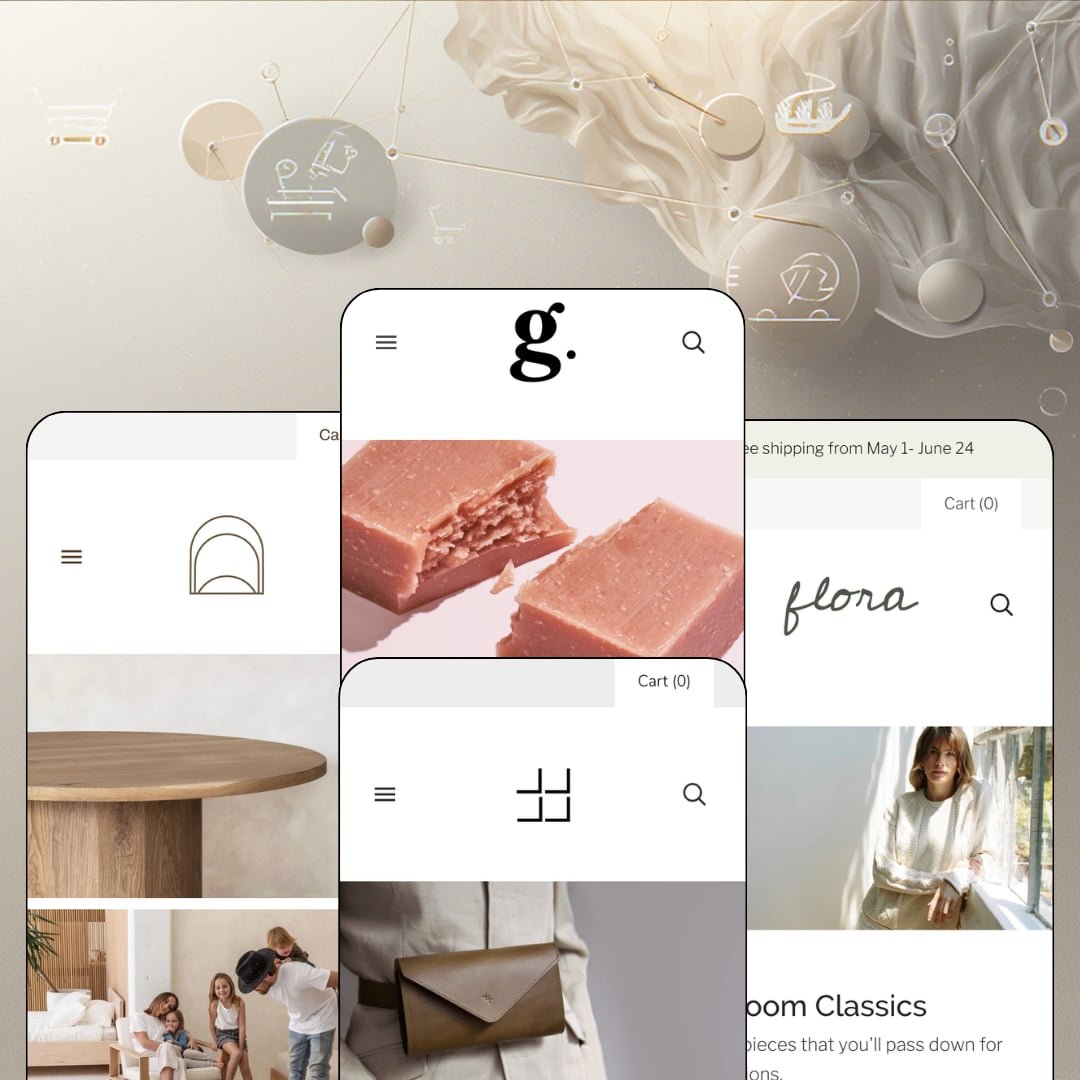
Most Shopify homepages stack full-width banners in a single column and hope you keep scrolling. Grid tiles the page instead, arranging collections, single products, and editorial pages into a masonry wall where every block is a door. Pixel Union's Online Store 2.0 theme has lived in the Theme Store since 2017, currently sells for $280, and ships four presets: Grid, Flora, Knoll, and Ember. The open question is whether a layout engine that made its name a decade ago still justifies a 2026 price tag, and the four demos give a surprisingly clear answer.
The masonry grid treats every surface as sellable space
Grid's namesake section arranges mixed tile types in one wall: collection links, single-product deep-links, static pages, and captioned editorial blocks all coexist in the same layout, with per-tile CTAs. Re-merchandising for a season means swapping tiles, not rebuilding templates, which is exactly the "every season and sale" pitch the theme makes for itself. Restaging is an afternoon, not a project. For visual-first brands with 11–100 SKUs running seasonal or drop-cadence merchandising, this is the feature that decides the purchase.
Can shoppers buy without ever leaving the homepage?
In Grid, yes. The featured-product module places a complete buy box in the homepage flow, and Ember's version shows its ceiling: the Great Rucksack module runs a four-color picker beside a nine-frame gallery that includes an actual product video, all functional mid-page. That removes an entire pageview between interest and add-to-cart. Single-hero brands and small catalogs under 30 SKUs selling giftable, impulse-friendly goods get a conversion path most of the page-one traffic never has to think about.
Navigation depth that reads like a department map
The mega menu runs labeled multi-column layouts with room for imagery and in-menu promos, and the Grid preset uses it for something smarter than category lists: a Concern column that splits skincare by Dryness, Dullness, Blemishes, and Redness. Two menus in one. That's problem-first taxonomy living inside the flyout, letting one catalog answer two different shopping questions from the same header without an app or a landing-page build. Multi-category merchants in browse-heavy verticals like beauty or home goods, especially at the 50–100+ SKU mark, get a discovery backbone out of the box.
A media pipeline built for close-up selling
High-resolution galleries, image zoom, card-level rollover to a second image, and native product-video support form one coherent kit for texture-driven catalogs. Nothing in it feels bolted on. The Finn Jumpsuit page runs an eight-frame gallery with numbered pagination and never feels crowded. Fabric weave, leather grain, wood finish: this is a theme for products that need to be inspected. Craft and apparel merchants at premium price points, where considered buyers zoom before they commit, will use every piece of it.
The buy box is a prose column
I went looking for a size guide on the Finn Jumpsuit page and came up empty. Eight sizes, XXS through 3XL, and the only fit help anywhere on the page is a single description paragraph; no size-chart layer, no accordion tabs for shipping and care, and no sticky add-to-cart appears in any demo or on the feature list. Eight sizes, no guide. Apparel returns are a fit-information problem before they're a logistics problem. Size-sensitive apparel brands serving considered, first-time buyers should price in the workaround before they price in the theme.
Documentation runs thinner than the support
Theme Store reviews from mid-2025 praise Pixel Union's response times while flagging that the written documentation stays high-level, and one merchant notes custom CSS is required for anything past stock options, citing dropdown styling for variant choices as the example. Fast answers help. But a help desk is a bottleneck where a deep manual is self-serve, and every styling wish beyond the settings panel becomes a ticket or a developer invoice. Single-brand operators at budget and mid-market tiers, running without an agency or in-house developer, will feel this line item first.
The cart is a receipt with buttons
Open the mini-cart and you get a subtotal, a tax note, and two buttons. That's the toolkit. Nothing in the demos or on the Theme Store feature list points to a free-shipping progress bar, an order-notes field, or an in-cart cross-sell slot, even while Flora's own announcement bar is busy promoting a free-shipping window the cart never counts down toward. Discount-led merchants running flash and sale cycles on impulse-buy catalogs lose the exact nudge layer their model depends on at the moment it matters most.
An Online Store 2.0 build at a 2026 price
Dawn, Shopify's free baseline, ships the same generation of editor: JSON templates, sections everywhere, roughly two levels of block nesting. The machinery is identical. Grid's $280 therefore buys the masonry system, the homepage buy modules, the mega menu, and the media kit, not an architectural step up, and the nesting ceiling that comes with this generation stays in place. Evergreen single-brand stores planning a multi-year build should weigh whether the layout signature alone carries the invoice, because the underlying machinery won't.
What it takes to launch
Expect a one-to-two-day pass across hero-tile imagery and captions, announcement-bar promotions, mega-menu re-mapping, About and story-page copy, testimonial curation, and blog seeding before the storefront reads current.
-
What works in this preset
You land on five masonry tiles before you read a single sentence, and every one of them is clickable. Body, Serums, Toner & Masks, Dryness, Face: the skincare catalog is laid out like a wall of shop windows, sized unevenly on purpose so the eye keeps moving. It works. The demo makes the case that a beauty store with a modest catalog can feel abundant purely through arrangement, without a single discount sticker doing the lifting.
Halfway down the page, the demo parks a complete buy box for the Rose Hibiscus Face Mist, with a five-frame thumbnail gallery, a 2 oz / 4 oz size picker, and a quantity control sitting right in the homepage flow. A shopper never has to leave. For a $16 entry product, that placement turns the homepage into a sampler counter rather than a brochure.
The staging leans neighborly in a way I noticed more the longer I read. A curbside-pickup band with a contact link, testimonials signed with names and cities, an anniversary discount code running in the announcement bar. This preset sells a local shop's temperament as much as a product line, and small beauty brands with storefronts will recognize themselves in it.
Where it stumbles
For a skincare demo, the product information stays shallow. Descriptions run one paragraph and close with a regulatory disclaimer, and nowhere does the staging structure ingredients, usage order, or skin-type guidance into anything a routine-builder could scan. Beauty shoppers read INCI lists the way drivers read fuel prices; this preset never shows where that content would live.
-
What works in this preset
"Heirloom Classics. Quality pieces that you'll pass down for generations." That hero line sets the register for the whole demo, and the pacing backs it up: a slideshow, a masonry pair, then a full-width brand manifesto in large type before the first product card appears. Flora is proof the same theme can slow way down.
The header goes flat here, six top-level links and nothing else, a staging choice that trades navigation depth for boutique airiness. It suits a tight womenswear line. Below, the bestseller grid quietly demonstrates the sale grammar: the Chelsea Dress renders $116.99 against a struck-through $187.00, and a clearance band promising up to 50% off routes straight to the markdown collection.
The closing act is retention math: a newsletter block trading 15% off for an email address, framed with style-tips copy rather than urgency. Nothing shouts. For brands whose photography carries a linen-and-daylight mood, this preset shows Grid restraining itself convincingly.
-
What works in this preset
The mega menu is the star. Open Catalog and you get three labeled columns, Collections, Furniture, and Household, plus a photograph of the UM Chair sitting inside the flyout itself, turning navigation into a small showroom. Ten collection paths sit one hover away.
Knoll also shows the masonry wall doing something the other demos don't: mixing commerce and content as equals. Bestsellers and Household tiles share the grid with Our Story and Coming Soon page tiles, so brand narrative gets hero real estate instead of a footer link. For a furniture maker whose story is the product, that's the right hierarchy.
The catalog spans a $25 oak iPad stand to a $3,160 sideboard, and the cards handle the spread with "from" price ranges throughout. The footer completes the considered-purchase posture with Delivery, Warranty, and Care Guide links grouped as a service desk. It reads like a business that expects questions before checkout.
-
What works in this preset
"Our goods are made of organically tanned leather from Tärnsjö Tannery in Sweden." The founder quote sits in its own full-width section, attributed to the owner by name, and it anchors the demo's whole argument: provenance as the pitch. Three named customer testimonials follow the same logic further down.
The hero is a proper slideshow with three staged slides, Model Pack, Fall Favorites, and The Messenger, each carrying a headline, a one-line subcaption, and its own CTA. The masonry tiles below add captioned deep-links, including one that routes straight to a single wallet product rather than a collection. Merchandising here is specific, not generic.
Quick shop labels sit on every card in the Fall Collection grid, staging a card-level add path for a catalog of grab-and-go accessories. Combined with the darkest palette of the four demos, Ember is the preset that most resembles a conversion-minded store rather than a lookbook.
Where it stumbles
The colorway staging fragments the hero product. The Large Messenger Bag appears four times in the Fall Collection at $725 each, one listing per color, even though this same demo runs a four-color variant picker on another bag one scroll below. I noticed the split immediately and it kept bugging me: any bestseller ranking, review count, or inventory view now divides by four. Merchants copying this staging inherit the catalog overhead by choice, not necessity.
One lean kit, four believable temperaments
Read all four demos back to back and the range is the story: the same components produce a chatty neighborhood beauty shop, a hushed apparel editorial, a furniture gallery, and a workshop-toned leather brand. Nothing vertical-specific was added to achieve any of them. Palette, typography, and photography do the character work, which means the design system underneath is genuinely neutral and unusually obedient.
Restraint as a performance posture
Across the preset family, section counts stay low, imagery lazy-loads, and there's no popup engine, countdown stack, or animation layer fighting for attention. The pages feel light because there's simply less running on them. In an era where premium demos often arrive pre-cluttered, Grid's discipline is a legitimate differentiator for merchants who equate calm with credibility.
Differentiation rides on your camera roll
Because the four presets share one structural skeleton, what separates them is almost entirely photography and palette. A merchant with strong imagery inherits a temperament; a merchant without it inherits a wireframe. The masonry wall multiplies this: every tile is another slot demanding an art-directed image, so the asset bill scales with the layout's ambition.
Prose is the only data layer
Nowhere across four verticals does any demo structure product facts into reusable surfaces: no ingredient tables for the beauty catalog, no dimension or material specs for the furniture, no leather-care matrix for the bags. Everything lives in hand-typed paragraphs. That keeps setup simple and keeps scale expensive, because fifty products means fifty bespoke essays rather than one populated data model.
The tile economy has a curation ceiling
Grid's whole premise assumes someone keeps re-staging the wall: new seasonal tiles, fresh captions, rotated deep-links. That's a marketing habit, not a one-time setup task. Set-and-forget merchants will watch the storefront's core mechanism go stale within a quarter, and at that point they're paying the masonry premium for a static page.
Rating
★ 7.0/10
-
The masonry system, homepage buy modules, mega menu, and media kit form a real merchandising core, but cart tooling and product-page apparatus stay slim for the tier.
6
-
Tile-based staging in the Online Store 2.0 editor is intuitive and forgiving; venturing past stock settings pushes merchants toward support tickets or custom CSS.
7
-
The mega-menu columns collapse into a clean accordion list on small screens and the masonry wall stacks to a single readable column; nothing about the layout depends on desktop width.
7
-
Lean section counts, lazy-loaded imagery, and the absence of popup or animation layers keep every demo light on its feet.
8
-
One component kit convincingly produces four distinct brand temperaments; typography and palette changes alter the read completely.
7
Frequently Asked Questions
-
The Theme Store classifies it for "Some (11–100+)" products, and the curated tile model matches that band: enough SKUs to fill a wall, few enough that hand-staging stays manageable.
-
Yes, it's on the official feature list, which makes the theme usable for alcohol, CBD, or other 18+ catalogs without adding an app for the gate.
-
Jewelry & Accessories and Food & Drink. Notably, none of the four presets stages either vertical, so buyers in those categories will be translating beauty, apparel, furniture, and leather-goods demos to their own shelf.
-
Version 7.2.0, released March 2026, swapped in Shopify's new customer-account web component to replace the old sign-in experience and fixed a subscribe-button layout issue in the newsletter section.
-
Pixel Union, a Vancouver-based studio with multiple Theme Store entries; merchant reviews consistently single out the speed and quality of its support responses.
-
Yes, image rollover is a stock option on the feature list, alongside image zoom and product badges at the card level.
This review is based on hands-on testing of the publicly available preset demos of the Grid Shopify theme as of August 2026. Theme features, preset availability, and performance can change with subsequent updates from the theme developer.