
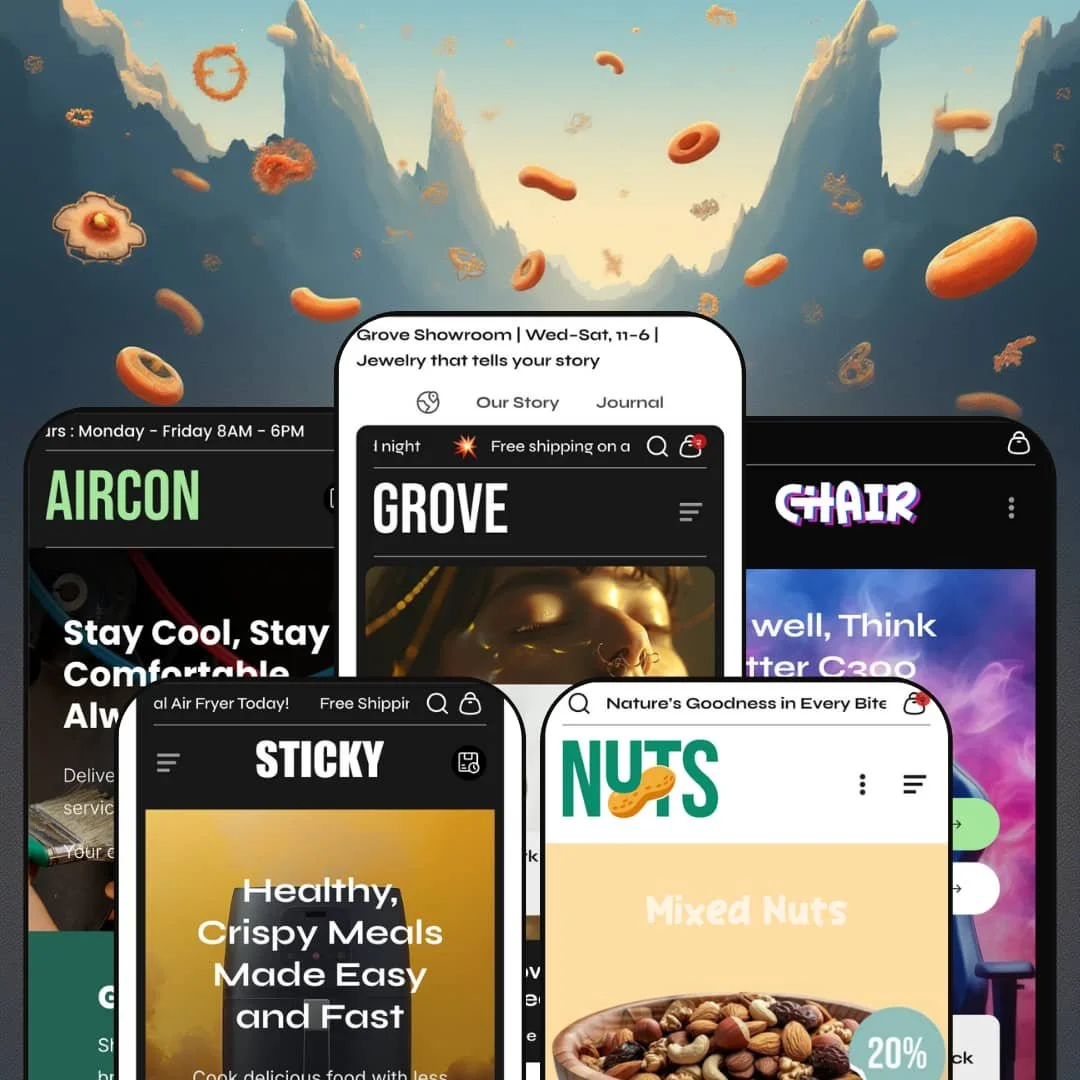
One of Grove's five demos doesn't sell a product at all; it books air-conditioner servicing. That's an odd thing to find inside a theme whose Theme Store listing pitches jewelry, and it's the best clue to what Omelatte actually built: an Online Store 2.0 theme organised around business models instead of verticals, with a multi-collection jeweller, a one-product landing page, a service company, a ten-chair brand and a snack shop all drawn from one library. The catch is how little outside evidence there is to lean on. At $320, you're mostly trusting your own trial.
A lead-capture kit for businesses that sell time
Grove ships the sections a service business needs to take enquiries: a header button that opens a quote form in a modal, plan cards whose Book Now buttons each open their own booking form, and a services grid that links through to a dedicated page. They arrived together in August 2025. Because the forms live in the header and inside the cards, a visitor is never further than one click from handing over a phone number, whatever page they landed on. For local service companies such as HVAC, cleaning or repair firms that sell appointments first and a parts catalogue of under 30 SKUs second, this removes the usual choice between a brochure site and a shop.
Physical stores get a permanent seat in the header
A Store Locations link in the top row opens a drawer listing each shop as a card, and in the jewelry demo that means three North Charleston addresses, each with a Get Directions link, available from every page. The homepage buy module then closes the loop with a pickup line reading "Pickup available at Dorchester Road, usually ready in 24 hours", plus a link to check the other stores. Online and showroom stop competing. For jewelry, furniture or appliance retailers with two to five locations and considered-purchase customers who want to see a piece before paying, the theme treats the shop floor as part of the funnel.
The homepage can take the order
Can a homepage sell without sending anyone to a product page? Grove's featured-product section renders the gallery, labelled rows for price and SKU, option pills, a quantity stepper and a live subtotal in place, so the chair demo's Elite Racer shows three photos with Blue, Red and Green pills on the homepage, and the snack demo's roasted almonds offer 400g to 1000g bags the same way. Four of the five demos run it. For single-hero brands and small evergreen catalogues under 30 SKUs, where traffic lands on the homepage from ads or social, that's one fewer page between interest and checkout.
A buy box that cross-sells twice
Inside the buy box, under the button, the air fryer page lists a short Deal Products strip: the AirGlow Compact at $122, the CrispMate Dual-Zone at $210 and the EcoFry Smart Air Oven at $176, each with its own View detail link. Lower down, a Complementary Product tray keeps a running Total Price and an item count beside a single Add Items to Cart button, so add-ons chosen there go into the cart together. Two upsell slots, no app. For mid-market appliance, jewelry or gifting stores with 30 to 100 SKUs and natural add-ons (a cover, a matching pendant, a second bag), the product page does the pairing work itself.
Booking stops at a contact form
Every route into the Aircon demo's booking flow ends in the same four fields: name, a service dropdown offering Repair, Maintenance, Installation or Others, phone and email. There's no date, no time slot, no deposit. The icon row promises Same Day Booking, yet what the theme sends is a message, and the scheduling happens afterwards by phone or email like any contact form. Appointment-driven service businesses with several technicians and a full calendar, the exact audience this preset courts, will need a booking app on top, and nothing in the section library is drawn to hold one.
The review counts are typed
Testimonial cards in the air fryer demo print "Based on 7596 reviews" beside each customer, and the service demo opens its testimonial row with a Review summary card carrying its own headline figure. That number is a caption, not a count. It's a text field in a section, connected to no submission form and no star rating on any product page, and this kept bugging me because the layouts present it with the confidence of a verified widget. Considered-purchase brands in appliances, jewelry or supplements, where buyers read reviews before spending $80 or more, will install a review app before launch and restyle the page around it.
Two reviews in fourteen months
Grove launched on July 10 2025 and the Theme Store shows two merchant reviews, from October 2025 and January 2026. Both are positive. Two data points can't tell you how the theme behaves under a large catalogue, a busy sale or a year of Shopify platform changes, and at $320 that leaves the trial store as your only real evidence. Agencies choosing a theme to standardise across client builds, and single-brand operators with 500+ SKUs who can't afford a mid-season rebuild, should weigh that thin record against how well the demos fit.
An Online Store 2.0 build at a 2026 price
Grove is an Online Store 2.0 theme: JSON templates, blocks one level deep, and a product form whose quantity stepper and "Sold out or unavailable" pill states behave as Dawn's do. That's the comparison worth making once. Dawn, Shopify's free baseline, sits on the same generation, so the $320 pays for Grove's section library, its header options and its service kit, not for a newer editor, and Shopify's own recent free themes have already moved to nested Theme Blocks. Multi-brand agencies and evergreen single-brand stores planning a three-to-five-year run on one install are buying late in an architecture's life.
What it takes to launch
Expect a two-to-three-day pass: placeholder store-location cards, default collapsible rows and sample testimonials on product templates, section copy carried over between demos, currency symbols inside announcement text, collection filters and complementary-product pairings to configure from scratch, and footer tickers and social links still on their defaults. Service builds add form routing and a real services page on top.
-
What works in this preset
Land on the homepage and the catalogue introduces itself in numbers. Collection tiles carry live product counts (Earrings 16, Pendants 17, Bracelets 9) and two of them add a price floor, "FROM 75 USD" on Moissanite Jewelry and "FROM 79 USD" on Earrings, so a shopper learns the range before clicking anything. Below that, a Latest Arrivals section tabs between Pendants, Rings, Necklace Sets, Earrings and Zircon Jewelry without leaving the page, and every card prints a stock label, a vendor line, a Quick view trigger and an Add to cart button. It's dense. For a jeweller with a hundred-odd pieces, dense is right.
"Showroom | Wed–Sat, 11–6" sits in a slim utility row above the logo, next to links for Store Locations, Our Story and the Journal, which tells you this demo imagines a jeweller with a front door. The main navigation keeps to four items, but SHOP opens into eight category links beside five product tiles, from the Elira Lace Spark Ring to the Sana Sunflower Sparkle. I clicked the search icon and the overlay arrived already filled, split into Collections, Products and Articles with five entries each. Search doubles as a second menu.
A hotspot section titled Highlighting Excellence pins four pieces on one styled image, and each pin opens a small card with the product name, price and a View product button. A before-and-after slider compares two finishes under the labels Warm Radiance and Bold Allure, a founder quote gets its own band, and four promotion banners close the merchandising run before the journal and testimonials. On the product page, the Zircon Shine Ring Vetra stacks Gem Color pills (Gold, White, Black) over Ring Size pills, with a Buy it now button under the main one. Pills, not dropdowns.
Where it stumbles
I went looking for help choosing a ring size and found three pills: 9, 7 and 6. The theme carries a size-guide modal, but this demo doesn't stage it beside the one picker that needs it most, and no product page offers an engraving line or a gift note, the two fields a jeweller selling anniversaries and proposals gets asked for weekly. Those would be line-item properties, and nothing on the feature list suggests the product form takes them. Gifting is the business here, and the buy box doesn't know it.
-
What works in this preset
The name is the feature. A section called Sticky Features pins a product image in place while six benefits scroll past it, Non-Stick & Easy to Clean, Auto-Cook Presets, Family-Sized Capacity, Rapid Air Circulation, Removable & Dishwasher Safe and Safety First Design, each swapping the picture as it takes focus. It arrived in the August 2025 update alongside the pricing and services sections. For one product with six arguments, it turns a feature list into a guided tour.
The header is stripped for a single-product store: Home, About and Support on one side, a Shop Now button on the other that drops straight onto the SmartCrisp Digital Air Fryer, and a three-message ticker above it all cycling the offer, the shipping threshold and the colour options. A How It Works row walks three illustrated steps, and a video band sets its headline in alternating weights, "Fry. Bake. Roast. Reheat. All in one!". Three blog cards with tag chips close the page. Nothing here needs a collection to exist.
Scroll the product page and it behaves like a landing page with a checkout attached. Price, SKU and the option pickers sit in labelled rows, a Size Guide link opens a chart in a modal next to the litre options, and four tiles under the button (Quick Start, Easy Clean, Oil Free, Smart Timer) compress the pitch into two words each. Under that come a trust-icon row, three testimonial quotes, image-with-text rows and a looping gallery strip with a Follow Us on Instagram panel in the middle. Long, but ordered.
-
What works in this preset
A Shopify theme with a quote form where the hero button should be. The Aircon homepage opens on a headline, a supporting line and a Get in Touch form set into the hero itself, asking for contact details before the visitor has scrolled an inch. Directly beneath, an icon row makes four promises, among them No Hidden Cost and GST Absorbed. It reads like a local contractor's site. That's the model.
The top strip swaps promotions for practicalities: opening hours and a support address, each with its own icon, looping as a ticker. Further down, a four-tile grid names Air Cooler Installation, Cooling System Maintenance, Custom Cooling System Design and Ductless Cooling Solutions above a View All Services button, and a plan section sets four cards side by side under air-conditioner brand imagery. The header drops the account and cart icons entirely. Quiet, and deliberate.
I scrolled through expecting the shop to be missing, and it isn't. A Trending Products row sells an outdoor cover, pipe insulation tape, a wall-mounted remote holder and a small home unit at $299, each card with a Low stock label, Quick view and Add to cart, so the same site takes a service enquiry and a parts order. A before-and-after slider contrasts Struggling to Stay Cool with Comfort, Upgraded, and two promotion banners push a seasonal maintenance offer. Service first, store second.
Where it stumbles
The plan cards quote real figures, $109.99 for one unit scaling to $399.99 for four on the first card, and none of them can be bought. Not one. They're typed rows, not products, so a customer ready to pay for a two-unit service at the listed price has no route to the cart and lands back in the enquiry form. A services brand that wants deposits or prepaid packages will be rebuilding those cards as products and linking them by hand.
-
What works in this preset
Each hero slide carries its own product. On the first, two buttons split the choice between a black and a white chair while a compact card for the ProErgo Mesh Back Chair, caption and $139.99 price included, rides along in the corner; the second slide swaps in the AeroPro Mesh Gaming Chair at $249.99. The September 2025 release added this product-aware slide type. For a brand with ten products and two heroes, the slideshow does the featured-collection job by itself.
Three alternating image-and-text rows explain the chair the way a spec sheet can't: dynamic lumbar support, a flexible backrest, a headrest that adjusts in three directions. A video band follows, then a collection list where each name (Ergonomic Essentials, Executive Comfort, Gamer's Edge, Playful & Whimsical) breaks into a scrolling marquee on hover. Two stacked tickers of slogans run underneath. It's loud in the way gaming brands are loud.
SALES and NEW IN sit as buttons beside the logo, outside the three-link menu. That's the header doing merchandising: two collections promoted to permanent calls to action while Home, Catalog and Contact stay plain, a split that gives a small brand two doors it can repaint every season without touching the navigation. The catalogue page behind them lists ten chairs with stock labels, a sort dropdown and a filter drawer. Small range, clear doors.
Where it stumbles
"Pre Order Black Chair", says the hero. The chair behind that button is listed In stock with a normal Add to cart, because pre-order is a word on a button here, not a product state, and the feature list carries no pre-order mode. A launch-driven furniture brand will need an app for the mechanic its own hero advertises.
-
What works in this preset
Open the page and it moves like a grocery aisle with commercials. A video banner titled Crunchy Nut Treats gives way to a row of product cards, then Roasted Goodness, then Choco Bliss with its own row, then Premium Brazil Nut and Salted Delights, five banners alternating with shelves all the way down. Every card has a one-tap Add to cart, a stock label and a struck-through price. Browse, tap, keep scrolling.
Instead of one hero image, three promotion banners share the top of the page, each with its category name drawn as custom lettering over the photo: Mixed Nuts, Cashew Nuts, Pistachio. The header rearranges itself to match, with search on the left, the logo centred, five category links beneath and About and Contact promoted to buttons on the right. A closing ticker under the newsletter form repeats two health claims. Even the footer moves.
On the almond product page, four tiles under the buy button stand in for tabs: Product Info, Health Benefits, Storage Guide and Shipping Info, each with a three-or-four-word answer. A trust-icon row (Premium Quality, Healthy Choice, Fast Delivery) and three customer quotes follow, then four short text blocks on sourcing, gifting, nutrition and freshness. It's quick to read. For a snack bought on impulse, quick is the point.
Where it stumbles
Nuts are an allergen category. The product page has no place built for that. Ingredients, nutrition per serving and allergen warnings would all go into the description or those small tiles as typed text, with no table and nothing a filter could read. Food merchants selling to parents and gift buyers will want that information louder than the layout allows.
Presets by business model, not by palette
Read the five demos together and the differences aren't cosmetic. One is a multi-collection catalogue, one a single-product landing page, one a lead-generation site, one a ten-product brand store and one a quick-add grocery shelf, and each rearranges the page logic to suit instead of reskinning the same homepage. The family has range where it counts. It also means the preset you pick decides far more than fonts and colours.
The header is the most configurable part of the theme
No two demos share a header. Across the five you get a utility row with opening hours, a centred logo with search moved left, plain links promoted to buttons, a single Shop Now call to action and a version with the cart and account icons removed, and the release notes show header layout settings expanding in both the August and September 2025 updates. Much of what makes each demo feel purpose-built happens in those first hundred pixels.
Motion is a system, not a garnish
The same marquee mechanic turns up as announcement tickers, slogan bands, hover-animated collection names, looping gallery strips and, in two demos, a closing ticker under the footer. Used with restraint it gives a small catalogue energy. It also sets a tone every preset shares, so a brand that wants stillness will spend its first hour switching movement off.
The changelog went quiet
Eight updates landed in the six months after launch, two of them adding whole section families and new presets. The last one is dated January 22 2026, a fix for the Add to cart button when the quantity field is hidden, and nothing has shipped in the eight months since. Shopify's platform hasn't stood still over that stretch. A young theme that stops moving is harder to read than an old one that never did.
Numbers have nowhere to live
Ring measurements, fryer wattage and capacity, a chair's weight rating and recline range: across the demos, the facts shoppers compare on arrive as sentences inside descriptions or two-word tiles. The feature list carries no specification table and no comparison view, and none of the five product pages render product data as a table. Catalogues that are bought on numbers will maintain them by hand, product by product.
The listing describes one preset out of five
The Theme Store page sells Grove as a jewelry theme and tags it for jewelry and for food and drink. Three of the five presets, the appliance landing page, the service site and the chair store, sit outside both tags, which means the merchants those demos were built for are unlikely to find the theme by filtering, and the feature blurbs won't tell them what the Aircon or Sticky layouts can do. Judge each preset from its own demo. The listing won't do it for you.
Rating
★ 7.0/10
-
Quote and booking forms, a store-locations drawer, homepage buy modules, hotspots, before-and-after sliders and two product-page cross-sell slots; reviews, scheduling and spec tables stay app-and-hand work.
7
-
Every demo pattern is a stock section, and the header and footer take layout settings instead of code, but each preset leaves a long list of default copy and unconfigured blocks to clear before launch.
7
-
A slide-out menu with the header buttons folded in, a slide-out cart, pill pickers sized for thumbs and tickers that hold one message per line; the multirow section takes its own mobile heights.
7
-
Homepages stack three to five tickers, looping gallery strips and several video bands per page, and the snack demo alone runs five video banners, so page weight depends on the merchant's restraint.
6
-
Five page logics from one library, multiple header and footer layouts, per-section colour schemes and font switches on banners; the shared motion language is the one constant to work around.
8
Frequently Asked Questions
-
The Sticky demo is built for it, though it quietly keeps three sibling fryers in the catalogue to feed the cross-sell strip on the product page. With a true one-SKU store that strip has nothing to show, so plan to hide it or add accessories.
-
The Sticky and Aircon demos run a footer language switcher with English, Spanish, Italian, French and German. That covers buttons and labels; translating your product and page content stays with Shopify's own tools.
-
An age verifier is on the feature list, which matters because the listing tags food and drink as a target industry. None of the five demos switch it on, so check the copy, timing and return-visit behaviour in the trial.
-
It's on the feature list as a conversion tool, but no demo stages it. If wholesale-style, line-by-line ordering is part of your plan, build a test page in the trial before counting on it.
-
The tray waits for complementary products to be assigned to each item, and the demo stores haven't assigned any, so it shows a $0.00 total and zero items. Pair a few products in your trial store to see it populated.
-
Both Theme Store reviews single out quick responses to change requests. Support and documentation run through the developer's Help Scout site, and the January 2026 release updated those links, so use the ones on the current listing.
This review is based on hands-on testing of the publicly available preset demos of the Grove Shopify theme as of September 17 2026. Theme features, preset availability, and performance can change with subsequent updates from the theme developer.