
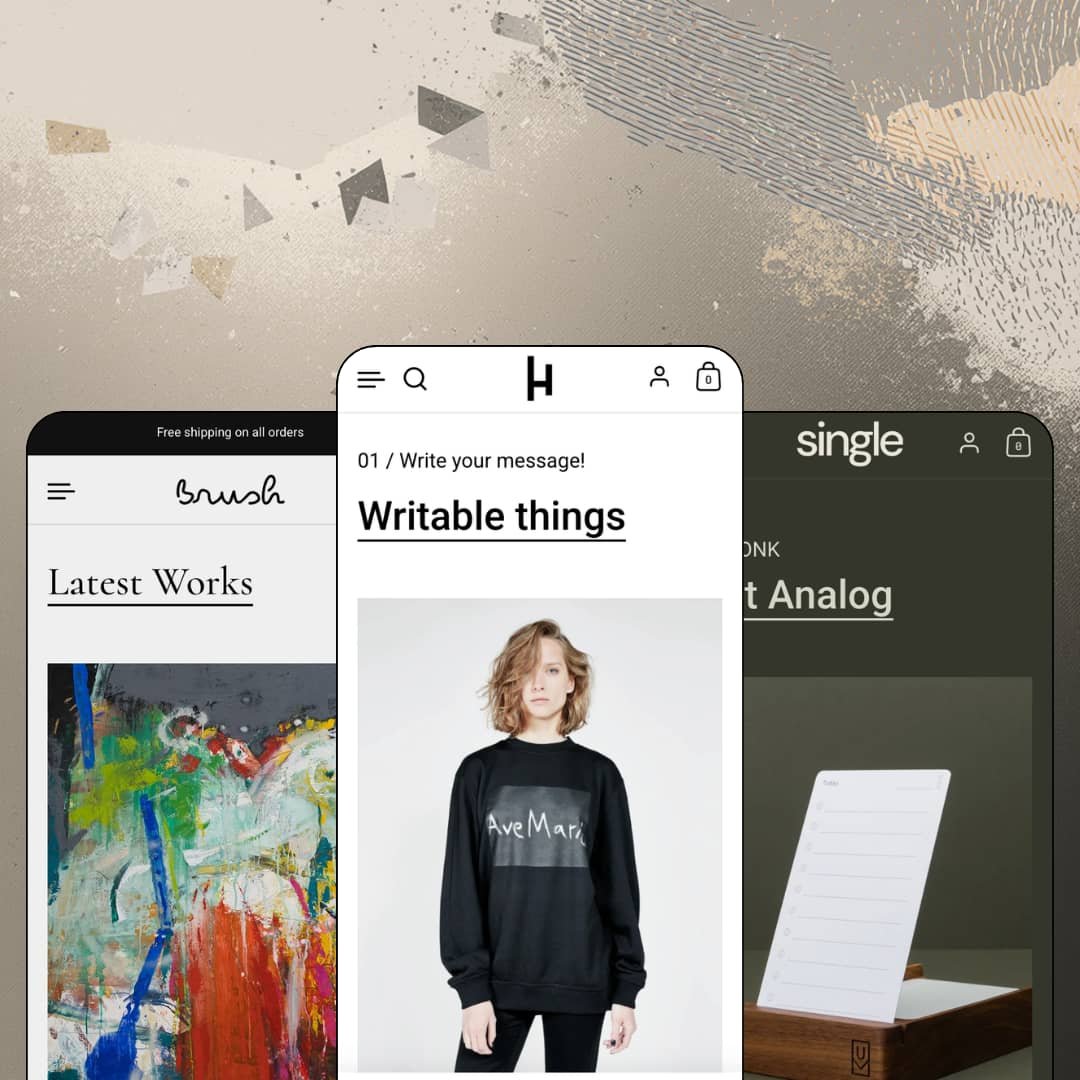
You're selling a product that needs explaining before anyone reaches for the buy button. That's the exact problem Highlight, Krown Themes' $280 Online Store 2.0 theme, was designed around: its sections exist to stage benefits as icons, captioned sliders, and numbered homepage chapters. Three presets ship with the license, covering a multi-collection design-goods store, a one-product funnel, and an artist portfolio. The theme launched in May 2021 and was still receiving versioned updates as of April 2026.
A buy module on the homepage
The featured-product section puts live variant pickers and an add-to-cart button directly on the homepage; the flagship demo stages a t-shirt with six sizes and three colors, purchasable before a product page ever loads. One click gone from the funnel. For brands where a single hero SKU carries most of the revenue, that placement turns the homepage from a brochure into the point of sale, which is why the one-product demo leads with it too. It fits single-brand operations with hero-product catalogs under 30 SKUs and buyers making considered rather than impulse purchases.
Benefit staging is the house language
Merchants selling products that need explaining, functional apparel, productivity tools, any innovation-led catalog in the 11-to-100 SKU band, get sections purpose-built for the job. The theme's namesake machinery is an icon-grid benefits row and a tabbed, captioned image slider that attach to the product template; the demo t-shirt runs five benefit icons with two-line explanations and a three-tab feature slider directly under its description. Long description walls become scannable. That's the difference between a spec sheet and a sales page for considered-purchase buyers.
Product cards argue in the grid
Collection cards can carry a per-product benefit icon with a short caption, so a t-shirt card in the Apparel demo reads "Windproof and breathable" before anyone clicks through. Differentiation starts at browse level. When a grid holds four near-identical tees, that one line of card-level context does the sorting a buyer would otherwise do across four product pages and back-buttons. It suits apparel and accessories merchants with lookalike SKUs and comparison-minded, cross-shop-heavy buyers.
One popup engine, three jobs
Newsletter capture, cookie consent, and product promos run through a single popup system, a coherent toolkit rather than three bolt-ons. The flagship demo stages a timed promo popup pulling a live sale price from the catalog, while the other demos run the cookie-consent variant with accept and decline as equal buttons. Compliance and capture share one settings area. Mid-market brands running seasonal promo calendars, and any storefront serving European visitors, get particular mileage here.
Navigation lives in a drawer at every screen size
The menu sits behind a toggle on desktop as well as mobile, and the structure underneath runs exactly one submenu level deep, with no mega menu anywhere in the feature list. That is a deliberate stance, not an oversight. It flatters a 20-product catalog and starts costing taps the moment a store pushes past the theme's own stated 11-to-100 catalog band or serves cross-shop-heavy buyers who hop between categories mid-session.
One gallery pattern, and merchants have noticed
Product images render as one stacked gallery. An April 2026 review on the theme's own listing, from a store four years into using it, asks for thumbnail layouts and more room for content beside the images. Four years is a long time for that request to stay open. For apparel and jewelry merchants shooting six to eight angles per SKU for buyers who study photos before committing, a long vertical scroll is the only way those images will ever present.
The demo look is a content bill
Reproducing what the demos do takes per-product icon assets, benefit copy, feature-slider imagery, and photography strong enough to hold full-width sections, and none of it generates itself from a product feed. This kept bugging me as I scrolled: every impressive surface is a surface someone has to feed. Skip the feeding and the theme reverts to ordinary. Single-operator brands scaling toward the 100-SKU end of the range should budget real production time per product.
It's 2026 money for a 2021 architecture
Highlight runs the same Online Store 2.0 generation as Shopify's free Dawn: JSON templates, sections on every page, shallow block nesting. The gap is design, not generation. The $280 buys Krown's design system, section library, and support channel rather than a newer platform generation, and that trade reads differently depending on who's paying. Budget-minded founders launching a first store with under 30 SKUs can get the architectural baseline free and should be certain the editorial staging is what they're paying for.
What it takes to launch
Expect a multi-day pass before launch: full copy replacement across chaptered homepage sections, per-product population of benefit icons and card captions, feature-slider and lifestyle imagery for each hero SKU, and a verification sweep of the five bundled interface translations against your final storefront copy.
-
What works in this preset
The homepage reads like a table of contents. Sections arrive numbered, 01 for writable things, 02 for reflective gear, 03 for home and food, and each chapter pairs a one-line claim with product tiles and its own explore link, so a first-time visitor absorbs the catalog's logic before ever seeing a collection page. It's editorial pacing applied to merchandising, and it suits a brand whose products need context.
Halfway down, two captioned photos sit side by side: the same reflective tag shot in the dark and in the light. I sat up at that one. No copy block anywhere on the page argues the product's case as efficiently as that single paired-image comparison does, and merchants who want the interactive version of the same idea have a slider section for it.
Browsing the Apparel collection, I noticed a full-width brand statement embedded mid-grid, splitting eleven product cards with a line about idea-first design and a link deeper into the store. The grid sells while it talks. The trust row above the footer keeps the same specificity, listing dispatch cutoffs and a 30-day return window instead of generic reassurance.
-
What works in this preset
A one-product brand lives or dies on its pitch page, and this preset turns the entire homepage into that pitch: explainer chapters for the card system, a captioned detail slider, and testimonials attributed to named authors with job titles, so product education and social proof share one continuous scroll. Nothing on the page competes with the product.
The navigation drops collections entirely. Menu entries point straight at the three products, Starter Kit, Extra Cards, Travel Case, which is exactly the right structure when a catalog has three SKUs and a visitor's only real question is which one to click first.
Objections get answered where the $99 decision happens. The product page stacks a five-question FAQ accordion, a video explainer, and a captioned feature slider under the gallery, and I went looking for the usual dead-end contact-page fallback before realizing the page had already covered everything a hesitant buyer would ask.
Where it stumbles
Refill economics stop at the theme's edge. Extra Cards is a consumable, the natural repeat purchase in this catalog, and the theme's toolkit for that motion ends at recommended-products and cross-sell blocks; anything subscription-shaped means an app from day one, which merchants planning a replenishment model should price in before choosing this preset.
-
What works in this preset
€2,750 for Archangel, oil on canvas, one of one. The preset treats work like work: hero triptychs with title captions instead of prices, a dedicated Gallery page in the navigation, and sold-out pieces left visible in the collection grid, where a sold sticker in this vertical reads as proof of demand rather than a merchandising failure.
Restraint carries through to the footer. In this preset demo the footer is staged down to an about note, social links, and the language row, with no payment icons or trust badges crowding a storefront that's meant to feel like a gallery wall.
Where it stumbles
Original art at four-figure prices often sells through conversation, and the preset routes every purchase through a plain add-to-cart, with a general contact page as the only dialogue channel. Commission requests or price-on-request selling would need custom work. For artists selling one-of-one pieces at luxury prices to collectors who buy slowly, that dialogue layer is the piece to plan for.
One grammar, three business shapes
The same section system stages a five-collection catalog, a one-product funnel, and an artist portfolio without changing its underlying page logic. That range within a single license is the theme's quiet argument: pick the preset that matches your store's shape and the sections already know their roles.
A five-year maintenance rhythm
Launched in May 2021, the theme was still shipping versioned updates in April 2026, the latest a mobile video-autoplay fix for Chrome. Buying it is not buying abandonware, and for merchants planning to hold a storefront for years, developer attention over time matters as much as the launch-day feature list.
Persuasion without pressure
Read all three demos back to back and one character trait holds: the theme convinces by explaining. Chapters, captions, paired comparisons, and attributed testimonials do the selling, while the urgency tooling that exists in the settings, stock counters, promo tiles, stays optional rather than baked into the default temperament. Brands that want a storefront to sound calm and confident will find that temperament consistent across every preset.
Preset variety is content-deep, not structure-deep
Move between the three presets and the content changes far more than the page logic does. The chaptered homepage rhythm and the single product-template spine repeat across all three, so a merchant hoping the presets represent structurally different storefronts is choosing between three stylings of one skeleton. That narrows the range for multi-brand operators or agencies expecting one license to produce genuinely distinct builds.
The depth is front-loaded
The further a visitor travels from the homepage and product page, the plainer the theme runs. Across all three demos, blog listings, the cart page, and utility pages carry little of the signature staging, so mid-funnel surfaces get a fraction of the design attention that entry points receive. Stores whose buyers browse laterally through articles and secondary pages will feel that drop-off.
Rating
★ 7.8/10
-
Benefit-staging sections, the homepage buy module, a three-role popup system, plus size-chart and product-FAQ tooling cover the $280 brief; one gallery layout and drawer-only navigation cap the ceiling.
8
-
Presets map cleanly onto three store types and section names describe what they do; the icon rows and card captions need metafield legwork before anything resembles the demo.
8
-
The drawer navigation is a mobile-native pattern that desktop inherits rather than the reverse, and sticky cart plus back-to-top controls ship in the settings.
8
-
Pages run lean, with lazy-loaded imagery and a restrained script footprint; the long-scroll homepages are the heaviest thing the theme asks a phone to render.
8
-
Wide range within its editorial register across three very different demo verticals; the poster typography and single gallery pattern mean the look bends less than the section list implies.
7
Frequently Asked Questions
-
Yes, one preset is built specifically around a one-to-three-product catalog, with the homepage doing the selling and products listed directly in the menu.
-
It renders values from Shopify's product-rating metafield, which is why the demos display scores like 4.8 out of 5; collecting those ratings still requires a review app.
-
Theme interface strings come pre-translated in English, French, Italian, German, and Spanish. Translating your product content is separate work handled through Shopify's localization tools.
-
A slide-out cart drawer with an order-instructions notes field, and sticky cart behavior is available in the settings for mobile checkout paths.
-
Yes, a before/after image slider ships as a section; drag it onto any template where the product's value shows best in contrast.
-
Version 4.0.2 shipped on April 23, 2026, continuing an update cadence that has run since the 2021 launch.
This review is based on hands-on testing of the publicly available preset demos of the Highlight Shopify theme as of August 2026. Theme features, preset availability, and performance can change with subsequent updates from the theme developer.