
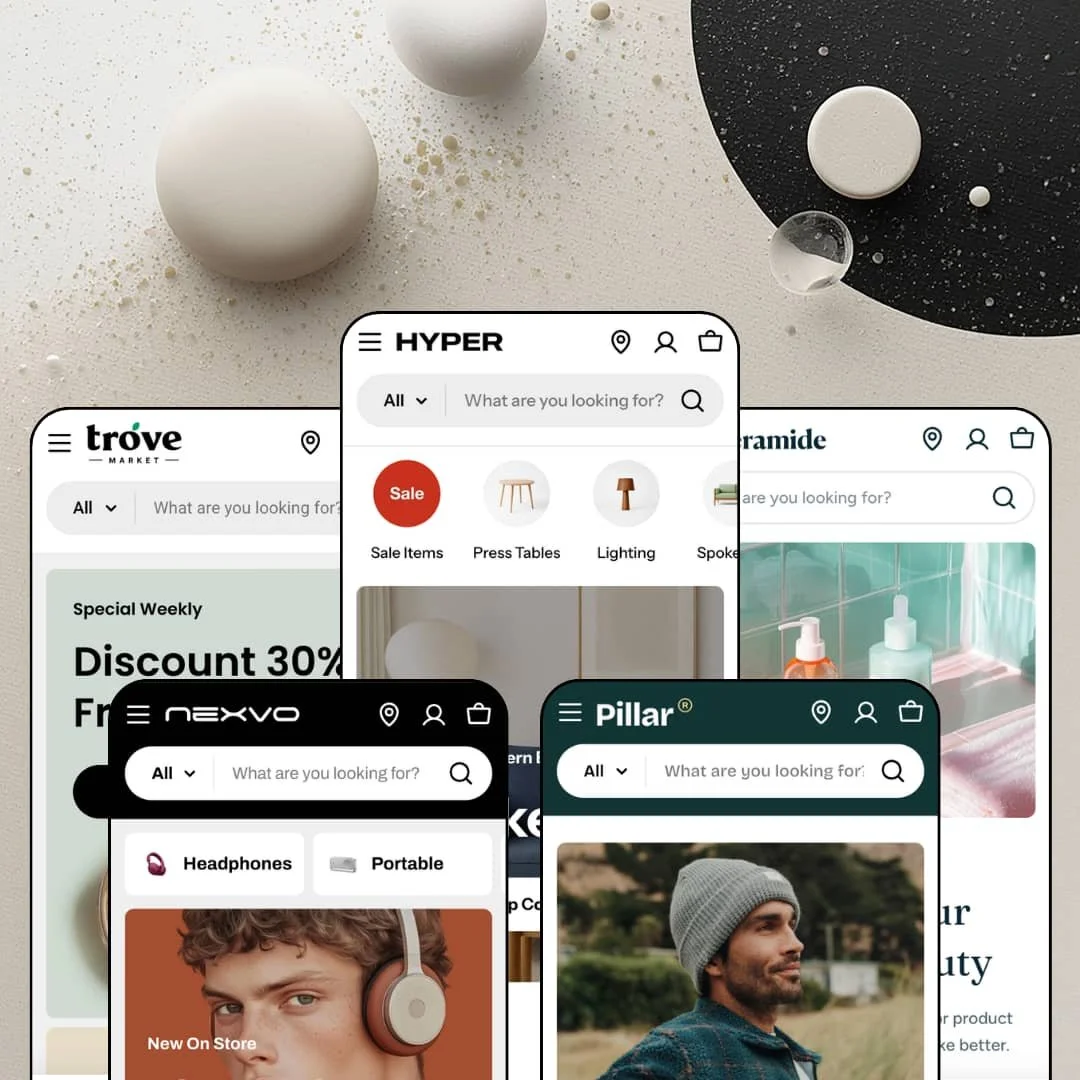
Most Shopify themes pick a mood and commit to it; Hyper reads more like a department store's operations manual. FoxEcom aims this Online Store 2.0 theme at high-growth B2B and wholesale brands, then ships five presets that stage furniture, beauty, groceries, menswear, and electronics from one shared section library. I spent time in all five demos to test whether the wholesale headline survives contact with a standard Shopify plan, and where the theme's real strengths actually live.
Built for catalogs that outgrow a nav bar
If your store carries a hundred-plus SKUs across unrelated categories, Hyper's search treats that as the default case. The header search scopes queries through an All Categories dropdown of product types, surfaces staged suggestion products before a single keystroke, and pins merchant-defined "Most searched keywords" beneath the box. Discovery starts working pre-query. Multi-category retailers in the 100-500 SKU range with cross-shop-heavy customers get a search bar that behaves like a store directory rather than a plain text field.
A native bundling layer with three distinct grammars
Bundling is one capability family here, deployed three ways: fixed sets with a single add-all action, a tiered build-your-own module with escalating discounts, and shop-the-look sets that keep full variant selection per item. The Nexvo demo alone rotates four "Buy 2 and get 20% OFF" panels through a slider, each slot with its own option picker. That's AOV machinery living in the theme. For grocery, CPG, and beauty merchants with repeat-buyer bases and mid-market price points, this family alone can justify the license.
Product comparison ships in the collection grid
Every collection card carries a Compare checkbox feeding a persistent Compare (0/5) bar, so shoppers can queue up to five products for side-by-side review while they browse instead of hunting for a separate tool page afterward. Selection happens in the grid. That's where comparison decisions actually begin. Electronics, appliance, and furniture sellers with multi-attribute products and considered-purchase buyers get the browsing behavior their category demands, built in.
Mega menus that merchandise, not just navigate
Open the Tables & Desks menu in the furniture demo and a Trending Products rail appears inside it, complete with prices and color swatches, beside a five-room "Shop By Room" column set and an in-menu promo tile. The menu sells. Navigation depth doubles as shelf space, which suits multi-department stores and holding-company setups running broad assortments where the header is the most-touched surface on the entire site.
The wholesale headline leans on a plan you may not have
Hyper markets itself to B2B and wholesale brands, but the two heaviest mechanics behind that pitch, quantity pricing and combined listings, are flagged as Shopify Plus features on the theme's own listing. None of the five demos stages a wholesale storefront either. Every preset is dressed as consumer retail, so on a standard plan the B2B story thins to a quick order list plus strong general tooling. Wholesale-first operations on Basic or Grow plans, especially distributors running 500-plus SKU catalogs, should budget for a Plus upgrade or B2B apps before treating the tagline as delivered.
Social proof is set dressing
"Verified Buyer" labels, an "Over 2000 Positive Reviews" headline, a typed-in "4,8 Review Score" stat: all of it is hand-authored section content with no collection mechanic behind it. The badges verify nothing. This kept bugging me across all five demos, because the presentation implies a review engine the theme doesn't contain, and gathering real ratings still means installing a review app such as Judge.me or Loox. Beauty and electronics merchants selling to review-checking, considered-purchase buyers should price that dependency in from day one.
Discounting is the default voice
Copy-a-code flash sale blocks, a bottom-corner offers drawer that follows every page, countdown sections, and steep percentage badges run through all five presets as the resting state. Turn nothing off and your store shouts. Each piece can be disabled, but the staging shows where the theme's instincts point, and they point at promotion. Full-price and luxury positioning with evergreen, non-promotional sales patterns will spend real configuration time dialing the volume down before this reads as their store.
What it takes to launch
Expect two to three days before launch: a full copy pass across navigation labels, section headlines, FAQ entries, and testimonial slots; a link audit through menus and image tiles; and hands-on data work populating comparison-table rows, curating bundle sets, staging search keyword suggestions, and building out brand collections.
-
What works in this preset
Scrolling the Garace furniture demo feels like walking a showroom with a salesperson at your elbow. The product page is the clearest example. Beneath the gallery sit a spec table listing brand, dimensions, seat height, and weight, then a numbered feature walk, an annotated hotspot banner, and "Get Inspired by Spaces" cards that price out every item pinned inside a styled room shot. One product page does the work of a landing page.
"Hurry up, only 3 items left in stock." That line sits directly above the variant pickers on the Arc Chair, next to a limited-time offer promising $20 off orders past $1,000, a two-axis Color and Material selector, and a mini sticky bar that keeps the price and Add to cart pinned while you scroll the rest of the page. I went looking for filler and found working conversion parts instead. The buy box is dense but earns it.
Lookbook sliders labeled "Shop this look" attach a numbered product list to each lifestyle image, complete with sale prices, so a styled living room quietly doubles as a three-item order form for the sofa, the lamp, and the side table in frame. It's a simple pattern. For home and decor merchants whose photography carries the cross-sell weight, it turns inspiration into carts without extra tooling.
-
What works in this preset
Beauty retail is a brand game, and Ceramide plays it openly. A ten-logo "Shop By Brands" wall links straight into per-brand collections, pushing the demo past single-brand skincare staging into multi-brand retailer territory, which is a rarer stance for a beauty preset. Stores reselling several labels get their navigation posture staged on day one.
The bundle module here is staged as "Saving 20% On Bundle": pick four products, each slot carrying its own size picker down to 512ml versus 946ml bottles, then push everything into the cart through one button. Routine-building is native. Skincare routines are multi-product by nature, and the demo treats that as a merchandising fact instead of an afterthought.
"What Trending On Social" rows creator-attributed video clips into a UGC wall, and every single clip ties to a named product link, so the section behaves like a shoppable feed rather than a mood reel. Each video sells one item. That is a sharp fit for beauty, where short-form video is the discovery channel that actually moves units.
Where it stumbles
For all its multi-brand staging, a brand here is only a collection with a logo on top. There is no dedicated brand page type carrying its own story, banner set, or editorial slots, so a retailer building out ten label identities will assemble each one from generic sections by hand. The wall looks like architecture; underneath, it's curation.
-
What works in this preset
Build Your Own Bundle is the section I kept returning to. Add three items for 10% off, four for 15%, five for 20%, with a running "Your Bundle" counter, per-item variant buttons like Yellow Corn versus White Corn, and a live total that resolves into a single bundle add-to-cart with the discount applied at checkout. That's supermarket math done in the storefront. It nudges basket size the way an end-cap display does.
Prices read "From $2.00" and titles read like shelf labels: 1 lb, 1 pack, 1 bunch. The preset's whole grammar is weight-and-pack variants instead of color swatches, backed by a "View 20+ Categories" tile wall built for produce-aisle browsing rather than editorial scrolling. Small detail, real signal. Carts get built by the pound here, and the storefront's language matches how grocery customers actually shop.
Where it stumbles
Trove pitches an organic food market, which is a replenishment business, yet nothing in the preset reorders anything. There is no subscribe-and-save mechanic, no delivery cadence, no standing basket; recurring purchases would need a subscription app wired in on top of the theme. For weekly-groceries positioning, that's the missing organ, not a missing garnish.
-
What works in this preset
"Iconic Autumn Set" stages shop-the-look as an actual order form: three garments beside one photo, each with a full color-and-size dropdown running from Beige / XS through Brown / XL, and a single add-all button underneath the stack. Outfit selling keeps its variant depth. Apparel merchants get the look-to-cart pipeline without sizes being flattened away for the sake of a tidy module.
Browsing by campaign feels closer to a catalog spread than a collection grid. "Shop By Campaign" cards pair a hero image with three product thumbnails and a live item count, nine items in Flannels, seventeen in Jackets, so shoppers can weigh a category before spending a click on it. It's a small courtesy. It also quietly communicates assortment depth, which matters when a store wants to feel bigger than its SKU count.
A video lookbook card runs footage with a three-product shop list attached, and the footer closes with a store-count banner plus a Get Help column that includes a bulk-orders link. The preset's retail-plus-online posture stays consistent from header to footer.
-
What works in this preset
How do you sell headphones against fourteen near-identical rivals? Nexvo's answer is the filter rail: availability with per-option counts, a price band with typed from-and-to fields, color, product type, and a brand facet listing labels like Marshall and JBL, all stacked beside nine sort orders and a grid-versus-list view toggle. I clicked through it expecting decoration and found working discovery plumbing. Electronics catalogs live or die on exactly this.
"Find Your Perfect Match" renders a genuine comparison table on the homepage: three smartwatches side by side across rows for case size, battery life, chip, and display brightness, with each column ending in its own Shop button. Spec shoppers get spec answers without leaving the homepage. It reframes the hero real estate as a decision aid instead of another banner.
Testimonial cards here carry a headline, a quote, and a thumbnail of the exact product being praised, which reads more like a review feed than a quote wall. A membership banner closes the footer. The preset's entire posture is big-box electronics retail, down to the "Shop with an expert" service tiles.
One grammar, five costumes
Read all five demos back to back and the same skeleton emerges: scoped search, merchandising menus, promo apparatus, bundle module, testimonial slots, re-skinned per vertical. Learning one preset is learning them all. That repeatability means a second storefront, or a pivot into a new category, becomes a styling exercise instead of a new build.
Price-band elasticity
The identical card and section components carry $2.00 produce in Trove and a $3,289.00 sofa in the furniture demo without either looking miscast. That stretch is the quiet proof of the design system: typography, badges, and buy modules hold their proportions whether the basket is an impulse snack or a considered four-figure purchase.
The storefront assumes you also have a door
Every header carries a find-a-store utility link, locator pages ship across the demos, and in-store pickup sits in the cart feature set. Online-only is not the baseline assumption here. Retailers with physical locations get a click-and-mortar posture already staged rather than retrofitted after launch.
Density is the resting state
All five homepages run long, stacked builds: heroes, bundles, UGC, testimonial walls, brand logos, promo strips, blog cards, membership banners. The theme's instinct is always to add a section. Minimal brands will fight that instinct at every step, and the content appetite behind it, video clips, creator handles, room photography, brand marks, is substantial before a single product is even uploaded.
Hand-typed truth
Spec rows in the comparison section, stat lines like review scores and store counts, bundle rosters: much of what looks like data across the presets is authored text living inside sections. Nothing syncs it to the catalog. As assortments rotate, keeping dozens of these blocks accurate becomes a standing editorial chore, which is a real tax on exactly the large, fast-moving stores the theme courts.
The listing and the pitch tell different stories
Shopify's taxonomy files Hyper under Jewelry & Accessories and Food & Drink with a catalog badge of "Some (11-100+)," while the sales copy promises high-growth wholesale scale and the presets span furniture, beauty, apparel, and electronics. Jewelry gets no preset at all. Buyers should trust what the five demos actually stage over what the category tags claim.
★ 8.2/10
Rating
-
Native compare, three bundle grammars, scoped search, and a coordinated promo kit all run without extra tooling; the two flagship wholesale mechanics carry a Shopify Plus flag.
9
-
The section library is deep but hungry: comparison rows, bundle rosters, mega menus, and keyword staging are all hand-fed, so configuration is a project measured in days, not hours.
7
-
A dedicated mobile logo asset, drawer navigation, and a sticky add-to-cart mini bar show mobile was designed for rather than shrunk to; the long homepages still mean long thumb-scrolls.
8
-
Product imagery lazy-loads and pages stay lean per section, but the default homepages stack video lookbooks, UGC walls, and slider after slider, so restraint in section count falls to the merchant.
8
-
Five verticals from one library, with multiple gallery and collection layouts linked straight from the demo navigation; the promo-forward voice is the one aesthetic it resists shedding.
9
Frequently Asked Questions
-
Hyper stages furniture and home decor, Ceramide multi-brand beauty, Trove organic groceries, Pillar casual menswear, and Nexvo consumer electronics; all five draw on the same section library.
-
Version 1.4.0 landed on June 22, 2026, and Pillar and Trove only joined with version 1.2.0 in mid-2025, so the preset lineup grew from three to five within roughly a year.
-
The page's meta text lags behind the listing itself, which displays five presets; go by the preset gallery, not the search snippet.
-
The demo navigation links four product-gallery styles (vertical thumbnails, horizontal thumbnails, two-column grid, mixed grid) and six collection-page layouts, from banner variants to card-based headers.
-
No. Walls showing labels like Marshall or JBL are staging; you build your own brand collections and upload your own marks, and the brand filter facet then picks them up automatically.
-
The demo menus link live examples of flash sale, coming soon, pre-order, and out-of-stock treatments, each rendering its own badge and buy-box behavior.
This review is based on hands-on testing of the publicly available preset demos of the Hyper Shopify theme as of August 2026. Theme features, preset availability, and performance can change with subsequent updates from the theme developer.