
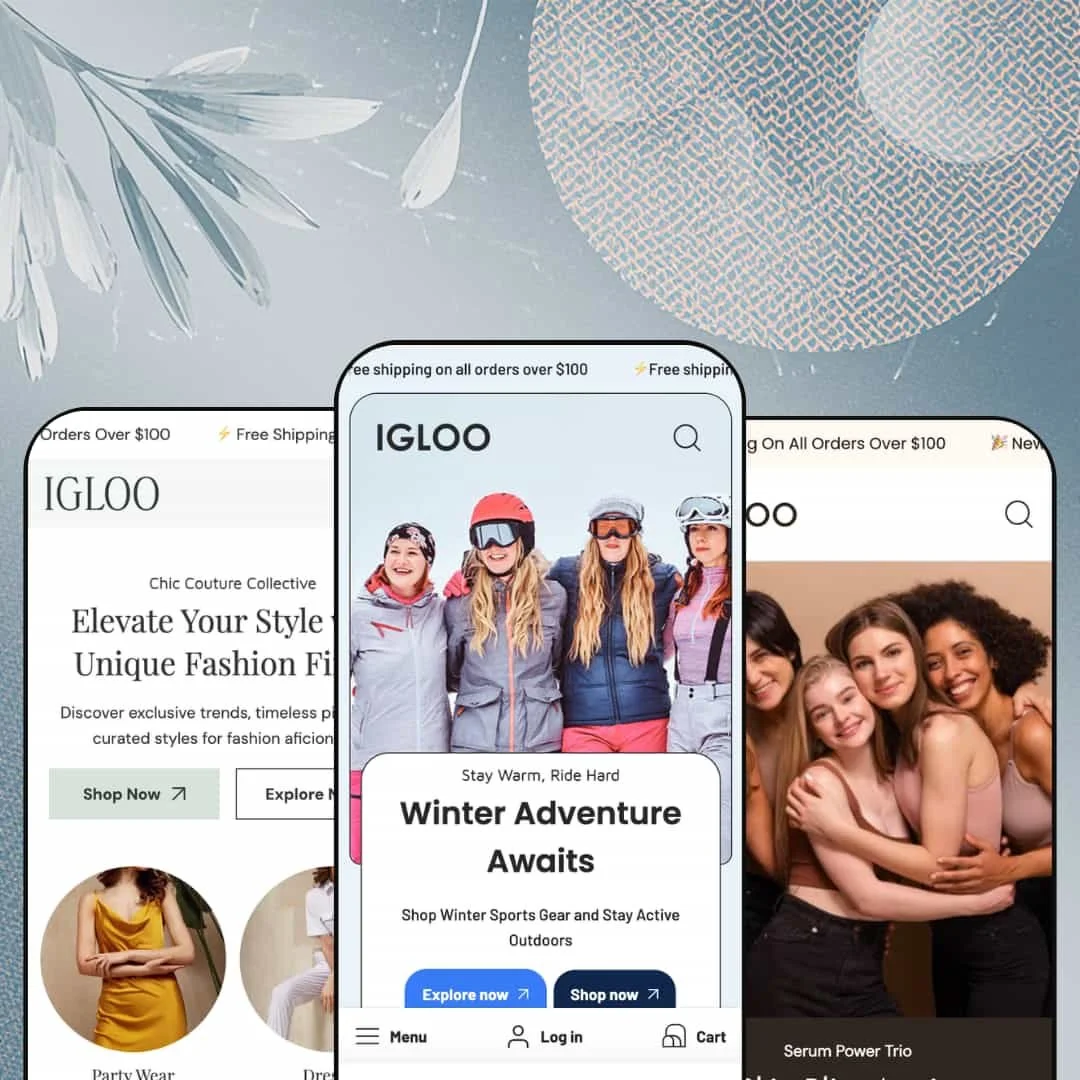
Most Shopify themes pick a lane and stay in it. Igloo runs three at once, opening as a winter-sports outfitter, a women's fashion boutique, or a skincare shop depending on which preset you load. Built on Online Store 2.0 architecture, it treats those three demos less as palette swaps and more as separate businesses, each carrying its own navigation logic, homepage rhythm, and variant model. The real question for a buyer is whether spreading across three verticals leaves enough depth in the one lane you actually sell in.
Three storefronts from one purchase
Merchants who haven't committed to a single product category get unusual optionality here. Igloo ships three fully built presets across three unrelated verticals, so a founder weighing winter gear against apparel against beauty can stand up a credible storefront in any of them without buying a second theme. The breadth is the draw. For an operator running more than one brand, or an undecided first-time merchant testing which category to commit to, that range turns one license into three viable starting points.
A product page that carries weight
The product template goes well beyond a gallery and a buy button. Across the demos it pairs a modal-zoom image gallery with accordion tabs for description, shipping, and returns, a related-products row with inline quick-add, an in-store-pickup readout, and variant pickers that handle up to three axes such as size, color, and material. For a catalog with multi-attribute products and shoppers who read specs before buying, like furniture or technical apparel running 50 to 200 SKUs, that depth removes a stack of customization work. It earns its space. The page does the explaining so the merchant doesn't have to assemble extra blocks to do it.
A merchandising kit built for storytelling
Igloo's section library is stocked for brands that sell through imagery. Beyond standard collection rows, it offers lookbooks, image hotspots, a before/after slider, slideshows, promo tiles, and full-bleed banner sections, the same toolset the fashion and beauty demos use to build mood ahead of product. For an image-led label in a considered-purchase category, such as a skincare or apparel brand leaning on editorial content, those sections let you build a storytelling homepage from parts rather than constructing one section by section from scratch. The library is broad. You arrange the narrative from pieces that ship in the box.
Conversion cues already in place
The promo and cart layer arrives pre-wired across every preset. A pinned announcement bar (single or multi-message), promo popups, countdown timers, a stock counter, and a slide-out cart with order notes and a terms checkbox are all staged rather than left for you to discover and configure. For a shop running a sales calendar of seasonal drops and discount codes, like a flash-sale apparel store or a seasonal-gift seller, those urgency tools are ready on day one. Less plumbing, more selling.
One starting point per vertical
Igloo's breadth comes with a trade. Because the three presets cover three different industries, a merchant committed to a single category gets exactly one layout tuned to it, with no second or third in-vertical design to test against. A large apparel retailer carrying 500-plus SKUs, or a single-brand beauty shop wanting to A/B two homepage concepts, will find the other two presets built for businesses they don't run. The range that helps a multi-brand operator gives a focused merchant only one purpose-built option.
Online Store 2.0, not the newest architecture
The theme sits a generation behind the current Horizon-era build. Igloo runs on Online Store 2.0 sections, and while version 3.0.0 added a Custom Section that accepts AI-generated code, the surrounding architecture doesn't offer the deeply nested block model that newer themes use for granular, drag-anywhere layout control. For an agency building bespoke section layouts for clients, or a merchant planning heavy custom layout work beyond the supplied sections, that ceiling is worth weighing before committing. It is capable, just not the newest. The supplied library is broad, but the editing model underneath it is the prior standard.
The design needs photography to hold up
Strip out the lifestyle imagery and several homepages have little to fall back on. The fashion and beauty presets in particular lean on stacks of full-bleed banner sections, each one a large photo with overlaid text, so a merchant without a strong image library will watch the layout expose empty space fast. Without good photography, this design has nothing to stand on. A bootstrapped founder shooting on a phone, or a commodity-goods seller in a category where lifestyle imagery isn't natural, should budget for a real shoot before launch. Images carry these layouts.
What it takes to launch
Plan two to three days of real work after you pick a preset: replacing hero and banner copy across sections, re-pointing the demo's deep category menus to your own collections, populating metafields for product tabs and any ingredient or usage blocks, configuring markets and currency, and aligning vendor and brand naming throughout. Because the demos arrive fully merchandised, the job is swapping their content for yours rather than building from an empty canvas.
-
What works in this preset
I opened the Snowboarding menu and the navigation ran three levels deep. The header stages a genuine nested mega menu: top-level departments like Women and Men open into category columns (Snowboards, Jackets & Snow Pants, Accessories), and several of those expand again into sub-listings such as Goggles & Lenses, Helmets, and Boots. For a gear catalog that naturally splits into department, category, and sub-category, that depth is doing real work. It is the most elaborate navigation of the three demos, and it sets Igloo up as the catalog-heavy preset of the set.
Scroll past the header and the homepage opens on a two-slide hero, pairing "Winter Adventure Awaits" with "Fashion Meets Function," then drops into a countdown band for a seasonal sale. Below that sit category tiles routing to Snow boards, Snow clothes, and Snow glasses, followed by a product grid where each card swaps to a second image on hover and exposes color and size pickers inline. The flow is brisk. It reads like a store that expects you to browse by category first and product second.
Product placement follows the same gear-shop logic. The free-shipping announcement bar stays pinned above the header, the category tiles feed straight into populated collections, and the product cards put price, swatches, and add-to-cart within a single glance, so a shopper hunting a specific board never has to dig through a generic grid to find where the buying decisions actually live. None of it feels bolted on. Each piece is staged where a snowboard shopper would look, which makes the preset a usable template rather than a mood board.
Where it stumbles
The whole preset is built around a season. Snow imagery, a "Winter Wonderland Sale," and cold-weather copy give it a strong identity, but a shop selling outdoor gear year-round inherits a storefront that looks out of step by April. You can re-theme the imagery and retire the seasonal countdown, yet the underlying mood, from color temperature to hero messaging, leans hard into winter and will need deliberate softening for an all-season catalog.
-
What works in this preset
Where Igloo browses by category, Drift leads with editorial mood. The fashion demo stacks a sequence of full-width banner sections (Glamour Grove Outlet, Couture Corner Showcase, Luxury Statement Pieces) that read like magazine spreads, each with its own headline and call to action. Between them, a collection-tile grid and a "This Week's Highlights" tab strip give shoppers faster routes into Dresses, Blouses, Pants, and Party Wear. The effect is a boutique that wants to set a tone before it sells you a dress.
The product cards here add a vendor line and a sale flag, and on hover each one cross-fades to an alternate shot. I clicked into the embedded featured product and got a full image gallery, a size/color/material picker, and a live "Super Deals" promo strip, all without leaving the homepage. That is a lot of product surface to hand a shopper before they ever reach a collection page. It suits a fashion buyer who decides on the strength of imagery and styling.
Drift is also the preset configured for cross-border selling out of the gate. Its country selector is staged with genuine currency variation in the demo, switching between euros, pounds, and dollars, and an English/French toggle sits alongside it, drawing on the theme's bundled EU translation strings. For a boutique shipping across Europe, that is the right default. Short and useful.
Where it stumbles
The three-axis variant model is a double-edged demo choice. Several products expose Size, Color, and Material, but the Material option often holds a single value, so a shopper meets a "Silk" dropdown with nothing to choose from. The fix is simple. The capability itself is sound and genuinely useful for apparel that varies fabric, yet in this demo the third axis mostly adds a click without adding a decision, and a merchant who doesn't vary material will want to remove it before launch.
-
What works in this preset
Bella is where the theme's section library gets its fullest workout. The skincare demo runs a hosted product video (a looping "Nourish and Glow" clip served straight from Shopify), a brand-story block, a two-post blog feed, a four-up trust row, and an Instagram grid, all stacked into one long narrative homepage. It is the most content-rich of the three, and it shows how far the merchandising sections stretch when a brand wants to tell a story before it sells anything. A beauty shopper gets education and atmosphere ahead of the add-to-cart.
Product modeling fits the category cleanly. Skincare items use a single Size axis measured in millilitres (100 ml, 200 ml, 300 ml), which is exactly how a moisturizer line should be sold, and the announcement bar runs two rotating messages, free shipping over $100 and a welcome discount code. The cart keeps the same order-notes treatment used elsewhere. Small touches, but they fit.
The brand-story and "Our Story" sections give a founder room to build trust, and the blog feed is wired to real skincare articles rather than placeholder posts. For a beauty label whose customers research before they buy, that editorial real estate matters. I went looking for the kind of routine-builder content a skincare buyer expects, and the demo delivers it through standard sections rather than custom tooling. That keeps it flexible, even if it asks the merchant to assemble the story themselves.
Three presets, three genuinely different blueprints
Load the demos back to back and the differences go well past color. Igloo navigates three levels deep and browses by category; Drift sequences editorial banners and sells on imagery; Bella scrolls through video, story, and blog like a brand site. The navigation logic, homepage sequencing, and even the variant models change from one to the next, which means IT-Geeks arranged three distinct information architectures rather than recoloring a single template. For a buyer, that is the difference between three real choices and one choice in three coats of paint.
Still actively maintained
This is not an abandoned theme coasting on an old release. The April 2026 version 3.0.0 added Combined Listings, Extended Variants, Nested Cart Lines, and the AI-capable Custom Section, which means the developer is still tracking new Shopify capabilities years after the theme first shipped. For a merchant making a multi-year commitment, that update cadence lowers the risk of buying into a dead end.
The presets share one engine underneath
The variety is real at the surface and thinner below it. Because all three presets draw on the same section library, their distinctiveness lives largely in arrangement and content rather than in unique, vertical-specific components, so a buyer expecting three structurally different theme engines is really getting one engine in three configurations. That is fine if you want a flexible generalist. It is a letdown if you were expecting each preset to ship vertical-specific machinery that the others don't.
Every homepage talks before it sells
A pattern surfaces once you have seen all three. Each preset's default homepage front-loads brand storytelling, banners, and atmosphere ahead of shoppable product density, so a returning customer who just wants to reach the catalog has to scroll past the mood-setting first. For a browse-first audience, the editorial emphasis that flatters a new visitor works against a repeat buyer who already knows what they want.
★ 8.0/10
Rating
-
A deep product page, three-axis variants, a broad merchandising library, and a full promo and cart layer are available whichever preset you choose.
9
-
The Online Store 2.0 editor is approachable, but reaching the demo's polish takes metafield population and menu re-staging, so the first launch isn't a quick swap.
7
-
Each preset ships dedicated mobile hero artwork and a slide-out menu, so the small-screen layout is considered rather than a desktop afterthought.
8
-
Homepages lazy-load imagery and keep the initial section count restrained, though the banner-heavy demos and large hero photos add weight as you populate them.
7
-
Three presets, a wide section set, and the v3.0.0 Custom Section give real layout range; the ceiling is set by Online Store 2.0 rather than the newer nested-block model.
9
Frequently Asked Questions
-
Yes. The three looks (Igloo, Drift, Bella) are presets inside one theme, so you can load a different one from the editor, though you'll restyle imagery, copy, and menus to match.
-
It does. The deep menu is wired to the demo's collections, so you'll map each department and sub-category to your own before it functions on your store.
-
Only if you define it. The demo stages some products with a single-value Material option; if your catalog doesn't vary material, you can remove that axis entirely.
-
It's a built-in section playing a Shopify-hosted video, part of the theme's merchandising library rather than a third-party add-on.
-
A fair amount. Product tabs, ingredient and usage blocks, and the review stars all read from metafields or a reviews app, so your own store won't look as finished until you populate that data.
-
Yes. The April 2026 release added Combined Listings, Extended Variants, and Nested Cart Lines, so newer variant and cart behaviors are supported.
This review is based on hands-on testing of the publicly available preset demos of the Igloo Shopify theme as of June 21 2026. Theme features, preset availability, and performance can change with subsequent updates from the theme developer.