
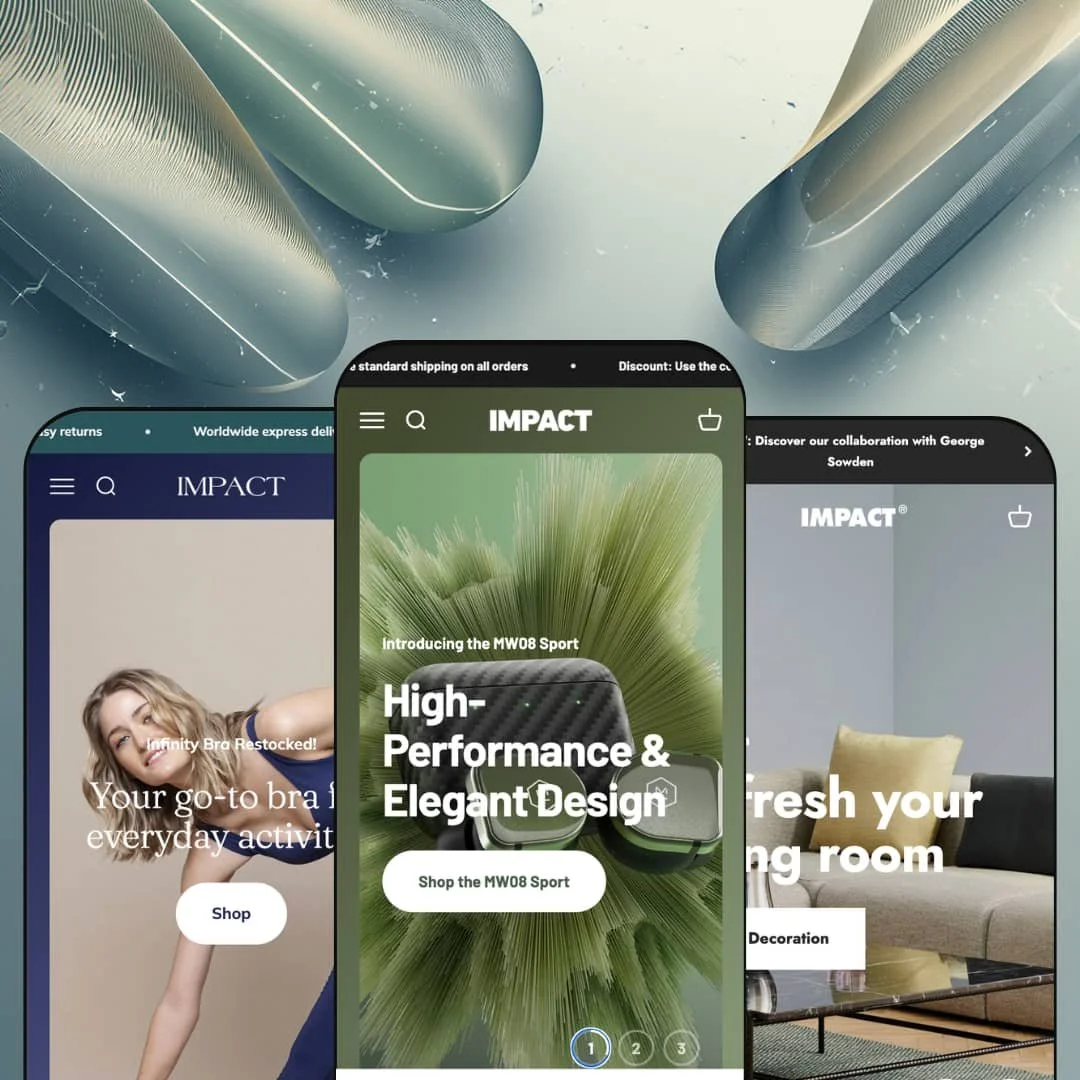
A doughnut chain's merch store and a courier-bag brand run their storefronts on the same theme, and that range says more than any feature list. Impact is Maestrooo's Online Store 2.0 loudspeaker of a theme: $400, three presets, oversized type, animated storytelling sections, and product comparison built in as theme functionality rather than an app hook. The demos stage it as a luxury audio brand, a Scandinavian design shop, and a European activewear label. I spent time in all three, and the real question is whether that storytelling machinery earns its price for your catalog.
Product comparison ships as theme functionality, not an app hook
Impact renders side-by-side product comparisons and spec tables from structured product data, and pairs them with a dedicated Compare page template. No storefront install required. The rows cover whatever attributes you define, which means the same system scales from headphones to appliances to cookware without touching code, and the identical data feeds the spec blocks on product pages. For electronics and gear merchants with 20–200 SKUs selling to considered-purchase buyers who cross-shop models before committing, this replaces a comparison-app install plus the integration work that follows it.
Why send shoppers to a product page at all?
All three demos embed a complete purchase flow directly into the homepage: gallery, variant pickers, quantity stepper, add to cart. The Sound demo goes further and attaches a delivery-promise line directly beneath the button, so the purchase argument and the logistics reassurance share a single screen without a click between them. That's checkout distance cut to one scroll. For flash-drop apparel labels and single-hero-product brands selling to impulse-buy audiences, the homepage stops being a lobby and starts being the register.
A brand-storytelling kit that moves as one unit
The editorial sections function as a coordinated set: scrolling text ribbons, animated number callouts, press-quote carousels, image hotspots, a before/after slider, and a multi-year timeline, all speaking the same oversized-type language. One purchase covers the campaign pages. Each demo bends the set to a different job, from fabric engineering to company history, and none of it looks borrowed from another store. For single-brand, story-led labels in audio, beauty, or apparel that sell on provenance and material claims, the kit handles About-page and launch-page builds that would otherwise turn into custom section work.
The header is campaign real estate
The mega menu sells as much as it navigates. Menu panels hold featured product tiles with working quick-add buttons, promotional image links, and rotating product slots, and the Sound demo stages a Paris Saint-Germain collaboration headphone, priced and purchasable, inside the navigation panel itself. Open the menu and a product is already waiting. For multi-line brands running seasonal drops and collaboration launches, that's persistent promotional surface on every page of the store, with no popup required to get attention.
The best features run on data you have to build
The comparison tables, spec rows, and per-product selling points all read from structured product fields, and none of that structure exists in a fresh store. Impact won't fill them for you. Until each product carries defined attributes, those sections either render thin or get left out of templates entirely, which places the theme's most distinctive merchandising behind a data-entry project. Single-operator electronics resellers and small teams migrating from stores that kept specs buried in description text should budget for that groundwork before the marquee features earn anything.
Built for narrative throughput, not catalog throughput
Impact's intelligence concentrates on storytelling surfaces. All three demos stage catalogs measured in dozens of products, and the section library's center of gravity sits in single-product heroes, single-claim numbers, and full-bleed imagery that wants room to breathe. Density is not the design's instinct. For 500-plus-SKU, multi-brand or restock-driven operations whose homepage needs to function as a working product grid, a meaningful share of the $400 buys sections that will never leave the library.
Two boxed features are locked to Shopify Plus
Quantity pricing and combined listings both appear on Impact's feature list with a Plus flag attached. On a standard Shopify plan they don't operate, because both depend on Plus-level platform capabilities rather than theme code. That stings at $400. Wholesale-enabled sellers running volume tiers, and multi-colorway apparel brands hoping combined listings would clean up their catalog structure, should read that flag before buying rather than after.
What it takes to launch
Expect a multi-day build: full copy and imagery replacement across three content-hungry homepage layouts, structured-data definition and population for the spec and comparison sections, mega menu re-staging with your own products and promotions, and a cleanup pass over demo contact details and incentive copy before launch.
-
What works in this preset
The Sound demo is the theme showing off. It stages a luxury audio catalog whose homepage runs from full-bleed slideshow through oversized number callouts, a magazine-quote carousel, and a brand timeline reaching back to 2014, all holding one continuous art direction. Nothing on the scroll reads like filler.
The homepage comparison table earns its slot. Two headphone models sit side by side with rows for driver, weight, dimensions, and battery life, every value pulled from structured product data rather than pasted into a text block. For a $349 considered purchase, that's exactly the content shoppers otherwise open a second tab to find.
Product pages stack a spec table, an included-in-the-box icon carousel, a 42-hour-battery number section, and a second comparison block set against the sibling model. It's dense. The staging argument is that a premium audio buyer wants evidence rather than vibes, and the page delivers that evidence in five different formats without splitting it across tabs.
Where it stumbles
The preset pushes nearly the entire section library onto one homepage, and the scroll gets long for a store selling a four-line catalog. As a sales argument for the theme it works; as a staging model for an actual small-catalog audio brand it front-loads more narrative than the products need. Trim before you copy it.
-
What works in this preset
Restraint is harder to stage than volume, and Cocoon proves the same library can do quiet. The demo swaps gradients for white space, leads with a designers-first navigation concept, and lets a shop-the-room image with inline add buttons carry the merchandising instead of shouting. Product photography does the talking here.
I clicked through the designer pages and the information architecture is genuinely clever: each designer gets a landing hub reachable from both the mega menu and the footer, which turns a multi-vendor design shop into something curated rather than catalog-shaped. Shoppers browse by the person behind the object, not just by room or price. That framing fits how design-goods buyers actually think.
The image-comparison slider gets repurposed as room-by-room inspiration, moving between a living-room scene and an office scene, while a founder-quote carousel with portraits puts faces behind the values copy. Small demo, coherent argument.
Where it stumbles
The designer hubs that make the preset feel curated are hand-built pages, not automated collections. Every designer you sign means another page to design and another set of menu links to maintain, which is manageable at five names and a chore at twenty-five. The structure rewards a tightly edited roster and quietly punishes growth.
-
What works in this preset
I went looking for a template echo of the other two demos and instead found the most conversion-focused staging of the set. Balance opens on a repeating announcement ribbon, moves through sustainability figures presented as oversized claims, and lands shoppers on a complete purchase module for a sports bra, with color and size options selectable before any product page loads. The homepage closes distance instead of building atmosphere.
The before/after slider becomes a product-engineering demonstration, moving between relaxed and stretched fabric shots, and the hotspot section assembles a terracotta outfit with linked product callouts. Sections built for storytelling get bent into proof.
Social proof arrives layered rather than dumped: photographed customer review cards, a magazine-quote carousel, and a press-logo strip each occupy their own beat down the page. For an intimates-adjacent category where trust decides the purchase, that sequencing looks deliberate rather than decorative, and it gives the brand three distinct registers of credibility instead of one wall of stars.
Where it stumbles
The preset argues brand values harder than it argues range. The demo surfaces roughly a dozen styles, and between the manifesto moments there's little staging that shows how the design behaves once an apparel catalog grows past two collection tiers. You'll be designing that density yourself.
One library, three unrelated brands
Read the demos back to back and the striking thing isn't any single section, it's the temperature range. The same design tokens produce a neon-charged audio flagship, a gallery-calm design retailer, and a warm activewear label, and no preset feels like a reskin of its neighbors. That elasticity is what you're actually buying at this tier.
Four years of shipping, still current
Impact launched in October 2022 and stood at version 7.2.0 in early July 2026, a release history spanning four years of platform change. A theme is a multi-year commitment, and the changelog here shows a developer that keeps paying attention. That maintenance record is worth more over a store's lifetime than any individual feature on the box.
The demos double as documentation
All three presets are staged with licensed, production-grade brand content rather than abstract placeholders, so every section can be studied in a believable deployment before you rebuild it yourself. That turns the demo stores into a working reference for your own staging decisions. It's an underrated part of the package.
An appetite for finished content
Every preset assumes a mature asset library: campaign photography, quotable press, provable numbers, a brand history worth a timeline. Feed it thin material and the oversized staging amplifies the thinness instead of hiding it. This is a theme for teams whose marketing is already ahead of their storefront, not one that manufactures a brand where none exists.
No quiet register
Even Cocoon, the calmest preset, speaks in manifestos, ribbons, and declarative type. If the goal is a storefront that disappears entirely and lets a catalog speak flatly for itself, the typographic system will keep inserting itself into the frame. Impact has a voice, and you never fully get to turn it off.
★ 8.2/10
Rating
-
Native comparison, structured spec merchandising, and a 35-plus section library cover the presentation layer end to end; little is left wanting on the storefront side.
9
-
Editor work is standard Online Store 2.0, but the signature features assume comfort with defining and populating structured product data.
7
-
Presets ship dedicated mobile image crops for key banners, and the slide-out menu keeps the full mega menu content reachable on small screens.
8
-
Imagery loads lazily with responsive sizing throughout, and even the heavily staged demos stay disciplined about weight relative to how much they show.
8
-
Three presets stretch one token system from neon-loud to gallery-calm; almost nothing feels locked to a single visual mood.
9
Frequently Asked Questions
-
No. It's an Online Store 2.0 theme with JSON templates and a full sectioned build, actively maintained at version 7.2.0 as of July 2026.
-
Yes: Shopify's listing shows Tim Hortons' TimShop and Chrome Industries among live storefronts built on the theme.
-
Theme interface strings come translated in English, French, Italian, German, and Spanish, with right-to-left script support included; translating your product content remains a Shopify Markets job.
-
The developer counts over 35 sections, and the three demos stage most of them in at least one live deployment you can inspect.
-
Product cards carry a quick-add trigger and the cart runs as a slide-out drawer, so shoppers add and review items without leaving the page they're browsing.
-
Maestrooo, a Paris-based studio with a long Theme Store track record; Impact has been in continuous release since October 2022.
This review is based on hands-on testing of the publicly available preset demos of the Impact Shopify theme as of July 2026. Theme features, preset availability, and performance can change with subsequent updates from the theme developer.