
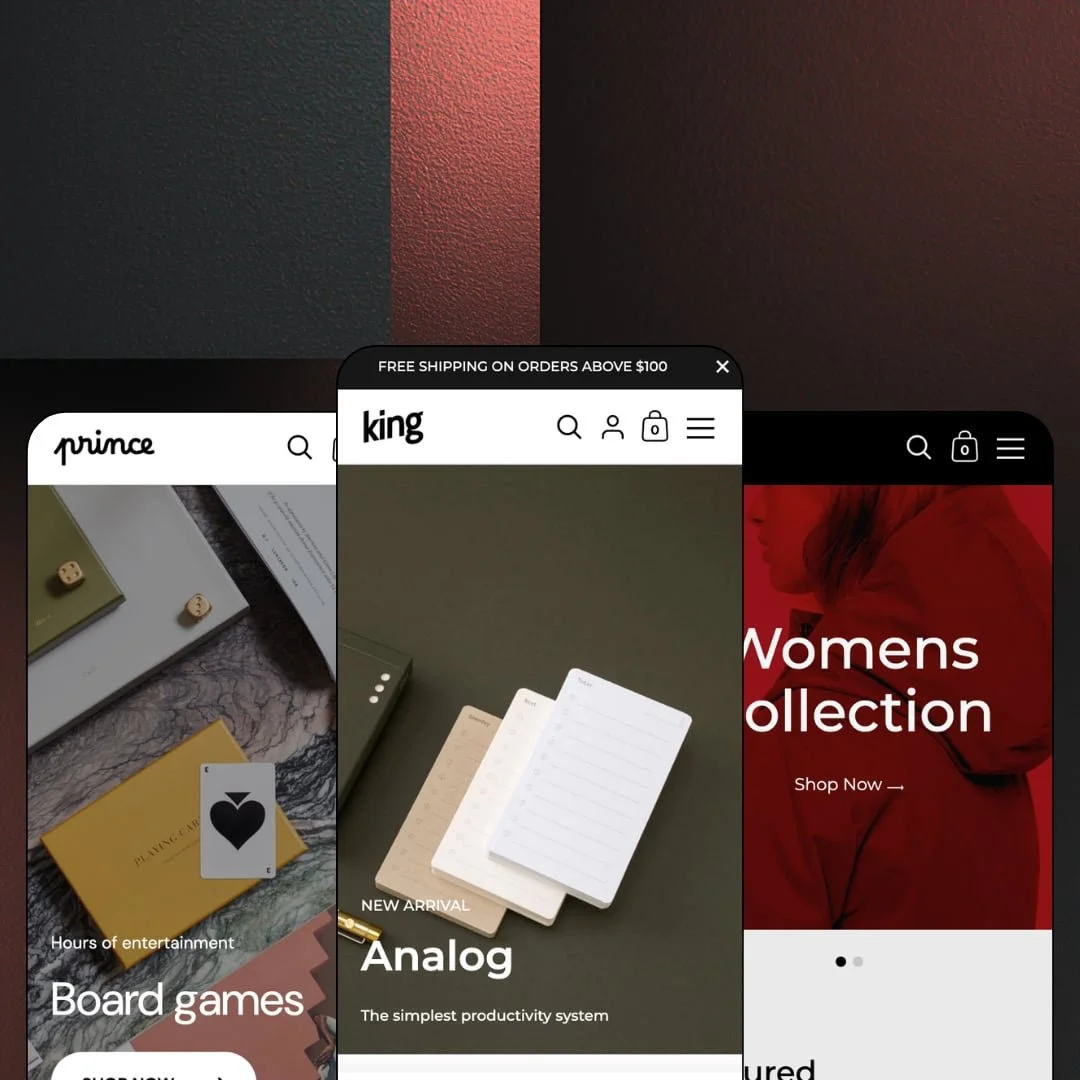
Most Shopify themes hang their identity on a horizontal header. Kingdom bolts it to the left wall instead: a fixed signature sidebar carries your logo, navigation, cart trigger, and language switcher while the content column scrolls like a magazine. Krown Themes has kept this $280 Online Store 2.0 theme in active development since 2017, and the current build ships three presets covering design goods, apparel, and games. I spent time in all three demos to find out whether the sidebar is a styling choice or an actual selling decision.
The sidebar does real work
What does pinning navigation to the wall actually buy you? Persistence: the logo, menu, cart trigger, and language switcher stay on screen for the entire scroll, which lets image rows run tall without a header eating vertical space and keeps the exit to any collection one glance away. For single-brand stores with strong photography, sub-100-SKU catalogs, and considered-purchase buyers, the frame reads more like a brand installation than a template.
Buying starts before the product page
The homepage carries a working buy box. The featured-product section renders a gallery, price, quantity stepper, and add-to-cart button inside the scroll, and grid cards across the Kingdom demo carry quick-add and choose-options triggers, so a shopper can complete a purchase path without ever opening a product page. For gift and design-goods stores in the 11-100 SKU range serving impulse-buy behavior, that is a shorter route into the slide-out cart.
Local pickup lives on the product page
Click-and-collect gets native treatment here. The product page renders a pickup availability block under the buy button, complete with the location name, a usually-ready-in-24-hours line, and a store-information link, which wires Shopify's location data into the purchase decision at the exact moment it matters. Single-location retailers with evergreen catalogs and walk-in traffic get an omnichannel signal without an extra install.
Five interface languages in the box
EU cross-border sellers get a head start. The theme ships pre-translated interface strings in English, French, Italian, German, and Spanish, the language switcher is staged in both the sidebar and the footer across all three demos, and right-to-left support sits on the feature list for markets beyond Europe. For mid-market merchants selling into multiple EU countries, that removes the first localization chore, though product content still flows through Shopify's own translation workflow.
Discovery is a list, and it stays a list
The sidebar that gives Kingdom its identity also caps its navigation. The list never widens. Menus render as a stacked vertical column with a back-button drill-down, the deepest structure any demo stages is two levels, and there is no wide panel where category columns, imagery, and promos could spread out for a shopper comparing departments. Multi-category stores past a few hundred SKUs, with cross-shop-heavy buyers moving between departments, will feel that ceiling quickly.
The stars are on loan
Queen's product cards and product pages render rating badges, and the score on the product page links straight down to a review-app block, which means the numbers you see in the demo arrive with an app install, not with the theme. The testimonial rows across all three presets are hand-typed text blocks. That's rented proof. Repeat-purchase apparel and beauty brands at mid-market prices should budget a review app and its setup time before the social layer means anything.
An Online Store 2.0 build at a 2026 price
Kingdom runs the same JSON-template, drag-and-drop editor generation that Shopify's free Dawn established, without the nested-block depth of the newest theme generation. The underlying editor is not the premium part. The $280 buys the sidebar grammar, the section library, pickup, and the translation set, so first-time sellers with small evergreen catalogs and tight budgets should weigh whether the design signature justifies the gap over a free baseline they could restyle themselves.
What it takes to launch
Expect a one-to-two-day pass replacing demo photography, rewriting placeholder informational copy, aligning promotional messaging across announcement surfaces, and wiring menus and policy pages before launch. No metafield population or structured-data work is required, which keeps the checklist short.
-
What works in this preset
Scrolling this demo feels like paging through a design magazine that occasionally asks for your card. The opening slideshow rotates three campaign slides, a promo ticker runs beneath it, and then the New Arrivals grid gets straight to work with quick-add buttons and sale labels that print the exact discount on the card, from -11% on a desk knife to -30% on a tumbler. The badges do the math for you.
The Shop by Collection rows are the preset's best idea. Each one pairs a full-bleed collection image with a short product rail, so a Craighill capsule or a Foxtrot Supply leather drop gets its story and its add-to-cart triggers in the same viewport, which is where curated capsule selling usually breaks apart. It's a lookbook that checks out.
Deeper down, the page shows how much content plumbing the theme carries: a journal feed with article teasers, a ten-image detail gallery, and a testimonial row with customer avatars. The sidebar itself sorts shop navigation into one stack and the Journal, About, FAQ, and Contact links into another, keeping store and story separate. I scrolled through the whole homepage twice and never hit a dead section.
-
What works in this preset
Two doors, one storefront. The hero splits into Womens and Mens panels with their own Shop Now targets, and the sidebar menu goes a step further by deep-linking individual hero pieces, so Denim Jacket and Wool Jacket sit in the navigation as direct product links between the category stops. The menu itself becomes a small merchandising surface.
The size-guide treatment earns its place next to the picker. A View size chart link sits beside the size buttons and opens genuine reference tables: a neck-size row for simple sizing, a fit-based chest and sleeve table, and a US/EU/UK shoe conversion grid with inch measurements. This is content a merchant adapts, not builds.
Trust gets a rhythm here too. Testimonials arrive as a trio with names and cities attached, a mission band restates the brand voice, and the page closes on a newsletter block with its own persuasion copy before the footer takes over. Nothing shouts.
Where it stumbles
For an apparel preset, the color story never reaches the buy box. The demo splits colorways into separate catalog entries, so Short Jacket shows up twice in the featured grid as red and pink standalone listings with identical titles, and no product page I opened demonstrates color selection inside the picker. That staging choice leaves the theme's swatch tooling unshown exactly where a fashion buyer would go looking for it.
-
What works in this preset
Prince is the quiet one, and the restraint is the point. Three stacked hero rows introduce Board games, Outdoor games, and Playing cards, each with an eyebrow line and its own Shop Now target, and the third row skips the collection page entirely to deep-link a single product. The path from landing to buy box is two clicks.
The caption gallery does material storytelling on a budget. Image tiles carry short captions, Lacquered wood, FSC-certified plywood, Packed in a cotton bag, which lets quality claims ride on photography without a paragraph of prose underneath each one. That suits giftable goods.
The welcome band embeds live collection links inside the heading typography itself, so the big statement doubles as navigation. Even the newsletter block reads consent-forward, spelling out withdrawal terms right beside the signup field.
Where it stumbles
Every buy box in this demo sells a single-option product. I clicked into several products and each one offers exactly one Default Title configuration, with no Choose options trigger anywhere in the grids, so the preset aimed at boxed and giftable goods never demonstrates how the theme handles variant selection at all. It's a staging gap, not a capability gap, but a buyer evaluating Prince watches the picker do nothing.
Editorial pacing is the house style
Read all three demos back to back and the same rhythm appears: commerce rows alternate with story rows, with galleries, statements, and testimonial bands breaking up the grids, so every preset paces like a publication and never like a catalog dump. The skeleton flexes enough that a desk-goods store, a fashion label, and a games shop share it without feeling cloned.
Launch runs on copy and images, not data
Nothing across the preset family leans on metafields, spec tables, or structured product data. The sections run on products, collections, text, and photographs, which makes week-one effort predictable and keeps the theme approachable for merchants without a data-entry appetite.
Nine years of shipping behind the license
The launch date reads 2017, the current release arrived in spring 2026, and the demo stores themselves run on rebuilt third-generation setups. A theme this old that still receives browser-specific fixes is being maintained, not parked. Buyers get a long release history where newer themes offer a short one.
The listed verticals never show up
The Theme Store files Kingdom under Jewelry & Accessories and Food & Drink, yet the three presets stage design goods, apparel, and games. A jeweler or a food merchant evaluating the theme gets no staged reference for their catalog shape, imagery density, or page needs, and has to translate from adjacent verticals on faith.
The conversion list stays backstage
Back-in-stock alerts, a stock counter, promo popups, image hotspots, and a before-and-after slider all appear on the official feature list, but the demo family keeps nearly all of them off stage. The capabilities exist; the evaluation problem is that you buy them as bullet points, not as behavior you watched work.
Photography carries everything
All three demos run on credited brand libraries from Ugmonk, REVOLUTION, and VINGA, and the image-focused layout returns exactly the quality it is fed. Merchants with thin or inconsistent photo sets will watch the full-width rows expose that faster than a denser, text-forward layout would.
Rating
★ 7.6/10
-
A long conversion checklist plus pickup, translations, and a size-guide system in practice; navigation depth stops at a two-level list.
7
-
Online Store 2.0 sections with no data-layer dependencies; a merchant swaps copy and images and is most of the way to launch.
7
-
The sidebar collapses into a back-button stacking drawer, and sticky cart and sticky header options keep purchase controls reachable on small screens.
7
-
Homepages stay lean, with restrained section counts, lazy-loaded imagery, and a single newsletter popup as the only overlay.
8
-
Strong range within the sidebar grammar, as three different verticals prove; step outside that grammar and you are fighting the theme's one big idea.
7
Frequently Asked Questions
-
The sidebar is the design premise, not a module; every preset and the Theme Store pitch are built around it, so choosing Kingdom means choosing that spatial identity.
-
Yes. The slide-out cart includes a special-instructions field for the seller in all three demos, alongside the running total and the checkout button.
-
Kingdom suits mixed design and lifestyle catalogs, Queen is the apparel build, and Prince works for compact single-category shops with short menus.
-
Yes, combined listings appear in the feature set, flagged for Shopify Plus stores.
-
Product videos are part of the feature set, but the demos stage still photography throughout, so plan on supplying your own footage to see it.
-
Yes. An FAQ page template is included, and the Kingdom demo runs a live Help / FAQ page from the sidebar's secondary menu.
This review is based on hands-on testing of the publicly available preset demos of the Kingdom Shopify theme as of August 2026. Theme features, preset availability, and performance can change with subsequent updates from the theme developer.