
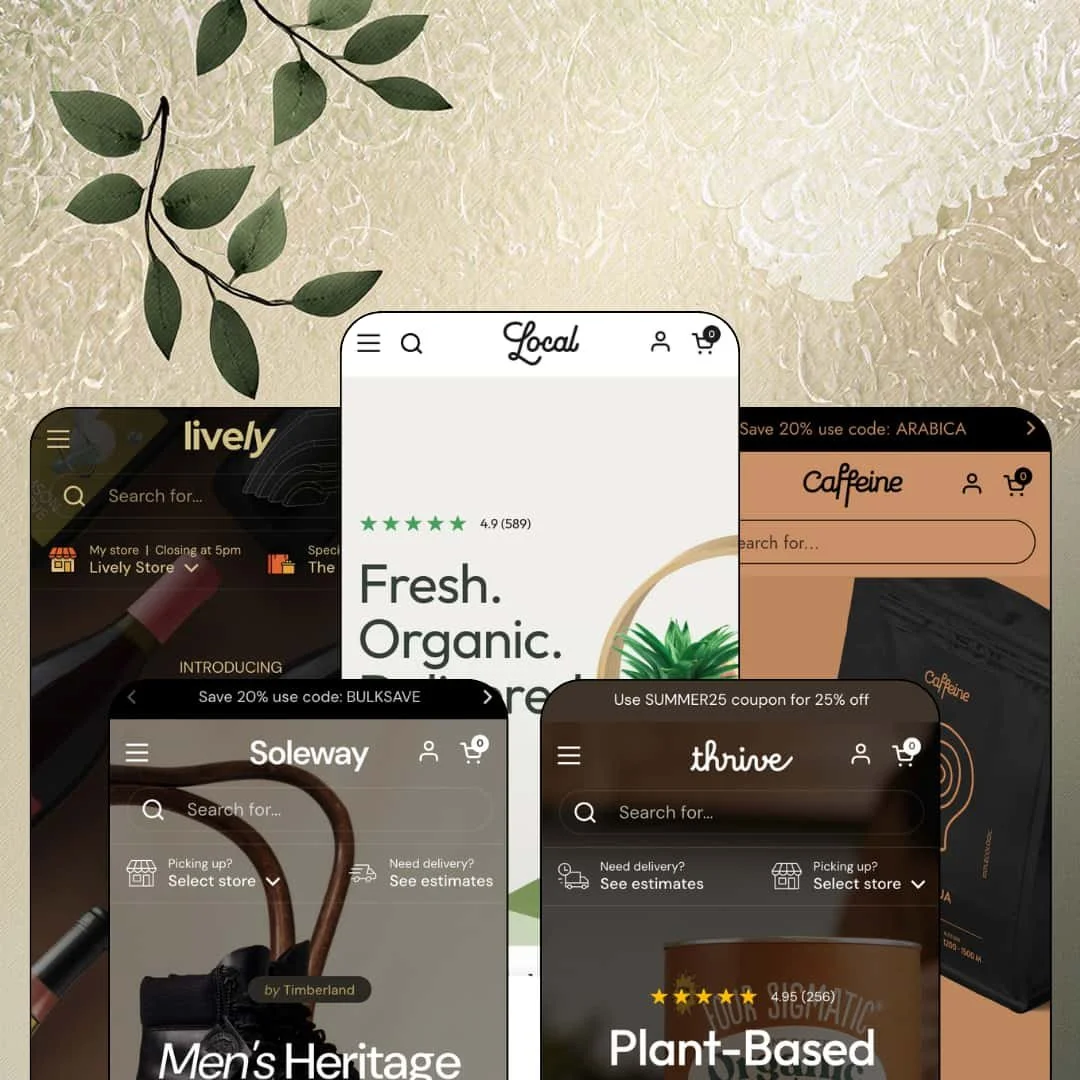
Most premium Shopify themes treat a merchant's physical shops as a footnote, a map tucked onto the contact page. Local, the $380 food-and-beverage specialist from Krown Themes, flips that hierarchy and builds the whole storefront around the question of where a customer will actually collect their order. It's an Online Store 2.0 build, live since August 2022 and still actively updated, now spanning five presets: a grocer, a footwear store, a supplement brand, a coffee roaster, and a wine shop. I spent time in all five demos to test whether the local-first pitch survives outside the food aisle.
A pickup system that behaves like storefront state, not a checkout option
Local treats the customer's chosen store as a persistent setting the whole storefront respects. The store follows the shopper everywhere. Once a preferred location is set, product pages respond with per-store stock lists, marking an item available for pickup at one branch and out of stock at another, complete with ready times and a directions link before anything reaches the cart. For bakeries, butchers, and beverage retailers running two to ten counters on same-day, restock-driven trade, this is the closest a theme gets to carrying their operations for them.
One attribute-block grammar, five vocabularies
Underneath the presets sits a single mechanism: icon and meter blocks fed by product metafields. The grocery demo speaks it as allergens and nutrition scores, the footwear demo as material properties, the supplement demo as benefits, and the coffee and wine demos as roast meters and tasting profiles, with none of them looking borrowed from a neighboring industry. Shoppers get label-level facts at card level. For consumable-goods brands with 30 to 300 SKUs selling to label-reading, considered-purchase buyers, this replaces burying the same information three tabs deep in a description.
A cart drawer built for orders with instructions
Delis taking sandwich notes, florists taking card messages, gift shops taking wrap requests: that's who this cart drawer was drawn for. It carries an order-instructions field, a discount-code input with an inline promo hint, an optional terms-agreement checkbox, and in the coffee demo, a $10 gift-wrapping product offered right inside the drawer with its own buy button. Nothing here waits for checkout. The specifics that make local orders complicated get captured while the customer is still in the mood to specify them.
A header that runs promotions, not just navigation
The mega menu accepts image-tile columns and full promo blocks, so a "40% OFF" banner with its own link can live inside the Categories dropdown right next to the taxonomy, backed by three levels of menu depth. Above it, the announcement bar rotates multiple messages without eating vertical space. That's promo infrastructure at the top of every page. Merchants cycling weekly and seasonal offers across dense, 100-plus-SKU category trees get a header that carries the campaign instead of just the sitemap.
The local engine is dead weight for shipping-only stores
Strip away the store selector, the pickup panels, and the per-location stock logic, and a meaningful slice of what $380 buys goes unused. Local still functions as a capable consumables theme without physical locations, but its header real estate, its product-page availability blocks, and its entire identity assume there's somewhere to drive to. A pure-shipping supplement brand or an online-only pantry store with no counters and no pickup operations is paying premium-tier money partly for machinery it will switch off on day one. That trade should be conscious, not discovered later.
Footer flexibility trails the rest of the theme
Across all five demos the footer runs the same modest pattern: a brand column, link lists, an address block, a newsletter field, payment icons where enabled. I went looking for richer footer blocks, a featured-collection slot, a trust-badge row, anything resembling the inventiveness one level up, and found none staged anywhere in the family. The header clearly got the imagination budget. For multi-brand operators and content-heavy grocers who use the footer as a second navigation layer across 100-plus-SKU catalogs, this is the one structural area where the theme's ambition visibly drops.
Five shops, one skeleton
Put any two preset homepages side by side and the shared bone structure is obvious: hero slideshow, icon-badged product rows, paired promo tiles, testimonial cards, newsletter band. The re-skinning is genuinely skilled, and each vertical reads convincingly on its own, but the theme has one rhythmic idea about how a homepage flows and it repeats that idea five times. It's a template family, and it looks like one. Luxury-tier brands in considered-purchase categories like fine wine or premium leather goods, wanting editorial pacing, asymmetry, and long-form storytelling, will be fighting the grid.
What it takes to launch
Expect a multi-day build defining and populating the metafields behind the attribute blocks, entering real store locations with hours, fees, and ready times, and running a full copy pass across heroes, events, FAQs, and club or guide pages before any preset is launch-ready.
-
What works in this preset
Before you've scrolled past the hero, the header is already asking a question no other part of the page can answer for you: "Picking up? Select store." Tap it and a panel lists four locations around Paris, each with its own pickup fee, ready time, weekly hours, a storefront photo, and a directions link; Champs-Élysées charges $5 and promises two hours, the Warehouse is free at twenty-four. Set a preferred store and the choice sticks. From then on, every product card quietly checks stock against it.
The product template stacks food-specific blocks in the order people actually read labels. The trail mix I opened starts with allergen icons for corn, gluten, nuts, peanuts, and celery, moves through a color-coded Nutri-score scale from A to E, and closes with a full nutritional table listing daily-value percentages down to iron and potassium. Between the variant picker and the buy button sits a copyable coupon block, and a "Goes well with" cross-sell pairs the mix with a $3 coconut water that carries its own buy button.
Then there's the events section. Wine tastings, a cooking class, and a pumpkin-carving contest each get a date, a venue, a description, and a register button, which turns the storefront into a community calendar without a single external tool. A shoppable video rail titled "See It, Cook It, Shop It" pulls similar double duty, attaching priced product cards directly to six looping recipe clips.
-
What works in this preset
A food theme wearing hiking boots shouldn't work. Yet the footwear demo runs a twelve-step shoe-size axis alongside a separate width option, and above the buy button sits a three-point fit guide reading "Runs small, True to size, Runs large," a small block that answers the question every online shoe buyer asks first.
The icon system that renders allergens in the grocery demo reappears here as material badges. Product cards carry "Premium leather," "Waterproof," and "Windproof" markers in the slot where the food preset lists gluten warnings, and further down the homepage, stat bands showing a 4.47/5 rating and a 98% recommendation score sit alongside a countdown promo and a brand Instagram grid, giving the preset the cadence of an established label rather than a template.
Where it stumbles
Colorways are wired as separate products linked to one another, the pattern Shopify's combined-listings feature formalizes, and the Theme Store feature list pins combined listings to Shopify Plus. A standard-plan shoe merchant with eight colorways per style will be maintaining those product-to-product relationships by hand every time the range changes. It works. It just scales with elbow grease rather than with the catalog.
-
What works in this preset
Supplement shoppers compare before they commit, and Thrive's homepage is arranged for exactly that behavior. A tabbed product carousel flips between Our Picks, Proteins, Coffees, and Supplements without leaving the section, each card carrying three benefit icons like "Stress Relief" or "Smooth Digestion" plus a one-line subtitle under the title.
An image-hotspot section turns the newest blend into an annotated diagram, with five markers dotted across the product photo, each expanding into a note on Reishi, Lion's Mane, Chaga, Cordyceps, or Maitake. A five-entry FAQ accordion then answers buyer objections on the homepage itself instead of exiling them to a support page.
This preset also shows the pickup machinery at a different scale. The delivery side gets equal care. Where the grocery demo stages a handful of Paris shops, Thrive's selector lists nine US locations from Atlanta to San Francisco inside the identical header prompt, while a "Need delivery? See estimates" drawer opens a five-row shipping table with costs, timeframes, and tracking availability for each method.
-
What works in this preset
How do you sell a $25 bag of beans to someone who can't smell it? Caffeine's answer is measurement. Roast level and brightness render as three-step meters with the active value highlighted, taste notes appear as icon rows reading orange, chocolate, cherry, and red grapes, and collection cards carry flavor eyebrows like "BLACKBERRIES / LEMON / HONEY" above each product name.
The grind-size option is the most operationally serious variant picker I've seen in this theme family, running twelve labeled steps from "0 - Whole Bean" through "Traditional Mokapot" to "10 - Cold Brew." The buy area also renders Shopify's recurring-purchase consent text when a selling plan is attached, a quiet signal that the preset is wired for coffee's replenishment economics. Coffee people will notice.
-
What works in this preset
I clicked into the wine demo and hit a wall first: an age-verification overlay asking me to certify I'm over 18 before it shows a single bottle. That's the right wall for this vertical, and past it the storefront keeps thinking like a bottle shop, printing per-liter unit prices next to the wines and organizing the mega menu by region, by country, and by price band from "$10 - $15" up to "Over $100."
This is the smallest deployment in the family, one Munich shop, and the preset leans into that intimacy. Store hours live in the footer, three tasting events carry register buttons, and a Wine Club page anchors the loyalty pitch. One store is enough. The header selector treats it with the same ceremony a chain would get.
Where it stumbles
The Wine Club itself is a story page rather than a working membership machine. The monthly and quarterly shipments it promises would run on Shopify's subscription infrastructure or a companion app, so a club-driven wine retailer should budget genuine configuration work after choosing this preset, not just a copy pass. The preset sells the club beautifully; it doesn't operate it.
The preset family works as documentation
Because every demo is staged with production-depth data, from filled nutritional tables to a twelve-step grind chart, reading the five presets in sequence teaches you how the theme wants to be configured. A merchant can treat the preset closest to a neighboring vertical as a worked example and copy its structure, rather than reverse-engineering settings from a help center. That shortens the path from purchase to something presentable in a way no feature list conveys.
One engine, proven at two extremes of scale
Read across the presets and the local-commerce machinery demonstrates its full operating range: a single Munich wine shop at one end, a nine-city American pickup network at the other, with the identical header prompt, selector panel, and availability logic serving both. Nothing about the theme's identity had to bend at either extreme. For a buyer, that's evidence the system was designed as infrastructure, not staged as a demo trick.
It persuades by cataloguing, not by exciting
Every preset sells the same way: present the facts, structure them well, and trust the shopper to conclude. Icons, meters, tables, and schedules do the persuading, and even the promotional moments sit inside orderly grids. Brands whose economics run on adrenaline, hype, and impulse conversion will find the theme temperamentally against them; it's a shopkeeper's theme, and no quantity of red banners changes its posture.
An Online Store 2.0 build in a Theme Blocks era
Local launched in 2022 and remains on the Online Store 2.0 architecture while Shopify's newest generation moves to deeply nestable theme blocks and AI-assisted section generation. Krown updates the theme actively, so this is about ceiling rather than neglect: merchants planning to lean hard on the newest editor capabilities over a multi-year horizon are buying into the previous architectural generation, however polished this instance of it is.
★ 8.2/10
Rating
-
The pickup engine, attribute-block system, and vertical presets cover consumable retail end to end; what's absent mostly lives outside the theme's chosen lane.
9
-
The mobile menu stacks with back-button navigation while keeping image tiles and in-menu promos, and presets load dedicated mobile hero crops instead of squeezed desktop art.
-
Editor work is standard Online Store 2.0, but the signature product blocks stay empty until the merchant defines and fills the metafields feeding them.
7
9
-
Homepages run long, especially the grocery demo's section count, but imagery ships in tightly sized responsive variants and the pages avoid heavyweight animation baggage.
8
-
Five convincing vertical identities come out of one section library; the shared homepage rhythm marks the visible limit of that range.
8
Frequently Asked Questions
-
Only for combined listings, which the feature list flags as a Plus capability; everything else on the list, from the age verifier to pre-orders, runs on standard plans.
-
There's no advertised cap; the demos themselves range from one store to nine, each entry with individual fees, ready times, and weekly opening hours.
-
Theme UI strings come pre-translated for English, French, Italian, German, and Spanish; translating your own product content remains a Shopify Markets job.
-
Yes; they render whatever metafields you point them at, so a cosmetics brand could list ingredients and certifications with the same icon treatment.
-
An age-verification popup ships as a built-in feature, and the wine demo runs it as a sitewide entry gate before any product becomes visible.
-
The theme renders Shopify's recurring-purchase options and the required consent text when selling plans exist, but the plans themselves come from Shopify's subscription tooling or a companion app.
-
Product cards carry "Buy now" buttons and quick-view triggers, so single-variant items can go straight to the cart without opening the product page.
This review is based on hands-on testing of the publicly available preset demos of the Local Shopify theme as of July 2026. Theme features, preset availability, and performance can change with subsequent updates from the theme developer.