
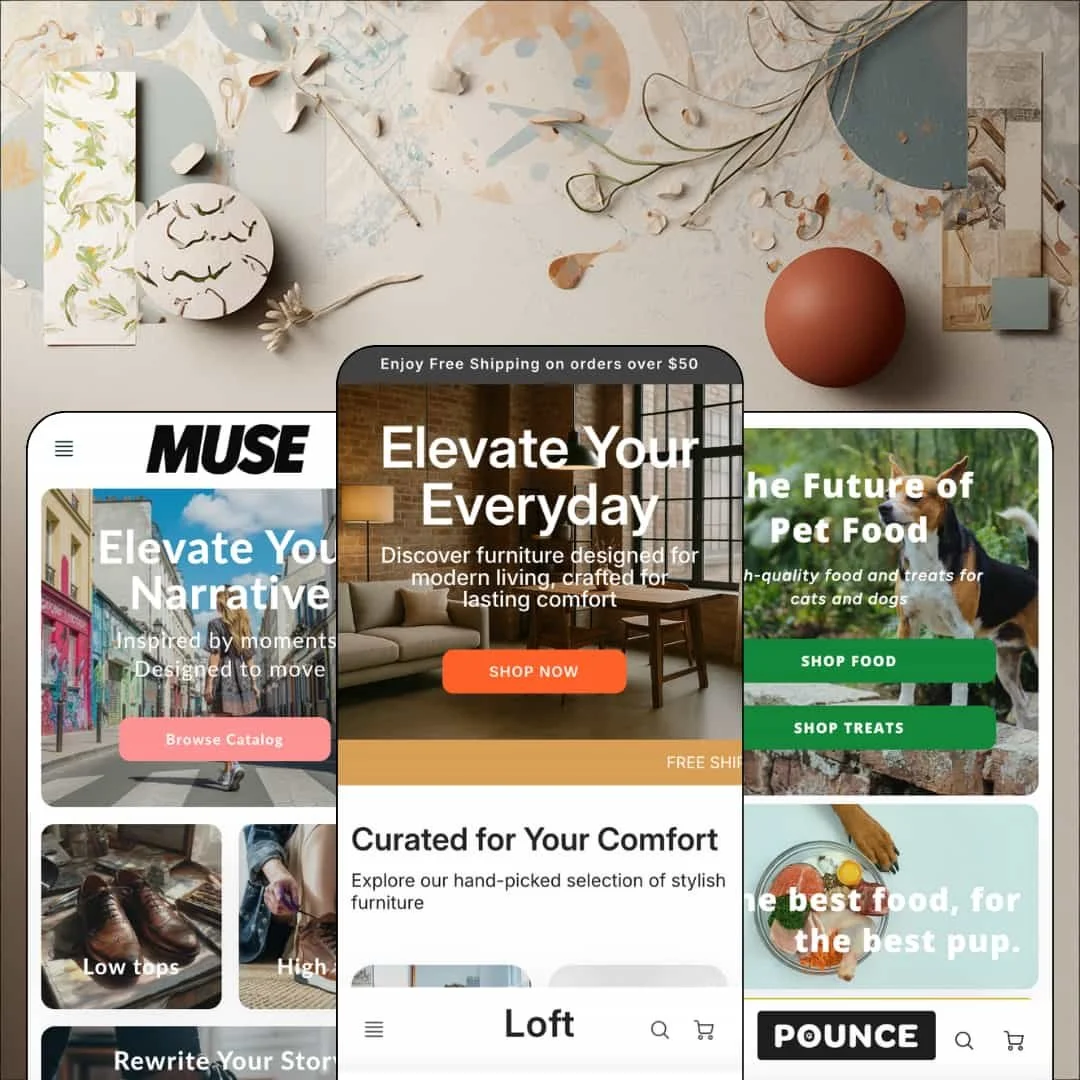
Most theme developers treat promotion as an announcement bar and stop there. Trailblaze Media built Loft's whole personality around the offer, wiring promo tiles, promo popups, and in-menu promos directly into an Online Store 2.0 section library. For $180 you get three presets that couldn't sit further apart: Loft sells furniture, Pounce sells pet food, and Muse sells minimalist sneakers. The open question is whether a theme this comfortable shouting discounts can also carry a brand that prefers to whisper.
A promo kit that covers every selling surface
Loft ships promotion as one coordinated kit: promo bar, promo popups, in-menu promos, badge styling, and promo tiles that sit directly inside collection grids as first-party sections. In the sneaker demo, a "Today only" sale tile is dropped straight between product cards in the Casual collection, so the offer travels with the shopper instead of waiting back on the homepage. That's the point. For discount-led stores running flash promotions to impulse-buy audiences, this kit removes the usual pile of banner installs before the first campaign even starts.
Why make a repeat buyer click into a product page at all?
Loft's featured-product section answers by putting the entire buy box on the homepage: variant buttons, a quantity stepper, and Add to Cart. The pet demo stages it with a dog food product and its 15, 30, and 40 lb. sizes, meaning a returning customer can land, pick a bag size, and check out without a single page transition in between. It's the shortest reorder path a theme can offer. Replenishment-model catalogs in the 11–100 SKU range serving repeat buyers will feel that shortcut on every returning session.
Variant rendering that holds up under a real matrix
On the Marcus sneaker, the picker renders nine sizes as button groups and two colorways as image swatches, eighteen combinations in total, with individual sold-out states flagged per variant rather than hiding stock problems behind the add-to-cart button. The same swatch language repeats on product cards. Shoppers see color options before clicking. Footwear and apparel brands at mid-market price points, where size runs multiply variants fast, can trust this picker as delivered instead of budgeting for a replacement.
Navigation with genuine depth
Where many storefronts flatten everything into one dropdown row, the furniture demo runs three full menu levels, Shop into By Material into Leather, and the flyout panel itself accepts an image tile with a heading and a SHOP button inside it. That combination lets the menu do two jobs at once, taxonomy and merchandising, without an app in the chain. Single-brand home and furniture stores organizing 50–100 SKUs by material, type, and room get a browsing structure that actually matches how their customers think.
The promo engine stops at the cart
The storefront sells hard for three scrolls, then hands off to a cart whose entire feature entry on the Theme Store sheet reads: cart notes. That's it. All three demos advertise a free-shipping threshold in the header, $49 or $50 depending on the preset, yet the cart never shows progress toward it, offers no cross-sell slot, and generally drops the offer momentum at the exact moment it converts into order value. The demos promise the threshold and the cart goes silent about it; that's a self-inflicted miss. Discount-led stores courting impulse buyers toward higher order values will feel this gap on every single session.
A product page that expects apps to do the lifting
The buy area is gallery, picker, one tab, share buttons. The star ratings visible on the pet demo's product cards come from a review app rather than the theme, and the feature sheet lists a sticky header but no sticky add-to-cart, so once a shopper scrolls into a long description the buy button is gone until they scroll back. Considered-purchase verticals like furniture and footwear, where buyers read, compare, and want proof before committing, will be shopping the app store to finish this page.
An Online Store 2.0 build at a 2026 price
Loft launched in 2017 and has stayed maintained, with version 2.4.1 shipping in October 2025, but it remains an Online Store 2.0 architecture while Dawn, Shopify's free baseline, sits on the same generation and inherits every new platform capability first. The $180 buys the promo kit, the preset range, and the section polish, not an architectural edge over free. First-store founders running budget builds on catalogs under 30 SKUs should price that trade honestly before committing.
What it takes to launch
Expect a copy-and-imagery pass across hero captions, quote banners, and blog placeholders, plus menu re-staging so navigation labels and links point at your own content, and product-template sections that ship with unconfigured slots to populate before launch.
-
What works in this preset
Scrolling the furniture demo feels like paging through a catalog someone actually edited. Five collection tiles, labeled Best Sellers, Desks, Chairs, Rooms, and Accents, each carry a short editorial caption ("Small details, big shifts") instead of a bare category name, which turns a routine collection list into something closer to a lookbook spread. The Fresh Finds grid underneath keeps card chrome quiet. I clicked into a Sale-badged pillow and got a slashed compare-at price, a quick-view trigger, and a rollover second image with nothing else crowding the card.
Between the hero and that collage sits a scrolling ticker strip: FREE SHIPPING, WARRANTY GUARANTEED, 24/7 SUPPORT, QUALITY TESTED, running in a loop. It's a small section with outsized effect, injecting retail energy into an otherwise calm interior-design palette without resorting to another stacked banner. The strip earns its screen space.
The footer reads as designed rather than assembled. A brand-blurb column anchors the left, two link columns handle Information and Shop, and the social row runs nine networks deep, with WhatsApp, Snapchat, and Threads sitting alongside the usual four. This demo also stages the country and language selectors down here, keeping the header clean for navigation and cart.
Where it stumbles
Furniture shoppers hunt for dimensions, materials, and care instructions before anything else, and this demo answers them with a single prose Description tab that buries "90 day warranty" in a bullet list. The tab block itself is flexible. Merchants in this vertical should plan to build their own specification presentation inside it, because the preset doesn't stage one.
-
What works in this preset
Pounce is where Loft stops being polite. A first-order discount code sits in the top bar, a "Save $10" tile with its own code interrupts the mid-page scroll, and a TODAY ONLY sale banner pushes toward the sale collection, so the preset demonstrates in one page what stacked, always-on offer pressure looks like when the sections are built for it. The pacing stays coherent. Nothing here reads like a banner app bolted onto a quiet theme.
I noticed how much of the page is social-proof rhythm rather than product grid. Full-width quote banners attributed to named pets ("Mia & Bruno," "Chris, Bailey & Pixel") alternate with a three-column values row and a checkmark trust strip above the footer. For a demo carrying roughly half a dozen products, that's a smart trade, and it shows the theme is comfortable staging a tight assortment like a brand instead of a warehouse.
Category discovery gets solved with two oversized image tiles, Adult and Treats, instead of a taxonomy tree. Navigation stays three items wide. The whole store is reachable in two clicks, which fits a catalog where shoppers already know what they came to reorder.
Where it stumbles
The vertical trades on comparison, and the data isn't structured for it. AAFCO compliance, ingredient claims, and feeding logic all live in bolded prose paragraphs on the product page, so a shopper cross-checking two formulas is parsing sentences rather than scanning a table. For a food catalog, that's real merchant homework the preset leaves unassigned.
-
What works in this preset
"These are the shoes I reach for when I want to feel like myself." That customer line runs full-bleed over campaign photography, and Muse repeats the pattern three times down the homepage, each quote attributed with a name and a city. The preset treats testimonials as art direction rather than a widget, and it changes the temperature of the whole theme.
Navigation here deep-links into tag-filtered slices of the catalog. Shop Casual opens straight into Low tops and High tops, each landing on the casual collection pre-filtered by tag, so a store with only two collections behaves like six. That's a clever, low-maintenance structure for a small footwear line. It costs the merchant nothing but consistent tagging.
Merchandising states get a full workout across the grid. Sale cards show slashed compare-at pricing, one sneaker sits at $89 down from $112, and sold-out items stay in the grid wearing a Sold Out flag instead of disappearing, which keeps the assortment looking fuller than it is while staying honest about availability.
Where it stumbles
I went looking for a size guide and came up empty. The product pages run a nine-step size ladder across two colorways, yet nothing near the picker explains fit, and footwear returns live and die on exactly that question. The preset leaves fit guidance to description prose, which is a thin answer for a sizing-driven vertical.
Three temperatures from one section library
Read back to back, the presets prove range of mood rather than range of parts: the same sections come out industrial-calm in the furniture demo, loud and treat-driven in the pet demo, and gallery-quiet in the sneaker demo. A merchant unsure of their brand voice gets three worked examples of how far the palette, type, and pacing controls actually stretch. That range is the most convincing argument the demos make.
Honest about its catalog scale
None of the three demos pretends to be a marketplace. Each one merchandises a tight, curated assortment, matching the Theme Store's own 11–100+ catalog classification, and the section choices consistently favor storytelling density over endless grids. Merchants with focused catalogs won't fight the theme to look intentional.
A nine-year runway
A 2017 launch with a version 2.4.1 release in October 2025 is a longevity signal few storefront purchases carry. The developer has kept an old product current through multiple platform eras, which lowers the odds of buying into abandonware at this price.
The architecture eats photography
Every meaningful difference between the three demos is carried by imagery and copy: full-bleed quotes over campaign shots, oversized category tiles, lifestyle collages. Strip the photo library out and all three presets collapse into the same quiet skeleton. Merchants without strong visual assets will get the structure but none of the mood the demos are selling.
Listed verticals the presets never show
The Theme Store files Loft under Jewelry and accessories, yet no preset stages jewelry, and the closest thing to the Food and drink listing is pet food. Buyers in those lanes are extrapolating from furniture and sneakers, which is a real leap when the theme's character depends so heavily on how each vertical is staged.
★ 6.8/10
Rating
-
The promo kit, homepage buy box, and variant handling are genuinely deep; the cart column carries one feature and the review layer is app territory.
6
-
Shallow menus, a compact section vocabulary, and copy-and-image differentiation mean most launch work is content, not configuration.
8
-
The slide-out menu stacks submenu headers cleanly through three levels, and the image-led sections translate to small screens without desktop leftovers.
7
-
Pages stay short with restrained section counts and WebP-served imagery across all three demos; nothing in the build reads heavy.
7
-
Three convincingly different moods from one library, though the homepage rhythm of hero, tiles, grid, and quotes repeats underneath each one.
6
Frequently Asked Questions
-
Adding an item fires a compact slide-in confirmation with checkout and continue buttons; the full cart lives on a dedicated page with a notes field.
-
Yes. Both the furniture and sneaker demos ship "View in space" viewers inside the gallery, so AR-ready product models render natively alongside photos.
-
Quick view is part of the card toolkit; the furniture and pet demos stage the trigger, while the sneaker demo stages cleaner cards without it.
-
Yes. The pet demo runs a dedicated product template with an extra highlight section below the description, so hero products can carry more page than the rest of the catalog.
-
Product pages include a "See more from" vendor link that lands on a vendor-filtered collection, useful for multi-brand assortments.
-
Trailblaze Media, with support running through their Zendesk help center; the latest release, version 2.4.1, shipped in October 2025.
This review is based on hands-on testing of the publicly available preset demos of the Loft Shopify theme as of August 2026. Theme features, preset availability, and performance can change with subsequent updates from the theme developer.