
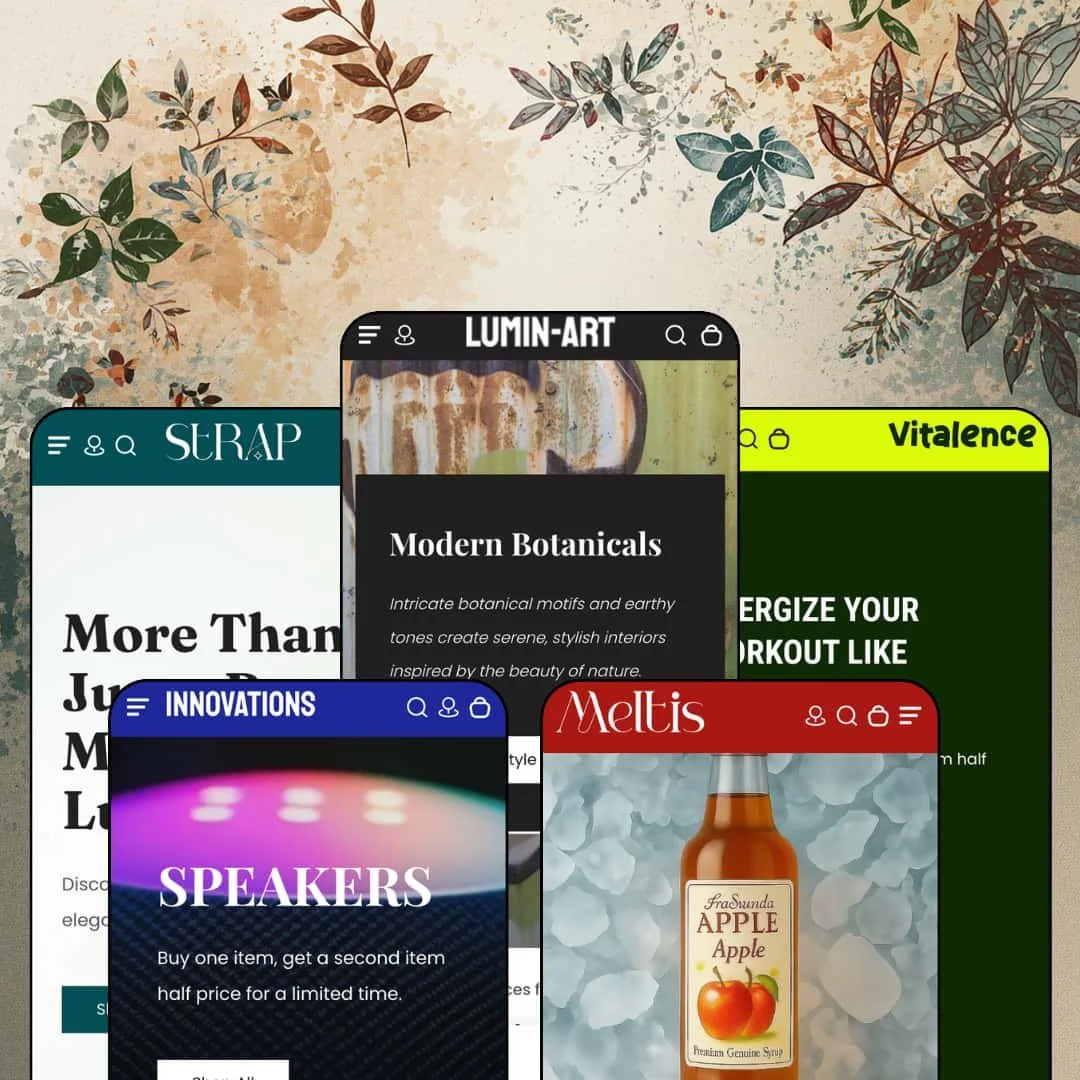
Somewhere between its January 2025 launch and today, an art-gallery theme quietly turned into a five-vertical preset family. Lumin, a $290 Online Store 2.0 theme from 1o1development, still opens its Theme Store pitch with "Showcase Your Art," yet four of its five presets now stage supplements, handbags, consumer electronics, and fruit syrups. I spent time in all five demos to see whether the gallery DNA survives that expansion. The short answer: the conversion tooling travels well, and the data layer doesn't.
Five verticals on one license
If you run more than one small brand, start here. A single $290 purchase covers five fully staged directions, spanning gallery art, supplements, handbags, consumer electronics, and beverages, each demo built with its own layout rhythm rather than a recolor of the flagship. For holding-company operators juggling distinct storefronts and for 11-100-SKU merchants who expect to pivot niches, that breadth is the theme's strongest argument.
Inventory states that talk
Lumin treats stock as a message system, not a badge. Cards and product pages pair In stock and Low stock labels with unit-exact counter lines whose tone flips with the number, cheering at "Excellent! 120 items left" and pressing at "Hurry! Only 1 item(s) left," all driven by live inventory. The urgency needs no extra wiring. For flash-drop sellers and restock-driven consumer-goods brands, scarcity messaging comes wired into the catalog itself.
A retail layer in the header
Every preset's header carries a store-locations popup: named outlets with street addresses, phone numbers, embedded maps, and Get Directions links, one tap away from any page on the site. The map lives in the header. Combined with the in-store pickup entry on the feature list, Lumin treats physical retail as a first-class surface, which suits galleries selling by appointment and multi-outlet food or wellness retailers whose customers still walk through doors.
A buy box that fields questions
What happens when a buyer hesitates mid-decision? Lumin's answer sits inside the buy box: an Ask a Question button opens a native name, email, and message form on the product page itself, with no contact-page detour and no extra install, so the doubt and the Add to cart button share one viewport. For considered-purchase catalogs like original art or higher-ticket electronics, that placement turns hesitation into a lead instead of an exit.
The default voice is a discount
The Vital hero leads with a buy-one-get-the-second-half-price offer, countdown slots sit on product cards and inside a navigation dropdown, and a discount popup greets first-time visitors on the art demo. The theme's resting state is a clearance event. Everything here can be switched off in the editor, but luxury-positioned brands and considered-purchase categories will spend their first configuration day dialing the volume down rather than building anything up.
Prose where data should be
Product pages carry no structured spec layer. The electronics preset sells $130 speakers and $180 smartwatches on paragraphs alone, the art demo's product-information block is hand-typed bold text, and the feature list includes no metafield table, spec section, or comparison view anywhere in its four categories. For electronics and supplement merchants whose buyers compare on numbers, every attribute becomes copywriting instead of catalog data.
Limited track record
Four Theme Store reviews in roughly nineteen months is thin evidence for a $290 commitment, even with all four positive. There just isn't much of it. The most recent listed release, version 2.1.4 from January 2026, carries the single note "Theme URLs updated," which tells a buyer nothing about feature momentum. For single-brand, evergreen stores planning a multi-year run on one theme purchase, that sample size is part of the price.
The architecture carries no premium
Lumin runs the Online Store 2.0 generation, and Shopify's free Dawn ships the same JSON-template, sections-everywhere foundation for $0. Dawn is free. The $290 case therefore rests entirely on Lumin's section library, promo tooling, and preset breadth rather than any architectural edge, and merchants comparing it against newer-generation alternatives in their shortlist should price that in. For budget-sensitive first stores and single-preset buyers who will never open the other four demos, the ratio deserves a hard look.
What it takes to launch
Expect a multi-day pass across whichever demo brand you adopt: full copy and imagery replacement, re-labeling of tab and marquee sections, footer link and policy-page re-pointing, catalog work to populate variants, options, and product data, plus deliberate configuration of the promotional surfaces you actually intend to keep.
-
What works in this preset
Open the SALE ITEMS menu and you're not looking at a list of links. The dropdown stages five full product tiles, each with an image, strikethrough pricing, and its own countdown slot, so the navigation itself works as a promotional shelf instead of a table of contents. The menu does selling work.
Tap the search icon and a staged overlay opens before you type anything, offering Popular Collections plus two rows of suggested artworks with thumbnails and titles ready to click. For a gallery selling thirty to fifty pieces, that pre-filled discovery surface matters more than deep filtering ever would. It shortens the path.
The hero slideshow makes each slide shoppable, pairing every backdrop with a linked product card and a live price, and the lower page shifts into gallery mode with an About row, a commissions pitch, and a visit-us block carrying a street address. The page sells the art and the room around it.
Where it stumbles
This kept bugging me: the flagship product undercuts the gallery pitch. "Acanthus, 1879-1881" is presented as a William Morris masterwork, then its own information block lists three brushes, 24 acrylic colors, and a pre-printed canvas, which is a paint-by-numbers kit wearing a museum label. For a preset whose entire argument is curation, the catalog data pulls against the vertical it's dressed for.
-
What works in this preset
You can shop this entire homepage without leaving it. Every product card carries a direct Add to cart button rather than a quick-view detour, the slide-out cart catches the result, and for impulse-priced supplements that is precisely the right amount of friction: none. Grid to drawer in one tap.
In the buy box, a Subtotal line sits under the quantity stepper and restates the math as you adjust, flanked by breadcrumbs above and a guaranteed-checkout badge row below. Small conveniences, but they stack. Together they make a supplement page feel like it's keeping score with you instead of waiting for checkout to reveal the total.
Where it stumbles
The hero rotation loses the plot on its second slide, dropping a straw-hat beach editorial into a supplement pitch that otherwise talks strength, recovery, and protein grams. It reads like resortwear wandered in. One image, but it's the first impression for half the visitors who catch the rotation there.
-
What works in this preset
Every bag on this homepage ships with its own deadline. The Recent Products grid gives each of its six cards an individual countdown slot next to the Add to cart button, which points the whole preset at drop-style, date-driven selling rather than evergreen browsing. Urgency is the default posture here.
Scrolling the middle of the page feels like flipping a lookbook: a tabbed section swaps between image panels and story copy across four positioning angles, from Timeless Style through Bold & Beautiful, without ever leaving the viewport. It's a compact way to stage four brand arguments in one section's footprint.
A scrolling category marquee doubles as navigation, looping Backpacks, Satchel, Bucket Bags, Tote Bags and four more collection links through a single animated strip. Eight doorways, one ribbon.
-
What works in this preset
This is where the mixed-media grid earns its keep. Editorial panels titled "Game On" and "Sound That Moves You" sit interleaved with priced product links, so a headline, a lifestyle image, and a $139.99 earbuds link read as one composed unit. Shop-the-story, applied to tech.
I scrolled through three separately merchandised grids on a single homepage, with Featured Gadgets, Featured Watches, and All Type Speakers each running its own card row and quick-view triggers on every product. The segmentation happens on the landing page itself. A visitor reaches the right category without touching the menu.
-
What works in this preset
A utility bar above the header lists a phone number, an email address, and a street address before the logo even appears. For a food-and-drink brand courting wholesale inquiries or local pickup, that service-counter framing is a smarter opening move than yet another promo line. Contact first, pitch second.
The voice goes playful. An emoji marquee loops lines like "Add Flavor" and "Sweeten Your Day" beneath a double hero, a badge banner spotlights a Caramel Delight flavor, and a tabbed juice section swaps bottle imagery per flavor story, giving this preset a consumer-goods energy that none of the other four attempts.
Where it stumbles
Every product in both homepage grids wears a Sale badge over a struck-through price, sixteen out of sixteen. That's a launch state, not a promotion. A gourmet-syrup brand staged as a permanent clearance argues against its own premium adjective, and merchants in this vertical will want to rebuild the pricing story before showing anyone the store.
One grammar, five costumes
Read all five demos back to back and the same skeleton keeps surfacing in a good way: locations popup, staged search, slide-out cart, one card system, one marquee language. A merchant who learns one preset has effectively learned the theme, which makes the five-vertical pitch operationally real instead of five separate products sharing a name.
Motion is the house style
Every preset animates something: text marquees, logo loops, scrolling category strips, tab switchers, countdown slots. That kinetic identity gives even a quiet vertical like art a pulse, and it recurs consistently enough across the family to count as the theme's signature rather than any single preset's gimmick.
The interface arrives pre-translated
Each demo stages four to five interface locales with language and country selectors placed in both header and footer, so the theme-side translation of buttons, labels, and form strings is demonstrated rather than merely promised. Merchants selling into multiple European markets get a visible head start on the storefront half of a localization setup.
The listing hasn't caught up with the theme
The store pitch still opens with art and creators, and the designer's own review replies describe a theme built for visual artists and galleries, while four of five presets now chase entirely different verticals. Buyers who take the positioning literally will underestimate what they're getting; buyers who came for the art story may fairly ask which identity holds the developer's attention.
Nobody staged a variant
Color swatches, product options, and a size chart all appear on the theme-wide feature list, yet across five demos and every product page I opened, not a single item is configured with options: paintings without sizes, protein without flavors, bags without colors. The capabilities are listed; the demos never prove them, so the entire variant interface remains untested at the moment you're deciding whether to pay.
Asset appetite
Marquees, tab panels, mixed-media grids, and seven-image galleries are hungry sections, and they are everywhere in this family. A merchant without a deep library of photography and copy will feel the gap between the demo and their own first draft within an hour. The design flatters brands that can feed it.
Rating
★ 7.2/10
-
Strong conversion and retail tooling, from inventory messaging to the header locations layer, but no structured product-data or comparison layer to match the electronics ambitions.
7
-
Familiar Online Store 2.0 section editing and one shared grammar across presets, though the sheer count of animated and promotional surfaces means real configuration time before launch.
7
-
Slide-out menu, drawer cart, and the marquee and tab patterns all carry cleanly to small screens; countdown-equipped cards get visually busy on narrow grids.
7
-
Homepages run long, stacking multiple carousels, looping marquees, and large image galleries per page; lazy-loading is in place, but these are not lean pages.
7
-
Five genuinely distinct vertical identities built from one section library, with tabs, marquees, and mixed-media grids serving as versatile building blocks.
8
Frequently Asked Questions
-
The flagship Lumin preset: it stages a by-appointment gallery block with a street address and map link on the homepage, and the header's store-locations popup covers multiple mapped outlets with phone numbers and directions.
-
Not natively. Vital stages one-off purchases only and the feature list carries no subscription entry, so replenishment selling means adding a subscription app on top of the theme.
-
No. It launched in January 2025 with an art identity, and the current five-vertical lineup is a later expansion; the store description still leads with the original art pitch.
-
The feature list includes an age verifier. Meltis demos non-alcoholic syrups and leaves it off, so merchants selling restricted products should plan to configure it themselves during setup.
-
1o1development runs a public documentation hub and a support form linked directly from the Theme Store listing, with a listed contact address in Austin, Texas.
-
Both appear on the feature list. The demos stage fully stocked catalogs, so neither state is visible in action; treat them as listed capabilities worth testing during the free trial period.
This review is based on hands-on testing of the publicly available preset demos of the Lumin Shopify theme as of August 2026. Theme features, preset availability, and performance can change with subsequent updates from the theme developer.