
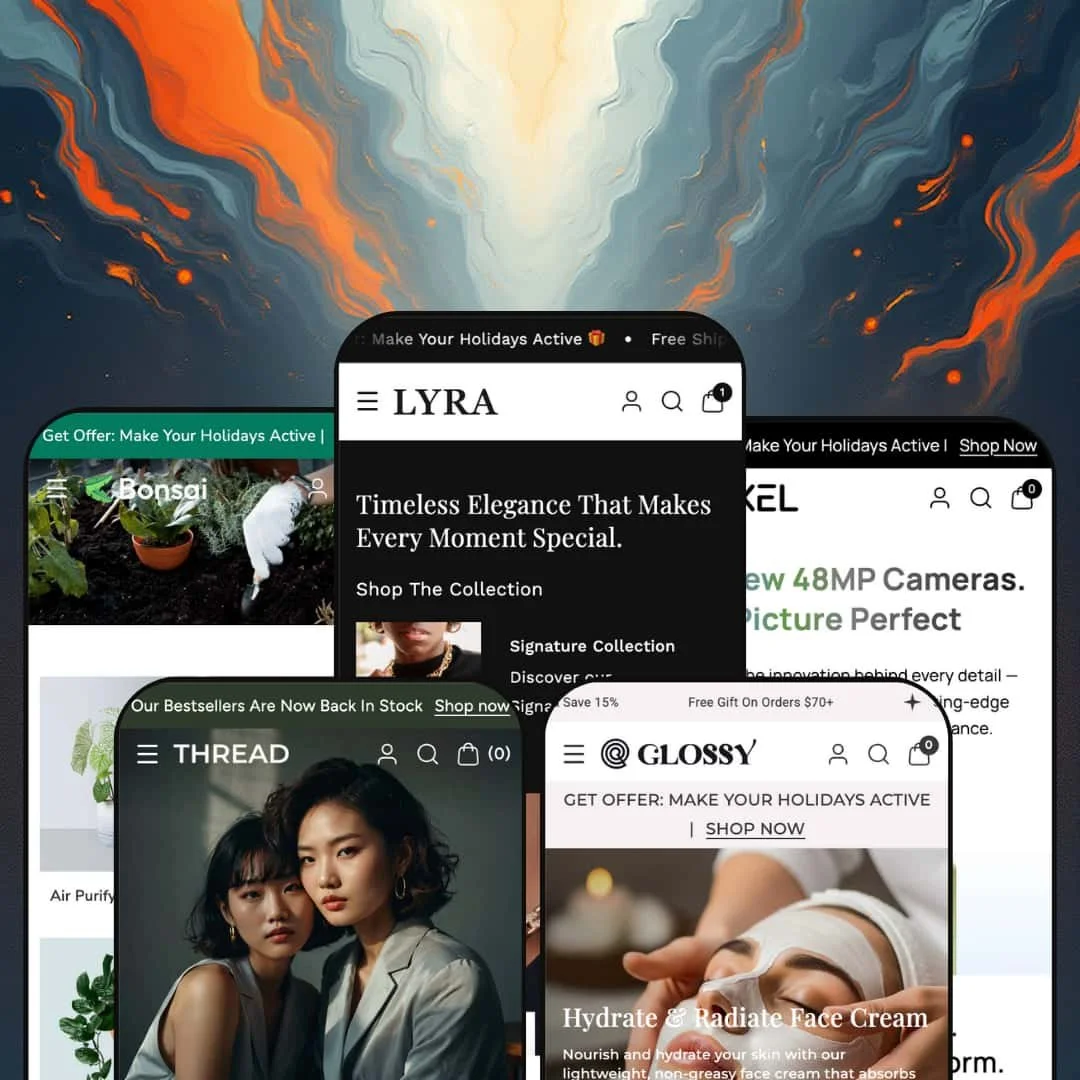
The cart drawer starts a countdown before you've put a single ring in it. That reflex says a lot about Webibazaar's Lyra, an Online Store 2.0 theme that pitches "luxury-focused brand experiences" for jewelry and then ships four more presets for fashion, electronics, beauty and garden retail on the same $260 licence. The section library underneath is wide and the update cadence is real, so the question isn't whether Lyra can build a store. It's whether a theme this fond of the sale badge can also sell a $1,600 bracelet with a straight face.
A bundle builder that does the arithmetic
The Product Bundle with Discount section runs as three numbered slots (Select Tops, Select Shoes, Select Jackets), each slot a product carousel with size pills, and a tray that tallies Subtotal, a 20% Discount line and Bundle Total before one "Add bundle in cart" button pushes the whole set through. The percentage is a display promise, so the matching automatic discount still has to exist in Shopify admin, but the builder itself is native and needs no app. For apparel and footwear merchants with 50 to 200 SKUs whose customers build outfits rather than buy singles, it's the reason to shortlist this theme.
A mega menu built for attribute shopping
The Shop menu routes by metal, type and shape in three icon columns (Gold/Silver/Rose Gold, Earrings/Pendant/Diamond Ring/Bracelet, Round/Pear/Oval/Cushion/Emerald), then hangs four photo sub-menus off the collection links and, under "New in", a row of five product tiles with sale badges and prices. Discovery, merchandising and promotion in one flyout. For jewelry and beauty brands with 100 to 500 SKUs and considered-purchase buyers who filter by attribute before they filter by price, it replaces a homepage's worth of collection tiles with something reachable from any page.
Cart drawer and sticky bar as one conversion pair
The slide-out cart shows a free-shipping progress line ("Spent more $50.00 extra"), a trust icon row, an order-notes field and a countdown block, and the sticky add-to-cart bar keeps a live variant dropdown on screen and hides itself when the footer scrolls into view. Neither needs configuration beyond a threshold. For beauty, plant and accessories stores selling mid-market goods under $50 to impulse-driven buyers on phones, the two together cover the moment where a mobile cart goes quiet.
Homepage buy modules that behave like product pages
A homepage speaker sells with a seven-image gallery, a "45 in stock" line, a benefit-icon trio and a full add-to-cart form, and a July update added a custom font-size range so the module's title can carry a hero headline. It's a landing page inside a section. For drop-model and single-hero-product brands under 30 SKUs that launch one thing at a time, the launch page and the homepage become the same page, with no separate template to maintain.
Social proof is staged, not collected
The 4.8★ Customer Rating on the beauty demo is a stat block, not a rating. None of it was submitted by a customer. Testimonial cards pin a product to each quote and a "Trusted By Iconic Brands" logo strip fills the gap, but no product page in any of the five demos renders a star row, a review count or a form. For single-brand beauty and jewelry stores selling considered purchases where a stranger's verdict is the last nudge, a review app and the hooks to place it are day-one work.
The default voice is discount
Every demo runs a "Hurry up! Sale ends in" countdown inside the cart, strikethrough compare-at prices on nearly every card, a "Get Offer" announcement bar and a 20%-off newsletter popup, and the jewelry preset adds a "Mega sale" banner and a 15%-off first-order marquee to a page that also says "Luxury". Those two registers fight. Luxury-tier and heirloom jewelry brands on an evergreen, no-sale pricing model will spend their first week switching promotional blocks off rather than on.
No structured spec or comparison layer
The electronics preset sells projectors, televisions and tablets, and its fitness-watch page describes the product with four bullet points and a shipping tab; the Details & Dimensions rows on the jewelry demo read as typed content (a "Width" of "10 grams") rather than fields a filter or a comparison could use, and the feature list carries no compare-products section at all. For electronics and appliance merchants with 50 to 500 SKUs and buyers who put two models side by side before deciding, that's the missing piece.
An Online Store 2.0 build priced for 2026
Lyra launched in July 2025, after Shopify's Theme Blocks generation arrived, and it still uses the section-and-block model with the familiar two-level nesting limit. Dawn ships the same editing model at no cost; what $260 buys here is the section library and the presets on top. That's a fair trade for many stores, less so for agencies and holding-company operators running several builds, and for subscription-driven or B2B brands whose editor customization runs deepest.
What it takes to launch
Expect a multi-day copy pass across product descriptions, contact and gift popups, footer contact blocks and testimonial cards in all five presets, plus a variant-naming and menu-link clean-up, a size-chart and product-detail population job, and the creation of the Shopify discount and countdown dates that back whichever promotional sections you decide to keep.
-
What works in this preset
Three boutiques, three sets of opening hours, one embedded map. That's how the homepage ends, and for a jeweler who still sells across a counter it's the section I'd build the site around. The Multi Location block lists a Soho atelier, a Los Angeles studio and a London experience store with separate hours and a "More Details" link each, then drops a Google Maps embed underneath; paired with the brand Timeline above it (flagship openings in 2015, 2018 and 2023, each with a photo triplet) the page reads like a heritage house rather than a dropship storefront. I sat up at that.
The engraving field sits between the swatches and the size chart. Open the Black Titanium Ring and the buy box stacks three metal-icon callouts (18K Gold, Titanium, Luxurious), an Engraving input, a Size Chart link that opens a tabbed table for rings, bracelets and necklaces with both India and US ring sizes, then a certified/hallmarked/14-day-returns icon row under the button. Below that a gift popup asks whether you want a custom piece, and a "Here to help" band puts a WhatsApp chat, an email address and a phone number on the page next to the store's hours. It's a service desk, not a spec sheet.
The product page keeps selling after the buy box. A "Complete the look" hotspot image tags three pieces with prices, a Details & Dimensions block lays out style number, thickness, metal weight and gross weight as label/value rows, and a YouTube video banner and a second inline buy module close the page. I scrolled through the whole thing twice; it's long, but every block is a section a merchant can reorder or delete.
Where it stumbles
Rings without ring sizes. Every ring I clicked carries a single Color axis (gold, rose gold, silver) and nothing else, so the size chart the theme takes care to render is a reference table with no variant to apply it to. For a considered $199 to $1,599 purchase that's the one field a buyer needs before "Add to cart", and Lyra's demo leaves it to the merchant to add.
-
What works in this preset
"Hurry, only 10 left in stock." That line sits inside a full buy module on the homepage, not on a product page: a gallery with seven thumbnails, a colour picker, a quantity stepper, add-to-cart, and two promo tiles beneath it reading Flat 20% Off and Bank Offers. Thread treats the homepage as a place to close, which for a fast-fashion drop makes sense. It's the loudest section on the page.
Shoppers who browse by label get their own menu. The Clothes mega menu carries an "Our Brand Family" row of nine image tiles (Grace, Floweris, Karysoma and so on) alongside four text columns, so a multi-brand boutique can route by house before it routes by garment type, and the Dresses column beside it repeats the trick with six photo tiles for necklines and occasions. Two ways in, one flyout.
Size pills live on the product cards. The New Arrivals grid shows S/M/L (or M/L/XL) buttons and an add-to-cart under each dress, the product page adds a plain "45 in stock" counter under the price and a Copy Link control next to the share icons, and the sticky bar at the bottom keeps a size dropdown live while you read the shipping tab. Small things, but they shorten the path.
Where it stumbles
Thread stages dresses with S/M/L pills and no size chart. The Size Chart block is theme-wide (the jewelry demo renders it in tabs), but the Relaxed Fit Maxi Dress page ships without it, so a merchant moving in will need to switch the block on and fill it before a returns-sensitive apparel catalog goes live. A fashion demo is the one place I expected the chart on by default.
-
What works in this preset
35,000 button presses, 15,000 screen touches, 1,200 scratch tests, minus 40 to 60 degrees. That's the "Tested To Prove It" counter row, and it's the most electronics-native block in the whole family: five big numerals with captions, staged right after a rugged-speaker banner that runs its own countdown for "the first 500 orders". Pixel understands that gadget buyers want proof in digits. The rest of the page follows that logic.
You never lose track of what a product does for you. Every card and buy box carries a benefit icon trio (Powerful Sound, Full Range Bass, Travel-friendly on the speaker; Bluetooth, Long Battery Life, Fitness Tracking on the watch), the "Why Choose These One" section repeats the pattern with three illustrated tiles, and a video-with-text block for earbuds sits between them. It's iconography doing the work of a spec sheet, and for accessories under $100 that's probably enough.
Colour swatches carry from grid to buy box. The fitness watch shows four dots on its card, four pills on its page and the same four in the sticky bar, and the Modern Wireless speaker does the same with two. Variant discipline like this is what keeps a 40-SKU accessories shop from feeling like a 10-SKU one.
Where it stumbles
"Trade In And Upgrade At Pixel Store For Less" promises cash back for old phones. The button under it goes to the collections index. There's no trade-in form, valuation step or line-item mechanism anywhere in the preset, so the section is a banner wearing a program's clothes; a phone or laptop reseller will need an app or a custom form before that headline is honest.
-
What works in this preset
Shop by what's wrong with your skin, not by what's in the bottle. Glossy's Shop menu opens with a Skin Concern column (Brightening, Dark Spots, Dry Skin, Pore Care) beside the Face Care column, and further down the homepage a "Powered by Ingredients" strip turns four actives (Lumizyme, Algae Oil, Hydritens, Sensityl) into collection tiles with their own landing pages. Concern in, ingredient out. That's the routing a skincare buyer actually uses.
Drag the slider and the dull skin becomes glowing skin. The Image Compare section stages a before/after pair under "See the Glow Difference", the "Real Results" block above it runs animated counters for 92% Smoother Skin and 30 Days Visible Results, and a four-step Cleanse/Treat/Hydrate/Protect ritual walks the routine with numbered photos. It's the most complete efficacy story any of the five demos tells.
The Video Gallery ties clips to products. Six short vertical videos run in a row near the foot of the page, each with a product card pinned beneath it (mascara, renewal mask, matte lipstick, eyeshadow palette, lip gloss, glam kit) and an Instagram icon in the corner, so a merchant can stage creator content as shoppable tiles without an app. I noticed the same section gained Video and Product block types in a spring update, which explains how tidy it looks.
Where it stumbles
The Velvet Matte Lipstick has no shade. Glossy's product pages carry a Summary/Benefits/Ingredients/How-to-use tab set, but the makeup SKUs ship with a single default variant, so there's no swatch row to test the theme's colour rendering against in the one category where it matters most. The four-step routine is also staged as an image strip that links to a collection; Glossy doesn't deploy the theme's bundle section to sell that routine as a set, so a merchant would add and configure it themselves.
-
What works in this preset
The plant comes with a manual. Bonsai's "Guide to Plant Care" section lists Prepare The Soil, Maintain Water Regularly and Nurturing With Sunlight as three illustrated steps, each with its own Read More page, and the blog beneath it tags posts by Plant Care, Indoor Plants and Patio Plants so the how-to content is filterable. For a garden shop whose returns are dead plants, that's not decoration. It's the returns policy in another form.
The featured buy module changes its icon language per vertical. On Bonsai the Amaryllis Bulb module carries Plant Setup, Daily Care and Blooming icons under the description, an "In stock" line without a number, a free-shipping-over-$400 note and a Copy Link control, and the whole thing sits between two runs of a "Free Plant Care Course Included" marquee ticker. Same block as the other presets, different dialect.
Browsing feels like walking greenhouse aisles. The Plants menu splits Indoor (Low-Light, Air-Purifying, Pet-Friendly, Tabletop) from Outdoor (Flowering, Herbs & Edibles, Sun Loving), adds Perfect for Patio and New Arrivals as photo tiles, and the homepage collection grid describes each tile in a sentence rather than just naming it. I went looking for a category without a route to it and didn't find one.
Where it stumbles
Plants ship in one size. Every product I opened has a single variant, so pot diameter, plant height and bare-root versus potted, the three axes a nursery actually prices on, never appear in the buy box, and the care attributes that drive plant purchases (light, water, pet-safe) exist only as collection names, never as badges or rows on the product itself.
One section library, five different dialects
Reading the five demos back to back, the same skeleton recurs (hero, collection tiles, featured product, promo banners, testimonials, blog, Instagram), yet each preset dresses it in different sections: timeline and multi-location for jewelry, a slot builder for fashion, counters and countdowns for electronics, a compare slider and a video gallery for beauty, a care guide for garden. Every demo also carries a "Theme Features" menu that links seven or eight sections as live pages. That's a developer showing range rather than repainting one layout.
A release cadence you can see
Eight versions in thirteen months, with three presets added in the second release, a new bundle section and Customer Account Menu support in the seventh, and a Video Gallery, an Effective Banner and a mobile-columns setting along the way. For a theme with a dozen reviews, that history says more than the rating does. It also means the bugs named in one note (a sticky bar over the footer, a popup that returned after subscribing) are closed in the next.
A retail layer, not just a checkout
In-store pickups sit in the feature list, but the demos go further: the jewelry preset stages three boutiques with hours and a map, and two of the five product pages carry WhatsApp, phone and email lines plus opening hours right under the buy box. A merchant with a counter as well as a cart gets a theme that already knows the difference.
The listing promises a vertical the presets don't stage
The Theme Store files Lyra under Jewelry & Accessories and Food & Drink. Jewelry gets the flagship preset; food and drink get nothing, and none of the remaining four demos carries a menu section, a nutrition block or an allergen pattern that a cafe or grocer could start from. A food merchant buying on the category tag is buying a blank.
Attributes live in the menu, not on the product
Metal, shape, skin concern, light need, sound category: every preset sells attribute-led goods, and every preset expresses those attributes as collection names and menu columns rather than as fields on the product. That works inside the catalog band Shopify files the theme under (11 to 100+), but past a few hundred SKUs the menu becomes the taxonomy and someone has to maintain it by hand.
Content hunger across every preset
Full-bleed video heroes on two demos, 3,840-pixel banners on the jewelry preset, a six-clip video gallery, twin image runs in the gallery sections and stat counters that need real numbers: the defaults assume a brand with a content team. A store with twenty product photos and no video will end up deleting sections rather than filling them.
★ 7.6/10
Rating
-
Bundle builder, homepage buy modules, size-chart tabs, multi-location and a full promo kit are native; reviews and spec tables aren't.
8
-
Sections are plentiful and plainly named, but five presets' worth of promotional defaults and popups means a long "switch off" pass before a clean launch.
7
-
Slide-out cart, a sticky bar that yields to the footer, per-section mobile column settings and a mobile-first jewelry pitch; the marquee tickers and stacked video are the trade-off on small screens.
8
-
Release notes claim repeated Lighthouse gains and product imagery lazy-loads, but the demos stack autoplay video, marquees and animated counters that a merchant will want to thin out.
7
-
Five vertical presets, several header layouts and a section library broad enough to make each demo feel unlike the last; the discount-forward tone lives in the defaults rather than the settings.
8
Frequently Asked Questions
-
The section tallies a subtotal, a discount line and a bundle total and adds every pick to the cart in one click, but the price cut at checkout comes from an automatic discount you create in Shopify admin; the builder displays the promise and Shopify enforces it.
-
Yes. The Featured Product section carries a gallery, variant pickers, quantity and add-to-cart, and Thread, Pixel and Bonsai all stage it as a full buy module above the fold.
-
The jewelry demo links a Header Layout page and a Megamenu Style page from its Theme Features menu, and the release notes added a "logo middle left, menu middle center" position plus a single-banner menu style, so at least three desktop arrangements ship.
-
The Size Chart block opens a tabbed modal; on the jewelry demo the tabs hold rings, bracelets and necklaces with both India and US measurements. You fill the tables yourself and enable the block on the product template.
-
Colour swatches on cards and product pages are native, and the demos keep colourways inside one product; combined listings are supported but flagged as Shopify Plus in the feature list, so non-Plus stores stay with the variant approach.
-
Webibazaar runs a support portal and a GitBook manual for Lyra, the developer is based in Surat, India, and the Theme Store lists version 1.0.8 from July 30, 2026 as the current build.
This review is based on hands-on testing of the publicly available preset demos of the Lyra Shopify theme as of September 16, 2026. Theme features, preset availability, and performance can change with subsequent updates from the theme developer.