
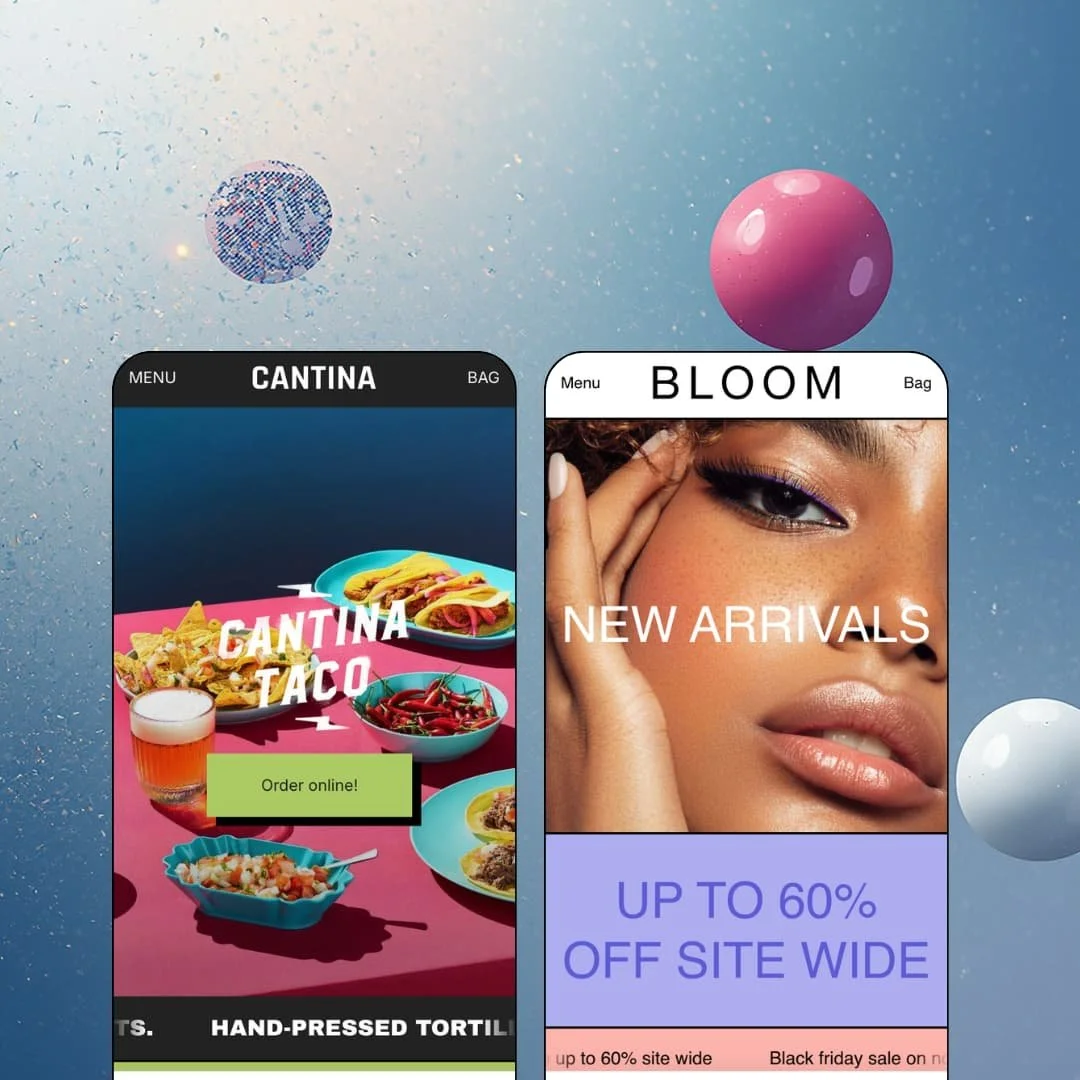
One of Maker's two demo stores barely behaves like an online shop: it's a taco counter with a checkout bolted on. That's the pitch, though. Troop Themes built this $400 Online Store 2.0 theme for brands that shout, and its two presets stage that voice in opposite verticals: Cantina, a pickup-and-delivery taco operation, and Bloom, a discount-forward beauty boutique. I spent time in both demos to find out whether the loud typography carries actual selling machinery underneath.
A header that doubles as an ordering counter
Maker's pinned utility row puts direct actions above the navigation, and Cantina loads it with "Order now" plus a deep link that lands on the day's featured dish as a ready-to-buy product page. It's one click from menu to money. When the average line item costs $4 and the purchase is an impulse, collapsing the distance between arriving and paying is worth more than any amount of homepage storytelling. For single-location food brands running pickup and local delivery on menus under 30 items, this row alone justifies a shortlist spot.
The cart drawer carries its own conversion stack
The slide-out bag opens with a free-shipping progress line, staged at a $100.00 threshold in both demos, plus an order-notes field and native cross-sell support. All of it ships in the theme. Progress math nudges order values upward while the notes field captures the allergy flags, gift messages, and delivery instructions that food and beauty orders generate, which means restaurants taking special requests and boutiques pushing baskets past a shipping threshold both get working cart mechanics without reaching for an app.
Marquee typography as a merchandising surface
For impulse-priced brands with loud identities, street-food counters, drop-style beauty, snack CPG, Maker treats type as motion rather than decoration. The announcement bar renders as a repeating ticker instead of a static line, and standalone marquee sections turn even a plain "About us" link into a scrolling band that owns a full viewport row of the Bloom homepage. One mechanic, several jobs. A brand with three words and confidence can dress an entire page with it, which is a real economy for merchants who have more voice than photography.
Product pages built like landing pages
Bloom's face-cream page runs an ingredient-spotlight section profiling calendula, bakuchiol, and kaolin in editorial prose, then a four-question FAQ accordion, then a "Compliment your routine" cross-sell row, all before the footer arrives. Education first, objections second, attachment sell third. That sequencing lets a single product page argue for the purchase the way a dedicated landing page would, so considered-purchase skincare brands and premium food sellers with small catalogs get storytelling depth per SKU instead of a bare buy box.
Social proof is display, not machinery
Bloom's homepage sets three oversized customer quotes, credited to "Serena K.", "Maya L.", and "Desiree P.", in full headline type. They're furniture, not evidence. There is no review engine behind them, no collection mechanism, no rating data, nothing a shopper can verify or expand, so beauty and food brands whose repeat-purchase economics depend on credible reviews will be installing a review app on day one and restyling its output to sit inside Maker's heavy typography.
Two staged directions at the top of the price band
$400 buys exactly two presets. Cantina models a restaurant and Bloom models a beauty boutique, which leaves apparel brands, home-goods sellers, jewelry merchants, and every other single-brand store outside those two verticals restyling someone else's staging instead of adapting one built for them. That is real design labor at a price point where the preset library accounts for a large share of what's actually being purchased.
An Online Store 2.0 theme at a 2026 price
Maker runs on the same Online Store 2.0 architecture as Dawn, Shopify's free default, so the $400 buys voice, presets, and the promo stack rather than a newer generation of section nesting or block depth. The architecture is table stakes. That's a fair trade for merchants who specifically want this register, but buyers weighing Maker against the free baseline should be clear that the premium sits entirely in the design and merchandising layer, not in the plumbing underneath it.
What it takes to launch
Expect a multi-day pass across the promotional staging, since both demos are dressed for campaign moments that won't match your calendar, plus per-product work populating tab content, option sets, and translated product copy for any EU storefronts. Budget additional time re-voicing the discount-forward demo messaging if your brand sells at full price.
-
What works in this preset
The header starts taking orders before you scroll. Above the main navigation sits a utility row with two pinned actions, "Order now" and "Todays special", and the second one deep-links straight into a purchasable product page for $4 beef birria tacos, which turns the most valuable pixel real estate on the page into a daily-menu billboard instead of a passive menu bar. I clicked that link expecting a collection page. Landing on a single dish is smarter.
A looping type band does the brand work. "Hand-pressed tortillas. Made fresh daily." scrolls across the hero as an endless ticker, and beneath it a weekly-specials carousel lists dishes at $3.50 to $4.50, price-forward and image-heavy in exactly the register a physical counter menu uses. It reads like fast food. That is a compliment here, because translating counter-service energy into e-commerce sections without it collapsing into noise takes genuine restraint in the layout system.
Cantina also stages the parts of a food business that aren't food. A "We're hiring" promo tile sits inside the homepage flow, a dedicated page explains the store's 15% donation to the LA Food Bank, and the blog opens on a Michelada recipe. The demo models a neighborhood operation with a personality, not a faceless product grid, and the collection description even frames the delivery menu as updated daily around available produce.
Where it stumbles
Every dish is staged as a single-option item. No salsa choice, no protein swap, no portion sizes anywhere on the menu, so for a preset whose entire argument is online ordering, the demo never shows the option picker earning its keep on an actual food order. Merchants planning a real menu should budget time staging modifier-style options themselves to see how the theme renders them.
-
What works in this preset
Would a beauty catalog survive the same skeleton? Bloom answers with a different retail posture: a "Shop" dropdown staged as two labeled columns, "Shop by type" and "Shop by collection", flanked by a New/Sale/Best-sellers rail, while four direct collection links still ride the top level of the header. Small catalog, big menu discipline.
The demo is frozen mid-campaign, and that's instructive. A Black Friday takeover runs through the entire preset: two stacked announcement links, a ticker repeating "Save up to 60% site wide", a dedicated Sale collection, and discount-struck prices in the featured grid, which means you get to watch the promo machinery deployed as one coordinated system rather than reading it as bullet points on a feature list. The staging sells the mechanism.
Localization is demonstrated live rather than promised. The footer pairs a working English/Spanish locale toggle with the country selector, and the theme ships its interface strings pre-translated in five EU languages, so a merchant's translation workload starts at product content instead of button labels. I scrolled through the Spanish locale and the storefront chrome holds up.
Where it stumbles
I went looking for a variant picker and never found one. A $45 face cream, a $45 perfume, body bars, bath soaks: every product in the staging ships as a one-option item, so sizes, sets, and shade choices, the selection steps a skincare purchase actually runs on, go entirely undemonstrated in the vertical this preset is named for.
Built for stores that run on a calendar
Read both demos side by side and the shared character is temporal: Cantina merchandises a rotating weekly menu, Bloom merchandises a sale event, and the section grammar in each case assumes there is always a current moment to promote. Merchants whose marketing lives in drops, specials, and seasonal pushes will find a theme that already thinks the way they do. Evergreen catalogs will use less of what they paid for.
One header system, two business models
The same header architecture produces a one-action ordering counter in one demo and a multi-column catalog menu in the other, and neither reads like a compromise of the other. That range says more about the theme's actual flexibility than any settings list could, because it demonstrates the system bending across business models instead of merely recoloring within one.
Small catalogs are a commitment, not an accident
Neither demo pretends to be a superstore. Cantina sells six dishes and four shirts, Bloom runs a boutique shelf, and the discovery layer of deep-linked header actions and curated collections is tuned for stores where a human picked everything on it. That matches Shopify's own 11-100 catalog classification for the theme and tells you honestly where the ceiling sits.
The listing and the presets disagree
Shopify's listing files Maker under jewelry and accessories alongside food and drink, yet neither preset stages a jewelry store, while the beauty vertical Bloom actually demonstrates isn't a listed industry at all. A buyer arriving through the jewelry filter gets no staged evidence the theme suits their catalog. Nothing is broken here, but the demos answer questions the listing never asked, and jewelry merchants carry the burden of imagination.
Product knowledge lives in prose
Across both presets, everything a shopper might want to verify, ingredients, preparation, usage, sourcing, arrives as typed paragraphs inside tabs and editorial sections. Neither staging demonstrates a tabular or data-driven alternative, so food brands with labeling obligations and skincare brands with INCI lists should test how far the ingredient and size-chart sections structure information before committing, because consistency in these demos depends entirely on writing discipline, one product at a time.
Rating
★ 7.6/10
-
The promo stack (ticker announcements, popups, promo tiles, countdown, age verifier, back-in-stock alerts) plus the cart drawer's progress-and-notes pairing cover a wide spread of conversion work natively; a review engine is the notable absence.
7
-
Two tight demos, a compact section vocabulary, and Online Store 2.0 drag-and-drop editing keep the learning curve short, though the campaign-heavy staging leaves real un-dressing work before launch.
8
-
The slide-out menu, slide-out cart, and sticky cart bar are patterns built for thumbs, and ticker bands scale naturally to narrow screens where static banners would truncate.
8
-
Both demo homepages run restrained section stacks with responsively sized imagery, and nothing in either build points to script-heavy dependencies dragging load times down.
8
-
Color schemes and section options are all present, but the loud typographic voice is the identity; brands wanting quiet minimalism will be working against the grain rather than with it.
7
Frequently Asked Questions
-
The theme ships in-store pickup support and a cart-notes field, which covers the storefront side of a pickup flow; delivery logistics beyond Shopify's own local delivery settings remain app territory.
-
No. The testimonial sections are static text you write yourself, so plan on a review app if ratings matter to your conversion path.
-
It's a different retail posture: Bloom's demo stages a structured two-column shop menu and a full catalog-and-campaign setup where Cantina stages a quick-order counter, so the two show genuinely different deployments of the same system.
-
Shopify classifies it for stores with 11-100+ products, and both demos stay under twenty items; discovery favors curated collections over heavy filtering, so test carefully at the top of that range.
-
Interface strings come pre-translated in English, French, Italian, German, and Spanish, and the Bloom demo runs a live Spanish locale; translating your product content stays on your side.
-
Version 12.2.0 landed in June 2026 on a theme first released in December 2016, which amounts to nearly a decade of continuous iteration under the same developer.
This review is based on hands-on testing of the publicly available preset demos of the Maker Shopify theme as of August 2026. Theme features, preset availability, and performance can change with subsequent updates from the theme developer.